Workday Productivity Insights: 7 Hidden Patterns in Your Data
Discover 7 hidden workday productivity insights that reveal how your team spends time and improve performance using real productivity data.

Have you ever wondered why your team stays busy all day, but productivity still feels inconsistent?
Your employees attend meetings, switch between apps, reply to endless messages, and work through packed schedules, yet it can still be difficult to understand what actually improves performance and what silently drains efficiency. That is where workday productivity insights become valuable. These insights help you uncover hidden patterns in your team’s daily workflows, from peak focus hours and meeting overload to app-switching habits and early burnout signals.
In this guide, you will learn how to analyze productivity data, identify hidden productivity patterns, and use those insights to improve team performance.
What Are Workday Productivity Insights?
Workday productivity insights are patterns and trends you discover when you analyze how your team spends time during the workday. These insights help you understand when your employees are most productive, how distractions affect their focus, and how much time is spent in meetings throughout the day.
They also help you identify workflows that reduce efficiency, areas where productivity gaps exist, and early signs that may indicate employee burnout or workload imbalance. These insights help you make smarter decisions based on real work patterns instead of assumptions. When you understand how your team actually works, you can improve productivity, reduce inefficiencies, and create a healthier work environment.
How to Analyze Productivity Data (4-Step Methodology)
Productivity data helps you understand how work happens across your organization. When analyzed correctly, it can reveal workflow inefficiencies, focus challenges, collaboration gaps, and opportunities to improve team performance.
A structured approach makes it easier to identify meaningful trends and make better operational decisions. Here is a simple 4-step methodology you can use to analyze productivity data effectively.
Step 1: Set a Baseline (At Least 30 Days)
Looking at productivity data for only a few days does not give you a complete or accurate understanding of how your team works.
Employee performance changes based on workload, project deadlines, meetings, seasonal demands, and team priorities. Collecting at least 30 days of productivity data allows you to identify consistent trends instead of reacting to short-term fluctuations.
A longer analysis period helps you:
- Identify recurring productivity trends
- Understand peak focus hours
- Compare weekly performance patterns
- Recognize workflow inefficiencies
- Make more reliable decisions
Step 2: Evaluate Productivity Trends at the Team Level
Productivity analysis works best when you focus on team-wide trends instead of individual employees. The goal is to identify workflow inefficiencies and operational challenges that affect overall team performance.
For example, instead of asking why one employee took longer to complete a task, analyze broader trends such as:
- Productivity drops after a long meeting
- Frequent app switching
- Reduced focus during certain hours
- Workflow or communication delays
This approach helps you improve processes, reduce inefficiencies, and create a healthier work environment focused on collaboration and performance.
Step 3: Combine Data with Employee Feedback
Productivity reports provide visibility into work activity, but employee feedback adds important context to the data. Metrics may show a productivity decline, but conversations help explain the reason behind it.
For example:
- Lower productivity may result from unclear priorities
- Increased idle time could be caused by technical issues
- Longer task completion times may reflect process inefficiencies
- Frequent overtime may indicate a workload imbalance
Combining productivity data with employee feedback helps you make more accurate decisions and avoid incorrect assumptions.
Use productivity insights during team discussions, performance reviews, and workflow evaluations to better understand operational challenges and improvement opportunities.
Step 4: Share Productivity Insights Transparently
Transparency plays an important role in building trust around productivity tracking. Your employees should clearly understand what data you collect, how you analyze it, and how those insights help improve workflows, collaboration, and overall team performance.
When your employees can view and understand productivity trends, they become more aware of their work habits and often take a more active role in improving their efficiency and daily workflows.
A transparent approach helps you create accountability while maintaining a healthy, collaborative, and trust-driven work environment.
Struggling to understand what’s affecting your team’s productivity?
Time Champ helps you uncover workflow inefficiencies, focus gaps, and productivity patterns in real time.
7 Workday Productivity Patterns Affecting Team Efficiency
Once you start analyzing productivity data consistently, certain patterns begin to appear. These patterns can help you understand what improves efficiency and what reduces performance across your team.
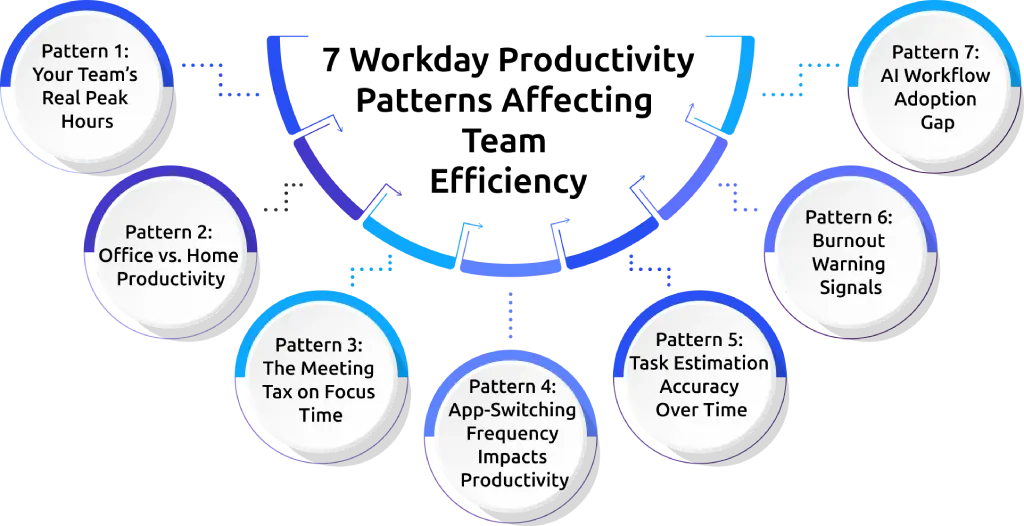
Pattern 1: Your Team’s Real Peak Hours (Not the Schedule)
Your employees may officially work from 9 AM to 6 PM, but that does not mean their highest productivity happens during those exact hours. Most teams experience natural productivity peaks and dips throughout the day.
Some employees perform best early in the morning, while others produce their best work later in the afternoon. When you analyze productivity, you can identify the following:
- When employees complete the most focused work
- Which hours generate the highest output
- When distractions increase
- Which times are least productive
Once you understand these patterns, you can schedule important work during high-focus hours.
Pattern 2: Office vs. Home Productivity (Per Person, Per Day)
Productivity often changes depending on whether work happens from home or in the office.
When you analyze daily productivity data, you can clearly see how work location affects focus time, task completion speed, collaboration, and overall efficiency.
For example, productivity reports can show the following:
- Higher focus time during remote work
- Faster collaboration during office work
- Fewer distractions in certain environments
- Better task completion on specific workdays
This pattern helps you understand where work gets done more efficiently on a day-to-day basis. The productivity insights help you compare actual performance across home, office, and hybrid environments using real work data.
Pattern 3: The Meeting Tax on Focus Time
Meetings help you collaborate, but too many meetings reduce valuable focus time. Constantly moving from one meeting to another makes it difficult to maintain deep concentration. Even short meetings interrupt momentum and reduce the ability to stay focused on important tasks.
Productivity insights help you understand how meetings affect your daily workflow and overall efficiency.
You can identify:
- How much time goes into meetings
- Which days create the most interruptions
- How meetings affect productivity levels
- Whether enough uninterrupted focus time exists
Reducing unnecessary meetings, protecting deep-work hours, and using asynchronous communication can help improve concentration and reduce mental fatigue.
Pattern 4: App-Switching Frequency Impacts Productivity
Using too many tools throughout the day can quietly reduce productivity.
Constantly switching between emails, chat apps, spreadsheets, browsers, and project management tools interrupts focus and slows down work. Even small interruptions add up over time and create mental fatigue.
Productivity insights help you understand:
- Which apps get used most frequently
- Which tools create the most distractions
- How often does app switching happen
- Which workflows feel unnecessarily complicated
Frequent switching between tools often signals workflow inefficiencies. Simplifying workflows, integrating tools, and reducing unnecessary interruptions help improve focus and make daily work smoother.
Pattern 5: Task Estimation Accuracy Over Time
Inaccurate time estimates often create delays, workload iimbalances, and project pressure.
Some tasks consistently take longer than expected, while others get completed faster than planned. Tracking estimated time against actual completion time helps reveal patterns affecting productivity.
Productivity insights help you identify the following:
- Tasks that regularly exceed planned time
- Repetitive workflow bottlenecks
- Areas where planning accuracy needs improvement
- Projects that require better resource allocation
Improving estimation accuracy helps create more realistic schedules, better planning, and smoother project execution.
Pattern 6: Burnout Warning Signals
Burnout usually develops slowly over time. Long working hours, fewer breaks, and constant activity without recovery often reduce focus, energy, and overall performance. Productivity data helps uncover these warning signs early before they become serious problems.
Common burnout signals include:
- Increased after-hours work
- Longer work hours with lower output
- Reduced focus time
- Fewer breaks during the day
- Fewer breaks during the day
Identifying these patterns early helps improve workload balance, support healthier schedules, and protect long-term productivity.
Pattern 7: AI Workflow Adoption Gap
AI tools are changing the way work gets done, but adoption levels often vary across workflows and teams.
Some workflows become faster and more efficient with AI support, while others still rely heavily on manual work. Productivity insights help you understand where AI improves efficiency and where additional support is needed.
You can identify:
- Which workflows benefit most from automation
- Where repetitive work consumes the most time
- How AI impacts productivity levels
- Which areas need better AI integration or training
Understanding these patterns helps you adopt AI more effectively and focus more time on high-value work instead of repetitive tasks.

Did You Know?
Research from the Federal Reserve Bank of St. Louis found that workers using generative AI reported saving an average of 5.4% of their work hours.
How to Use Productivity Insights to Improve Your Team Performance
Collecting productivity data is only the first step. The real value comes from using those insights to improve workflows, reduce inefficiencies, and help your team perform better over time. Productivity insights help you make decisions based on actual work patterns.
Discuss Insights With the Team
Sharing productivity insights openly helps to create better awareness across your team. When everyone understands what affects focus, collaboration, and efficiency, it becomes easier to solve problems together. In many cases, simple discussions reveal workflow issues that are not visible through data alone.
Test One Change at a Time
Improving productivity works best when changes happen gradually. Making too many adjustments at once creates confusion and makes it difficult to understand what actually improved performance. Small workflow changes often create the biggest long-term impact because they are easier to follow, measure, and refine over time.
Measure Results After 30 Days
Productivity patterns do not change overnight, because it’s not magic, right? After making a workflow adjustment, reviewing the same productivity data after a few weeks, at least 30 days, helps you see whether the change improved focus, efficiency, or task completion. Comparing past and current performance makes it easier to identify what is working and what still needs improvement.
Document the Tasks Completed
Once a workflow improvement starts producing better results, documenting the process helps create consistency across the team. Keeping track of successful productivity practices makes future planning easier and prevents the same inefficiencies from returning later. Over time, these improvements become part of a stronger and more organized work culture.
Re-Baseline Every Quarter
Work patterns constantly change as projects, priorities, and workloads evolve. Reviewing productivity trends regularly helps you stay aligned with those changes and identify new challenges before they start affecting performance. A quarterly review gives you a clearer understanding of how productivity shifts over time and helps maintain continuous improvement across your team.
How Time Champ Helps You Uncover Productivity Patterns
Spotting productivity problems becomes much easier when you can clearly see how work happens across your team. Time Champ is employee monitoring and productivity tracking software that helps you understand how your team spends time, what affects focus, and which workflows reduce efficiency.
With clear visibility into daily activities, you can make smarter decisions to improve efficiency, reduce distractions, and create a more productive work environment.
Automatic Time Tracking
Time Champ automatically tracks work hours, productive time, unproductive time and task duration to help you understand how time is actually spent across your team. This helps you identify time leaks and improve daily productivity.
Productivity Reports and Insights
Detailed productivity reports help you understand work patterns, performance trends, and workflow bottlenecks. These insights make it easier to improve efficiency and support better productivity decisions.
Idle Time Tracking
Idle time tracking helps you identify unproductive time and understand where work interruptions happen most often. This helps you create more focused and consistent work routines.
App and Website Tracking:App and website tracking help you understand how apps and apps affect productivity. It helps identify distractions, excessive app switching, and workflow interruptions throughout the day.
Activity Monitoring
Activity monitoring gives you better visibility into employee workflows and daily work habits. This helps you improve accountability and understand how work gets completed across your team.
Looking for a smarter way to improve team productivity?
Use Time Champ to identify productivity gaps, improve focus, and optimize daily work flows.
Conclusion
Workday productivity insights help you understand how work actually happens across your team. When you analyze real productivity patterns, you can identify what improves focus, what reduces efficiency, and where workflow changes are needed. From meeting overload and app-switching distractions to burnout signals and AI adoption trends, these insights help you make smarter decisions that improve both productivity and employee experience.

Guna Lakshmi

Table of Content
 What Are Workday Productivity Insights?
- How to Analyze Productivity Data (4-Step Methodology)
- 7 Workday Productivity Patterns Affecting Team Efficiency
- How to Use Productivity Insights to Improve Your Team Performance
- How Time Champ Helps You Uncover Productivity Patterns
- Conclusion

Related Blogs

Discover how employee productivity tracking builds accountability, drives ownership, and turns daily activity into measurable team performance.
Guna Lakshmi | May 01, 2026
Learn how to track productivity in the workplace using proven methods, role-based metrics, and tools. A practical 2026 guide for modern managers and teams.
Jahnavi Pulluri | May 06, 2026
Discover the real pros and cons of employee productivity tracking, how it impacts your team, and the right way to use it to support trust and performance.
Anjali | May 02, 2026
Learn the difference between productivity tracking and time tracking, how they work, and which approach helps improve team performance and visibility.
Guna Lakshmi | May 09, 2026
Want productivity tracking without the micromanagement? Learn the four signals that separate healthy oversight from surveillance, and practical rules.
Anjali | May 07, 2026
A practical guide to choosing productivity tracking software for your team, with comparisons of features, pricing, privacy, security, and rollout risks.
Jahnavi Pulluri | May 01, 2026


 4.7/5 avg.
Ready to Manage Your Workforce Smarter?
Join our family of 1500+ companies using smart insights to redefine workforces!

Free Trial
No Credit Card Required