8 Strategies for Building a Strong Remote Workplace
Strategies to build a remote workplace help you create clearer workflows, stronger collaboration, and better communication across distributed teams.
Trust is easy to promise in a remote workplace and much harder to prove. Employees feel it when they are judged by the quality of their work, included in important conversations, given time to focus, and supported without being constantly monitored. When those experiences become part of everyday work, distance stops feeling like a barrier. Let’s look at eight strategies for building a strong remote workplace where trust is visible, expectations are clear, and strong performance can grow naturally.
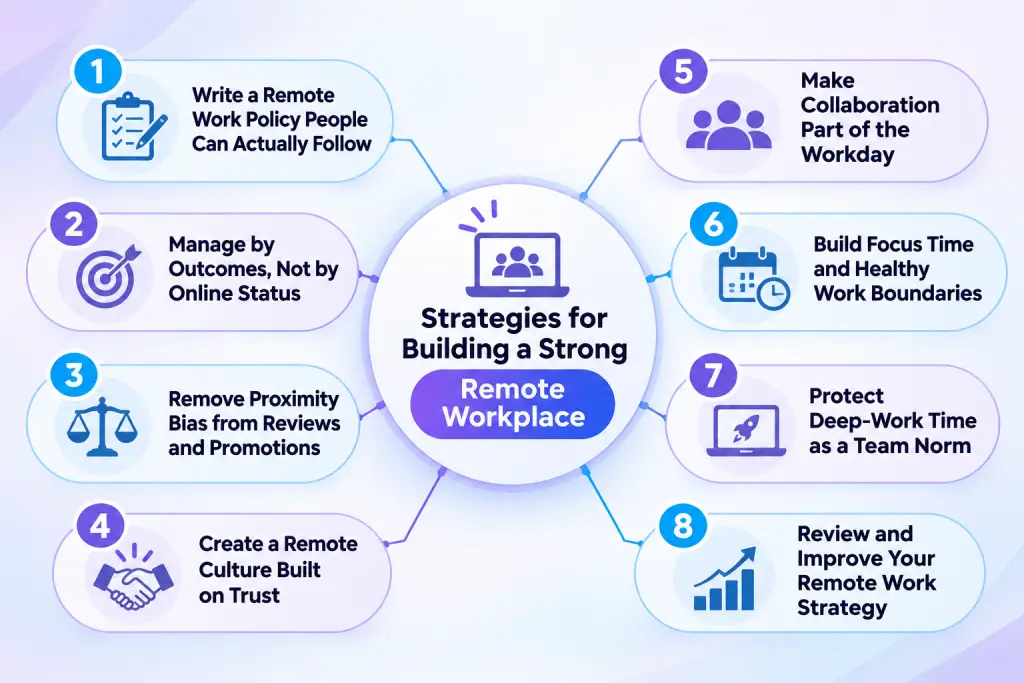
1. Write a Remote Work Policy People Can Actually Follow
Remote work gets complicated when everyone follows a different set of unwritten rules. One person expects an instant reply, another checks messages only a few times a day, and someone else starts a meeting when a short message would do.
A clear remote work policy removes that confusion. It gives your remote team a shared way to communicate, collaborate, handle work hours, and make decisions without relying on assumptions.
Keep your strategy practical. Instead of creating a long policy that no one reads, clearly define the rules your team needs every day.
- Set core hours when everyone should be available.
- Define expected response times for different types of messages.
- Decide which channel your team should use for updates, discussions, and urgent issues.
- Document important decisions so everyone can access them.
- Clarify when your team should use meetings and when an async update works better.
- Set expectations around availability, breaks, and after-hours communication.
For example, if your development team uses one platform for project updates and another for urgent communication, write that rule down. Your team should not have to guess where an important update belongs.
These simple rules form the foundation of effective remote team management strategies because everyone starts from the same expectations.
2. Manage by Outcomes, Not by Online Status
A green status does not tell you whether meaningful work is getting done.
If you judge work by who stays online the longest or responds the fastest, you can create the wrong incentives. Your team may spend more time showing that they are available instead of focusing on the results they need to deliver.
Instead, define clear outcomes for each role and review progress against those outcomes.
For each person on your team, make sure you can answer three simple questions.
- What needs to get done
- When does it need to get done
- What does a successful result look like
For example, instead of expecting a content writer to stay online for eight hours, set clear weekly outcomes such as completing assigned articles, meeting quality standards, and delivering work on schedule.
You can still use activity and time data to understand how work happens. The difference comes from how you use that information. Use it to identify workload issues, delays, distractions, or process gaps rather than treating online time as proof of performance.

Did You Know
On communication, Buffer's own remote work page says communication and collaboration have ranked among the top three struggles for remote workers across its last three State of Remote Work reports.
3. Remove Proximity Bias from Reviews and Promotions
Working from home should not make your work less visible.
Proximity bias can creep into hybrid teams when work done in the office gets more attention than contributions made remotely. Over time, this can affect project opportunities, recognition, performance reviews, and career growth.
You can start by creating a consistent evaluation process that looks at:
- Goals achieved
- Quality of delivered work
- Project contributions
- Deadlines met
- Skills developed
- Feedback from relevant stakeholders
- Progress against role expectations
Keep the same standards for remote and office-based work. When an important project or development opportunity comes up, look at skills, results, and experience rather than who happens to be nearby.
You should also document major contributions throughout the review period instead of trying to remember everything at the end of the year. This gives you a stronger record of actual work and reduces the chance that highly visible activity gets more weight than meaningful results.
Our guide on performance evaluation in remote workforces walks you through building this process step by step.
4. Create a Remote Culture Built on Trust
Trust holds a distributed team together, but you cannot see it on a calendar. Without hallway conversations, silence can easily be misunderstood, and assumptions can grow. A strong remote work culture comes from the habits you build and repeat, not from a values poster.
Google studied what helps teams perform well and found that psychological safety plays an important role. When your team feels safe speaking up without fear of punishment, they are more likely to share ideas, raise concerns, and ask for help. That means:
- Agree on goals before the work begins
- Give your team ownership over how they complete their tasks
- Keep communication consistent without making every update a meeting
- Address missed commitments directly
- Recognize reliable work and follow-through
- Give your team a safe way to raise workload or process concerns
Trust does not mean removing accountability. It means replacing constant supervision with clear expectations, regular communication, and evidence of results.
5. Make Collaboration Part of the Workday
Remote collaboration should not depend on everyone being online at the same time. You need simple ways for your remote teams to share updates, solve problems, make decisions, and stay connected while they work.
Start by making collaboration part of the work itself instead of treating it as an extra activity.
Build Simple Collaboration Habits:
- Share project updates in one central place.
- Document decisions so your team does not have to ask the same questions again.
- Use async updates when a meeting is not necessary.
- Set clear deadlines for feedback and approvals.
- Give everyone access to the information they need to complete their work.
- Use meetings when discussion, problem-solving, or decision-making actually requires them.
For example, a project update can include the current status, the next step, the person responsible, and the deadline. Your team can then move forward without waiting for another meeting. The goal is simple. Your team should know where to communicate, where to find information, and when they need to respond.
If you’re looking for collaboration tools for remote teams, we’ve listed some useful options in this guide to help you choose the right fit.
Finding it hard to manage workloads and stay connected across a remote team?
Try Time Champ to bring work patterns, time, and attendance into one clear view.
6. Build Focus Time and Healthy Work Boundaries
Remote work can blur the line between working hours and personal time. A message in the evening can turn into another task, while an open calendar can quickly fill with meetings.
Create Clear Expectations Around:
- Working hours and core availability
- Meeting-free periods
- Breaks and lunch
- After-hours messages
- Response expectations outside core hours
- Time off and out-of-office communication
Clear boundaries also support a healthier work-life balance. Make it clear that your team does not need to respond immediately to every message. If something can wait until the next working period, let it wait.
A healthy remote workplace best-practices approach gives your team enough space to work without creating an expectation of constant availability.
7. Protect Deep-Work Time as a Team Norm
Focus time gets harder to protect when meetings, messages, and notifications keep interrupting the day. Set a team norm that gives everyone dedicated time for work that needs full attention.
- Set one or two meeting-free blocks each week so your team has uninterrupted time for important tasks.
- Move routine status updates to written, asynchronous updates when a meeting adds no real value.
- Encourage your team to mute non-urgent notifications during focus periods and check messages at planned times.
- Agree on which messages need an immediate response and which ones can wait.
- Protect focus blocks once you create them. Avoid adding last-minute meetings unless the issue genuinely needs immediate attention.
- Keep these blocks consistent so your team knows when they can focus without interruptions.
Want to understand how focused work differs from routine, fragmented tasks? Read our deep work vs shallow work guide to see how each type of work affects your day.
8. Review and Improve Your Remote Work Strategy
Your remote work strategy should not stay unchanged while your team, workload, and business needs a change.
A communication rule that worked for a 10-person team may create unnecessary delays for a 50-person team. The same applies to meeting schedules, core hours, workload expectations, and collaboration practices.
Review These Signals:
| What To Review | What It Can Tell You |
|---|---|
| Project completion | Whether work moves forward as planned |
| Missed deadlines | Where your processes may create delays |
| Meeting hours | Whether collaboration takes too much time |
| Focus time | Whether your team gets enough uninterrupted work |
| Overtime trends | Whether workloads are becoming difficult to manage |
| Attendance patterns | Whether schedules create recurring issues |
| Employee feedback | What your current setup feels like day to day |
| Workload distribution | Whether some roles carry consistently heavier loads |
Do not wait for an annual review to change something that clearly does not work. If your team spends too much time in meetings, test a different meeting structure. If communication keeps getting scattered, simplify the channels. If workloads remain uneven, review how you assign work.
How Time Champ Helps You Build a Better Remote Workplace
A strong remote workplace needs more than clear policies and good communication. You also need visibility into how work is progressing, where workloads are building up, and whether your team has enough time to focus. Remote work software can help you manage work across different locations, from tracking time and attendance to keeping projects on track. Time Champ brings time tracking, workforce analytics, attendance, workload insights, and productivity data together, giving you a clearer view of how your remote team works and helping you make better decisions.
- Track Work Hours and Attendance: Monitor working hours, attendance patterns, breaks, and schedules across your remote team. Use this data to understand work patterns without relying on manual updates.
- See Workload and Focus Patterns: Review focus time, activity patterns, overtime, and workload trends to spot uneven workloads or signs that someone may need support.
- Understand App and Website Usage: See which applications and websites your team uses during work hours. Use these insights to identify distractions, workflow gaps, or tools that support focused work.
- Monitor Projects and Tasks: Connect time and work activity with projects and tasks to see where work is moving forward and where delays may be developing.
- Use Workforce Analytics for Better Decisions: Bring work data into clear reports and dashboards so you can review productivity trends, workload balance, attendance, and other key signals in one place.
- Set Smart Alerts for Work Patterns: Use alerts to identify suspicious activity, overtime, productivity drops, or other patterns that may need attention before they become larger issues.
- Support Healthy Work Boundaries: Review overtime, late-night activity, breaks, and work patterns to identify when workloads or schedules may start affecting healthy work boundaries.
- Keep Monitoring Transparent: Clearly explain what you track, why you track it, and how you use the data. Be open with your team about your monitoring practices so everyone understands what the data means and how you use it.
Struggling to keep your remote team aligned, focused, and on track?
Try Time Champ to bring clarity to work patterns and keep your team focused on what matters.
Conclusion
Building a better remote workplace starts with clear expectations, focused work, trust, and regular communication. The right strategies to improve a remote workplace can help you create a setup where your team knows what to do, stays connected, and has the space to do meaningful work.
If you want clearer visibility into time, attendance, workloads, and work patterns, Time Champ brings these insights together in one place.

Thasleem Shaik

Table of Content
 1. Write a Remote Work Policy People Can Actually Follow
- 2. Manage by Outcomes, Not by Online Status
- 3. Remove Proximity Bias from Reviews and Promotions
- 4. Create a Remote Culture Built on Trust
- 5. Make Collaboration Part of the Workday
- 6. Build Focus Time and Healthy Work Boundaries
- 7. Protect Deep-Work Time as a Team Norm
- 8. Review and Improve Your Remote Work Strategy
- How Time Champ Helps You Build a Better Remote Workplace
- Conclusion
Related Blogs
Handle the challenges of managing remote employees with clear solutions for accountability, communication, time zones, security, and team engagement.
Thasleem Shaik | Sep 29, 2026
Explore the top remote work trends of 2026, from hybrid work and RTO realities to AI agents, and find out what they mean for your remote workforce success.
Jahnavi Pulluri | Sep 23, 2026
Understand the role of productivity tracking in remote work and how it improves team clarity, workload balance, and performance with real insights.
Thasleem Shaik | May 01, 2026
Struggling with remote work productivity challenges? Learn what’s slowing your team down and how to improve focus, communication, and performance.
Guna Lakshmi | Apr 15, 2026
Remote workforce management, also called virtual workforce management, helps teams stay engaged. Explore its definition, benefits, challenges & tools.
Thasleem Shaik | Sep 16, 2025
Don't let remote work myths hold your team back. Learn how to overcome challenges and build a productive, engaged remote workforce.
Guna Lakshmi | Aug 04, 2026


 4.7/5 avg.
Ready to Manage Your Workforce Smarter?
Join our family of 1500+ companies using smart insights to redefine workforces!

Free Trial
No Credit Card Required