8 Free Performance Review Templates (Excel, Word & PDF)
Make your appraisals easier and more accurate with our free performance review templates. Download, customize, and use them anytime you need for better results.
Hey HR’s and Managers, I know performance reviews are a complete hit or miss. Sometimes they go smoothly, and sometimes you may feel like you never have enough insight to decide.
I have curated a list of 8 measurable and accurate employee performance review templates that can save you from blunders. You can use these templates as it is or make tweaks according to your requirements.
Let’s get into it, I will walk you through each one and explain its key features.
What Are the 8 Types of Performance Review Templates?
Here are the performance review templates for different situations.
1. Standard Performance Review Template
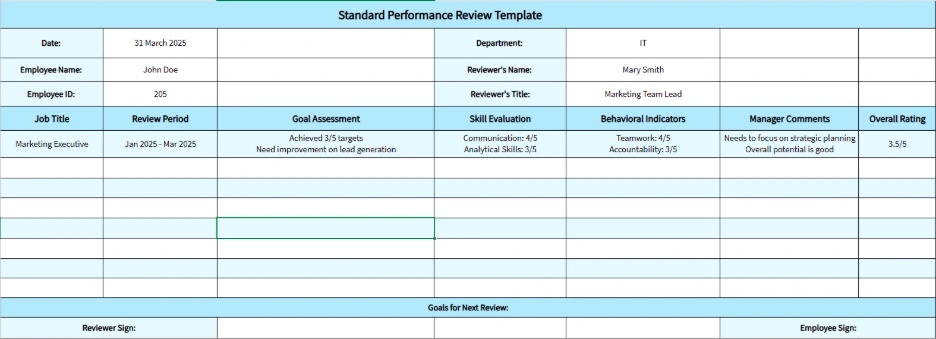
As the name suggests, this is a very standard performance review template. It measures an employee’s overall accomplishments, you can see where the employee is excelling and where he/she is lacking, and you can even identify improvement areas. Ultimately, this template gives you an overall idea of your employee’s capabilities.
Key Features:
- Goal Assessment: Tracks employees’ progress against defined objectives, ensuring clarity on achievements and gaps.
- Skill Evaluation: Measures technical and soft skills, providing a balanced view of overall performance.
- Behavioral Indicators: Evaluates core behavioral traits such as teamwork, accountability, and communication.
- Manager Comments Section: Allows supervisors to add observations and qualitative feedback for future improvement.
Best For:
HR professionals, team leaders, and organizations conduct standard performance reviews at regular intervals.
Judge performance based on insights, not impressions!
Time Champ shows you who’s really working and who’s acting
2. Weekly Performance Review Template
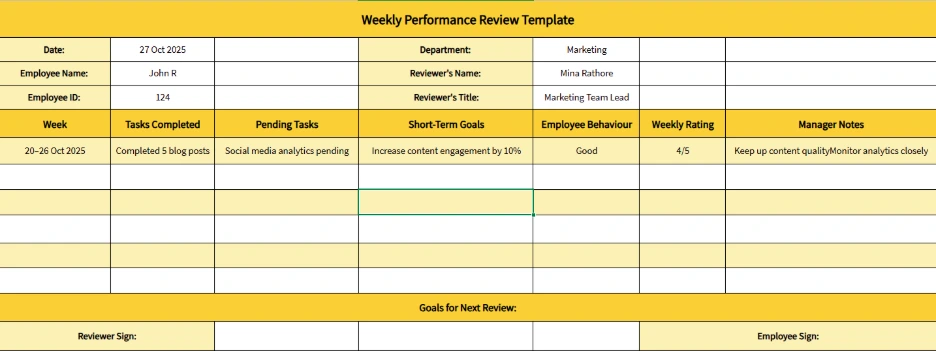
This template gives you an instant insight into how the employee performed throughout the week. It’s a very accessible option for a quick performance review on the go, and these reviews help you understand how the employee is performing every week, and if your company demands weekly deliverables, this template is a cherry on top for you.
These templates can come in handy when you want to assess a new employee’s performance or someone who’s on a performance improvement plan.
Key Features:
- Task Completion Log: Captures weekly deliverables and helps visualize what’s completed or pending.
- Short-Term Goals: Highlights goals for the week, making priorities clearer for both employees and managers.
- Feedback Tracker: Records weekly feedback points for real-time improvement.
- Action Plan Section: Allows employees to note actionable steps for the next week’s tasks.
Best For:
Team leaders managing agile projects, fast-paced departments, or remote teams that need quick feedback loops.
3. Monthly Performance Review Template
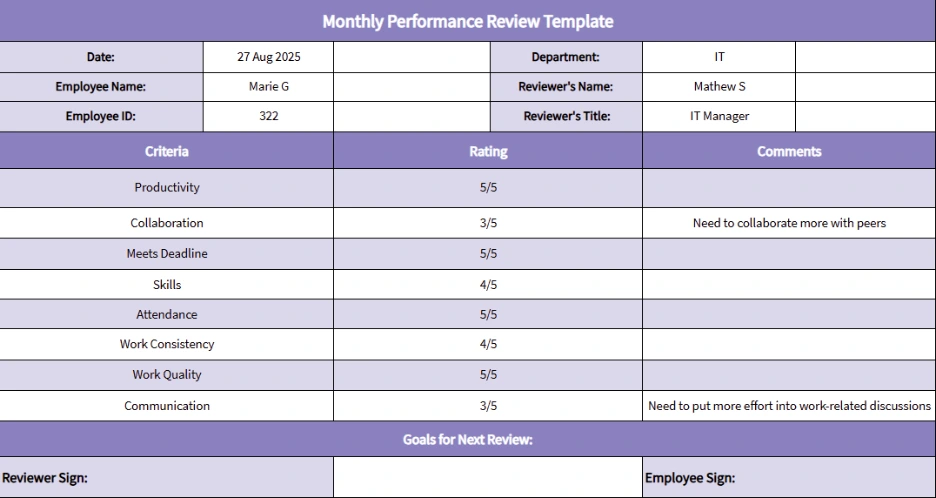
This template gives you an overall monthly view of employee performance. Generally, managers use these templates to recognize standout performers or to identify recurring challenges before they fully bloom. This template format ensures each employee’s work aligns with your department's goals and strategic plans. It’s also great for highlighting progress made on monthly targets and KPIs.
Key Features:
- Monthly Objectives Summary: Outlines goals achieved during the month to measure overall success.
- Performance Rating Scale: Quantifies progress across various performance areas for easy comparison.
- Strengths & Weaknesses Section: Identifies key strengths and development areas.
- Manager and Employee Comments: Encourages two-way dialog for open communication.
Best For:
Department heads and managers conducting recurring monthly reviews for employees with measurable results.
4. Quarterly Performance Review Template
These templates are best if you have quarterly objectives and recognitions, as you can just view the whole quarter’s progress of an employee at a glance. Many managers and team leads use this template to measure KPI based performance cycles and ensure quarterly assessments.
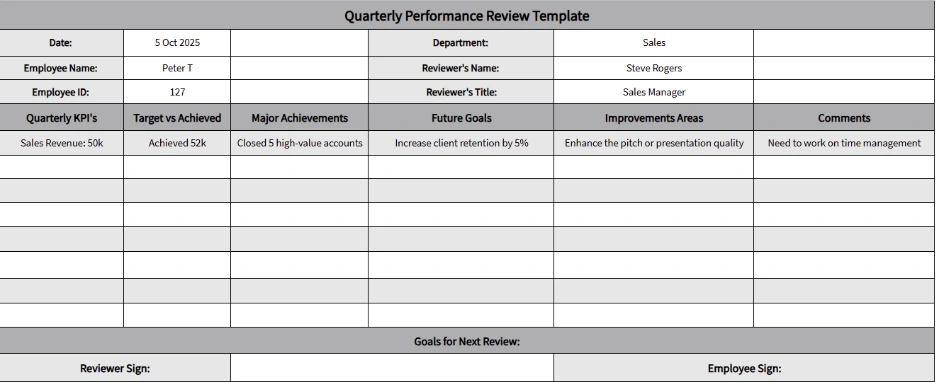
Quarterly performance reviews are perfect for tracking progress against business objectives and adjusting goals strategically. This template
Key Features:
- Quarterly KPIs: Monitors goal completion rate and progress toward quarterly targets.
- Comparative Analysis Section: Compares performance across quarters for trend identification.
- Achievement Highlights: Documents major milestones and accomplishments during the quarter.
- Future Goals Section: Defines priorities for the upcoming quarter to maintain focus.
Best For:
Mid-sized to large companies that conduct strategic performance evaluations every three months.
5. Year-End Performance Review Template
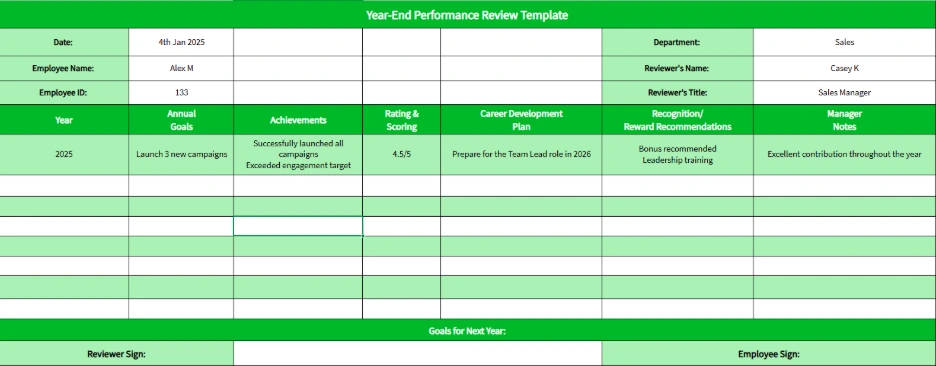
If you organize annual appraisals or just recognitions, this template really helps you. It tells you how your employee performed throughout the year, it highlights every single achievement and tells you who to reward fairly. Many employers use these year-end templates as a base to make promotions and hike decisions.
Key Features:
- Annual Goal Review: Recaps achievements and milestones over the year.
- Rating & Scoring Section: Offers a standardized scoring system for overall performance.
- Career Development Section: Focuses on growth opportunities and future role planning.
- Recognition Notes: Allows you to record appreciation or reward recommendations.
Best For:
HR teams that conduct year-end appraisals and annual performance discussions.
6. 30-60-90 Performance Review Template
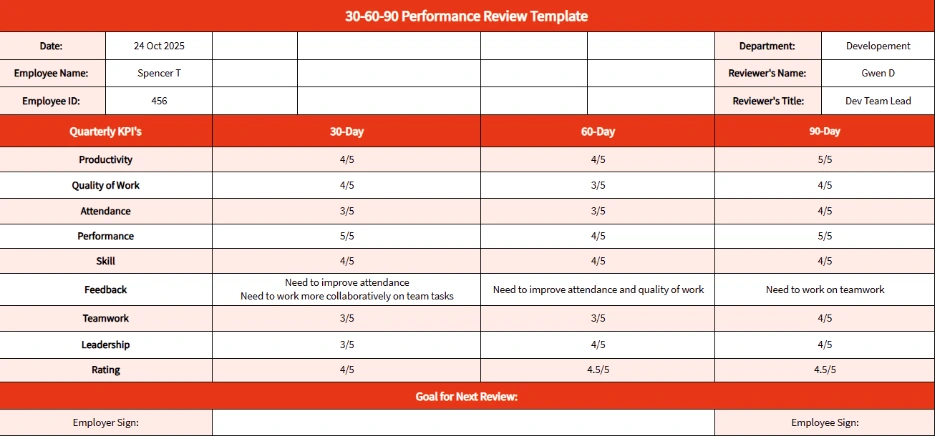
When you have a new employee on board, this template helps you track their progress at 30, 60, and 90-day intervals. It lets you know if the employee is really adapting to your company environment and how much he/she is contributing to their new responsibilities. Most managers use this template to set clear goals and identify areas needing support. This is also helpful in monitoring and managing employees who have moved into new roles.
Key Features:
- Goal Milestones: Breaks goals into 30, 60, and 90-day checkpoints.
- Learning Progress Tracker: Monitors how quickly an employee understands role responsibilities.
- Feedback Notes: Documents feedback from mentors or team leads at each stage.
- Improvement Plan Section: Provides space to note areas of focus for upcoming review phases.
Best For:
HR departments, team leads, and hiring managers are onboarding new employees or evaluating probationary progress.
7. Peer Performance Review Template
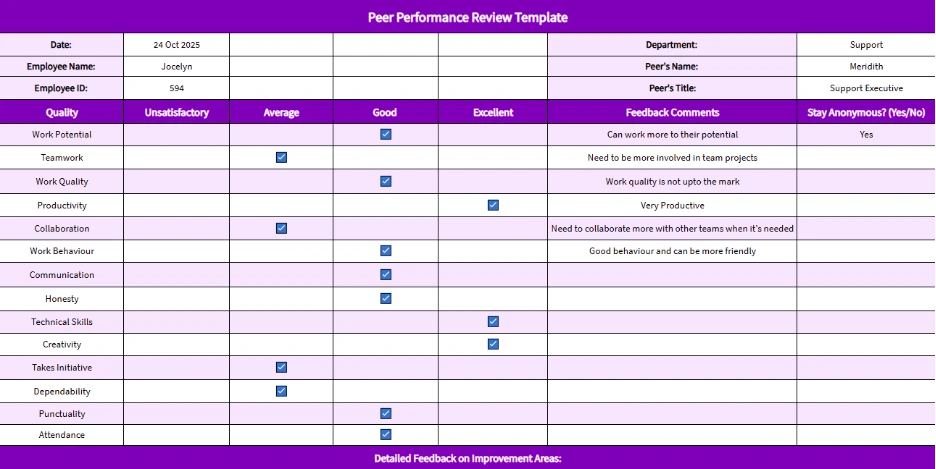
This template allows colleagues to evaluate one another’s collaboration, communication and dependability. It’s most commonly used to create team spirit and provides constructive feedback on performance from a peer’s perspective. This template is mostly used to gather insights from colleagues who work closely with other employees to assess interpersonal skills and teamwork.
Key Features:
- Peer Feedback Section: Records evaluations from coworkers regarding collaboration and support.
- Behavioral Insights: Captures how employees handle teamwork, communication, and problem-solving.
- Anonymous Feedback Option: Ensures honest, bias-free input from peers.
- Overall Peer Rating: Summarizes peer perspectives into a final feedback score.
Best For:
Teams emphasizing collaboration, cross-functional projects, and a transparent feedback culture.
8. Employee Self-Evaluation Template
Here, you are not the one evaluating the employee’s performance, nor a peer, but the employee themselves. Self-evaluation promotes self-awareness, reflection and ownership of achievements in employees, and it creates an honest bridge between you and your employees. Generally, employees use this template to submit self-assessments before the official reviews.
You can absolutely edit all of these templates.
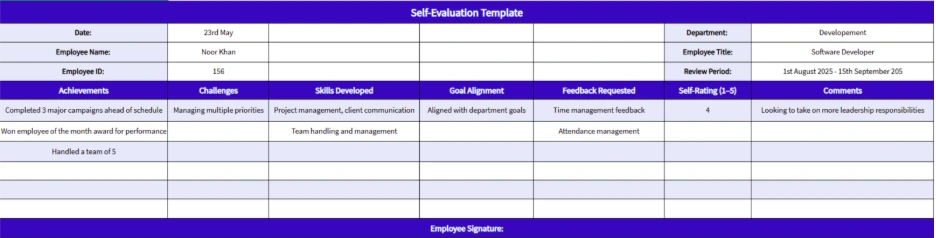
Key Features:
- Self-Reflection Section: Encourages employees to document achievements and challenges in their own words.
- Goal Comparison: Helps match self-perceived performance with set objectives.
- Skill Development Tracker: Notes progress on learning and growth initiatives.
- Feedback Request Option: Allows employees to request feedback on specific projects or goals.
Best For:
Employees preparing for appraisals and organizations promoting self-driven performance evaluation.
What Are the Pros and Cons of Performance Review Templates?
| Pros | Cons |
|---|---|
| 1. Ensures consistency across reviews | 1. Can feel too generic or impersonal |
| 2. Saves time with ready-to-use frameworks | 2. Limits flexibility in evaluation |
| 3. Makes goals and metrics more transparent | 3. Risk of overlooking contextual factors |
| 4. Encourages actionable and objective feedback | 4. Promotes a check-the-box review mindset |
| 5. Simplifies data tracking and comparisons | 5. Leaves room for subjective bias in scoring |
Make appraisals easy with Time Champ!
Get clear insights and keep every review fair
How Does Time Champ Track Employee Performance Reviews
Time Champ is a workforce intelligence platform that gives you real insights on your employee performance, productivity, attendance, achievements and more. All you need to do is just sign up for your account and invite your team, you are completely set up to manage your team’s tasks, projects, schedules, attendance, and even more.
Configure settings according to your company’s requirements to start getting insights and accurate reports. You can see who’s overworking and who’s underworking and adjust their tasks and schedules accordingly.
Time Champ gives you proper visibility into every team’s work and performance so that you can create accurate performance review reports every time.
Conclusion
Performance review templates are absolutely necessary if you want to make accurate appraisals every time without creating any mess among employees. So make good use of these pre-made templates for a quick review, you just need to download them and click on enable editing to use them.
Now you have measurable and organized appraisals every time.

Shabana Shaik


Table of Content
-
 What Are the 8 Types of Performance Review Templates?
-
What Are the Pros and Cons of Performance Review Templates?
-
How Does Time Champ Track Employee Performance Reviews
-
Conclusion
Instant Signup
Thank you for your request!
We have received your signup request and our team will get back to you soon. In the meantime, you can book a demo to see Time Champ in action.
Book a DemoFree trial. No credit card required. Prefer a walkthrough? Book a demo.
Related Blogs
Get free attorney time tracking templates in Excel, PDF, and Word to streamline billing, improve accuracy, and manage billable hours efficiently.
Thasleem Shaik | 31 March 2025
Simplify time tracking with our free daily timesheet template (Excel, PDF, Word). Enhance productivity effortlessly. Download now for efficient workflow.
Mounika Sai | 09 January 2024
Explore various free downloadable operational plan templates, including basic, strategic, project-based, and nonprofit templates for efficient planning.
Chetana | 07 November 2025
Explore 13 free expense report templates in Excel, Word, and PDF, including daily, weekly, monthly, petty cash, and business expense tracking options.
Mounika Sai | 17 January 2024
Explore free employee attendance sheet templates to simplify tracking, improve accuracy, and enhance management with daily, weekly, and monthly options.
Tarun Kumar | 07 November 2023
Download free agile project management templates in Excel, Word, and PDF formats to plan, track, and manage agile projects with clarity and control.
Sai Keerthi Uppala | 19 February 2026


 4.7/5 avg.
Ready to Manage Your Workforce Smarter?
Join our family of 1500+ companies using smart insights to redefine workforces!

Free Trial
No Credit Card Required