What Is Remote Work? A Complete Guide for 2026
Learn what is remote work, how it works, its benefits and challenges, common types, and what you need to know about working remotely in 2026.
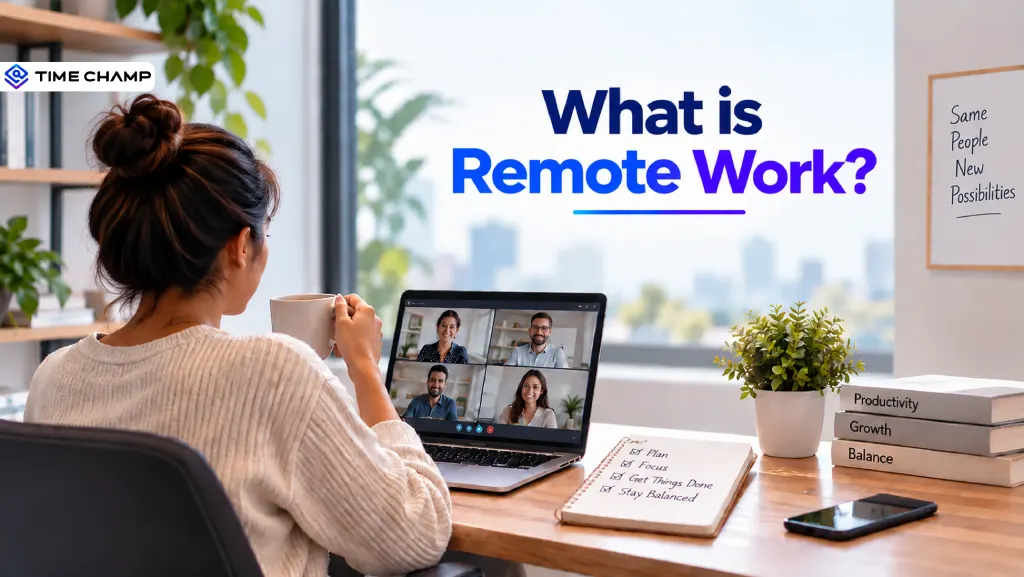
You’ve probably heard the term "remote work" plenty of times. You may even be working remotely already. But remote work involves more than simply working from home. It can change how you communicate, manage tasks, and collaborate with your team.
So, what is remote work, and how does it actually work in 2026? In this guide, you’ll explore how remote work works, its key benefits and challenges, common remote work models, and what you need to know to make it work effectively.
What Does Remote Work Mean?
Remote work is a work arrangement that allows employees to perform their jobs outside a traditional office, usually from home or another location. Employees use digital tools to communicate with their teams, manage tasks, and complete their work without being physically present in the office. Remote work can be full-time or part-time, depending on the company’s work policy and the role.
Knowing which model fits your organization is the first step toward building a policy that actually works, and it helps to see how remote work compares to in-office work before committing to one structure.
Types of Remote Work and How They Work
Remote work can take different forms depending on where employees work and how often they need to be in the office. The most common types include fully remote, hybrid, flexible, freelance, contract, and remote-first work arrangements.
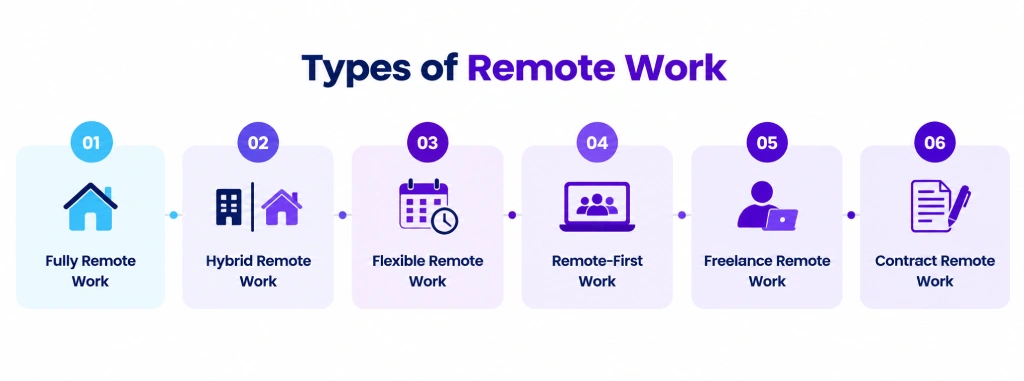
1. Fully Remote Work
Fully remote work means employees work outside the office on a regular basis. They can work from home, a coworking space, or another approved location.
As an employer, you can use this model when a role does not require employees to be physically present. You’ll need clear expectations around working hours, communication, and performance.
2. Hybrid Remote Work
Hybrid remote work combines working from home with working from the office. You can set fixed office days or allow employees to choose when they come in, depending on your company policy.
This model can work well when you want to offer flexibility while still keeping regular in-person collaboration. You can also adjust the number of office days based on the needs of each team.
3. Flexible Remote Work
Flexible remote work gives employees more choice over where or when they work within the limits you set. The amount of flexibility can vary based on the role and your company’s requirements.
As an employer, you can use this model when results matter more than having employees follow a fixed schedule. You can still set core working hours or specific days when employees need to be available.

Did You Know?
A Stanford study of 1,600+ Trip.com employees found that those working from home two days a week were just as productive as employees working fully from the office.
4. Remote-First Work
Remote-first work means remote employees are treated as the default rather than an exception. Your company’s processes, communication, and meetings are designed to work well for people who are not in the office.
You can choose this model when you want remote work to be a central part of your company culture. It also allows you to build teams across different locations without making an office the center of daily work.
5. Freelance Remote Work
Freelance remote work involves hiring independent professionals to complete specific projects or services. Freelancers may work with several clients at the same time and are generally responsible for managing their own work.
You can use freelancers when you need specific skills without hiring someone for a permanent role. This can be useful for short-term projects, specialist work, or periods when your team needs extra support.
6. Contract Remote Work
Contract remote work involves hiring someone for a specific period or project. The agreement usually defines the work, payment, responsibilities, and length of the contract.
You can use this model when you need additional support for a limited period. It can also help you bring in specialized skills for a particular project without creating a long-term position.
Not sure which remote work model is right for your team?
Use Time Champ to manage your remote workforce, improve productivity, and gain better visibility into team performance.
Remote Work vs. Work from Home vs. Hybrid
These three work models may sound similar, but they have some key differences. Here are the main differences between remote work, work from home, and hybrid work, based on where employees work and how often they need to be in the office.
| Comparison | Remote Work | Work from Home (WFH) | Hybrid Work |
|---|---|---|---|
| Basic Meaning | Employees work outside the traditional office. | Employees work from their home instead of the office. | Employees divide their time between home and the office. |
| Primary Work Location | Home, coworking spaces, or other locations | Mainly the employee’s home | Home and company office |
| Office Presence | Usually not required regularly | Usually not required during WFH days | Required on selected days |
| Work Schedule | Can be fixed or flexible | Usually follows the company’s regular schedule | Can combine fixed and flexible schedules |
| Employee Flexibility | High | High | Moderate to high |
| Team Interaction | Mostly virtual | Mostly virtual | Mix of virtual and in-person |
| Best For | Roles that can be done from anywhere | Roles that can be done effectively from home | Teams that benefit from both remote and in-person work |
| Employer Control | Focuses more on outcomes and communication | Easier to manage through regular schedules and policies | Requires coordination between remote and office days |
| Common Challenge | Maintaining team connection across locations | Keeping work and personal time separate | Coordinating office schedules and team availability |
| Example | An employee works remotely from another city | An employee works from home every Friday | An employee works from home Monday and Friday and comes to the office Tuesday through Thursday |
What Does a Remote Worker Do?
A remote worker handles their regular job responsibilities from outside the company office. Their daily work can include:
- Completing Assigned Tasks: Finishing daily responsibilities and project work within the expected timelines.
- Communicating With the Team: Sharing updates, asking questions, and staying connected with managers and coworkers.
- Attending Virtual Meetings: Joining team meetings, client calls, training sessions, and other online discussions.
- Managing Projects: Planning tasks, following deadlines, and keeping projects moving forward.
- Collaborating With Coworkers: Working with team members on shared projects and solving work-related issues.
- Meeting Performance Goals: Maintaining the expected quality, productivity, and work standards.
- Managing Their Work Schedule: Organizing their working hours and staying available during the agreed working time.
- Using Work Tools: Using company-approved apps and software to complete tasks, communicate, and share work.
Did You Know?
Remote workers are getting more focused work time each week, with an average of 22.75 hours compared with 18.6 hours for office-based employees.
Tools You Need to Manage Remote Work
The right tools help you keep remote work organized and give your team a simple way to communicate, collaborate, and complete their work. Here are the main tools you can use and how each one helps:
1. Communication Tools
Communication tools help your team stay connected through messages, calls, and video meetings. They make it easier to share updates, discuss work, and solve issues without being in the same office.
Best Tools: Microsoft Teams, Slack, Zoom
You can use these tools to keep important conversations organized and help remote employees get quick answers from their teammates.
2. Collaboration Tools
Collaboration tools help your employees work together on documents, notes, and shared resources. They allow your team to work on the same files and share information from different locations.
Best Tools: Microsoft 365, Google Workspace, Notion
You can use these tools to keep everyone working with the latest information and make collaboration easier across remote teams.
3. Project Management Tools
Project management tools help you organize projects, assign tasks, set deadlines, and check project progress. They make responsibilities clearer and help your team stay focused on what needs to be done.
Best Tools: Asana, Trello, Jira, Time Champ
You can quickly see which tasks are completed, pending, or delayed without asking every employee for an update.
4. Time Tracking Tools
Time tracking tools help you understand how employees spend their working hours and how much time goes into different projects. They can give you better visibility into work hours, project time, and employee activity.
Best Tools: Time Champ, Toggl Track, Clockify
You can use this information to understand workloads, improve project planning, and make better decisions about team capacity.
5. Workforce Management Tools
Workforce management tools help you manage attendance, working hours, productivity, workload, and team performance. They give you a broader view of how your remote workforce is performing.
Best Tools: Time Champ, Rippling, Workday
With Time Champ, you can bring time tracking, attendance, productivity insights, project management, and workforce analytics together in one platform. This helps you understand how your team works and identify areas that need attention.
6. File-Sharing Tools
File-sharing tools help your team store, access, and share work files from different locations. They make important documents available to the right people without relying on office-based storage.
Best Tools: Google Drive, OneDrive, Dropbox
You can also use access controls to manage who can view or edit important files and keep your team's documents organized.
Benefits of Remote Work
Remote work can benefit both employers and employees when it is planned and managed well. Some of the key benefits include:
- Lower Operating Costs: You can reduce some office-related expenses by having fewer employees work from a physical office.
- Access to A Wider Talent Pool: You can hire skilled employees from different cities, regions, or countries without requiring them to relocate.
- Greater Flexibility: Employees can have more flexibility in where they work, which can make it easier to manage different work arrangements.
- Higher Employee Satisfaction: Giving employees more flexibility can improve their overall work experience and help create a more positive work environment.
- Better Productivity: With the right processes and tools, you can help employees stay focused and manage their work more effectively.
- Improved Business Continuity: Your team can continue working even when employees cannot reach the office because of travel issues, weather, or other disruptions.
- Easier Workforce Expansion: You can build teams across different locations without needing to open additional offices.
Did You Know?
A Great Place to Work study of 800,000 employees found that productivity remained stable or even increased when employees worked remotely.
Challenges of Remote Work
Remote work can offer flexibility, but it also creates a few challenges that you need to plan for as an employer.
- Communication gaps: Without regular face-to-face interaction, important updates can sometimes be missed or delayed.
- Managing Productivity: It can be harder to understand how work is progressing when employees are working from different locations.
- Team Collaboration: Different schedules and locations can make it harder for employees to work together smoothly.
- Employee Isolation: Limited in-person interaction can make some employees feel disconnected from their team and company.
- Data Security Risks: Remote employees may access company information from different networks and devices, increasing security concerns.
- Maintaining Work-life Boundaries: Employees may find it difficult to separate their work time from personal time when working from home.
- Technology Issues: Poor internet connections, device problems, or software issues can interrupt work and affect productivity.
Using the right tools but still struggling to manage your team effectively?
Use Time Champ to bring time, productivity, attendance, and workforce insights together from a single platform.
How to Get Started with Remote Work
If you’re planning to introduce remote work in your organization, a clear plan can help you avoid confusion and keep your team productive. Follow these steps to build a remote work setup that works well for your business.
Step 1. Choose the Right Remote Work Model
Decide whether you want your employees to work fully remote, hybrid, or under a flexible arrangement. Consider the needs of each role and how much in-person work is required. You can also use different models for different teams based on their responsibilities. Start with a model that fits your business instead of trying to change everything at once.
Step 2. Create a Clear Remote Work Policy
Set clear rules for working hours, availability, communication, meetings, performance expectations, and data security. Make sure employees understand what is expected of them before they start working remotely. Your policy should also explain when employees need to be available and how they should handle important work issues. Keep the guidelines simple so employees can easily follow them.
Step 3. Set Up the Right Tools
Provide your team with the tools they need for communication, collaboration, project management, file sharing, and time management. Choose tools that work well together and are easy for employees to use. Make sure employees know how to use these tools before remote work begins. You should also review your tools regularly to make sure they still meet your team’s needs.
Step 4. Define Goals and Responsibilities
Give each employee clear responsibilities, deadlines, and performance goals. Focus on the work that needs to be completed rather than simply where the employee is working. Clear goals make it easier for employees to understand what they need to achieve. They also give you a better way to review performance and project progress.
Step 5. Establish Communication Guidelines
Decide which channels your team should use for different types of communication. For example, you can use instant messaging for quick updates and video calls for discussions that need more interaction. Set expectations for response times and meeting schedules so employees know when they need to be available. This can help prevent unnecessary meetings and missed messages.
Step 6. Support Your Employees
Make sure employees have the equipment, software, training, and support they need to work effectively. Regular check-ins can also help you understand challenges and address them early. Give employees a clear way to report technical issues or other work-related problems. Regular feedback can also help you improve the remote work experience over time.
Step 7. Measure and Improve
Review how your remote work setup is performing and look for areas that need improvement. You can use employee feedback, project results, attendance data, and productivity insights to make better decisions. Look at the results regularly instead of waiting for major problems to appear. Use what you learn to update your policies, tools, and work processes when needed.
Manage Remote Teams More Effectively with Time Champ
Managing a remote team is easier when you have a clear view of working hours, attendance, productivity, and workload. Time Champ brings these insights together in one platform.
Time Champ is employee monitoring and remote workforce management software that helps you manage remote teams, understand work patterns, and improve productivity.
Use these features to get better visibility into your remote team and manage their work more effectively:
- Automatic Time Tracking: Automatically records working hours so you can see when and how long your remote employees work.
- Attendance Management: Helps you manage employee attendance, work schedules, and leave from one place.
- Productivity Analytics: Gives you insights into productivity patterns and helps you identify areas that need attention.
- Employee Activity Tracking: Shows work activity across applications and websites to give you better visibility into how work is being done.
- Project and Task Tracking: Helps you assign work, manage projects, and understand how much time employees spend on different tasks.
- Timesheets and Reports: Gives you detailed timesheets and reports to review work hours, project time, and team performance.
- Real-Time Dashboards: Gives you a quick view of workforce data so you can make faster decisions.
- Workforce Analytics: Helps you understand workload, productivity, and workforce trends across your remote team.
Ready to manage your remote workforce with greater control?
Start using Time Champ today to understand employee activity and keep your remote operations secure.
The Future of Remote Work
Remote work is already a major part of the modern workplace, and it is likely to remain important in the years ahead. Gallup’s latest data shows that among U.S. employees whose jobs can be done remotely, 52% currently work in a hybrid setup and another 26% work fully remotely.
This suggests that flexible work is likely to remain important in the coming years. As an employer, you can expect to see more focus on flexible work models, better remote collaboration tools, stronger data security, and better ways to understand team performance.
Here are some key changes you can expect in the future of remote work:
- Hybrid Work Will Remain Popular: More companies are likely to combine remote and office work instead of choosing only one model.
- Remote Work Will Support Wider Hiring: You can reach talent from more locations without requiring employees to relocate.
- Technology Will Play A Bigger Role: Communication, collaboration, AI, and workforce management tools will become more important for running distributed teams.
- Performance Will Matter More Than Location: You’ll focus more on results, productivity, workload, and business outcomes rather than simply where employees work.
- Remote Work Policies Will Become More Structured: You’ll need clear rules around communication, working hours, security, performance, and collaboration to make flexible work successful.
Conclusion
Remote work gives you the flexibility to build distributed teams, access wider talent, and keep work moving beyond the traditional office. With the right policies, tools, and clear expectations, you can make remote work effective for both your employees and your business.
If you’re looking for a complete solution to manage your remote workforce, Time Champ can be a strong choice. It helps you manage working hours, attendance, productivity, projects, and workforce insights from one platform.

Guna Lakshmi

Table of Content
 What Does Remote Work Mean?
- Types of Remote Work and How They Work
- Remote Work vs. Work from Home vs. Hybrid
- What Does a Remote Worker Do?
- Tools You Need to Manage Remote Work
- Benefits of Remote Work
- Challenges of Remote Work
- How to Get Started with Remote Work
- Manage Remote Teams More Effectively with Time Champ
- The Future of Remote Work
- Conclusion
Instant Signup
Thank you for your request!
We have received your signup request and our team will get back to you soon. In the meantime, you can book a demo to see Time Champ in action.
Book a DemoFree trial. No credit card required. Prefer a walkthrough? Book a demo.
Related Blogs

Still working from your dining table? Discover the work from home essentials you need to build a comfortable, productive workspace.
Guna Lakshmi | Aug 10, 2026
Create an effective and simple remote work policy with practical steps, proven best practices, helpful examples, and a free downloadable template.
Thasleem Shaik | Jul 27, 2026
Misread messages, missed updates, endless pings? Learn how to overcome communication challenges in remote work and keep your team connected.
Guna Lakshmi | Jul 20, 2026
Download a free remote work agreement template in Word and PDF. Learn what to include, see a completed sample, and avoid common mistakes after signing.
Jahnavi Pulluri | Aug 19, 2026
Learn how to motivate remote employees using proven strategies to build trust, increase engagement, recognize achievements, and improve performance.
Thasleem Shaik | Jul 28, 2026
Companies are watching remote workers more than ever. But is it ethical? We break down where monitoring is justified and where it crosses the line.
Guna Lakshmi | Apr 16, 2026


 4.7/5 avg.
Ready to Manage Your Workforce Smarter?
Join our family of 1500+ companies using smart insights to redefine workforces!

Free Trial
No Credit Card Required