Why You Need to Monitor Freelancers: Pros and Cons
Find out why you may need to monitor freelancer work, including key pros and cons that affect productivity, quality, accountability, and trust in teams.

Freelancers are no longer just a temporary solution, they’re now core contributors in modern businesses. From agencies to startups, they bring flexibility, niche skills, and cost efficiency that full-time hiring often can’t match.
This raises an important question: “How do you know if a freelancer is actually delivering what they promised?”
You can’t see their day-to-day work, and tracking progress isn’t always easy. When issues show up, like missed deadlines or budget overruns, it’s often too late.
That’s why the topic of how to monitor freelancers has become important. In this blog, I’ll break down both sides so you can decide what works best for your team.
What Does It Mean to Monitor a Freelancer?
Monitoring a freelancer is not the same as monitoring an employee. The goal is not to “catch mistakes,” but to create a shared system of visibility that works for both sides.
In practice, it can include:
- Time tracking - recording hours spent on tasks or projects
- Activity tracking - understanding how work time is used
- Progress check-ins - milestone or deliverable-based reviews
- Work logs or screen records - optional proof of work for quality checks
- Communication tracking - ensuring timely responses and updates
- Billing verification - matching invoices with actual work completed
The level of monitoring depends on the type of work, the working arrangement, and the tools used. A designer on a fixed-price project will need different monitoring compared to a developer working hourly on a long-term contract.
What matters most is clarity from the beginning, both sides should understand what is being tracked and why.
Why Businesses Are Choosing to Monitor Freelancers
Let’s be honest, most businesses don’t start monitoring freelancers out of distrust. It usually comes after repeated issues that could have been avoided.
A freelancer invoices 40 hours, but the output reflects far less. A developer goes silent mid-sprint, a contractor mishandles sensitive data, and a designer misses deadlines without notice.
These situations are not uncommon. Over time, they push businesses to introduce clearer monitoring for their freelance teams.
Beyond risk management, there are also practical benefits:
- Resource planning improves when you understand how long tasks actually take
- Client billing becomes more accurate and easier to justify with real data
- Performance reviews become based on facts rather than assumptions
- Scaling teams becomes simpler with clear productivity benchmarks
Ultimately, monitoring freelancers is less about control and more about creating the clarity needed for consistent, reliable work.
Pros and Cons of Monitoring Freelancers
Monitoring freelancers can be helpful, but it also has its downsides. It can improve visibility, keep work on track, and make output easier to manage. At the same time, too much monitoring can feel restrictive and affect trust.
Here’s a quick look at both sides.
Pros of Monitoring Freelancers
1. Accurate Billing and Time Accountability
When freelancers charge by the hour, you’re relying on self-reported time, which can be hard to verify at scale. Time tracking tools create a shared record for both sides. Freelancers can validate their work hours, and businesses can review them without any disputes. This reduces invoice conflicts because the data is already clear.
For agencies handling multiple freelancers and clients, this becomes even more important. It’s not just about total hours, but separating billable vs non-billable time and linking it to the right project.
Tools like Time Champ help automate this by capturing time at the task and project levels, making billing more transparent and structured.
2. Project Progress Visibility
Freelancers often switch between multiple clients, so your project isn’t the only one they’re focused on. Without a structured system, you’re mostly dependent on manual updates.
Monitoring tools solve this by showing what’s done, what’s in progress, and what’s blocked in real time, instead of chasing updates, you can simply check the status. This is especially useful for long-term or complex projects where delays and scope changes are more likely.
3. Productivity Benchmarking
Over time, monitoring creates useful benchmarks. You start to see how long tasks usually take, who delivers consistently, and where delays happen.
This helps with:
- Estimating future project timelines more accurately
- Comparing freelancer performance fairly
- Identifying where support or clearer briefs are needed
- Choosing the right freelancers for repeat work
Without this data, every project starts from guesswork. With it, decisions become much more informed.
4. Deadline and Deliverable Assurance
Missed deadlines are often less about skill and more about a lack of visibility until it’s too late. Monitoring tools help flag issues early, like inactivity, slow progress, or tasks running behind schedule. This gives you time to step in before things slip further.
Tools, like Time Champ, provide alerts for idle time or productivity drops, helping you catch problems early and adjust timelines if needed.
5. Data Security and Confidentiality Protection
Freelancers often work with sensitive business data, client information, internal systems, or unreleased products. In industries like finance, healthcare, or legal services, this becomes even more critical. Monitoring tools with security features can track file access and system activity, creating an audit trail if needed. They also help reduce careless handling of sensitive data by making access more accountable.
6. Building a Performance Track Record
Over time, monitoring builds a clear picture of how a freelancer performs across projects, speed, consistency, accuracy, and engagement. This makes future decisions easier, and you can confidently rehire reliable freelancers and avoid those who don’t align well, based on actual performance data rather than assumptions.
Cons of Monitoring Freelancers
1. It Can Damage Trust and Autonomy
Freelancers choose this work model for flexibility and independence. Heavy monitoring can feel like micromanagement, even if the intent is positive. When freelancers feel monitored too closely, they may disengage, do only what’s required, or move on to other clients. Ironically, this approach may result in losing the best freelancers.
The fix: Be transparent about what you track and why. Position it as a shared accountability system, not surveillance, and let freelancers access their own data.
2. Legal and Compliance Gray Areas
Freelancer monitoring laws vary by region, and in some cases, tracking without clear consent can create legal risks. There’s also the risk of misclassification, if freelancers are monitored too closely, like employees, it may raise compliance concerns in certain jurisdictions.
The fix: Always get consent, define monitoring clearly in contracts, and ensure you comply with local labor laws and data protection rules.
3. Administrative Overhead
Monitoring systems take time to set up and manage, including choosing tools, onboarding freelancers, and reviewing data. For small or short-term projects, this effort may outweigh the benefits.
Another issue is data overload. Without proper use, tracking data can become noise instead of insight.
The fix: Use monitoring selectively, for long-term, high-value, or critical projects. For simpler work, lighter check-ins may be enough.
4. Risk of Micromanagement Culture
Monitoring tools can create an illusion of control. High activity doesn’t always mean high-quality work, and low activity doesn’t always mean low productivity. If you overreact to raw metrics, it can lead to stress, shallow work habits, and reduced creativity among freelancers.
The Fix: Focus on outcomes, not just activity. Use data as context, not judgment, and combine it with deliverable-based evaluation.
Start Monitoring Freelancers with Full Clarity Today.
Get complete visibility into work, progress, and productivity
How to Monitor Freelancers the Right Way
The answer to this question isn’t to monitor freelancers for everything or to avoid monitoring altogether. It’s about building a balanced approach that is transparent, proportional, and focused on outcomes.
Here’s a practical way to do it:
- Make expectations clear from the start. Define what you’ll track, which tools you’ll use, and how the data will be used.
- Focus on results, not just activity. Track progress, milestones, and deliverables instead of only hours or screen time.
- Share visibility and give freelancers access to their own data so they can stay aligned and improve their performance.
- Use alerts, not constant monitoring. Set thresholds and step in only when something needs attention.
- Review and adjust as you go. Reduce or change monitoring as trust builds and the project evolves.
What to Look for in a Freelancer Monitoring Tool
Not all monitoring tools are built with freelancer workflows in mind, so choosing the right one makes a big difference in how smoothly things run.
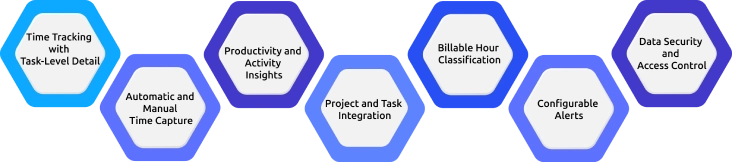
Here are the key features to focus on:
1. Time Tracking with Task-Level Detail
Choose a tool that breaks time down by project and task instead of only showing total hours. This helps you clearly see where the freelancer’s effort is going and removes guesswork from reporting. It also improves billing accuracy since every hour is tied to specific work. You get a much clearer view of real progress.
2. Automatic and Manual Time Capture
Go for a system that supports both automatic tracking and manual time entry. Automatic capture records work in real time, while manual entries can cover meetings, research, or client discussions. This ensures all work activity is properly recorded, together, they give you a complete and reliable time record.
3. Productivity and Activity Insights
Use tools that show how work time is actually being spent through activity insights. These insights help you understand work patterns without constant follow-ups. You can see focus levels, app usage, and productivity trends, which keeps visibility high without heavy supervision.
4. Project and Task Integration
Pick a tool that connects time tracking directly with projects and tasks. This keeps everything organized in one place, progress, task updates, and time logs. It helps you manage multiple freelancers and projects more effectively and also reduces confusion and improves coordination.
5. Billable Hour Classification
Make sure the tool clearly separates billable and non-billable time. This makes it easy for you to know what can be charged to freelancers and what is internal work. It helps avoid billing errors and disputes and keeps financial reporting clean and transparent.
6. Configurable Alerts
Choose a system that gives smart alerts instead of requiring constant monitoring. These alerts help you get notified about inactivity, delays, or budget issues when they occur. This helps you take timely action without checking dashboards all the time, which makes management more efficient.
7. Data Security and Access Control
Make sure the tool includes strong security and access control features. Since freelancers handle sensitive data, restrict access to only authorized users. This protects client and project information from misuse and ensures better compliance and trust.
How Time Champ Helps You Monitor Freelancers Without the Friction
Time Champ is an employee monitoring tool with advanced workforce intelligence features that turn raw activity data into decisions, offering productivity tracking that solves a common challenge for freelance workflows, giving businesses clear visibility into freelancers without creating unnecessary overhead or turning work into micromanagement.
Here’s how it supports freelancer monitoring in a practical way:
Automatic Time Tracking
It records work hours in the background, so freelancers don’t need to manually log every minute they work. At the same time, one-click timers give them flexibility when they want to track specific tasks. This balance ensures tracking feels simple and non-intrusive. Time is captured at both task and project levels, which helps you clearly see how effort is distributed. With built-in separation of billable and non-billable hours, billing and reporting become more accurate and transparent.
Activity and Productivity Insights
It gives you a clear view of how work time is being used without needing constant updates from freelancers. You can understand activity patterns like app usage, website behavior, and focus levels during work hours. This helps you identify productive trends as well as potential inefficiencies. Instead of watching every action, you get meaningful insights that reflect overall performance. It keeps oversight balanced while still maintaining strong visibility.
Project and Task Management
Time Champ organizes freelancer work directly within your project structure. You can assign tasks, set deadlines, and track progress in real time without switching between multiple tools. This makes it easier to manage several freelancers across different projects at once. You always know what has been completed, what is in progress, and what is delayed. It brings more structure and clarity to day-to-day project execution.
Budget Tracking with Real-Time Alerts
It allows you to set clear time or cost limits for each project before work begins. As freelancers log hours, the system tracks usage against the defined budget. You receive alerts before limits are crossed, helping you avoid unexpected overruns. This makes it easier to control costs and manage scope from the beginning, and also helps you make timely decisions if a project needs adjustment.
Automated Timesheets
Timesheets are generated automatically from tracked activity, eliminating the need for manual entry. You can review and approve them quickly without going through a bunch of logs. This makes payroll processing and client billing much faster and more accurate. Overall, it simplifies one of the most time-consuming parts of freelancer management.
Data Security Features
It tracks file activity and device usage to ensure sensitive business data stays protected. Any interaction with important files or systems can be monitored for accountability. This is especially useful when freelancers handle confidential client information or internal assets. Along with this, configurable alerts help you stay informed about inactivity, delays, or unusual activity patterns. These early signals allow you to respond quickly before small issues turn into bigger problems.
Overall, Time Champ supports freelancer management in a way that focuses on clarity and structure rather than control. It helps you maintain visibility without disrupting workflows, making monitoring feel more like a productivity system than surveillance. This balance is what helps build healthier and more efficient freelance relationships.
Build a Transparent Freelance Workflow Now with Time Champ!
Keep things on track without the constant follow-ups.
Conclusion
Monitoring freelancers is not really about loss of trust, it’s about structure. The freelance workforce is here to stay, and businesses that build clear accountability systems around it will perform better than those relying on assumptions. Done with transparency and the right tools, monitoring benefits both sides, freelancers know expectations clearly and can prove their value, while businesses get the visibility needed to make better decisions.

Jahnavi Pulluri


Table of Content
-
 What Does It Mean to Monitor a Freelancer?
-
Why Businesses Are Choosing to Monitor Freelancers
-
Pros and Cons of Monitoring Freelancers
-
How to Monitor Freelancers the Right Way
-
What to Look for in a Freelancer Monitoring Tool
-
How Time Champ Helps You Monitor Freelancers Without the Friction
-
Conclusion
Instant Signup
Thank you for your request!
We have received your signup request and our team will get back to you soon. In the meantime, you can book a demo to see Time Champ in action.
Book a DemoFree trial. No credit card required. Prefer a walkthrough? Book a demo.
Related Blogs

Compare the best employee monitoring apps for BYOD devices, with privacy controls, security features, pricing, and use cases for remote and hybrid teams.
Shabana Shaik | Apr 28, 2026
Understand how employee monitoring affects workplace morale, trust, and productivity, with practical ways to implement monitoring without reducing engagement.
Jahnavi Pulluri | Apr 28, 2026
Explore the best employee monitoring tools for contractors. Track work hours, productivity, and manage contractors with clear visibility and control.
Thasleem Shaik | Apr 28, 2026
Can employee monitoring detect incognito mode? Learn what stays visible, how tracking works, and why incognito does not hide activity on work devices.
Thasleem Shaik | Apr 28, 2026
Discover the top agency workforce monitoring tools in 2026 to track productivity, manage remote teams, and improve efficiency across your workforce operations.
Jahnavi Pulluri | Apr 28, 2026
Explore how an employee monitoring privacy policy protects employee rights, maintains compliance, and supports transparent workplace monitoring.
Thasleem Shaik | Apr 25, 2026


 4.7/5 avg.
Ready to Manage Your Workforce Smarter?
Join our family of 1500+ companies using smart insights to redefine workforces!

Free Trial
No Credit Card Required