7 Free Construction Project Management Templates (2026)
Get 7 free construction project management templates, download them for free in Excel, Word, and PDF formats and plan schedules and budgets effectively.
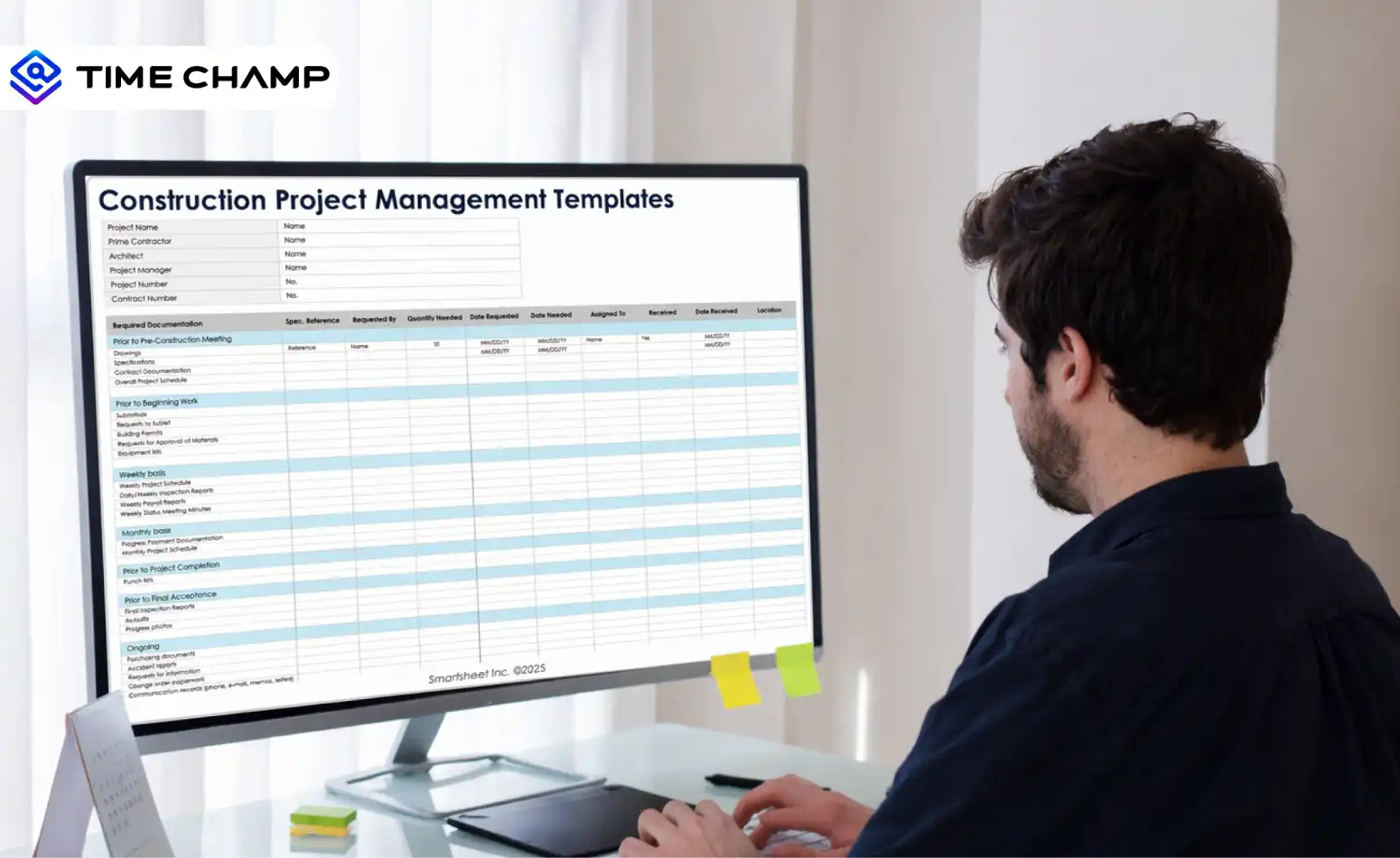
Managing a construction project means handling many moving parts. You need to coordinate workers, manage budgets, track materials, monitor timelines, and communicate with multiple stakeholders. Without a clear system, even small mistakes can delay the project and increase costs. Teams that take project description templates seriously avoid the most common rework cycles later. The detail here sits inside a wider conversation covered in our best project management software guide.
That’s why using construction project management templates is essential. They help you organize tasks, schedules, budgets, and resources in one structured place, making it easier to plan and manage your projects efficiently. These templates act as a practical framework that simplifies planning and reduces the chances of project miscommunication.
To help you stay organized and avoid delays, here are 7 essential construction project management templates you can download in Excel, Word, and PDF formats to simplify construction planning and project tracking.
What Are the 7 Types of Construction Project Management Templates?
Below are the 7 most useful construction project management templates you can use to organize planning, scheduling, budgeting, and resource management. Each template helps you simplify complex construction workflows and keep every stakeholder aligned. Using the right template at the right stage of the project can significantly improve coordination and efficiency.
1. Construction Project Plan Template
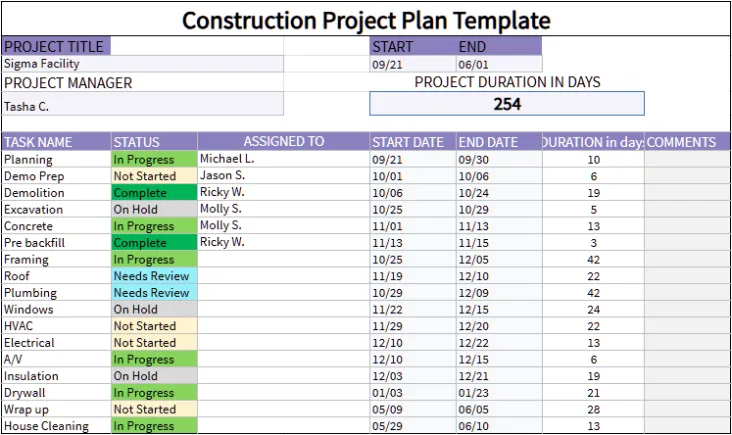
Download the construction project plan template for free!
A construction project management plan template helps you outline the entire project before work begins. It acts as a structured roadmap that defines the project scope, goals, timeline, responsibilities, and budget. When you use this template, you ensure that everyone involved in the project clearly understands their roles and expectations. This early planning stage helps reduce confusion and sets a clear direction for the entire construction project. Learn more about what is project planning to understand how structured planning drives better project outcomes.
Key features:
- Project overview and objectives
- Scope of work and deliverables
- Roles and responsibilities of team members
- Project timeline and milestones
- Budget estimates and cost allocation
- Risk assessment and mitigation plan
Best for: Construction managers who want to create a clear project roadmap before starting the project.

Did You Know?
According to McKinsey, global construction spending could rise from $13 trillion in 2023 to $22 trillion by 2040, showing how quickly the construction industry is growing. This rapid growth increases the demand for better planning tools and structured project management systems.
2. Construction Project Schedule Template
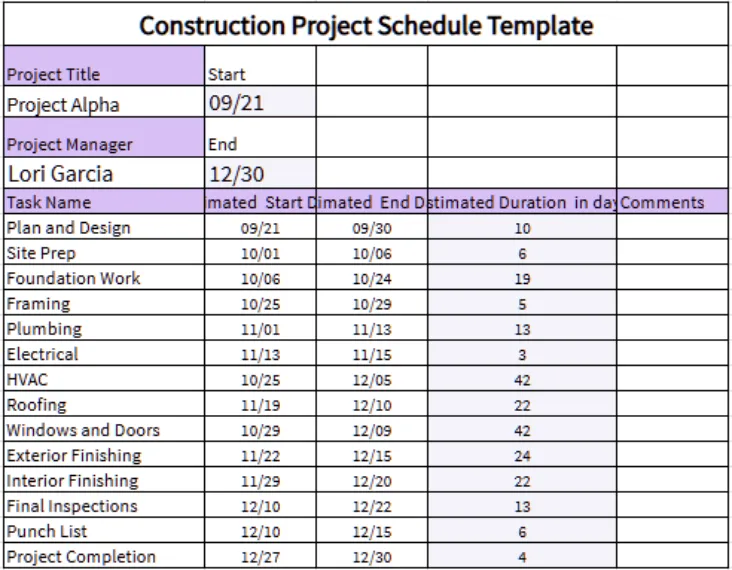
Download the construction project schedule template for free!
A construction project management schedule template helps you organize and track project timelines. It allows you to plan tasks, set deadlines, and monitor progress to ensure every stage of the project stays on schedule. With a clear schedule, you can quickly identify delays and adjust tasks when necessary. This rapid growth increases the demand for better planning tools and structured project management systems. Understanding project schedule management helps you maintain better control over every construction phase.
Key features:
· Task list with start and end dates
· Project milestones and deadlines
· Task dependencies and workflow tracking
· Progress status for each activity
· Timeline visualization (Gantt chart view)
· Resource allocation for scheduled tasks
Best for: Project managers who need to track timelines and coordinate multiple construction tasks efficiently.
3. Construction Budget Template
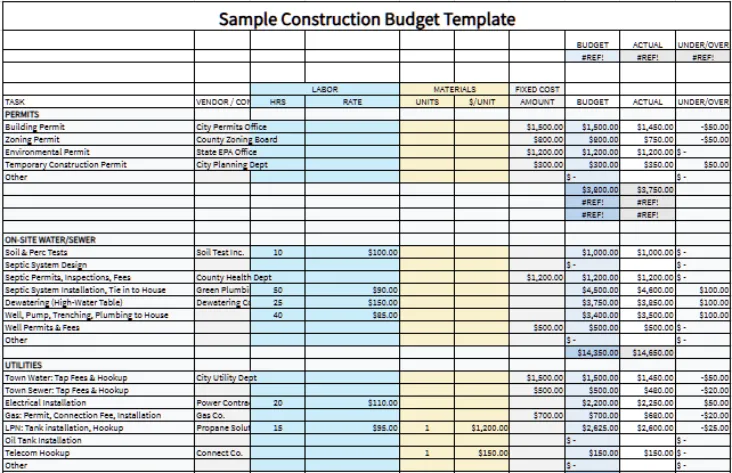
Download the sample construction budget template for free!
A construction budget template helps you estimate and track project expenses throughout the construction process. It allows you to compare planned costs with actual spending to keep the project within budget. This makes it easier to control expenses and avoid unexpected financial issues. Proper budget tracking also helps you make informed financial decisions during the project lifecycle. A strong understanding of project cost management helps you reduce the risk of financial overruns.
Key features:
· Estimated project costs
· Labor and material expenses
· Equipment and vendor payments
· Budget allocation by project phase
· Actual vs estimated cost comparison
· Contingency cost tracking
Best for: Construction teams that use construction estimating services and need better visibility into project expenses and financial planning.
4. Construction Task Tracking Template
Download the sample construction budget template for free!
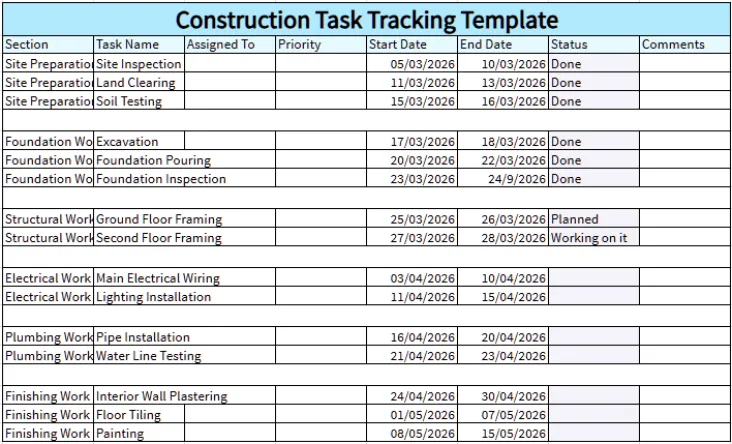
A construction task tracking template helps you monitor daily activities and ensure every task progresses as planned. It allows you to assign responsibilities and track completion status across different teams. This improves accountability and keeps everyone aligned with project deadlines. With clear tracking of tasks, you can quickly identify and resolve the bottlenecks and keep the project moving forward smoothly. Using a task tracker ensures nothing falls through the cracks during complex construction workflows.
Key features:
· Task name and description
· Assigned team member
· Task priority level
· Start and due dates
· Task progress status
· Comments or update section
Best for: Project managers who want to track task progress and improve team accountability.
5. Construction Resource Planning Template
Download the sample construction budget template for free!
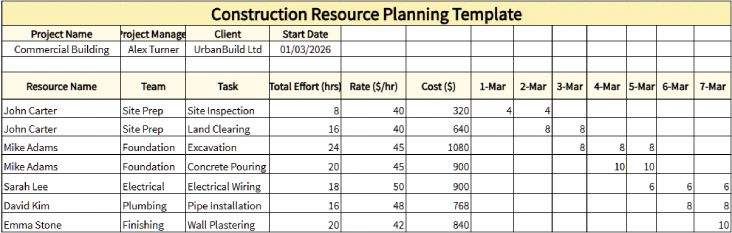
A construction resource planning template helps you allocate workers, equipment, and materials across different phases of the project. Proper resource planning improves productivity and prevents delays caused by shortages. It also helps you ensure that every team has the resources needed to complete their tasks. Efficient resource allocation helps you to maintain consistent progress without interruptions.
Key features:
· Workforce allocation planning
· Equipment availability tracking
· Material requirements
· Resource assignment schedules
· Resource utilization tracking
· Cost estimation for resources
Best for: Construction managers responsible for coordinating labor, equipment, and materials efficiently.
6. Construction Risk Management Template
Download the sample construction budget template for free!
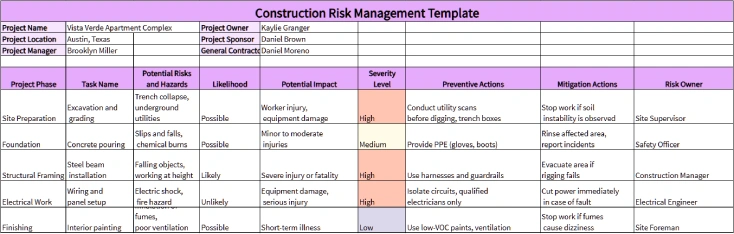
A construction risk management template helps you identify potential risks and prepare mitigation strategies before they affect the project. It ensures that safety, financial, and operational risks are properly monitored. You can reduce disruptions during the project lifecycle by documenting risks early. Early risk identification helps you create contingency workforce plans that minimize project disruptions. Learn how effective task management strategies can further support your risk mitigation efforts.
Key features:
· Risk identification list
· Probability and impact assessment
· Risk mitigation strategies
· Responsible team member
· Risk monitoring status
· Contingency planning section
Best for: Construction teams that want to proactively manage project risks and avoid unexpected disruptions.
7. Construction Daily Report Template
Download the sample construction budget template for free!
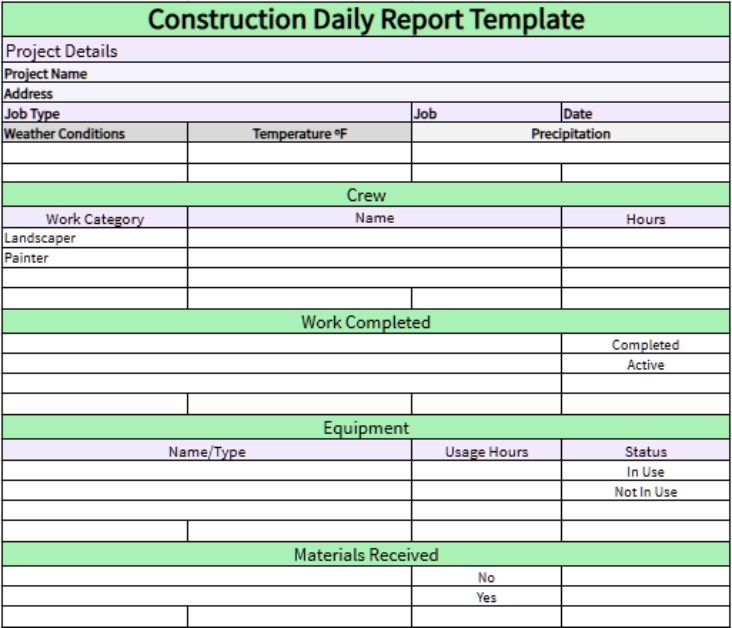
A construction daily report template helps you document daily job site activities and progress. It provides a clear record of work completed, workforce attendance, weather conditions, and any issues encountered. These reports help maintain transparency and track project progress consistently. Daily reports also create a reliable historical record that can be useful for audits and project reviews.
Key features:
· Project date and location
· Workforce attendance details
· Tasks completed during the day
· Equipment used on site
· Weather conditions
· Issues or delays encountered
Best for: Site supervisors who need to maintain accurate daily records of construction activities.
What Are the Pros and Cons of Construction Project Management Templates?
Construction project management templates help you organize planning, scheduling, budgeting, and documentation in a structured way. However, like any tool, templates also come with a few limitations. Understanding both the advantages and disadvantages helps you decide how to use them effectively in your projects.
| Pros | Cons |
|---|---|
| Better project organization: Tasks, timelines, budgets, and resources stay organized in one place. | Need customization: Some templates need changes to match your project needs. |
| Faster project planning: Ready-made templates help you start planning quickly. | Needs manual updates: Templates must be updated regularly to keep information accurate. |
| Clear team communication: Templates help everyone understand project tasks and responsibilities. | Version confusion: When multiple people edit the same template, it can be hard to track the latest version. |
| Easy progress tracking: Tasks and deadlines become easier to monitor. | Limited automation: Most templates do not include automatic updates or advanced features. |
| Works with common tools: Many templates work easily in Excel, Word, or Google Sheets. | Dependent on manual accuracy: Incorrect data entry can affect project tracking and planning. |
| Easy to share with stakeholders: Templates make it simple to share project information with clients and managers. | May not include advanced reporting: Basic templates may not provide detailed analytics or reports. |
Enhance Construction Workforce Visibility with Time Champ
Even if you use the best construction project management templates, one major challenge remains, ‘understanding how work actually happens inside the team’. Construction projects involve multiple crews, subcontractors, and job sites.
Without clear workforce visibility, it becomes difficult for you to track productivity, monitor attendance, or identify delays before they impact the project schedule.
This is where the Time Champ workforce intelligence platform becomes a powerful addition to your construction management process. While templates help you plan projects, Time Champ helps you see how work is actually progressing in real time. You can monitor employee activity, track attendance, and analyze productivity across different teams and job sites from a single dashboard. This level of visibility allows you to quickly identify inefficiencies, reallocate resources, and ensure that every crew stays aligned with project timelines.
With features like attendance tracking , activity monitoring, productivity insights, and workforce analytics, Time Champ helps you make smarter decisions based on real data. When you combine structured construction project templates with Time Champ’s workforce intelligence, you create a complete management system that improves accountability, boosts productivity, and helps you deliver construction projects on time and within budget.
Conclusion
Using construction project management templates helps you organize project plans, schedules, budgets, and daily tasks in a clear and structured way. These templates simplify planning, improve team coordination, and help you track progress more efficiently throughout the construction project. These templates provide a practical starting point to manage construction projects with better control and visibility.
When you combine these templates with a workforce intelligence platform, you can gain deeper insights into team productivity and project progress, helping you keep projects on schedule and within budget.

Table of Content
-
 What Are the 7 Types of Construction Project Management Templates?
-
What Are the Pros and Cons of Construction Project Management Templates?
-
Enhance Construction Workforce Visibility with Time Champ
-
Conclusion
Related Blogs
Best construction project management tools that improve contractor performance, procurement, and team collaboration for professionals in the construction field.
Mounika Sai | Jan 10, 2024
Explore 7 free project planning templates to plan, schedule, and manage projects effectively. Download in Excel, Word & PDF and boost your project success.
Chetana Choudary | November 11, 2025
Explore 12 free project schedule templates in Excel, Word, and PDF, including simple, construction, tracking, timeline, and multi-project options.
Thasleem Shaik | November 03, 2025
Download 5 free Project Status Report Templates in Excel, Word, and PDF to track progress, spot risks early, and keep stakeholders aligned.
Tarun Kumar Reddy | Feb 11, 2026
Explore free downloadable goal-setting templates, including employee, smart, works, and project templates in excel, word, and pdf for goal tracking.
Jahnavi Pulluri | November 07, 2025
Get 8 free pay stub templates with built-in calculators in Excel, PDF, and Word formats instantly. Customize as needed, save time, and simplify payroll.
Sai Keerthi Uppala | November 25, 2025


 4.7/5 avg.
Ready to Manage Your Workforce Smarter?
Join our family of 1500+ companies using smart insights to redefine workforces!

Free Trial
No Credit Card Required