AI in Workforce Analytics: How It Works & Benefits
See how AI in workforce analytics improves productivity, workforce planning, and decision-making while helping businesses manage teams more effectively.
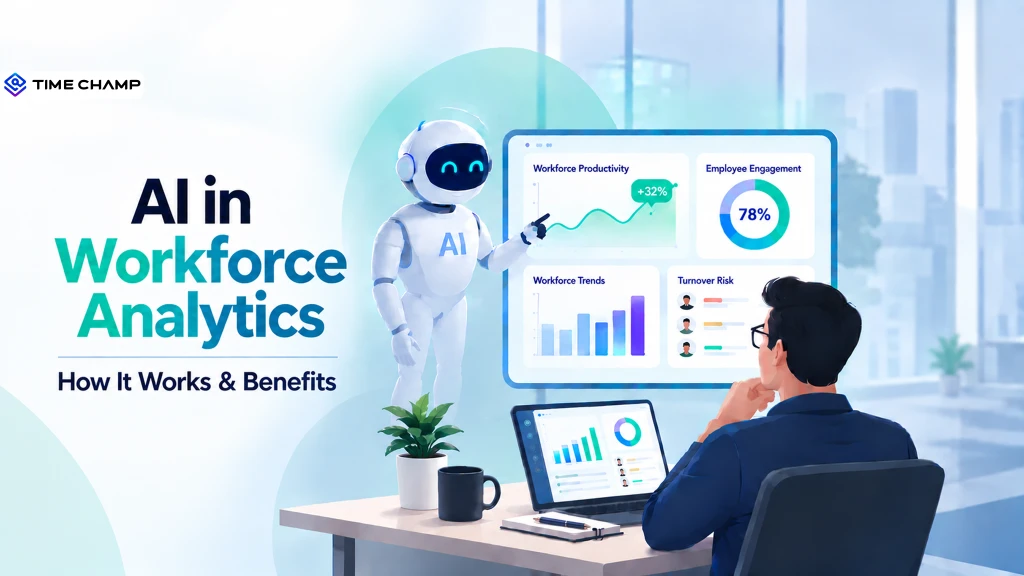
Most businesses don’t struggle with a lack of data, but they struggle to make sense of it. When your workforce insights are unclear or buried in scattered reports, planning resources, improving productivity, and identifying performance trends often become guesswork, not strategy. AI in workforce analytics changes the game, turning raw workforce data into meaningful insights that support faster, smarter decisions.
Here you’ll understand how AI works in workforce analytics, its benefits, common challenges, and practical ways to get started. You’ll also learn how businesses can use AI responsibly and how it can be applied effectively in workforce analytics.
What Is AI in Workforce Analytics?
AI in workforce analytics is the use of machine learning to analyze workforce data, identify patterns, and generate actionable insights. It helps you improve productivity, forecast workforce needs, optimize resource allocation, detect performance trends, and support faster, data-informed decisions by turning large volumes of employee data into meaningful recommendations.
How Does AI Actually Work in Workforce Analytics?
AI in workforce analytics transforms large volumes of workforce data into actionable insights for faster decision-making. It continuously analyzes data from multiple sources to identify patterns, forecast trends, and improve productivity and workforce planning.
- Collects Workforce Data: AI gathers data from systems such as time tracking, attendance, payroll, project management, HR software, employee performance records, and collaboration tools to build a complete view of your workforce.
- Integrates and Organizes Data: It combines information from different sources, removes duplicate or inconsistent records, and prepares the data for accurate analysis.
- Identifies Workforce Patterns: Machine learning algorithms examine workforce data to detect trends such as productivity changes, attendance patterns, workload distribution, overtime, and employee engagement.
- Predicts Future Workforce Trends: AI analyzes historical and real-time data to forecast outcomes such as staffing needs, employee turnover, workload demands, skill gaps, and project resource requirements.
- Generates Actionable Insights: Based on its analysis, AI highlights opportunities to improve workforce efficiency, optimize schedules, balance workloads, and support better business decisions.
- Delivers Real-Time Dashboards and Alerts: Interactive dashboards display key workforce metrics, while automated alerts notify managers about significant changes, unusual patterns, or potential workforce risks that require attention.

Did You Know?
According to Gallup, 41% of U.S. employees say their organization has already integrated AI into workplace practices, reflecting the rapid adoption of AI across businesses.
AI in Workforce Analytics vs AI in HR: What is the Difference?
While both come under HR technology, AI in workforce analytics and AI in HR have distinct roles. AI in HR supports a wide range of human resource functions, whereas AI in workforce analytics is centered on analyzing workforce data to improve productivity, planning, and operational performance.
| Aspect | AI in Workforce Analytics | AI in HR |
|---|---|---|
| Primary Focus | Analyzes workforce data to improve productivity, workforce planning, and business performance. | Automates and enhances HR processes across the employee lifecycle. |
| Main Goal | Provides actionable insights for better workforce decisions. | Improves HR efficiency, employee experience, and administrative processes. |
| Data Used | Time tracking, attendance, productivity, project data, workforce utilization, and performance metrics. | Resumes, employee records, payroll, recruitment data, training history, benefits, and engagement data. |
| Common Use Cases | Workforce planning, productivity analysis, capacity planning, turnover prediction, workload optimization, and performance insights. | Resume screening, candidate matching, interview scheduling, onboarding, employee support, and performance reviews. |
| Primary Users | Operations managers, HR leaders, business leaders, workforce planners, and department managers. | HR teams, recruiters, talent acquisition specialists, and people managers. |
| Business Impact | Improves workforce efficiency, resource allocation, forecasting, and operational decision-making. | Streamlines HR operations, reduces manual work, accelerates hiring, and enhances employee management. |
| Decision Support | Helps leaders make strategic workforce and operational decisions using predictive insights. | Helps HR teams make faster and more consistent people management decisions. |
| Success Metrics | Productivity, workforce utilization, labor costs, employee retention, and workforce performance. | Time-to-hire, quality of hire, employee satisfaction, onboarding efficiency, and HR process effectiveness. |
What Are the Benefits of AI in Workforce Analytics
AI in workforce analytics helps businesses turn workforce data into practical insights that improve planning, productivity, and operational efficiency. It enables you to identify trends early, make informed decisions, and build a more agile workforce.

Predicts Employee Turnover
Identifies early signs of employee turnover by analyzing attendance, engagement, productivity, and performance patterns. This helps you detect retention risks early so you can take proactive steps to support employees and improve retention.
Improves Workforce Planning
Forecasts future staffing needs by analyzing workforce trends, business demand, seasonal changes, and team capacity. This helps you plan hiring more effectively, prepare for growth, avoid staffing gaps, and allocate resources efficiently.
Identifies Skill Gaps
Detects skill gaps by comparing employee capabilities with current and future business requirements. This helps you design targeted training programs, support employee development, and make smarter hiring decisions.
Boosts Workforce Productivity
Analyzes productivity trends, workload distribution, and workflow bottlenecks across teams. This helps you optimize processes, balance workloads, remove inefficiencies, and improve overall team performance.
Reduces Manual Reporting
Automates workforce reporting and analysis by generating real-time insights and summaries. This helps you save time and focus more on strategic planning instead of manual reporting tasks.
Supports Personalized Employee Development
Evaluates employee strengths, performance patterns, and growth opportunities. This helps you create tailored development plans, recommend relevant training, and support long-term career growth.
Enables Faster, Data-Driven Decisions
Processes workforce data in real time and delivers insights through dashboards and alerts. This helps you quickly identify changes, respond to workforce needs, and make more confident, data-driven decisions.
Want to turn workforce insights into measurable results?
Time Champ helps you track, analyze, and improve team performance.
What Are the Challenges Businesses Face When Using AI in Workforce Analytics
While AI in workforce analytics offers significant advantages, successful implementation requires careful planning and responsible use. Addressing these challenges helps you get the most value from AI while building trust and ensuring reliable outcomes.
Poor Data Quality
AI relies on accurate and complete workforce data to generate meaningful insights. If your data is inconsistent, outdated, or incomplete, it can reduce the accuracy of predictions and lead to poor decisions.
Employee Privacy Concerns
Workforce analytics often uses data from attendance, productivity, and work activities. Without clear communication and transparent policies, employees may worry about how their information is collected, used, and protected.
Bias in AI Models
AI systems learn from historical data. If that data contains bias, AI may produce unfair recommendations related to hiring, promotions, performance evaluations, or workforce planning. Regular reviews and model validation help you reduce this risk.
Integration with Existing Systems
Many workplaces use multiple HR, payroll, time tracking, and project management tools. Integrating AI with these systems can be complex and may require data standardization and technical expertise.
Lack of AI Skills and Adoption
Introducing AI requires you and your teams to understand how to interpret insights and apply them effectively. Without proper training and change management, it can be difficult to achieve the expected outcomes.
Balancing AI with Human Judgment
AI provides valuable recommendations, but workforce decisions often require context that only people can provide. Combining AI insights with business understanding, employee feedback, and professional judgment helps you make balanced decisions.
Meeting Compliance and Ethical Standards
You need to ensure that AI practices align with data privacy regulations and ethical guidelines. Clear governance, transparent policies, regular audits, and responsible data handling help you maintain compliance and strengthen employee trust.
How to Get Started with AI in Workforce Analytics
Getting started with AI in workforce analytics doesn’t require a complete overhaul of your existing processes. A structured approach helps you implement AI effectively, generate reliable insights, and achieve measurable business outcomes from the start.
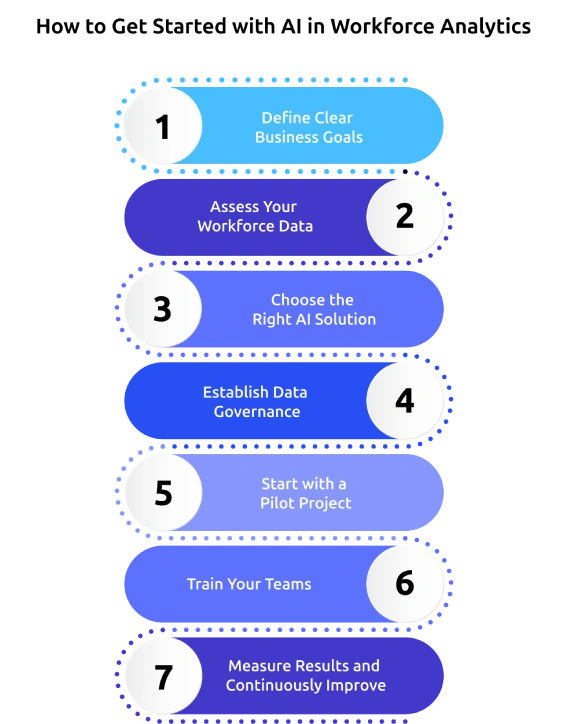
1. Define Clear Business Goals
Start by identifying the workforce challenges you want to solve. Focus on specific objectives such as improving productivity, forecasting staffing needs, reducing employee turnover, or optimizing workforce utilization.
2. Assess Your Workforce Data
Review the quality of your existing workforce data before implementing AI. Ensure information is accurate, complete, and consistent across time tracking, attendance, payroll, HR systems, and performance records.
3. Choose the Right AI Solution
Select an AI-powered workforce analytics platform that aligns with your business goals and integrates with the existing HR and workforce management systems. Look for features that provide actionable insights, reporting, and workforce forecasting.
4. Establish Data Governance
Create clear policies for data collection, access, privacy, and security. Define who can use workforce data, how it will be managed, and ensure your AI practices comply with applicable data protection regulations.
5. Start with a Pilot Project
Implement AI for a single workforce use case, such as productivity analysis, workforce planning, or attendance insights. A pilot project helps you evaluate performance, identify improvements, and build confidence before expanding AI across the organization.
6. Train Your Teams
Help HR professionals and business leaders understand how to interpret AI-generated insights and use them in everyday decision-making. Proper training encourages adoption and helps your teams gain more value from technology.
7. Measure Results and Continuously Improve
Track key performance indicators such as productivity, workforce utilization, employee retention, and operational efficiency. Review AI insights regularly and refine your strategy to support changing workforce needs and business goals.
Did You Know?
Deloitte’s Global Human Capital Trends report found that 73% of organizations recognize the need to reinvent the role of managers as AI reshapes work, yet only 7% say they have made significant progress.
How Time Champ Fits Into AI-Driven Workforce Analytics
Making workforce decisions becomes challenging when employee data is scattered across multiple tools, spreadsheets, and disconnected reports, making it hard to get a unified view of performance. Without centralized insights, your teams often struggle with delayed decisions and missed productivity opportunities. Time Champ is a smart employee monitoring software with built-in workforce analytics features that bring your workforce data together, helping you monitor productivity, identify trends, and make informed decisions with greater confidence.
Here are the key features of Time Champ that help you track workforce performance in real time and make better decisions.
- Provides Actionable Workforce Analytics: Offers real-time workforce metrics through interactive dashboards that highlight productivity, attendance, workforce utilization, and performance trends, helping you make faster, data-backed decisions.
- Tracks Employee Productivity with Greater Visibility: Monitors productive time, idle time, app and website usage, and work patterns to identify opportunities for improving team efficiency and balancing workloads.
- Monitors Attendance and Work Hours Accurately: Automates attendance tracking, monitors clock-ins and clock-outs, manages leave records, and maintains accurate work-hour data for reliable workforce reporting.
- Improves Time Tracking and Resource Planning: Captures time spent on projects and tasks automatically to understand resource utilization, identify delays, and optimize workforce planning across teams.
- Simplifies Shift Scheduling and Workforce Management: Creates flexible shift schedules, manages multiple time zones, and allocates employees efficiently to maintain smooth business operations.
- Generates Comprehensive Workforce Reports: Access detailed reports on productivity, attendance, time usage, and workforce performance to identify trends, measure improvements, and support strategic workforce planning.
Still relying on scattered workforce data to make important decisions?
Use Time Champ to turn workforce data into actionable insights.
Conclusion
Making informed workforce decisions not only requires collecting employee data, but it also requires the ability to turn that data into meaningful insights. AI in workforce analytics helps you identify trends, improve workforce planning, enhance productivity, and support smarter business decisions with greater accuracy. As AI becomes more common at work, businesses need reliable workforce data and clear guidelines for using it. Set clear goals, keep workforce data accurate, and use AI responsibly to improve productivity, adapt to workforce changes, and support better decisions.

Anjali

Table of Content
 What Is AI in Workforce Analytics?
- How Does AI Actually Work in Workforce Analytics?
- AI in Workforce Analytics vs AI in HR: What is the Difference?
- What Are the Benefits of AI in Workforce Analytics
- What Are the Challenges Businesses Face When Using AI in Workforce Analytics
- How to Get Started with AI in Workforce Analytics
- How Time Champ Fits Into AI-Driven Workforce Analytics
- Conclusion
Instant Signup
Thank you for your request!
We have received your signup request and our team will get back to you soon. In the meantime, you can book a demo to see Time Champ in action.
Book a DemoFree trial. No credit card required. Prefer a walkthrough? Book a demo.
Related Blogs
![What is Workforce Intelligence? A Complete Guide [2026]](https://www.timechamp.io/images/workforce-intelligence-feature-image.webp)
Discover what workforce intelligence is, why it's critical, real examples, implementation steps, key benefits, challenges & how AI transforms the future.
Guna Lakshmi | Feb 11, 2026
Learn why workforce analytics is essential for process reinvention, how it reinvents key business processes, best practices & how to measure success.
Anjali | Apr 02, 2026
Learn what workforce management software is, how it works, its key features, benefits, types, and how to choose the best solution for your team in 2026.
Jahnavi Pulluri | Aug 07, 2026
Learn why workforce analytics drives business value, how to measure ROI with formulas, strategies for measurable returns, challenges, & business impact.
Thasleem Shaik | Feb 11, 2026
Learn what business intelligence (BI) is, why it matters, how it works, explore key benefits, challenges & how AI is used to enhance business decisions.
Anjali | Feb 11, 2026
Choose the right employee productivity monitoring software. A 2026 guide covering features, evaluation criteria, remote work needs, and rollout tips.
Jahnavi Pulluri | May 06, 2026


 4.7/5 avg.
Ready to Manage Your Workforce Smarter?
Join our family of 1500+ companies using smart insights to redefine workforces!

Free Trial
No Credit Card Required