What Is Shadow AI? Risks, Examples, and Governance
Shadow AI happens when employees use AI tools without approval. See its risks, examples, causes, governance strategies, and ways to manage it safely.

AI tools are now part of everyday work, helping teams write faster, analyze information, automate small tasks, and move projects forward with less friction. But when employees start using these tools without approval or visibility from IT, security, or leadership, it creates a hidden layer of risk that many organizations do not notice until something goes wrong. That hidden use is called shadow AI.
It often begins with good intentions, such as saving time, improving content, fixing code, or summarizing data, but it can expose sensitive information, weaken compliance, and make AI decisions harder to control.
This guide explains what shadow AI means, why it is growing, where it commonly appears, and how you can manage it with practical governance instead of blocking innovation.
What Is Shadow AI?
Shadow AI is the use of artificial intelligence tools, apps, models, or AI features at work without approval, visibility, or governance from the organization’s IT, security, or compliance teams.
In simple terms, it happens when employees use AI on their own to complete work tasks, while the business does not know which tools employees use, what data employees share, or whether those tools meet organizational security and privacy standards.
Shadow AI can include public chatbots, AI writing tools, coding assistants, browser extensions, meeting note takers, image generators, analytics tools, and AI features built into software that employees already use.
For example, an employee may paste customer details into an AI chatbot to write an email, upload a contract to summarize key points, or use an unapproved coding assistant to debug internal code. The goal is usually to work faster, not to break rules, but the risk begins when company data moves into tools that the organization has not reviewed or controlled.
Why Shadow AI Is Growing So Fast
Shadow AI did not appear suddenly. Employees started using AI tools at work long before most organizations established clear policies, security controls, and governance frameworks. This creates a growing gap between how quickly your teams use AI and how slowly you establish governance frameworks. Understanding the factors behind this trend can help you create practical AI governance policies that support innovation while reducing risk.
Usage Statistics
- 45% of US workers have used AI at work without telling their employer (Gusto)
- 66% of those workers pay for the AI tools themselves (Gusto)
- 65% of employees use AI tools at work, 39% use free unapproved AI (IDC)
- 50% of employees are using unauthorized AI tools (Palo Alto Networks)
- 57% of employees hide AI usage from supervisors (HBR)
- 66% of employees use AI at work without knowing whether it is allowed (KPMG)
Industry-Specific Statistics
- 57% of healthcare professionals have used or encountered unauthorized shadow AI (Association of Health Care Journalists)
- Customer experience industries saw a 250% YoY increase in shadow AI usage (Zendesk 2026 CX Trends Report)
- Software developer teams show the highest shadow AI adoption due to AI code assistants (Black Duck)
Risk and Incident Statistics
- Organizations average 66 GenAI apps in use, with 10% classified as high-risk (Palo Alto Networks)
- GenAI-related DLP incidents increased 2.5x year over year (Palo Alto Networks)
- 48% of employees admit to inputting confidential information into public GenAI tools (The Missing Link)
- 20% of organizations have suffered a security breach tied to shadow AI (IBM)
Policy and Governance Statistics
Unapproved AI tools can put sensitive data at risk.
Use Time Champ to gain visibility into AI usage.
Shadow AI vs Shadow IT: Key Differences
Shadow AI and shadow IT are closely related, but they are not the same. Both involve using technology without formal approval or oversight. The difference is that shadow IT covers any unauthorized software, applications, devices, or cloud services, while shadow AI specifically focuses on AI tools and AI-powered features.
AI can process information, generate content, and influence decisions, and introduce additional risks that traditional shadow IT does not. The comparison below highlights the key differences between the two concepts.
| Aspect | Shadow IT | Shadow AI |
|---|---|---|
| Definition | Use of software, devices, or services without IT approval | Use of AI tools or AI features without organizational approval |
| Technology Scope | Covers all types of unauthorized technology | Focuses only on artificial intelligence tools and applications |
| Common Examples | Personal cloud storage, messaging apps, and project management tools | ChatGPT, Claude, Gemini, AI coding assistants, AI writing tools |
| Primary Risk | Security gaps, unmanaged applications, and data exposure | Data leakage, compliance issues, inaccurate outputs, and intellectual property risks |
| Visibility | Often detected through software inventories and network monitoring | More difficult to detect because many AI tools run directly in a browser |
| Decision Impact | Usually affects technology management and operations | Can directly influence content, analysis, recommendations, and business decisions |
| Compliance Concerns | Data security and access control requirements | Data privacy, AI regulations, governance, and model usage risks |
| Governance Focus | Managing unauthorized technology usage | Managing both AI usage and AI-generated outcomes |
Risks of Shadow AI
Shadow AI can help complete tasks faster, but using AI tools without visibility or governance introduces risks that are often difficult to identify until a problem occurs. The risks below highlight why you need clear oversight of AI usage across your workforce.
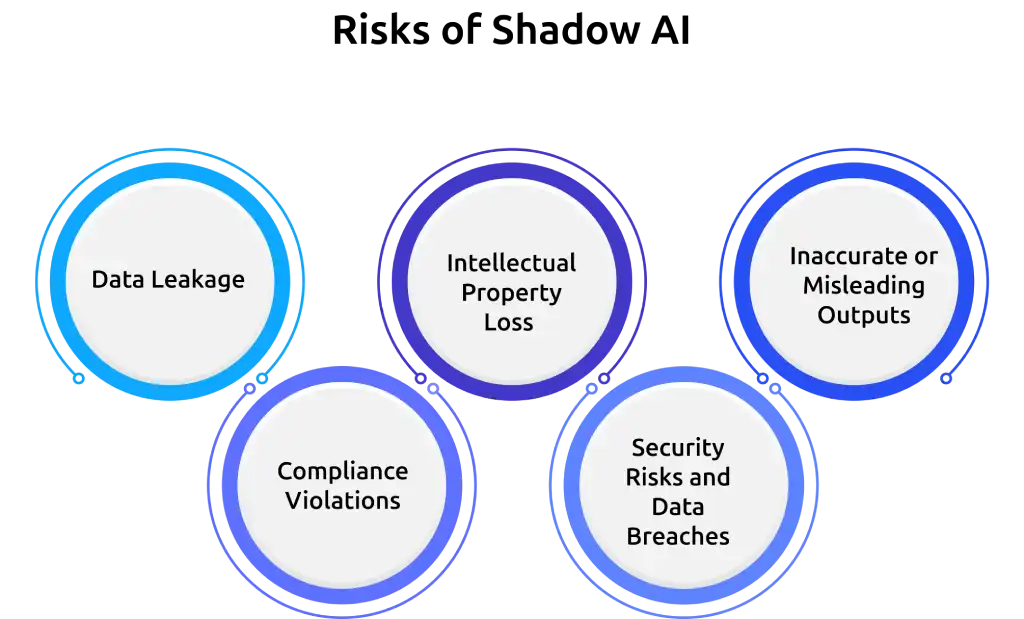
1. Data Leakage
One of the biggest risks of shadow AI is exposing sensitive information to external AI platforms. When confidential documents, customer records, financial data, or internal business information are entered into unapproved AI tools, that data leaves your organization's control. In some cases, AI providers may retain prompts or process information on external servers, increasing the risk of unintended data leaks.
2. Compliance Violations
Many industries must comply with regulations related to privacy, security, and data protection. Using unauthorized AI tools can create compliance issues when regulated information is shared without proper controls. This can lead to audit failures, regulatory penalties, and legal complications, particularly in industries that handle personal, financial, or healthcare data.
3. Intellectual Property Loss
AI tools are often used for content creation, coding, research, and product development. When proprietary information, source code, product designs, or business strategies are shared with unapproved AI systems, they can expose valuable intellectual property to third-party platforms. Once that information leaves your environment, recovering control becomes significantly more difficult.
4. Security Risks and Data Breaches
Shadow AI expands your attack surface because security teams have limited visibility into which tools employees use. Unapproved AI applications, browser extensions, or external accounts can introduce new vulnerabilities that are not covered by existing security controls. This makes it harder to detect threats, investigate incidents, and respond to potential breaches.
5. Inaccurate or Misleading Outputs
AI-generated content is not always accurate. When teams rely on unauthorized AI tools without validation or review, incorrect information can influence reports, customer communications, business decisions, and operational processes. Over time, these inaccuracies can affect quality, consistency, and decision-making across your organization.
Hidden AI usage can increase compliance risks.
Try Time Champ to identify unauthorized AI tools.
Causes of Shadow AI
Understanding the causes of shadow AI can help you address the root problem instead of only reacting to the risks. Let’s take a closer look.
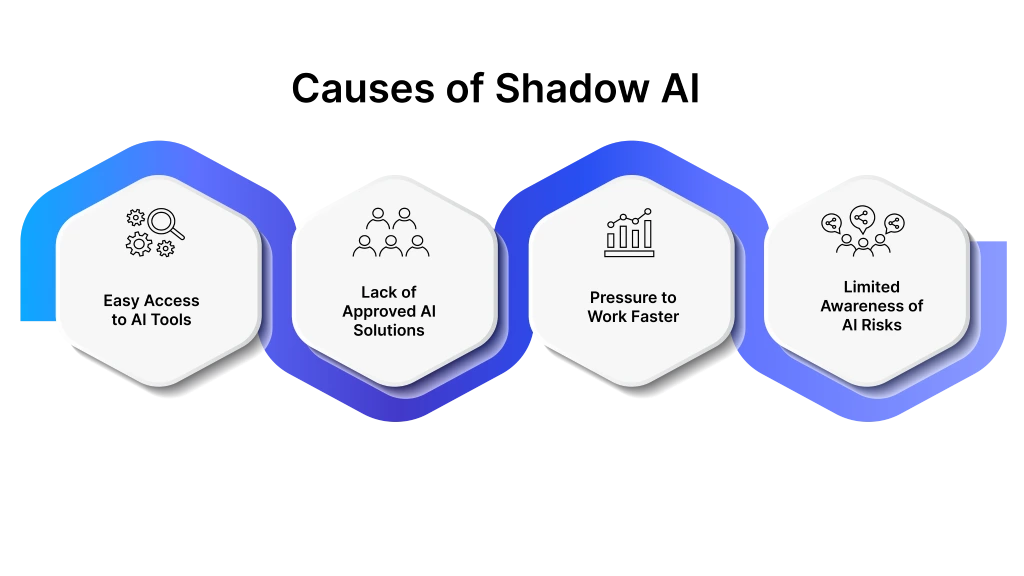
1. Easy Access to AI Tools
Most AI tools are available instantly through a web browser, mobile app, or browser extension. Unlike traditional software that often requires approval and setup, employees can access AI tools within minutes. This convenience encourages employees to experiment with AI solutions independently when they need quick answers, content generation, data analysis, or task automation.
2. Lack of Approved AI Solutions
When you do not provide approved AI tools, employees often look for alternatives on their own. Public AI platforms are usually easier to access and may offer features that employees need immediately. This creates a situation where AI adoption grows faster than official approval processes and governance frameworks.
3. Pressure to Work Faster
AI tools can help reduce repetitive work, speed up research, draft content, summarize information, and automate routine tasks. As workloads increase and deadlines become tighter, employees naturally look for ways to save time. If approved AI solutions are unavailable, shadow AI often becomes the fastest option.
4. Limited Awareness of AI Risks
Many employees focus on the benefits of AI without fully understanding the security, privacy, and compliance implications. Sharing sensitive information with public AI tools may seem harmless when the risks are not clearly communicated. Without proper training and guidance, shadow AI usage can grow unintentionally across teams.
Common Examples of Shadow AI
The examples below show some of the most common ways shadow AI appears across modern workplaces.
1. Content Creation and Writing Assistance
Employees use tools like ChatGPT, Claude, or Gemini to draft emails, create reports, write blog content, or generate marketing copy. While this can speed up content creation, it becomes shadow AI when the tool is not approved or when sensitive business information is shared during the process.
2. Meeting Summaries and Note Generation
AI tools are increasingly used to summarize meetings, create action items, and generate notes automatically. When meeting recordings, transcripts, or confidential discussions are uploaded to unapproved AI platforms, it creates visibility and data security concerns.
3. Code Generation and Software Development
Developers use AI coding assistants to write code, troubleshoot issues, and accelerate development tasks. Shadow AI arises when developers use these tools without approval, especially when they share proprietary source code or internal system information with external AI services.
4. Data Analysis and Reporting
Employees may use AI tools to analyze spreadsheets, generate insights, or create reports faster. However, when business data, financial information, or operational records are uploaded to unauthorized AI platforms, it can expose sensitive information outside organizational controls.
How to Manage Shadow AI
Eliminating shadow AI completely is not realistic. As AI tools become more accessible, employees will continue looking for ways to use them in their daily work. The goal is not to block AI adoption. The goal is to create visibility, reduce risk, and encourage responsible AI usage. The practices below can help you manage shadow AI while still supporting innovation and efficiency.
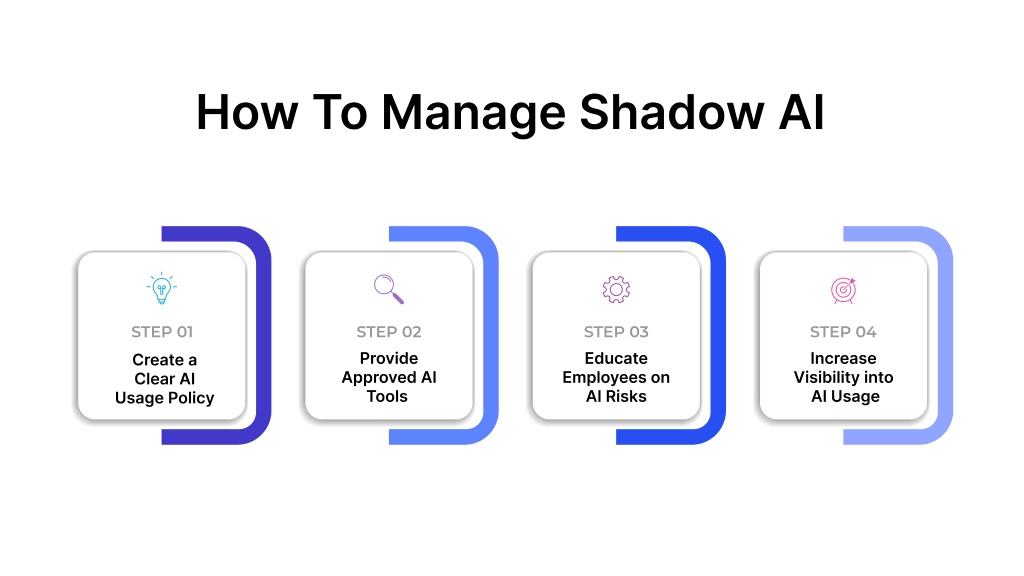
1. Create a Clear AI Usage Policy
Start by defining how employees can use AI tools within your organization. Clearly list the AI tools your organization approves, specify the types of data employees can share, and outline the activities that need additional review. Clear guidelines reduce confusion and help employees make informed decisions when using AI.
2. Provide Approved AI Tools
Employees often turn to shadow AI when approved alternatives are unavailable. Providing secure and approved AI solutions gives your workforce the tools they need without creating unnecessary risks. When employees have access to trusted options, they are less likely to seek external tools on their own.
3. Educate Employees on AI Risks
Many shadow AI incidents happen because employees do not fully understand the risks involved. Regular training can help employees recognize issues related to data privacy, compliance, intellectual property, and security. Better awareness leads to better decisions when using AI in daily workflows.
4. Increase Visibility into AI Usage
You need visibility into tool usage before you can manage shadow AI effectively. Monitoring which AI tools employees access helps you identify unauthorized applications, understand usage patterns, and detect potential risks early. Greater visibility allows you to address concerns before they become larger security or compliance issues.
Prevent Shadow AI Risks with Time Champ
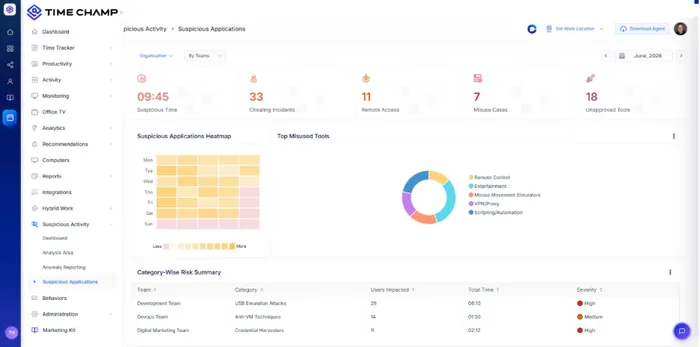
Shadow AI becomes difficult to manage when it operates without visibility. Time Champ helps you uncover technology usage patterns, identify potential risks early, and create a more informed approach to AI governance.
It provides visibility into application usage, website activity, and work patterns, helping you identify unauthorized AI usage and build stronger governance practices. Here are some ways Time Champ helps you manage shadow AI effectively.
- Application Usage Tracking: Track the applications employees use during work hours. This helps you identify AI tools that employees access regularly and understand how those tools fit into daily workflows.
- Website Usage Monitoring: Monitor website activity to gain visibility into web-based AI platforms. This allows you to identify unapproved AI tools and understand how frequently employees access them.
- Real-Time Activity Insights: View work activity as it happens and gain a clearer picture of digital work patterns. Real-time visibility helps you detect unusual tool usage before it becomes a larger governance concern.
- Suspicious Activity Detection: Automatically detect unusual behavior, such as frequent use of unknown AI tools, unapproved tools or access to restricted platforms. This helps you identify risks early and take preventive action.
- Tool Usage Reports: Get clear reports on which AI tools employees are using, how often they use them, and for how long. These insights help you understand usage patterns and make better decisions for AI governance.
- Data Loss Prevention: Stop employees from sharing sensitive information with unauthorized AI tools. Monitor how teams handle confidential data, control its usage, and restrict file transfers to reduce the risk of data exposure.
- Alerts: Set up alerts to notify you when employees access unapproved AI tools or show suspicious activity. This helps you respond quickly to potential risks and take timely action to maintain compliance and control.
- Detailed Productivity Reports: Generate reports that show application usage, website activity, and time allocation. These insights help you evaluate AI adoption trends and make informed governance decisions.
Time Champ provides the clarity needed to understand usage patterns, highlight areas of concern, and support better decision-making around AI governance. Clear visibility enables you to guide AI adoption in a structured way while maintaining control over data, supporting data loss prevention, ensuring compliance, and strengthening overall operations.
Limited visibility makes shadow AI harder to manage.
Try Time Champ to monitor applications and websites.
Conclusion
Shadow AI is not just about unauthorized AI tools. It is about the visibility, governance, and control needed to use AI responsibly across your organization. As AI adoption continues to grow, organizations that establish clear policies, improve visibility, and educate employees will be better positioned to reduce risks while supporting innovation.
Time Champ helps you gain the insights needed to identify shadow AI usage, understand work patterns, and strengthen AI governance. With the right balance of visibility and oversight, you can encourage responsible AI adoption while protecting your data, maintaining compliance, and supporting long-term business growth. Get started with Time Champ today and build a safer, more controlled approach to AI adoption with a 7-day free trial.

Thasleem Shaik

Table of Content
 What Is Shadow AI?
- Why Shadow AI Is Growing So Fast
- Shadow AI vs Shadow IT: Key Differences
- Risks of Shadow AI
- Causes of Shadow AI
- Common Examples of Shadow AI
- How to Manage Shadow AI
- Prevent Shadow AI Risks with Time Champ
- Conclusion

Related Blogs

Learn why AI is rising in the workplace, explore real examples, key benefits, challenges & how to use AI effectively to enhance productivity & performance.
Thasleem Shaik | Feb 11, 2026
Learn what AI in the workforce is, why it matters, and how to manage it effectively. Also, explore its pros and cons to strengthen productivity and performance.
Shabana Shaik | Feb 11, 2026
The AI employee monitoring software goes beyond basic tracking. It predicts risks, reveals patterns, and gives you real clarity to lead your team better.
Shabana Shaik | Apr 17, 2026
Understand how AI productivity tracking turns activity data into real insights. Explore use cases, benefits, and how to choose the best tool for your team.
Guna Lakshmi | May 06, 2026
Learn how AI-powered workplace productivity monitoring affects employee data privacy, compliance, transparency, accountability, and trust in organizations.
Jahnavi Pulluri | May 11, 2026
Data encryption in employee monitoring is non-negotiable. Learn the standards, certifications, and six questions to ask before signing with any vendor.
Sai Keerthi Uppala | May 07, 2026


 4.7/5 avg.
Ready to Manage Your Workforce Smarter?
Join our family of 1500+ companies using smart insights to redefine workforces!

Free Trial
No Credit Card Required