Productivity Tracking: Small Business vs Enterprise
Compare productivity tracking for small businesses and enterprises, including software features, scaling challenges, and workforce visibility needs today.

Have you ever implemented productivity tracking software expecting better visibility and accountability, only to end up dealing with reporting confusion, low adoption, or overwhelmed teams? In many cases, the issue is not the software itself, it is choosing a solution that does not fit your business size, team structure, or operational complexity. A productivity tracking platform that works well for a small team may struggle to support enterprise-level workforce demands, while enterprise-grade systems can feel unnecessarily complicated for growing businesses that only need basic productivity visibility. Choosing the right productivity tracking approach depends on how your business operates today and how it plans to scale tomorrow.
This guide explains productivity tracking for small businesses vs enterprise, including how tracking needs change across small businesses, mid-market companies, and enterprises. You’ll also learn the key differences between the setups, common mistakes businesses make when selecting productivity tracking software, and how to choose a solution that scales with your workforce.
Why Does Productivity Tracking Change as Businesses Scale?
Productivity tracking becomes more complex as your business grows because the way teams work, communicate, and manage performance changes with scale. In a small business, managers can easily understand workloads, identify delays, and monitor employee productivity through direct interaction and simple reporting. As teams expand, manual visibility becomes harder to maintain. More departments, hybrid work models, multiple managers, and growing operational data create the need for structured workforce productivity tracking and deeper reporting systems.
This is why productivity tracking for small businesses vs enterprise environments looks completely different in practice. Small teams usually need simple employee productivity tracking software focused on visibility, attendance, and daily activity tracking. Enterprises, on the other hand, require advanced analytics, role-based access controls, department-level reporting, compliance management, and integrations across multiple systems. As organizations scale, productivity tracking tool evolves from a simple monitoring tool into a workforce intelligence platform that helps you manage performance across hundreds or thousands of employees.

Did You Know?
According to a 2026 workforce analytics report, large enterprises made up 67.4% of workforce analytics adoption due to their growing need for large-scale productivity visibility and reporting. At the same time, small and mid-sized businesses are expected to see the fastest growth in adoption as more companies invest in productivity tracking systems to improve workforce efficiency.
How Productivity Tracking Changes from Small Businesses to Enterprises
Productivity tracking changes significantly as businesses grow because team structures, reporting needs, and operational complexity evolve over time. A small business usually focuses on basic visibility, attendance, and day-to-day productivity monitoring, while larger organizations need deeper workforce analytics, department-level reporting, and stronger access controls. As companies scale, productivity tracking software also shifts from simple employee monitoring to a broader workforce management and decision-making system.
The difference is not only about employee count. Growing businesses also deal with more managers, multiple departments, hybrid work environments, compliance requirements, and system integrations. This is why productivity tracking for small businesses and enterprise environments requires very different features, reporting depth, and scalability capabilities.
Small Businesses
Small businesses usually need simple productivity tracking software to monitor attendance, work hours, and daily productivity. Since teams are smaller, you can directly understand employee performance and workloads. Most businesses in this stage prioritize easy setup, affordability, and basic productivity visibility.
Mid-Market Businesses
Mid-market businesses need more structured productivity tracking as teams and departments grow. They often require dashboards, department-level reporting, hybrid workforce monitoring, and integrations with other business tools. At this stage, productivity tracking helps you improve visibility across multiple teams and operations.
Enterprise Organizations
Enterprise organizations require advanced productivity tracking systems to manage large and distributed workforces. These businesses need workforce analytics, role-based permissions, enterprise security, compliance controls, and detailed reporting. Productivity tracking at this scale supports organization-wide workforce management and operational decision-making.
Small Business vs Enterprise Productivity Tracking: 8 Key Differences
Productivity tracking software may offer similar core features across all business sizes, but the way you use, manage, and scale these systems changes significantly with workforce size. Small businesses usually focus on simplicity and quick visibility, while enterprises require advanced workforce analytics, security controls, integrations, and large-scale operational management.
| Dimension | Small Business (Under 50 Employees) | Enterprise (500+ Employees) |
|---|---|---|
| Deployment Time | Setup usually takes a few hours or days with simple onboarding. | Deployment can take weeks or months due to integrations, security reviews, and phased rollouts. |
| Pricing Model | Mostly affordable per-user monthly pricing with flexible plans. | Often includes annual contracts, custom pricing, and enterprise licensing models. |
| Customization | Limited customization with mostly ready-to-use features. | Advanced customization with tailored workflows, reporting, and implementation support. |
| Admin Management | Usually managed by a founder, HR manager, or small operations team. | Requires dedicated admins, IT teams, and ongoing implementation management. |
| Reporting & Analytics | Focus on basic dashboards, attendance, and employee productivity visibility. | Includes workforce analytics, department-level reporting, forecasting, and large-scale performance insights. |
| Integration Requirements | Typically connects with project management or communication tools. | Requires integration with HRIS, payroll, SSO, ERP, BI platforms, and enterprise systems. |
| Compliance & Security | Basic privacy and security controls are usually enough for daily operations. | Needs advanced compliance standards, audit logs, role-based permissions, and regional data controls. |
| Support & Service | Relies mainly on self-service setup, chat support, and help documentation. | Includes dedicated account managers, priority support, SLAs, and strategic onboarding assistance. |
How to Choose the Right Productivity Tracking Software for Your Business Size
Choosing the right productivity tracking software depends on your business size, operational complexity, and future growth plans. A solution that works well for a small team may not support larger workforce management needs later. Evaluating the right features, scalability, integrations, and reporting capabilities helps you choose software that fits both your current and long-term business requirements.
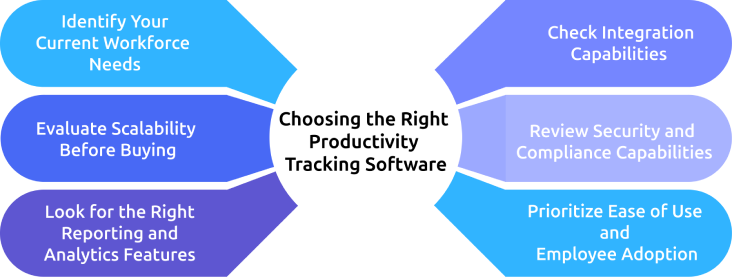
1. Identify Your Current Workforce Needs
Start by understanding what you actually want to track. Small businesses may only need attendance tracking, work hours, and basic productivity visibility, while larger organizations often require workforce analytics, department-level reporting, and compliance controls. Choosing software based on real operational needs prevents unnecessary complexity and costs.
2. Evaluate Scalability Before Buying
Select productivity tracking tool that can support your future workforce growth, not just your current team size. Make sure the platform can handle additional employees, departments, reporting structures, and integrations as your operations expand. Scalable software helps you avoid switching systems as your business grows.
3. Look for the Right Reporting and Analytics Features
Choose reporting and analytics features that match the complexity of your workforce management needs. Small teams may only require simple dashboards and productivity summaries, while larger organizations often need advanced analytics, forecasting, and department-level visibility. Focus on reporting capabilities that support your actual operational decisions.
4. Check Integration Capabilities
Check whether the productivity tracking software works smoothly with the systems your business already uses. Smaller businesses may only need integrations with communication or project management tools, while larger organizations often require HRIS, payroll, SSO, ERP, or BI integrations. Strong integrations help you centralize workforce data and reduce manual work.
5. Review Security and Compliance Capabilities
Evaluate the platform’s security features before implementation, especially if your business handles sensitive workforce data. Look for capabilities like role-based permissions, audit logs, secure access controls, and compliance support. Enterprise organizations should prioritize software that meets strict security and regulatory requirements.
6. Prioritize Ease of Use and Employee Adoption
Choose productivity tracking software that you and your employees can use without extensive training or technical support. A simple interface, clear reporting, and a smooth onboarding process improve adoption across teams. Easy-to-use software helps you improve workforce visibility without creating unnecessary operational friction.
Struggling to track productivity as your team grows and workflows become more complex?
Time Champ helps you manage workforce visibility, reporting, and productivity tracking from small teams to enterprise operations.
Common Mistakes Businesses Make When Choosing Productivity Tracking Software
Many businesses struggle with productivity tracking software, not because the platform is bad, but because the solution does not match their operational needs, workforce size, or industry requirements. Choosing the wrong software can create reporting issues, low adoption, unnecessary costs, and scaling challenges as the business grows.
Mistake 1: Choosing Enterprise Software Too Early
Some small businesses invest in enterprise-level productivity tracking software too soon to prepare for future growth. This often creates unnecessary complexity, higher costs, difficult implementation processes, and dashboards that teams rarely use because the business does not yet need advanced enterprise capabilities.
Solution: Choose software that matches your current operational complexity while still offering room to scale gradually.
Mistake 2: Staying With Small-Business Tools for Too Long
Many growing businesses continue using simple productivity tracking tools even after their workforce and reporting needs become more complex. Over time, limited reporting, weak integrations, and poor scalability create operational bottlenecks and force expensive software migrations later.
Solution: Upgrade to scalable workforce productivity tracking software before operational limitations start affecting your productivity and reporting visibility.
Mistake 3: Treating Mid-Market Businesses Like Small Teams
Mid-market businesses often assume they can simply extend small-business productivity tracking systems to larger teams. However, growing organizations usually need manager-level dashboards, department segmentation, automation, integrations, and structured workforce analytics that smaller tools may not support effectively.
Solution: Select productivity tracking software designed specifically for your growing and multi-department business operations.
Mistake 4: Ignoring Industry Compliance Requirements
Some businesses focus only on employee count when selecting productivity tracking software and ignore industry-specific compliance needs. Companies in healthcare, fintech, legal services, or government contracting may require enterprise-level security, audit logs, and compliance controls even with smaller teams.
Solution: Prioritize compliance, security, and data protection requirements based on your industry, not just your workforce size.
How Time Champ Scales from Small Business to Enterprise
As your business grows, you may start noticing that the productivity tracking software that once worked well for the team no longer supports your operational needs effectively. You can face challenges with limited reporting, poor workforce visibility, integration issues, permission management, and scalability as the organization expands from a small team to a larger workforce structure. Choosing a scalable platform becomes important if you want to manage productivity tracking for small businesses vs enterprise environments without repeatedly changing systems as the company grows.
Time Champ is an employee monitoring software with a workforce intelligence layer designed to support businesses at every growth stage using the same scalable foundation. Small businesses can start with fast deployment, simple productivity visibility, attendance tracking, app usage monitoring, and affordable per-user pricing. As organizations grow, the platform supports advanced workforce analytics, role-based permissions, department-level reporting, HRIS integrations, and hybrid workforce management without requiring a complete platform migration. For enterprise organizations, Time Champ also provides enterprise-grade security, GDPR, ISO 27001:2022, HIPAA, and SOC 2 Type I compliance support, along with dedicated implementation assistance for large-scale workforce operations.
Finding it difficult to scale productivity tracking software without changing systems repeatedly?
Time Champ gives you scalable employee monitoring, workforce analytics, and enterprise-ready reporting on one platform.
Conclusion
Choosing the right productivity tracking software is not only about features and pricing. Your business size, workforce structure, reporting needs, compliance requirements, and future growth plans all play a major role in finding the right fit. A solution that works well for a small team may not support greater operational demands later, while enterprise platforms may include advanced features, reporting layers, and management controls that smaller businesses may not actually need. Understanding the differences in productivity tracking for small businesses vs enterprise environments helps you select software that improves workforce visibility, supports scalability, and delivers long-term operational value as your organization grows.

Anjali

Table of Content
 Why Does Productivity Tracking Change as Businesses Scale?
- How Productivity Tracking Changes from Small Businesses to Enterprises
- Small Business vs Enterprise Productivity Tracking: 8 Key Differences
- How to Choose the Right Productivity Tracking Software for Your Business Size
- Common Mistakes Businesses Make When Choosing Productivity Tracking Software
- How Time Champ Scales from Small Business to Enterprise
- Conclusion

Related Blogs

Find out if employee monitoring software is worth it for your small business. See real ROI math, pricing, legal tips, and a 14-day implementation plan.
Jahnavi Pulluri | Apr 21, 2026
Learn how employee monitoring supports work-life balance by detecting overwork, protecting boundaries, and helping teams build sustainable work patterns.
Anjali | Apr 23, 2026
Understand the role of productivity tracking in remote work and how it improves team clarity, workload balance, and performance with real insights.
Thasleem Shaik | May 01, 2026
Learn how enterprise employee monitoring helps large organizations track productivity, improve security, and stay compliant with the right tools and strategies.
Anjali | Apr 21, 2026
Discover the best ways to introduce productivity monitoring in your organization smoothly and effectively.
Thasleem Shaik | Mar 18, 2025
Track the right employee monitoring metrics to understand work patterns, improve performance, and make data-driven decisions with confidence.
Thasleem Shaik | Apr 22, 2026


 4.7/5 avg.
Ready to Manage Your Workforce Smarter?
Join our family of 1500+ companies using smart insights to redefine workforces!

Free Trial
No Credit Card Required