Employee Monitoring and Work-Life Balance: A Smart Guide
Learn how employee monitoring supports work-life balance by detecting overwork, protecting boundaries, and helping teams build sustainable work patterns.

Employee monitoring and work-life balance are not opposites. When you use monitoring the right way, it helps teams stay productive without working too much. The real impact depends on how you design, explain, and use it in your workplace. Programs investing in zero trust employee monitoring see measurable reductions in time-to-detect for risky behavior.
Right now, many companies face the same problem. Employees want a better balance, but their daily work does not support it. According to the Randstad Workmonitor 2025 report, 83% of employees say work-life balance is a top priority when choosing a job. At the same time, around 55% of employees feel burned out, and burnout can cost businesses thousands of dollars per employee every year. What employees need and what workplaces provide are moving further apart.
In this guide, you will learn how monitoring tools help identify overwork early, reduce after-hours work, improve time management, and support healthier work habits. You’ll also learn how to use monitoring simply and transparently, which builds trust.
What Does Employee Monitoring Have to Do with Work-Life Balance?
Employee monitoring and work-life balance are closely connected. Monitoring tools track when people work, how long they work, and their daily patterns. When teams use this data with a well-being focus, it clearly shows where balance starts to break. Many companies only track productivity, like active time or task completion, but miss important signals such as overtime, skipped breaks, weekend work, and unused leave. When you shift the focus from control to insight, monitoring becomes a way to protect employees, not only by measuring them.
Many employees feel uncomfortable with traditional monitoring because it looks like tracking their activity. Constant tracking, screenshots, and activity checks can create pressure and reduce trust. A better approach is supportive visibility. It focuses on patterns, not every action, and helps teams understand whether people are working healthily.
Monitoring data can also act as an early warning system. It shows signs like long work hours, no time off, or increased weekend activity before employees speak up. This helps you start timely conversations and fix workload issues early, making monitoring a tool for care, not just to control.

Did You Know?
According to the American Psychological Association, 56% of monitored employees feel stressed at work, but clear communication and transparency can significantly reduce that stress. The way monitoring is used makes a major difference.
How Does Employee Monitoring Software Detect Overwork?
Employee monitoring software detects overwork by tracking when employees log in, how long they stay active, and how their work patterns shift over days and weeks. This helps highlight early signs of overwork before they turn into burnout.
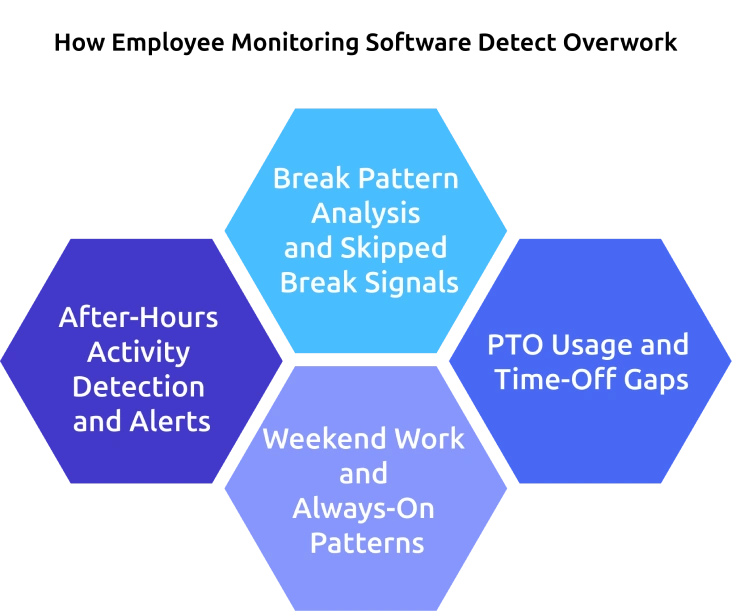
After-Hours Activity Detection and Alerts
Employee monitoring software tracks login and logout times across work tools and identifies employees who regularly work beyond scheduled hours. It highlights patterns over time, which helps separate occasional late work from consistent overwork. When extended hours continue for several days or weeks, the system can flag this behavior. These insights make it easier to step in early and review workload expectations.
Break Pattern Analysis and Skipped Break Signals
The software monitors activity and idle time to understand whether employees take regular breaks during the day. Long periods of continuous work with no breaks often signal rising fatigue. This becomes more important in remote settings, where natural breaks are less common. You can use this data to encourage better work routines and ensure employees are not working without pause.
PTO Usage and Time-Off Gaps
Employee monitoring tools can integrate with leave systems to track how often employees take time off. When someone avoids using leave for long periods, that pattern often signals workload pressure or hesitation to disconnect. The system highlights these gaps clearly, which gives you a strong reason to encourage time off and support long-term well-being.
Weekend Work and Always-On Patterns
The software tracks activity during weekends and holidays to uncover hidden work patterns. Frequent activity outside regular workdays can signal deeper workload or expectation issues. When this trend appears across a team, it also reflects a broader culture problem. You can then address the root causes, such as deadlines, staffing gaps, or unclear boundaries.
Did You Know?
The World Health Organization found that working 55+ hours per week significantly increases health risks, including a 35% higher risk of stroke and 17% higher risk of heart disease compared to standard hours
Can Employees Use Monitoring Data to Manage Their Own Work-Life Balance?
Employee monitoring data helps employee to improve their own work-life balance when you give them access to it. Modern monitoring tools make this possible through clear and simple dashboards. This helps employees understand their work habits and take control of how they manage their time.
Employee Self-Service Dashboards
You can give employees access to dashboards that show their work hours, break patterns, overtime trends, and time-off usage. This visibility helps them clearly see how they work each day and where balance starts to slip. When employees have access to the same data you see, it removes confusion and builds trust. They feel more in control of their work, which reduces stress and makes monitoring feel supportive.
Focus Time and Personal Work Patterns
You can help employees understand how they work, not just how long they work. Monitoring tools highlight focus time, showing how employees work continuously without interruptions. When employees notice low focus time or frequent distractions, they can adjust their schedules and improve how they use their day. This leads to better productivity and a healthier work routine without increasing total work hours.
Struggling to understand where time goes and why work feels overwhelming?
Use Time Champ to give your team clear insights and take control of work patterns.
How Managers Use Monitoring Data for Well-being Conversations?
Monitoring data helps you understand when something is not working well in your team. It gives you clear signals about workload, work patterns, and possible stress points. The way you use this data decides whether it builds trust or creates pressure.
Spot Early Signs of Overwork
Use monitoring data to notice patterns like long hours, missed breaks, or weekend work. These signals appear before employees say anything. Catching them early helps you act before the problem grows. This makes your support timely and more effective.
Add Context Through Conversations
Use data as a starting point, not as a conclusion. Talk with the employees to understand the reason behind the patterns. This avoids wrong assumptions and keeps discussions fair, which can help employees feel supported.
Turn Insights into Practical Support
Convert data into clear actions, adjust workloads, reset priorities, or encourage time off where needed. Focus on the changes that reduce pressure immediately. Employees respond better when the support leads to visible improvements.
Keep Monitoring Clear and Transparent
Explain what data is collected and how it is used. Make sure employees understand the purpose behind monitoring. Clear and transparent communication reduces stress, builds trust, and makes monitoring feel supportive.
Follow Up and Stay Consistent
Review progress after taking action. Check if workloads have improved and if employees feel better supported. Keep this process consistent across the team. Regular follow-ups can reinforce trust in the employees and long-term balance.
How to Implement Employee Monitoring That Prioritizes Work-Life Balance?
Employee monitoring supports work-life balance only when you design it with the right intent. A clear approach helps you protect employee well-being while still improving productivity. This is where employee monitoring and work-life balance come together to create balance, trust, and sustainable work habits.
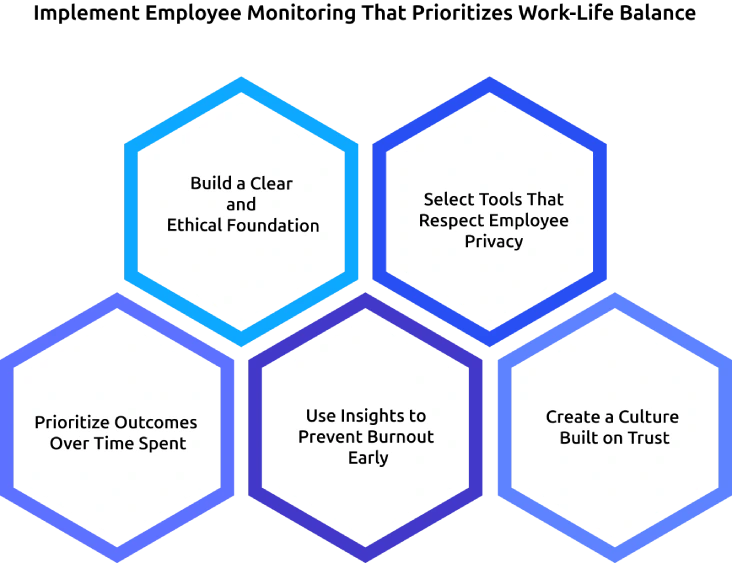
Build a Clear and Ethical Foundation
Start by defining why you are using employee monitoring and what you want to achieve. Communicate this clearly to your team so nothing feels ambiguous. Explain what data you collect, how you will use it, and how it benefits employees. When expectations are clear from the beginning, employees feel more comfortable and trust the system.
Select Tools That Respect Employee Privacy
Choose monitoring tools that focus on work patterns, not on constant activity tracking. Avoid features that feel intrusive, such as excessive screenshots or keystroke tracking. Tools that track time, workload, and trends give enough insight without creating pressure. This keeps monitoring effective while respecting personal boundaries.
Prioritize Outcomes Over Time Spent
Shift your focus from how long employees work to what they achieve. Long hours do not always lead to better results. Use monitoring data to understand productivity patterns and remove unnecessary work. This helps employees stay efficient without extending their workday.
Use Insights to Prevent Burnout Early
Look for signals like overtime, skipped breaks, and weekend work. These patterns show when employees are moving toward burnout. Act early by adjusting workloads, setting clearer priorities, or encouraging time off. Early action helps maintain both performance and employee well-being.
Create a Culture Built on Trust
Use monitoring as a support tool, but not a control system. Encourage open communication and involve employees in how monitoring is used. When employees understand the purpose and see real benefits, they feel more confident and engaged. A trust-based culture ensures that the monitoring improves balance without harming it.
How Time Champ Helps Improve Work-Life Balance
Many teams struggle with long hours, unclear boundaries, and hidden overwork. Employees keep working beyond their limits, and you might notice any problem too late. This leads to stress, burnout, and reduced productivity over time. Time Champ helps you solve this by giving clear visibility into work patterns, so that you can spot issues early and take action before they grow.
Time Champ tracks work hours, after-hours activity, break patterns, and focus time in real time, helping you understand how your team actually works each day. It highlights overtime trends, weekend work, and missed breaks, so you can quickly identify where balance is slipping. With features like productivity insights, team-level analytics, and workload visibility, you can adjust tasks, set better boundaries, and encourage healthy work habits. This makes it easier to create a balanced work environment where employees stay productive without feeling overworked.
Employees working beyond their set hours and struggling to disconnect after work?
Use Time Champ to track work patterns, control overtime, and keep work within healthy limits.
Wrapping Up
Employee monitoring and work-life balance connect when you use monitoring with clear intent. The value comes from understanding work patterns and acting on them early. Data helps reveal overwork, missed breaks, and unhealthy routines that often go unnoticed. When teams use these insights to adjust workloads and support employees, work becomes more sustainable, while clear communication and transparency build trust and reduce stress around monitoring. A balanced approach creates a work environment where employees stay productive, maintain healthy routines, and feel more in control of their time.

Anjali


Table of Content
-
 What Does Employee Monitoring Have to Do with Work-Life Balance?
-
How Does Employee Monitoring Software Detect Overwork?
-
Can Employees Use Monitoring Data to Manage Their Own Work-Life Balance?
-
How Managers Use Monitoring Data for Well-being Conversations?
-
How to Implement Employee Monitoring That Prioritizes Work-Life Balance?
-
How Time Champ Helps Improve Work-Life Balance
-
Wrapping Up
Instant Signup
Thank you for your request!
We have received your signup request and our team will get back to you soon. In the meantime, you can book a demo to see Time Champ in action.
Book a DemoFree trial. No credit card required. Prefer a walkthrough? Book a demo.
Related Blogs
Learn how to boost productivity by finding the right balance in employee monitoring, focusing on key indicators, and maintaining transparency for a driven team.
Explore the possible ethical considerations of monitoring employee's activities to increase their productivity while respecting their privacy.

Learn how to address employee monitoring concerns with transparency, clear policies, and trust-building practices that improve engagement and reduce resistance.

The cause of employee burnout has become very common these days. Employees are getting burned out during the working hours for several reasons.
From AI-powered behavior analytics to no-code workflow builders, explore the top 10 automation trends that are reshaping employee monitoring in 2026.

Explore features of employee monitoring tools, including tracking, security, and productivity insights, to choose the right solution.


 4.7/5 avg.
Ready to Manage Your Workforce Smarter?
Join our family of 1500+ companies using smart insights to redefine workforces!

Free Trial
No Credit Card Required