Employee Monitoring Software for Small Businesses: Is it Worth it?
Find out if employee monitoring software is worth it for your small business. See real ROI math, pricing, legal tips, and a 14-day implementation plan.

Consider a 15-person marketing agency where some employees work remotely, a few are in the office, and others are spread across time zones. On the surface, everything looks fine, projects are moving forward, clients are satisfied, and work is getting done.
But when you review your numbers, something feels off. Billable hours are lower than expected, even though your team is clearly active throughout the day. That gap raises a critical question, “If work is happening, where is the time and value getting lost?”
Employee monitoring software for small businesses helps answer that gap.
For small teams, the goal isn’t control or surveillance. It’s understanding how efficiently resources are being used and whether hidden inefficiencies are affecting revenue. In this blog, I’ll explore the real costs, the measurable ROI, and the practical situations where employee monitoring can add value, and where it might not be necessary.
What Does Employee Monitoring Software Actually Do for Small Businesses?
Employee monitoring software gives small business owners a clear, data-backed view of how work time is actually spent across the team. Instead of relying on assumptions about productivity, you get real insights. Instead of manually collecting timesheets, you get automated, accurate records. The objective isn’t to monitor every action, it’s to understand the bigger picture of how your team’s time and effort are distributed throughout the workday.
Core Capabilities That Matter for SMBs
Not every feature in employee monitoring system is essential for small businesses. For teams with 5 to 50 employees, the real value comes from a focused set of capabilities that directly improve visibility and decision-making:
- Time and Attendance Visibility: Automatic clock-in/out tracking that replaces manual timesheets and reduces payroll errors before they happen.
- App and Website Activity Reports: Understand which tools are actually used during work hours and whether time is going toward productive tasks or distractions.
- Productivity Classification: Assign apps as productive, neutral, or non-productive based on job roles, ensuring fair evaluation across different functions.
- Idle Time Detection: Identify inactive periods during work hours to uncover workload gaps, burnout signals, or disengagement early.
- Basic Reporting Dashboards: Weekly summaries that highlight productive hours, attendance trends, and top-used applications in a simple, easy-to-understand format.
And if you’re wondering which tool brings all of this together, Time Champ is here to help. With its core capabilities, it combines all the above features into one simple solution designed for small businesses.
What Employee Monitoring Does Not Do
Employee monitoring systems are often misunderstood, but their purpose is much more focused and limited than many assume. By default, it does not read personal messages, record phone calls, or access personal devices unless it is explicitly configured and permitted to do so. For most small businesses, it is designed to track only work-related activity on company-owned devices during working hours.
The goal is visibility into work patterns, not intrusion into private life.
How Much Does Employee Monitoring Software Cost for a Small Business?
For small businesses, an employee monitoring solution typically costs from a few dollars up to about ten dollars per user per month. However, the real cost isn’t just the subscription fee. You also need to consider setup time, onboarding, team adoption, and the effort required to actually interpret the data and turn it into decisions.
SMB-Friendly Pricing Comparison
Here’s how popular employee monitoring tools compare in 2026 for small businesses:
| Tool | Price/User | Billing Type | Best For |
|---|---|---|---|
| Time Champ | $5.9/user/month | Monthly | All-in-one time, activity, productivity, and attendance tracking |
| Hubstaff | $7/user/month | Monthly | Remote teams needing GPS and time tracking |
| Monitask | $6.49/user/month | Monthly | Screenshot-based verification for freelancers |
| Time Doctor | $8/user/month | Monthly | Time tracking with basic productivity monitoring |
| Teramind | $14.90/user/month | Monthly | Employee monitoring & insider threat detection |
Some tools require annual commitments, which means you’re locked in before you fully understand whether the product fits your workflow. For small businesses trying employee monitoring for the first time, monthly billing offers more flexibility and lower risk.
First-Year Total Cost of Ownership for a Small Team
The subscription fee is only one part of the equation. A more realistic view of cost includes setup, onboarding, and time spent managing insights.
For instance:
| Cost Category | Low Estimate | High Estimate |
|---|---|---|
| Software license (15 users x 12 months) | $810 | $1,800 |
| Setup and configuration time | $0 | $200 |
| Policy creation and internal communication | $0 | $100 |
| Training and onboarding | $0 | $150 |
| Report review and management effort | Included in workflow | Included in workflow |
Total First-Year Cost: $810 – $2,250
For most small businesses, the total investment remains relatively low in the first year. The real consideration isn’t whether the cost is high, it’s whether the insights gained from better visibility and productivity tracking return more value than the expense, in many cases, they do.
What Is the Real ROI of Employee Monitoring for Small Teams?
Employee monitoring software often delivers its strongest return in small teams because even small efficiency gains translate into significant financial impact. A small improvement in productivity may look similar on paper across companies of different sizes, but for small businesses, the effect is felt much faster, and at a much lower cost of implementation.
ROI Calculation for a 12-Person Agency
Imagine a digital agency with 12 full-time employees earning an average salary of $4,200 per month. That puts total monthly payroll at $50,400.
After implementing employee monitoring software, the team recovers about 14% of previously unproductive time. This translates into approximately $7,056 in regained productive value each month.
Now compare that with the software cost: 12 users × $5.9 = $70.80 per month.
- Monthly net benefit: ~$6,985
- Payback period: Less than a day
- ROI: Extremely high (9,800%+)
Even under a conservative assumption of just 7% productivity improvement, the system still generates thousands in recovered value against a very small software cost.
The 3 Reports That Actually Drive ROI for SMBs
Most employee monitoring tools offer dozens of dashboards, but you don’t need complexity, you just need clarity. These three reports deliver the most real-world value:
1. Weekly Productivity Summary
Gives a clear breakdown of productive vs non-productive hours per employee. It quickly highlights overload, underutilization, and overall team efficiency.
2. Attendance Exceptions Report
Flags late logins, early logouts, and missed check-ins. It reduces manual tracking and helps prevent payroll inaccuracies before they become costly.
3. Top Applications by Time
Shows exactly which tools consume the most work hours. This helps identify unused software subscriptions and optimize SaaS spending.
Want These Reports for Your Team?
Time Champ gives you all the valuable dashboards from day one with zero setup hassle.
When Is Employee Monitoring NOT Worth It for a Small Business?
Employee monitoring software is not always a great fit. In certain situations, it may create more overhead than value, especially for small businesses. Being clear about when not to use it helps you save costs and maintain a healthy team culture.
Scenarios Where You Should Skip Monitoring

1. Your Team is Very Small
If you have just a few employees, such as 4-5, day-to-day visibility is already easy to maintain through direct communication. In such cases, monitoring tools often add unnecessary complexity without delivering meaningful insights.
2. You Don’t Have a Clear Objective
If you cannot clearly define what problem you’re trying to solve, whether it’s productivity tracking, attendance, or billing accuracy, then the data collected is unlikely to be useful. The goal should come first, not the tool.
3. You Lack Time to Act on Insights
Even though these tools are affordable, they still require consistent review and action. If your schedule is already overloaded, adding another system to monitor without time to use it effectively can backfire.
4. Your Culture is Built on Full Autonomy
Some small businesses operate successfully on trust and independence. If introducing monitoring would conflict with your team’s values and there is no pressing operational issue, the cultural trade-off may not be worth it.
5. You are Targeting Individuals, Not Patterns
If the intention is to track a specific employee rather than understand overall team behavior, system-wide monitoring is not the right approach. Direct performance conversations are more effective in such cases.
The Monday Morning Test
Before implementing any employee monitoring system, ask yourself a simple question:
Can you confidently explain to your team why it is being introduced, what will be tracked, and how the data will be used?
If the answer is clear and comfortable, you are ready to proceed. If not, it’s a sign that the purpose needs to be defined more clearly before choosing any tool.
How Do You Implement Employee Monitoring in a Small Business?
Implementing employee computer monitoring in a small business is far simpler than most vendors suggest. You don’t need a complex IT setup or a long deployment cycle. What you do need is clarity on purpose, transparent communication, and a short pilot phase to validate value before full rollout.
The 14-Day SMB Implementation Playbook
| Phase | Timeline | Actions | Outcome |
|---|---|---|---|
| Phase 1 | Days 1–3 | Create a clear monitoring policy explaining what is tracked, why it is needed, and how it will be used. Announce it to the team and address concerns in a group discussion. | Employees understand the purpose and scope of monitoring |
| Phase 2 | Days 4–7 | Install the software on a small set of devices. Review initial reports and adjust productivity settings based on roles. | The tool is validated and properly configured for your workflow |
| Phase 3 | Days 8–14 | Roll out to the full team. Conduct the first weekly review and share team-level insights transparently. | Full adoption with actionable insights and a feedback loop established |
Common Implementation Mistakes Small Businesses Make
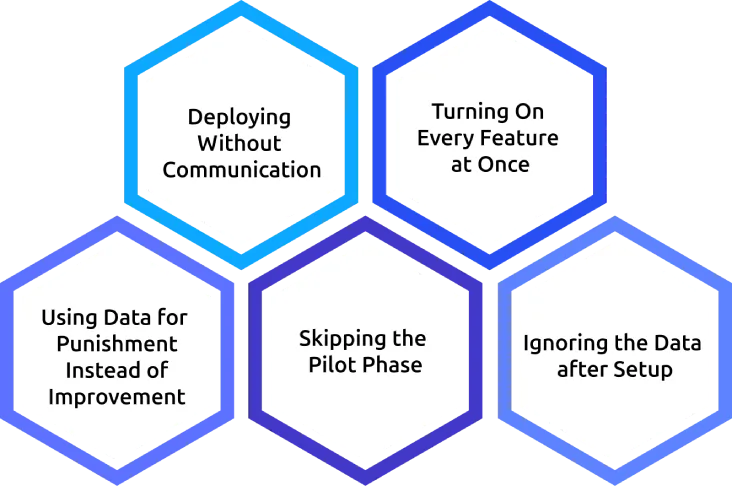
1. Deploying Without Communication
Introducing monitoring without informing employees immediately breaks trust. Transparency must come before installation, not after.
2. Turning On Every Feature at Once
Start simple with time tracking, app usage, and attendance. Additional features can be introduced later once the team is comfortable and data needs are clearer.
3. Using Data for Punishment Instead of Improvement
If monitoring is first associated with disciplinary action, adoption will fail. Use insights initially for coaching and improvement discussions.
4. Skipping the Pilot Phase
Rolling out to the entire team without testing often leads to misconfiguration and confusion. A small pilot group helps validate setup and expectations.
5. Ignoring the Data after Setup
The biggest mistake is treating monitoring as a setup-and-forget tool. Set aside dedicated time, such as a weekly review, to actually act on insights.
What Is the Best Employee Monitoring Software for Small Business?
For small businesses, the right employee monitoring software needs to deliver maximum value with minimal complexity. With limited IT resources, tighter budgets, and no time for long implementations, the ideal tool should be quick to set up, easy to manage, and capable of providing clear visibility into day-to-day work activity. Instead of relying on multiple disconnected tools, small teams benefit most from a single platform that combines time tracking, activity monitoring, and basic workforce insights in one place. Simplicity, transparent pricing, and scalability are key factors at this stage.
Time Champ fits this need well for small businesses. As it is an employee monitoring system, it brings together automatic time tracking, app and website activity monitoring, productivity classification, and attendance management in a unified system, eliminating the need for multiple tools or manual data consolidation. Features like automated timesheets, idle time detection, and smart alerts reduce operational effort, making it especially useful for teams without dedicated HR or IT support. With simple deployment, affordable pricing, and role-based access, Time Champ can be managed easily, even by very small teams, while still delivering enterprise-level visibility.
See What Your Team’s Time Data Really Looks Like with Time Champ
Get productivity, attendance, and app usage insights in your first week.
Conclusion
Employee monitoring software for small businesses can be a valuable investment when used with a clear purpose and the right expectations. It helps you find hidden productivity gaps, improve accountability, and make better data-driven decisions. However, its real value comes only when insights are actually reviewed and acted upon. It’s not about control, but about clarity and efficiency.

Jahnavi Pulluri


Table of Content
-
 What Does Employee Monitoring Software Actually Do for Small Businesses?
-
How Much Does Employee Monitoring Software Cost for a Small Business?
-
What Is the Real ROI of Employee Monitoring for Small Teams?
-
When Is Employee Monitoring NOT Worth It for a Small Business?
-
How Do You Implement Employee Monitoring in a Small Business?
-
What Is the Best Employee Monitoring Software for Small Business?
-
Conclusion
Instant Signup
Thank you for your request!
We have received your signup request and our team will get back to you soon. In the meantime, you can book a demo to see Time Champ in action.
Book a DemoFree trial. No credit card required. Prefer a walkthrough? Book a demo.
Related Blogs
Discover the ins and outs of employee monitoring: from its benefits to ethical considerations. Everything you need to know in one comprehensive guide.
Mounika Sai | Dec 08, 2023
Explore common employee monitoring myths and learn what's actually true. Find out how proper monitoring boosts productivity, trust, and team performance.
Anjali | Apr 14, 2026
Discover how employee monitoring software has evolved to become the new normal in a post-COVID-19 world. Explore the reasons behind its widespread adoption
Mounika Sai | Jul 31, 2023
Understand whether employee monitoring a Boon or Bane for Modern Workplaces. Discover how it impacts productivity, privacy, and the overall work environment.
Jahnavi Pulluri | Aug 06, 2024
Learn the key ethical considerations in employee monitoring. Know what to track, how to stay transparent, and how to build trust with your team.
Thasleem Shaik | Apr 15, 2026
Compare employee monitoring software costs in 2026. Explore pricing factors, models, tiers, hidden fees, and the real total cost of ownership for any team.
Jahnavi Pulluri | Apr 16, 2026


 4.7/5 avg.
Ready to Manage Your Workforce Smarter?
Join our family of 1500+ companies using smart insights to redefine workforces!

Free Trial
No Credit Card Required