Can Employers Monitor Freelancers Without Consent?
Monitoring freelancers without consent can be risky. Learn what the law says, what to include in contracts, and how to track work the right way.
Monitoring freelancers without consent is risky and usually not the right approach. If a freelancer is an independent contractor, the safer rule is simple. Explain what you want to monitor, put it in writing, and get agreement before any tracking starts. Anyone weighing this decision usually starts with our enterprise employee monitoring guide for the full landscape.
As you start relying more on freelancers for important tasks and projects, you also need a clear and reliable way to track their work, check progress, and verify hours. Without the right approach, this can easily lead to confusion, disputes, or even trust issues. More businesses are working with freelancers than ever. In the U.S. alone, about 36% (58 million) people work independently, making up around one-third of the workforce.
In this guide, you will learn when freelancer monitoring is acceptable, why consent matters, what should be included in a monitoring agreement, and how to track work using tools without crossing privacy boundaries.
The Real Answer to Monitoring Freelancers Without Consent
The short answer is no.
Monitoring freelancers without clear notice and a written agreement is not the right approach. Freelancers are not employees. They are independent contractors, and the relationship depends on the contract and the agreed scope of work, so they are not a part of internal company policies. Because of this, employee monitoring does not apply unless it is clearly agreed in advance.
It is also important to understand the relationship. Actually, you are a client, so both you and the freelancer decide together how the work will be tracked. Before monitoring starts, clearly define what will be tracked, why it is needed, when it will be active, and how the data will be used. If this is not agreed in advance, do not start monitoring.

Did You Know?
More than 64 million people in the U.S. are freelancing, contributing over $1.27 trillion to the economy.
Why Is Monitoring Freelancers Without Consent Risky?
Monitoring freelancers without consent can create several problems for your business. This goes beyond legal compliance and also impacts trust, data privacy, and the relationship. Here are the main risks you need to understand before deciding to monitor freelancers:
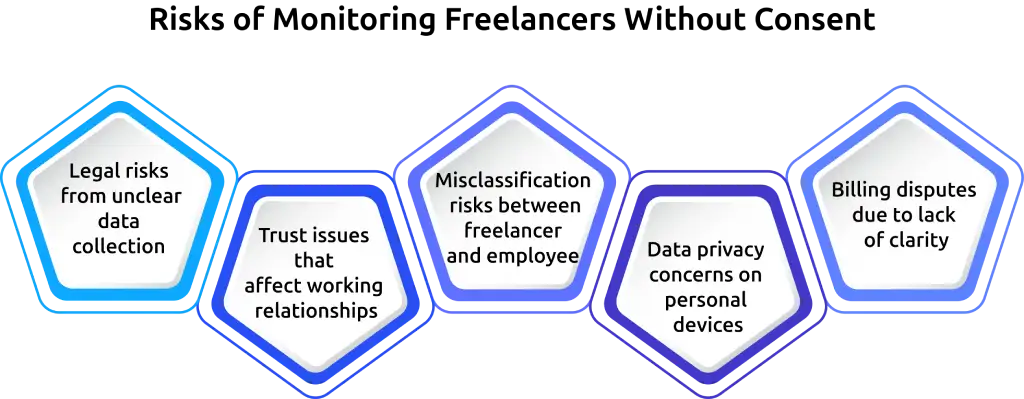
Legal Risks from Unclear Data Collection
Collecting data without clear permission can go against privacy or data protection laws. This becomes more serious when freelancers use their own devices for work.
Trust Issues that Affect Working Relationships
Freelancers value independence. When monitoring happens without their knowledge, it can make them feel uncomfortable or controlled, which can damage the working relationship.
Misclassification Risks between Freelancer and Employee
Too much monitoring can look like control over how work is done. This can blur the line between a freelancer and an employee, leading to legal or tax complications.
Data Privacy Concerns on Personal Devices
Monitoring tools may capture personal information by mistake, especially on personal devices. This increases the risk of handling sensitive data without clear boundaries.
Billing Disputes Due to Lack of Clarity
If monitoring was not clearly explained, freelancers may question the data during invoice reviews. This can lead to confusion and delays in payment, even when your payment collection software is working correctly.
The safer approach is to keep monitoring clear, limited, and focused only on what is needed for the work.
Want to avoid legal issues and trust problems with freelancers?
Use Time Champ to maintain compliant, transparent, and controlled monitoring practices.
How Does Device Ownership Affect Freelancer Monitoring?
Device ownership plays a big role in how much monitoring is reasonable. A freelancer using your company laptop is very different from a freelancer using their own personal device. The level of privacy, control, and expectations all change based on this.
Let’s break it down clearly.
Company-owned Devices
When you provide a device to a freelancer, you are creating a controlled work environment. This makes it easier to apply certain monitoring practices because the device is meant specifically for work. However, this does not mean you can monitor everything without limits. Freelancers are still independent professionals, not employees, so over-monitoring can still harm trust and even create legal risks.
What is acceptable
- Time tracking during defined work hours
- Monitoring work-related apps and tools
- Limited screenshots during active tasks
- Basic security monitoring (e.g., unauthorized software alerts)
What to avoid
- Monitoring without informing the freelancer
- Accessing personal accounts or private communication
- Continuous or excessive screen recording
Personal Devices (BYOD)
When freelancers use their own devices, the situation changes completely. These devices often contain personal data, private messages, and work from other clients. Because of this, you need to be much more careful. Freelancers expect a higher level of privacy on their own devices. If your monitoring goes beyond agreed work activity, it can quickly feel intrusive and unfair.
What is acceptable
- Start/stop time tracking
- Tracking tasks and project hours
- Monitoring activity within specific work tools (if agreed)
- Limited tracking during active work sessions
What to avoid
- Full device or background monitoring
- Capturing personal browsing, files, or apps
- Taking full-screen screenshots without boundaries
- Running monitoring tools without control or visibility
Work Profiles or Virtual Desktops
Work profiles or virtual desktops offer a smart middle ground. They create a separate workspace inside a personal device where all work happens independently from personal use. This setup solves many problems at once. It protects the freelancer’s privacy while still giving you the visibility they need.
What is acceptable
- Time tracking inside the work environment
- Tracking work-related apps and tasks
- Screenshots limited to the work profile
What to avoid
- Extending monitoring beyond the work environment
- Accessing personal files or applications
- Blurring the boundary between personal and work usage
A Quick Checklist on What is Acceptable vs What to Avoid
| Acceptable Monitoring (Safe Zone) | Avoid (Risky Zone) |
|---|---|
| Tracking work hours and project time | Monitoring without consent |
| Linking work to tasks and deliverables | Tracking outside agreed work hours |
| Limited activity insights | Accessing personal data or files |
| Optional screenshots with clear rules | Continuous screen recording |
| Monitoring only during active work sessions | Keystroke logging or webcam monitoring |
What Should Be Included in a Freelancer Monitoring Agreement?
Before you start monitoring a freelancer, you need to clearly define the rules. A freelancer monitoring agreement helps you set expectations from the beginning. It explains what will be tracked, when it will happen, and how the data will be used. When everything is written clearly, you avoid confusion around work hours, privacy, and billing. It also helps the freelancer understand your expectations, which makes the working relationship smoother.
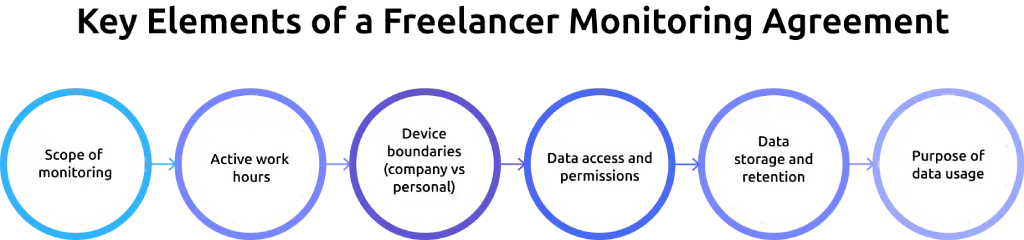
1. Scope of monitoring
Before you start monitoring a freelancer, you need to clearly define the rules. A freelancer monitoring agreement helps you set expectations from the beginning. It explains what will be tracked, when it will happen, and how the data will be used. When everything is written clearly, you avoid confusion around work hours, privacy, and billing. It also helps the freelancer understand your expectations, which makes the working relationship smoother.
2. Active work hours
Begin by clearly defining what will be tracked, so everything is transparent and easy to understand.
List each type of data you plan to collect in simple terms. This can include time tracking during work sessions, task and project-based tracking, billable and non-billable hours, activity summaries, and screenshots if they are part of the setup. Keep the scope limited to what is actually needed for the project. When the scope is clear and focused, it becomes easier for both you and the freelancer to stay aligned throughout the work.
3. Device boundaries (company vs personal)
Clearly define when monitoring will be active, so tracking stays limited to actual work time.
Explain when tracking starts, such as when the freelancer begins a task or turns on a timer, and when it ends. You can also mention expected working hours or time zone alignment if your team works across locations. Keeping monitoring within these defined hours helps avoid unnecessary tracking and respects the freelancer’s personal time.
4. Data access and permissions
Explain where monitoring applies, especially when freelancers may use different types of devices.
Clarify whether work will be done on a company-provided device or a personal one. If personal devices are used, clearly state that personal files, apps, and browsing are excluded from monitoring. You can also define if tracking is limited to specific tools, platforms, or workspaces. Clear boundaries help maintain privacy while still allowing you to track work effectively.
5. Data storage and retention
Define who can access the collected data and how it will be handled.
Mention which roles, such as project managers or finance teams, can view the data and what level of access they have. Keeping access limited ensures that sensitive information is handled responsibly. Allowing freelancers to view their own data can also improve transparency and reduce misunderstandings.
6. Purpose of data usage
Clearly explain how long the monitoring data will be stored and what happens after that period.
Set a defined retention timeline, such as 30, 60, or 90 days, based on your needs. Also include where the data is stored and when it will be deleted. Keeping this information clear helps you manage data responsibly and avoids storing unnecessary information for too long.
Final Note
Clearly explain how long the monitoring data will be stored and what happens after that period.
Set a defined retention timeline, such as 30, 60, or 90 days, based on your needs. Also include where the data is stored and when it will be deleted. Keeping this information clear helps you manage data responsibly and avoids storing unnecessary information for too long.
How Time Champ Helps with Transparent Freelancer Monitoring
Using the right employee monitoring software makes a big difference when working with freelancers. The goal is to track work clearly without making the process feel intrusive or complicated. Time Champ helps you do exactly that. It focuses on tracking work-related data like time, tasks, and progress, so you can stay informed while keeping things fair and transparent.
Here are the key features that help you monitor freelancer work clearly and without confusion:
Project and Task Tracking
You can create projects, break them into tasks, and ask freelancers to select a task before they start working. Once they start the timer, Time Champ records time directly against that task.
You can then view time logs by project, task, or user. This helps you see exactly where time is going, instead of just looking at total hours. If needed, you can review, edit, or approve time entries to keep everything accurate.
Billable vs Non-Billable Hours
You can mark tasks or time entries as billable or non-billable based on your project needs. Time Champ automatically organizes tracked time into these categories.
You can also set billing rates for users, projects, or tasks. When it’s time to create invoices, you can filter reports to show only billable hours. This makes billing clear and reduces manual work.
Screenshot Controls with Blur
You can control how and when screenshots are captured. For example, you can set intervals like every 5 or 10 minutes, and screenshots are taken only when the timer is running.
You can also enable blur to hide sensitive information on the screen. This lets you verify work without exposing private details. You stay in control of both visibility and privacy.
Role-Based Access
You can assign roles like admin, manager, or user and control what each role can see. For example, you can allow managers to view reports while limiting freelancers to their own data.
This helps you keep sensitive information restricted to the right people. You maintain control without overexposing data.
Reporting for Invoices
You can get detailed reports based on projects, users, or time periods. These reports show time logs, task breakdowns, and billable hours in one place.
You can filter the data and export reports in formats like CSV or PDF. This makes it easier for you to verify invoices, share updates, and keep records organized.
Extra Features That Improve Transparency
You can give freelancers access to their own time logs and activity data, so they can see exactly what is being tracked. You can also view activity summaries, like active and idle time, to understand work patterns.
With clear dashboards and shared data, you and the freelancer stay on the same page. This reduces confusion and keeps communication simple.
Ready to make freelancer tracking simple and reliable?
Use Time Champ to ensure accurate tracking, better visibility, and smoother workflows.
Conclusion
So, can you monitor freelancers without consent? The answer is no.
Freelancer monitoring works best when everything is clear from the start. Define what you track, limit it to work hours, respect device boundaries, and explain how the data is used. When you follow this approach, you reduce confusion, avoid disputes, and keep the working relationship smooth. You also make it easier to verify work without making freelancers feel controlled. When monitoring stays simple and transparent, it supports both productivity and trust.

Guna Lakshmi


Table of Content
-
 The Real Answer to Monitoring Freelancers Without Consent
-
Why Is Monitoring Freelancers Without Consent Risky?
-
How Does Device Ownership Affect Freelancer Monitoring?
-
What Should Be Included in a Freelancer Monitoring Agreement?
-
How Time Champ Helps with Transparent Freelancer Monitoring
-
Conclusion
Instant Signup
Thank you for your request!
We have received your signup request and our team will get back to you soon. In the meantime, you can book a demo to see Time Champ in action.
Book a DemoFree trial. No credit card required. Prefer a walkthrough? Book a demo.
Related Blogs
Optimize your freelance workflow with the 10 best time-tracking tools! Boost productivity and manage projects seamlessly. Find the perfect solution for you.
Mounika Sai | January 9, 2024
Employee screen monitoring captures work activity in real time. Learn all monitoring types, how they boost productivity, and how to implement them ethically.
Jahnavi Pulluri | Apr 17, 2026
Learn how to address employee monitoring concerns with transparency, clear policies, and trust-building practices that improve engagement and reduce resistance.
Anjali | Apr 17, 2026
Discover the ultimate guide to employee monitoring & time tracking software. Learn features, benefits, and tips to boost productivity effectively.
Mounika Sai | December 15, 2023
Learn how to choose the right remote employee monitoring software with the right features, scalability, and usability to manage remote teams effectively.
Guna Lakshmi | Apr 14, 2026
Companies are watching remote workers more than ever. But is it ethical? We break down where monitoring is justified and where it crosses the line.
Guna Lakshmi | Apr 16, 2026


 4.7/5 avg.
Ready to Manage Your Workforce Smarter?
Join our family of 1500+ companies using smart insights to redefine workforces!

Free Trial
No Credit Card Required