How Does DLP Work? A Beginner's Guide for Businesses
See how data loss prevention works step by step, from identifying sensitive data to blocking risky uploads, and also learn what DLP can't protect against.
Every day, employees email files, upload documents to cloud apps, and share information with teammates. Most of the time, these actions are harmless, but one accidental click is all it takes for sensitive data to end up in the wrong hands.
That’s the reason many businesses depend on Data Loss Prevention (DLP). Think of it as a security guard for your data, keeping an eye on sensitive information and stepping in before it's shared, copied, or transferred in ways that could put your organization at risk.
But how does DLP actually know what's sensitive? And what happens when someone tries to send confidential data outside your organization?
In this blog, I’ll explain how DLP works step by step, explain how it protects your business, and explore where its capabilities and limitations begin.
What is Data Loss Prevention?
Data Loss Prevention (DLP) is security software that helps keep sensitive information from being shared, copied, or stored where it shouldn't be. It identifies confidential data, monitors how it's used, and steps in when an action violates the security rules you've set.
DLP works across endpoints, networks, and cloud applications. Its goal is to stop the small number of risky actions that could lead to data leaks or compliance issues.

Did You Know?
According to an IBM Study, the average cost of a data breach climbed to $4.99 million in 2026, while AI-related breaches averaged $6 million.
How Does Data Loss Prevention Work?
Every time someone tries to email a file, upload a document to the cloud, or copy data to a USB drive, a Data Loss Prevention (DLP) system follows the same five-step process.
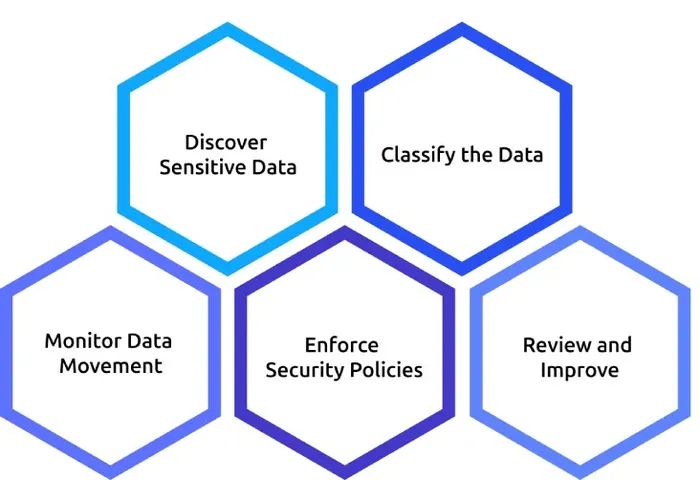
Stage 1: Discover Sensitive Data
Before DLP can protect your data, it first needs to find it. During the discovery phase, the system scans laptops, shared folders, email archives, file servers, and cloud storage to identify where sensitive information is stored.
For many organizations, this scan finds forgotten customer records, old financial reports, or confidential documents that have been sitting unnoticed for years. Once you know where your sensitive data lives, it's much easier to protect it.
Stage 2: Classify the Data
Every file has its own level of sensitivity and requires appropriate protection. That's why DLP classifies data based on its sensitivity.
It can automatically recognize information such as credit card numbers, customer IDs, or financial records using predefined patterns. Employees can also manually apply labels like Confidential or Internal, while files stored in protected folders can automatically inherit those labels.
With proper classification, DLP understands exactly which files require stricter security controls.
Stage 3: Monitor Data Movement
After identifying sensitive data, DLP continuously monitors how it's being used and where it's going.
It keeps track of common data-sharing channels, including:
- Email attachments
- Cloud storage and file-sharing apps
- USB drives and external devices
- Copy and paste into browsers or chat apps
- Printing and Print-to-PDF
- AI tools and web applications
This continuous monitoring helps DLP find potential data leaks before sensitive information is shared or transferred.
Stage 4: Enforce Security Policies
When someone attempts to move sensitive data, DLP checks the action against your organization's security policies and decides what to do next.
| Action | What happens |
|---|---|
| Allow & Log | The action continues, but the event is recorded. |
| Warn | The user receives a warning before continuing. |
| Justify | The user need to provide a business reason to proceed. |
| Block | The action is prevented immediately. |
| Quarantine or Encrypt | The file is secured automatically to prevent unauthorized access. |
Different situations require different responses. In many situations, warning or asking for a justification provides better security while allowing employees to complete legitimate work.
Stage 5: Review and Improve
Every DLP event is logged so security teams can review what happened and improve future policies.
A good audit log records:
- Who performed the action
- What data was involved
- Where the data was going
- When it happened
- What action DLP took
Reviewing these incidents regularly helps reduce false positives, identify risky behavior, and continuously strengthen your organization's data protection strategy.
How Does DLP Know Which Files Are Sensitive?
DLP doesn't depend on a single method to identify sensitive data. Instead, it uses multiple detection techniques to recognize confidential information, whether it's a customer database, financial report, contract, or screenshot.
| Detection method | How it works | Best for | Limitations |
|---|---|---|---|
| Pattern matching | Looks for predefined formats, such as credit card numbers, tax IDs, or bank account numbers. | Financial and personal information | Similar-looking numbers, such as order IDs or SKUs, may trigger false positives. |
| Keyword dictionaries | Searches for specific words or phrases using predefined keyword lists. | Medical terms, legal documents, project names | Can miss files that don't use the expected terminology or flag documents that mention keywords without containing sensitive data |
| Exact Data Match (EDM) | Compares content against hashed records from your organization's databases. | Customer records, employee data | Requires regularly updated data sources to remain accurate. |
| Document fingerprinting | Creates a unique fingerprint of a document and detects copies or similar versions. | Contracts, pricing sheets, source code | Major edits or formatting changes may reduce detection accuracy. |
| Optical Character Recognition (OCR) | Extracts text from images, scanned documents, and screenshots. | Scanned forms, photos, screenshots | Performance depends on image quality and can be slower than text scanning. |
| Context analysis | Considers factors like the user, destination, time, and volume of data being shared. | Detecting unusual or risky behavior | Needs time to learn normal user activity before producing reliable results. |
Prevent Data Leaks Before They Happen!
Detect unusual activity early and keep confidential business data protected at all times
How to Roll Out DLP Without Disrupting Your Business
A successful DLP rollout happens in phases, not all at once. This approach minimizes false positives and keeps business operations running smoothly.
1. Phase 1(Days 1-30): Discover and Monitor
- Scan devices, file shares, and cloud storage to locate sensitive data.
- Run DLP in monitor-only mode to understand how data moves.
- Inform employees about the rollout and remove outdated sensitive files.
Goal: Build a data inventory and identify potential policy violations without interrupting users.
2. Phase 2(Days 31-60): Tune and Enforce
- Review alerts and refine noisy policies.
- Enable enforcement for one channel, such as email or USB.
- Create a simple process for handling policy exceptions.
Goal: Reduce false positives and introduce enforcement with minimal disruption.
3. Phase 3(Days 61-90): Expand Protection
- Extend enforcement to cloud apps and AI tools.
- Add context-aware policies based on user behavior.
- Schedule regular policy reviews and assign an owner.
Goal: Achieve organization-wide DLP protection with ongoing policy improvements.
The Limitations of Data Loss Prevention
DLP is a powerful security tool, but it isn't a complete solution. It can't stop every type of data leak, especially those caused by human actions or risks outside its visibility. Understanding these limitations is just as important as knowing what DLP can do.
| Limitation | Why DLP Can't Stop It |
|---|---|
| Photos of screens | A phone camera capturing a monitor happens outside the digital environment, making it invisible to DLP. |
| Verbal sharing or memory | Information shared over a phone call or memorized leaves no digital trail to monitor. |
| Encrypted archives | If DLP can't decrypt a password-protected file, it can't inspect its contents. |
| Unmanaged devices | Devices without a DLP agent or security controls remain outside its visibility. |
| Printed documents | Once a document is printed and carried away, software can no longer track it. |
| Poor access permissions | DLP can detect risky activity, but it can't fix misconfigured permissions or excessive user access. |
How Time Champ Strengthens Your DLP Strategy
Time Champ is an employee monitoring software with built-in data loss prevention capabilities that help businesses protect sensitive information from accidental or unauthorized exposure. Combining workforce activity monitoring with security controls such as USB restrictions, website blocking, file movement tracking, and policy-based alerts, Time Champ gives organizations greater visibility into how sensitive data is accessed, shared, and used.
1. Monitors File Activity in Real Time
Track when files are created, edited, deleted, or moved. This helps you find unusual file activity early and keep sensitive business data secure.
2. Controls USB Access and File Transfers
Monitor and restrict USB devices and file transfers to prevent employees from copying or moving sensitive files to external storage without permission.
3. Protects File Uploads and Downloads
Monitor and control file uploads and downloads based on your security policies, helping reduce the risk of accidental or intentional data leaks.
4. Blocks Access to Risky Websites
Restrict access to unauthorized websites, cloud storage platforms, and other risky sites while monitoring browsing activity to help protect sensitive data.
5. Sends Instant Security Alerts
Receive real-time alerts whenever suspicious activities occur, such as unauthorized file access, USB usage, or policy violations, so you can respond quickly.
6. Manages Access with Role-Based Permissions
Control who can access sensitive data by assigning permissions based on employee roles or teams, ensuring only authorized users have access.
7. Generates Detailed Security Reports
Create simple reports on file activity, website access, USB usage, uploads, and downloads to support security reviews, audits, and compliance.
See Where Your Sensitive Data Goes!
Monitor file activity, block risky transfers, control USB devices, and receive instant alerts
Conclusion
Data loss prevention (DLP) helps businesses protect sensitive information by identifying, monitoring, and controlling how data is shared. While it can't prevent every type of data leak, it plays an important role in reducing security risks when combined with the right policies and employee awareness. Choosing the right DLP solution and rolling it out gradually can help you improve data security without disrupting everyday work.

Jahnavi Pulluri

Table of Content
 What is Data Loss Prevention?
- How Does Data Loss Prevention Work?
- How Does DLP Know Which Files Are Sensitive?
- How to Roll Out DLP Without Disrupting Your Business
- The Limitations of Data Loss Prevention
- How Time Champ Strengthens Your DLP Strategy
- Conclusion
Instant Signup
Thank you for your request!
We have received your signup request and our team will get back to you soon. In the meantime, you can book a demo to see Time Champ in action.
Book a DemoFree trial. No credit card required. Prefer a walkthrough? Book a demo.
Related Blogs

Learn about the impact of data loss on business, including its consequences, real-world examples, and ways to reduce its impact.
Guna Lakshmi | Aug 14, 2026
Data loss prevention helps protect sensitive business data from leaks, theft, and misuse. See how DLP works, its benefits, challenges, and best practices.
Thasleem Shaik | Aug 21, 2026
Explore 12 top endpoint security solutions to protect your organization and keep your data safe from cyber threats.
Jahnavi Pulluri | Jan 21, 2025
Learn how to create a BYOD security policy to protect company data, manage employee-owned devices, improve security, and reduce data theft.
Thasleem Shaik | May 11, 2026
Discover the risks of internal security threats and how to spot, prevent, and address them to keep your business secure and your data safe.
Thasleem Shaik | Jan 21, 2025
Your perimeter won't stop insiders. Learn how real-time insider threat monitoring, anomaly detection, SIEM, and response workflows work together to prevent risk.
Jahnavi Pulluri | Apr 14, 2026


 4.7/5 avg.
Ready to Manage Your Workforce Smarter?
Join our family of 1500+ companies using smart insights to redefine workforces!

Free Trial
No Credit Card Required