Employee Performance Monitoring: Importance, Methods, & Tools
Understand the importance of employee performance monitoring and discover the best tools to track productivity, improve efficiency, and boost team performance.

There’s a familiar point for managers as the quarter starts to close. Two team members are burnt out, one is doing great, and you’re looking at your tracker trying to understand what actually happened over the last 90 days.
You set goals, you run meetings, but somehow, you’re still depending on memory. That’s the gap employee performance monitoring is meant to fill. It’s not about surveillance, it’s about clearly seeing who is progressing, who is stuck, and where your attention is needed, before it’s too late.
In this blog, I’ll cover what performance monitoring is, why it matters in 2026, what to track, the best methods and tools.
What is Employee Performance Monitoring?
Employee performance monitoring is the ongoing practice of observing how people work, measuring how well they are hitting goals, and using that information to train, support, and rebalance workload. It blends quantitative signals like task completion and time-on-task with qualitative inputs like one-on-ones and peer feedback, so you get a clear visibility of performance.
Since 2020, the shift has been from yearly reviews to continuous tracking. Reviews still matter, but teams now evaluate performance weekly or monthly, making monitoring a key part of modern team management, not just a once-a-year process.
Why is Employee Performance Monitoring Important in 2026?
The “why” looks different in 2026 than it did in 2019, mainly because the nature of work has changed. Hybrid work is now the default in knowledge work, AI is automating parts of most roles, and projects move faster than annual reviews can keep up with. In this environment, managing on memory is no longer effective.
For Managers
You gain visibility into workload distribution, individual progress, and potential risks. You can identify underperformance early, recognize high contributors, and base one-on-ones on actual data rather than assumptions, reducing end-of-quarter surprises.
For Employees
It creates clarity around expectations and provides timely, actionable feedback. Employees also gain a consistent record of their contributions, enabling better self-management of time, focus, and workload.
For Organizations
It improves forecasting accuracy and aligns hiring decisions with actual capacity needs. Early detection of burnout supports retention efforts. With most organizations now adopting real-time performance tracking, continuous monitoring has become a standard operational practice.
What Should You Actually Measure?
Most teams get this wrong because they measure what’s easy, such as hours, screen time, app usage, and miss what actually matters, like output, quality, and impact. A balanced approach uses three categories.
Output Metrics
Tasks completed, projects delivered, tickets resolved, deals closed, and content published. These show what got done, and by the time you see them, the outcome is already decided.
Effort and Engagement Signals
Focus time, app and website usage by role, response time, attendance patterns, and collaboration signals. These are early indicators you can act on. They can be noisy, so look at trends over time, not single-day data.
Quality and Impact Metrics
Customer satisfaction scores, peer reviews, defect rates, internal NPS, and downstream impact on revenue or support. These ensure speed doesn’t come at the cost of quality.
What are the Most Reliable Methods of Monitoring Employee Performance?
There is no single method that does the whole job. If you want this to work, use three to five methods in combination. Your goal is to balance data, context, and conversation.
1. SMART Goals Tied to Role-Specific KPIs
Set goals that are Specific, Measurable, Achievable, Relevant, and Time-bound. Then attach two or three role-specific KPIs to each person. A support agent’s KPIs won’t match an SDR’s. If you use generic KPIs, you’ll get generic insights. Review them regularly, not just once.
2. Structured One-On-Ones with Accountability
Run weekly 30-minute one-on-ones. Open with the same question every time: “Walk me through what you got done this week and what got stuck.” This builds consistency and helps you find patterns quickly. You’ll often learn more here than from any dashboard.
3. 360-Degree Feedback (Quarterly)
Collect input from managers, peers, direct reports, and sometimes clients, plus a self-assessment. This helps you reduce bias and see a clear view of performance. Run it quarterly to find blind spots early.

Did You Know?
Employees who get frequent feedback are twice as likely to be engaged.
4. Outcome-Based Dashboards or OKRs
If you use OKRs, build your monitoring around them. Focus on outcomes, not just activity. A good dashboard shows progress clearly and highlights where your attention is needed. Use it to support better conversations, not replace them.
5. Activity and Productivity Tracking Software
Use tools that show app usage, focused work time, and project-level data without manual effort. Over time, this helps you understand work patterns and workload balance. Use it as a signal, not a final judgment.
6. Project Milestone Tracking
For project-based work, focus on milestones over hours. Break projects into 5–10 milestones, assign owners and deadlines, and review progress weekly. This helps you find delays early.
7. Self-Reported Reflection Logs
Ask each team member for a short weekly update, like what they completed, what got stuck, and what they need from you. It takes little time and gives you context that data alone won’t show.
8. Pulse Surveys (Monthly or Bi-Weekly)
Run short surveys to understand team sentiment, workload pressure, and clarity. This helps you find early signs of burnout or disengagement.
9. Skill and Development Tracking
Track how your team is growing, not just what they deliver. Monitor skills, training, or certifications over time so performance tracking supports long-term development, not just short-term output.
Best Practices to Monitor Employee Performance
Most rollouts fail here, not because of methods or tools, but because of how they’re introduced. Four principles separate systems that stick from those that get quietly abandoned.
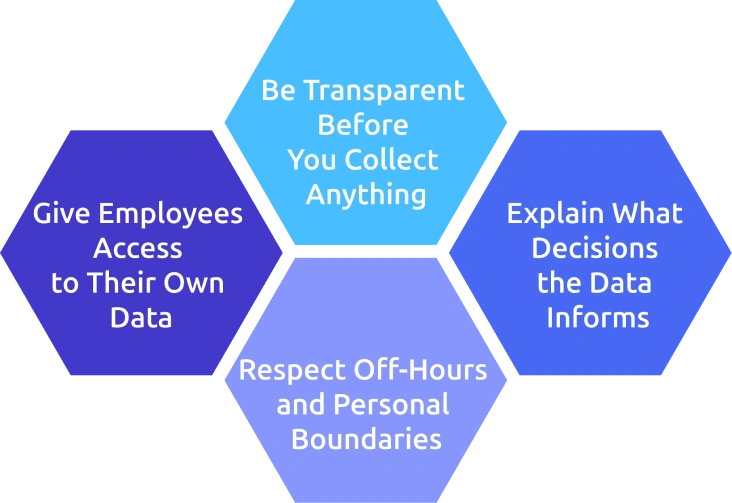
1. Be Transparent Before You Collect Anything
Write a one-page monitoring policy that clearly explains what you collect, when, by whom, for how long, and why. Walk your team through it, take questions, share the document, and get acknowledgement. Employees rarely push back on monitoring done openly, but they will resist if they discover it later.
2. Explain What Decisions the Data Informs
Be clear about how the data will be used. If it feeds into performance reviews, say so. If it’s for workload balancing, say that. If it doesn’t impact bonuses, make that explicit. Vague consequences are one of the fastest ways to lose trust.
3. Respect Off-Hours and Personal Boundaries
Stop monitoring when the workday ends. Avoid tracking on personal devices or capturing personal time. Just because a tool can track something doesn’t mean you should. This boundary is where trust is built, or lost.
4. Give Employees Access to Their Own Data
Let employees see their own activity and performance data. For instance, employee dashboard showing their own productivity score, focus hours, and top apps by week. When they understand their patterns, they often improve focus and productivity on their own. Monitoring should not feel like a one-way system.
Want to See What a Balanced Monitoring Stack Looks Like in Practice?
Try Time Champ and track real performance effortlessly
5 Best Employee Performance Monitoring Tools in 2026
There is no single best tool to satisfy every team. The right choice depends on your team size, work setup, privacy approach, existing tools, and whether you need workforce intelligence or just activity tracking.
To make this easier, here are five employee performance monitoring tools in 2026 that perform well across different team sizes and use cases. Each serves a slightly different need, so match the tool to your workflow rather than chasing features.
1. Time Champ
Time Champ is employee monitoring software with built-in workforce intelligence layer. It goes beyond basic monitoring by turning daily work data into meaningful performance insights, helping you understand not just what work is happening, but how effectively employees are doing it.
Key Features:
- Captures employee activity across apps, websites, and work sessions to give a clear view of how time is spent.
- Tracks focus time and productivity patterns to help identify high-performance and distraction trends.
- Provides role-based productivity scoring, so performance is measured in context, not just raw activity.
- Combines time tracking, project tracking, and attendance in one system to give a complete performance picture.
- Delivers team and organization-level analytics to spot workload imbalances and improve overall efficiency.
- Includes configurable screenshots and privacy controls, so monitoring stays transparent and adaptable to your policies.
- Supports field teams with GPS tracking, making it easier to monitor performance beyond the desk.
Pricing: Starts at$3.9/user/month (Annually), 7-day free trial
Pros:
- All-in-one platform for monitoring, tracking, and analytics.
- Clear visibility into employee activity and productivity.
- Strong support for remote, hybrid, and field teams.
- Easy-to-understand dashboards and reports.
- Flexible and transparent tracking settings.
Cons:
Has a learning curve due to its wide feature set.
Best For:
Teams that want employee monitoring and a workforce intelligence layer in one place, without paying enterprise prices.
Track Performance Smarter with Time Champ and Improve Productivity in Real Time.
2. ActivTrak
ActivTrak is a work intelligence tool that focuses on productivity insights and behavioral trends. It is designed more around understanding how teams work rather than deeply tracking every activity.
Key Features:
- Tracks employee activity across apps and websites to provide visibility into work patterns.
- Classifies activity as productive or unproductive based on role context.
- Provides benchmarking to compare performance across teams and peer groups.
- Offers real-time insights and alerts to highlight unusual activity or inefficiencies.
- Integrates with HR and project management tools to connect data across systems.
Pricing: Starts at $10/user/month (Annually), 14-day free trial.
Pros:
- Clean and easy-to-read dashboards.
- Focuses on analytics and productivity trends.
- Less intrusive monitoring compared to many tools.
Cons:
- Time tracking capabilities are relatively limited.
- Project-level insights are less detailed than dedicated tracking tools.
- Higher cost per user compared to some monitoring-focused tools.
Best For:
Larger teams that focus on analytics and prefer less detailed tracking.
3. Hubstaff
Hubstaff is a time tracking tool built for remote and field teams. It focuses on tracking work hours, managing payroll, and providing location-based insights.
Key Features:
- Tracks work hours with GPS to monitor location-based activity.
- Captures screenshots and tracks app and website usage for visibility.
- Automates payroll based on tracked time and pay rates.
- Integrates with accounting and project management tools.
- Supports both online and offline time tracking.
Pricing: Starts at $4.99/user/month (Annually), 14-day free trial.
Pros:
- Strong and reliable time tracking features.
- Useful for teams managing hourly or location-based work.
- Well-developed mobile apps for on-the-go tracking.
Cons:
- Focuses more on time tracking than performance insights.
- Limited depth in productivity analytics.
- Better suited for tracking hours than overall performance analysis.
Best For:
Distributed and field teams that need time tracking, payroll, and GPS tracking.
4. Insightful
Insightful is an employee monitoring and productivity tracking tool that focuses on detailed activity visibility. It is designed to help teams understand how work is done through real-time tracking and customizable dashboards.
Key Features:
- Tracks app and website usage to show how time is spent.
- Captures screenshots to provide visual context of work activity.
- Monitors activity in real time for better visibility into workflows.
- Supports project and task tracking to connect work with output.
- Integrates with project management tools for smoother workflows.
Pricing: Starts at $10/user/month, 7-day free trial.
Pros:
- Good visibility into day-to-day activity.
- Flexible dashboards and reporting options.
- Good integration support across tools.
Cons:
- More focused on activity tracking than performance insights.
- May feel detailed for teams that prefer lighter monitoring.
- Workforce-level analytics are less emphasized than activity-level data.
Best For:
Operations teams that want detailed activity tracking with custom dashboards.
5. Time Doctor
Time Doctor is a time tracking software that supports performance monitoring by providing detailed time and activity data, especially for teams that rely on billable hours and productivity tracking.
Key Features:
- Tracks time by project and client for accurate billing.
- Monitors app and website usage to understand work patterns.
- Provides distraction alerts and website blocking to improve focus.
- Captures screenshots for activity visibility.
- Integrates with payroll systems and generates productivity reports.
Pricing: Starts at $6.67/user/month (Annually), 14-day free trial.
Pros:
- Well-suited for client billing and time-based workflows.
- Includes features to manage distractions and improve focus.
- Reliable integrations for payroll and reporting.
Cons:
- The interface feels less modern compared to newer tools.
- Focus is more on time tracking than performance insights.
- Better suited for project-level tracking than overall team analytics.
Best For:
Outsourcing teams, BPOs, and agencies that bill clients based on tracked time.
How to Choose the Right Employee Performance Monitoring Tool?
Choosing a monitoring tool is one of the few decisions where shortlisting matters more than scoring. Use these five filters in order, if a tool meets all of them, it’s a strong fit.
1. Start with Your Team Type
Your workplace setup matters, like office, hybrid, remote, field, and BPO teams all have different needs. Field teams need GPS tracking, BPOs need client billing, and in-office employees benefit more from focus tracking and analytics.
2. Consider Your Data Sensitivity
If you’re in a regulated industry, look for tools with strong data protection and compliance features. Most teams should prioritize useful analytics over heavy surveillance.
3. Check Compatibility with Your Existing Tools
If you already use HR or project management systems, choose a tool that integrates well. Manual data handling slows things down and breaks the workflow.
4. Think About Your Team’s Maturity
If you’re just getting started, pick a tool with a simple setup and good defaults. More advanced teams can handle tools that require deeper configuration.
5. Look at the Total Cost, Not Just Pricing
Go beyond the monthly fee. Factor in setup time, training, and whether you’ll need additional tools later. The lowest price upfront is rarely the lowest cost overall.
Conclusion
Employee performance monitoring is no longer optional, it’s how modern teams stay aligned, productive, and proactive. The key is to focus on the right metrics, combine multiple methods, and use tools that fit your team’s actual needs. The process of implementing the software should always be transparent, balanced, and designed to help you and your employees succeed. Start simple, refine over time, and build a system that works for your team.

Jahnavi Pulluri

Table of Content
 What is Employee Performance Monitoring?
- Why is Employee Performance Monitoring Important in 2026?
- What Should You Actually Measure?
- What are the Most Reliable Methods of Monitoring Employee Performance?
- Best Practices to Monitor Employee Performance
- 5 Best Employee Performance Monitoring Tools in 2026
- How to Choose the Right Employee Performance Monitoring Tool?
- Conclusion

Related Blogs

Learn about employee monitoring laws, what they mean for businesses, and how they protect employee privacy and rights.
Shabana Shaik | Jul 10, 2024
Understand whether employee monitoring a Boon or Bane for Modern Workplaces. Discover how it impacts productivity, privacy, and the overall work environment.
Jahnavi Pulluri | Aug 06, 2024
Make your appraisals easier and more accurate with our free performance review templates. Download, customize, and use them anytime you need for better results.
Shabana Shaik | Nov 07, 2025
Performance evaluation in remote workforces: 7 metrics that matter, common biases to avoid, and how to run reviews your team trusts.
Guna Lakshmi | Apr 14, 2026
Invest in employees to supercharge performance! Learn strategies for boosting productivity and loyalty to optimize your workforce.
Shabana Shaik | Apr 11, 2024
Want to improve employee performance and retention? A strong performance appraisal system can make all the difference. See how to get it right!
Shabana Shaik | Jun 24, 2024


 4.7/5 avg.
Ready to Manage Your Workforce Smarter?
Join our family of 1500+ companies using smart insights to redefine workforces!

Free Trial
No Credit Card Required