Employee Monitoring Software for Startup Businesses
Explore employee monitoring software for startup businesses in 2026. Learn how to boost productivity, control costs, and manage remote teams with confidence.

Employee monitoring software for startup businesses helps founders and team leads clearly understand how work hours are spent across projects, tools, and teams. If you manage a growing startup with remote or hybrid employees, this visibility helps you identify delays early instead of discovering issues after a client raises concerns. Without clear visibility, small problems can quickly turn into missed deadlines, budget overruns, or team misalignment. Having the right data helps you make faster decisions and keep your startup on track. Approaches to employee monitoring small business carry constraints that off-the-shelf tools rarely address out of the box.
This guide explains how employee monitoring software works, which features matter at your stage, how much it costs, and how to introduce it without breaking team trust. You’ll also see which tools fit startup budgets in 2026.
What Is Employee Monitoring Software and Why Startups Need It
Employee monitoring software is a category of tools that captures how employees spend their work hours. These tools log time, categorize application and website usage, and generate reports that show work patterns across teams and projects.
For startups, the real value lies in clarity and control over daily work. When your team is small and every hour matters, you need clear insights into how time is spent, which projects are taking longer than expected, and whether your remote team stays aligned with priorities.
How Employee Monitoring Software Works for Small Teams
Employee monitoring software for small teams runs as a lightweight desktop or browser tool. It tracks work hours automatically or lets employees log time manually. It also records active apps and websites, then turns that data into clear reports that founders or team leads can review anytime.
Most tools work on the cloud, so you don’t need servers or an IT setup. You can sign up, invite your team, and start tracking within a day. The system shows simple outputs like timesheets, activity summaries, and project-wise breakdowns, making it easy to understand where time goes.
Five Signals That Your Startup Needs Employee Monitoring
Not every startup needs monitoring from the start. But these signs show when it becomes necessary:
- Your team grows beyond 10 people, and you lose clear visibility into daily work.
- Deadlines slip, and no one can clearly explain where the time went.
- You bill clients by hours and need accurate records to avoid revenue loss.
- Your remote team expands across time zones, making coordination harder.
- You prepare for investor reviews or compliance checks and need reliable work data.
When these signs appear, monitoring helps you stay organized, improve accountability, and make better decisions faster.

Did You Know?
Gallup’s research shows that better performance tracking and employee engagement can increase profitability by up to 23%. For startups, having clear visibility into work helps improve productivity and supports faster growth.
Struggling to track your startup team’s work clearly?
Use Time Champ to get real-time visibility and stay in control.
What Features Startups Look for in Employee Monitoring Software?
Start by choosing features that fit your startup’s current stage. Not every enterprise-level capability adds value to a small team, and unnecessary features can increase cost and complexity. Focus on tools that solve your immediate needs without adding extra burden.
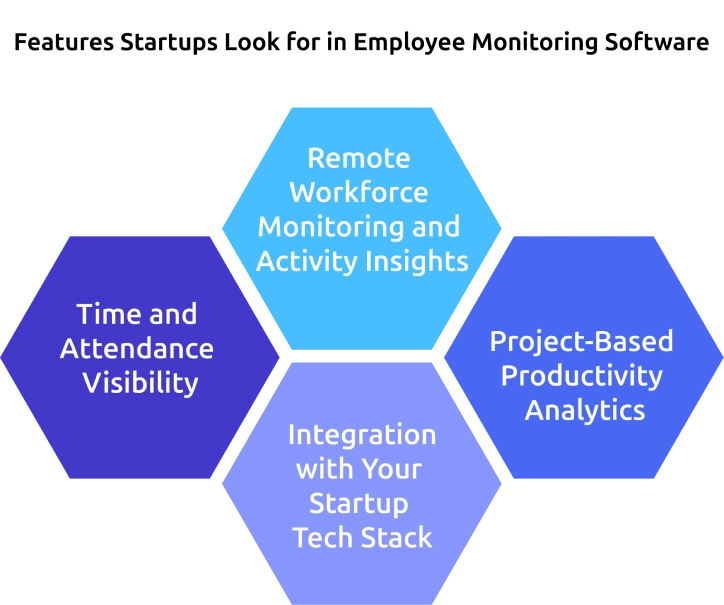
Time and Attendance Visibility
Time and attendance visibility forms the base of any employee monitoring software for startup. Choose tools that provide automatic clock-in and clock-out through activity detection or geolocation, along with manual time entry as a backup. Mobile tracking also helps team members who work on the go. At the startup stage, focus on accuracy over complexity. Clean and reliable timesheet data matters more than using a system that feels difficult to manage.
Remote Workforce Monitoring and Activity Insights
Remote workforce monitoring features help you understand how distributed teams use their work hours. These tools track app and website usage, classify activity levels, and detect idle time. They also show active working hours across the team. This data helps you quickly identify whether delays come from workload gaps or lack of focus, without relying on intrusive tracking methods.
Project-Based Productivity Analytics
Project-based analytics link time entries directly to projects and tasks. Without just seeing the total hours worked, you can view how much time each team member spends on specific projects. This becomes important when you bill clients hourly or need to calculate project margins.
Integrations with Your Startup Tech Stack
Employee monitoring software needs to connect smoothly with tools like Slack, Jira, GitHub, and Google Workspace. These integrations help to track time, sync tasks, and manage projects without manual work. You can link work hours to tasks, capture meeting time automatically, and export data to payroll, making your workflow faster and more accurate.
How Does Employee Monitoring Software Help Remote Startups Stay on Track
Employee monitoring software replaces assumptions with clear data. When you can’t walk over to a desk, you need a system that shows how work flows, highlights delays, and keeps distributed teams moving in the same direction.
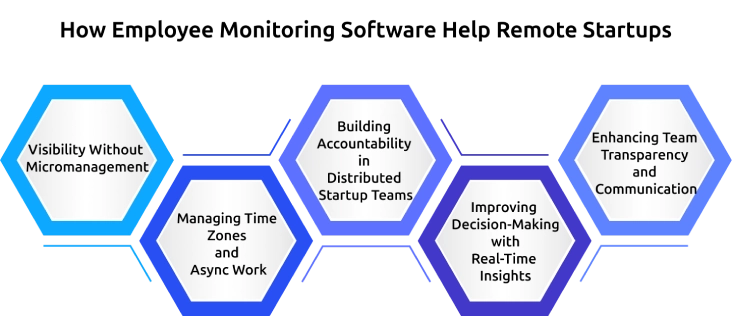
Visibility Without Micromanagement
The goal is not to track every minute of the employee’s activity. It is to understand how time is spent across different priorities. The right tools focus on outcomes such as hours per project, tasks completed, and utilization rates without constant activity tracking. This difference matters for the startup culture. You can build accountability while maintaining trust within the team.
Managing Time Zones and Async Work
Monitoring tools become more useful when teams work across different time zones. Activity data shows when each team member is most active, helping you find the best overlap for meetings and collaboration.
It also protects the focused work time. If a developer works best early in the morning, the data makes it clear, so meetings don’t interrupt their most productive hours.
Building Accountability in Distributed Startup Teams
Accountability in remote teams does not come from watching screens. It comes from clear, shared visibility into progress.
When team members can see their own data, and you track overall progress, everyone stays aligned and works with clarity. This removes confusion, reduces follow-ups, and keeps work moving without constant check-ins.
Improving Decision-Making with Real-Time Insights
Real-time data helps you make faster and better decisions. You can quickly identify delays, adjust workloads, and improve planning without relying on assumptions.
This clarity helps you stay efficient, respond faster to issues, and keep your projects on schedule.
Enhancing Team Transparency and Communication
Clear visibility into work patterns improves communication across remote teams. When everyone understands progress and priorities, it reduces unnecessary back-and-forth and aligns expectations.
This transparency builds trust, encourages ownership, and helps teams collaborate more effectively without relying on constant updates or meetings.
Facing delays and missed deadlines in your projects?
Manage tasks and productivity better with Time Champ.
How to Implement Employee Monitoring Software Without Breaking Team Trust?
Many startup founders worry about this step. You’ve selected a tool and understand its features, but the real challenge is introducing it to your team. The simple and best approach is to stay transparent and involve your team from the beginning. Here’s a practical framework you can follow.
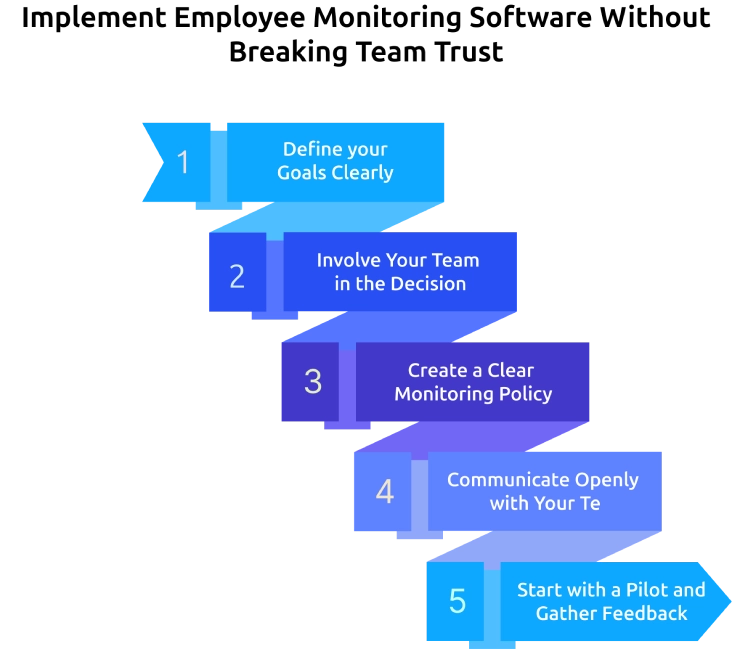
Step 1: Define your Goals Clearly
Start by identifying the problem you want to solve. Whether it’s improving project visibility, ensuring billing accuracy, or aligning a remote team, write your goal in one or two clear sentences before discussing it with your team.
Step 2: Involve Your Team in the Decision
Shortlist two or three tools and ask your team for input. When people take part in the decision, they are more likely to support the outcome.
Step 3: Create a Clear Monitoring Policy
Write a simple policy that explains what you will monitor, what you won’t, how the data will be used, who can access it, and how long it will be stored. Keep it short and easy to understand.
Step 4: Communicate Openly with Your Team
Introduce the tool in an all-hands meeting. Explain the purpose, demonstrate how it works, walk through the policy, and invite questions. Always communicate before implementation and never roll it out silently.
Step 5: Start with a Pilot and Gather Feedback
Run a two-week pilot with a small group. Collect feedback, make necessary adjustments, and then roll it out to the entire team with improvements in place.
Common Implementation Mistakes Startups Make
- Silent rollout: Installing monitoring software without informing your team damages trust immediately and may violate laws in states like Connecticut, Delaware, and New York.
- Monitoring everything on day one: Starting with too many features like screenshots or keystroke tracking can create distrust, so begin with basic time and project tracking.
- Using data punitively: Treating monitoring data as a tool for punishment sets the wrong tone, so use it to identify gaps and support your team instead.
- No feedback mechanism: Without a clear way for employees to share concerns or feedback, trust breaks down, so maintain open communication through regular check-ins.
What Startups Need to Avoid in Employee Monitoring
Employee monitoring software can capture a wide range of data, but tracking everything is neither necessary nor effective. Startups need to protect trust and culture, so setting clear boundaries matters as much as choosing the right tool.
The Startup Monitoring Boundaries Table:
| Safe to Monitor | Avoid or Handle Carefully |
|---|---|
| Work hours and clock-in/out times | Personal messages such as Slack DMs or personal emails |
| Application and website usage on company devices | Webcam or audio recording |
| Project time allocation and task completion | Off-hours activity or use of personal devices |
| Team-level productivity summaries | Individual keystroke tracking or mouse movement |
| Idle time and active hours during work schedules | Social media activity outside the work context |
| Billable vs non-billable time breakdown | Location tracking beyond work hours |
How Startups Must Scale Employee Monitoring as the Team Grows?
Monitoring needs to evolve as your startup grows. A setup that works for a 5-person team won’t support a 50-person company. You need to adjust your tools and approach at each stage to match your team size and complexity.
Stage 1: Seed to 15 Employees
Start simple, use a basic work time tracker with manual entry and a clear dashboard. At this stage, you must review timesheets yourself without automation. Tools like Clockify or a starter plan from Time Champ work well. Focus on building a consistent habit of logging time without adding any complex features.
Stage 2: 15 to 50 Employees
As your team grows, introduce integrations and automation. Spreadsheets and manual reviews can no longer help you. Add project-level analytics, connect payroll systems, and set up automated reports for team leads. Tools like Time Champ or Hubstaff help manage this stage effectively. You must also formalize your monitoring policy and collect signed consent from every employee.
Stage 3: 50+ Employees
At this stage, monitoring becomes part of your core operations. You need advanced capabilities like capacity forecasting, utilization tracking, compliance audit trails, and role-based access control. Use platforms that provide insights into team performance and project profitability. These features help you turn monitoring data into actionable business decisions.
Did You Know?
Gartner reports that employee monitoring among large employers doubled to 60% during the pandemic and is expected to reach around 70% as adoption continues to grow.
Which Employee Monitoring Tools Work Best for Startups in 2026?
Choosing the right employee monitoring software for a startup depends on balancing features, pricing, and ease of use. The best tools fit your current stage and solve real problems without adding complexity. Here are the top options to consider in 2026, based on different startup needs.
| Tool | Best For | Starting Price | Key Feature | Startup Fit |
|---|---|---|---|---|
| Time Champ | Remote teams | $3.90/user/mo | Project analytics + utilization | Excellent |
| Hubstaff | Field + remote | $4.99/user/mo | GPS + payroll integration | Strong |
| Clockify | Budget teams | Free trial | Unlimited users | Great to start |
| Apploye | SMB monitoring | $2.50/user/mo | Screenshots + tracking | Good |
| ActivTrak | Analytics focus | $10/user/mo | Productivity benchmarks | Strong |
| Time Doctor | Active nudges | $5.90/user/mo | Distraction alerts | Good |
Want to scale your startup without losing control?
Start using Time Champ to manage teams and improve efficiency.
Conclusion
Employee monitoring software for startup businesses gives you the clarity you need to manage work, improve productivity, and make better decisions as your team grows. You can use real data to track progress, control costs, and keep projects on schedule. The key is to choose the right employee monitoring software for startup teams based on your current stage. Start simple, involve your team, and focus on transparency to maintain trust. As your startup scales, you can add advanced features that support growth without adding complexity. When you implement employee monitoring software the right way for startups, you can build a more focused, accountable, and efficient team.

Anjali


Table of Content
-
 What Is Employee Monitoring Software and Why Startups Need It
-
What Features Startups Look for in Employee Monitoring Software?
-
How Does Employee Monitoring Software Help Remote Startups Stay on Track
-
How to Implement Employee Monitoring Software Without Breaking Team Trust?
-
What Startups Need to Avoid in Employee Monitoring
-
How Startups Must Scale Employee Monitoring as the Team Grows?
-
Which Employee Monitoring Tools Work Best for Startups in 2026?
-
Conclusion
Instant Signup
Thank you for your request!
We have received your signup request and our team will get back to you soon. In the meantime, you can book a demo to see Time Champ in action.
Book a DemoFree trial. No credit card required. Prefer a walkthrough? Book a demo.
Related Blogs
Discover the ins and outs of employee monitoring: from its benefits to ethical considerations. Everything you need to know in one comprehensive guide.

Learn how to address employee monitoring concerns with transparency, clear policies, and trust-building practices that improve engagement and reduce resistance.

Employee screen monitoring captures work activity in real time. Learn all monitoring types, how they boost productivity, and how to implement them ethically.
Learn how employee monitoring for financial services works, which teams need it, key features, and how it supports compliance, security, and productivity.
Find the best employee monitoring tools for 2026. Compare features, pricing, pros & cons to manage workforce performance and improve productivity.
Explore the possible ethical considerations of monitoring employee's activities to increase their productivity while respecting their privacy.


 4.7/5 avg.
Ready to Manage Your Workforce Smarter?
Join our family of 1500+ companies using smart insights to redefine workforces!

Free Trial
No Credit Card Required