Running a call center is a bit like running a busy restaurant. Too many customers can overwhelm your staff, while too few can leave them sitting idle. The same applies to call center occupancy. Finding the right balance helps you keep your team productive without pushing them too hard.
But what exactly is a good occupancy rate? And how do you calculate it without overloading your agents? In this guide, we’ll break down the call center occupancy rate formula, industry benchmarks, and practical ways to maintain a healthy balance between agent productivity and performance.
What Is Call Center Occupancy Rate?
Call center occupancy rate is the percentage of an agent’s available work time spent handling calls and completing related tasks. In simple terms, it shows how busy your agents are during their working hours. A healthy occupancy rate helps you balance employee productivity and workload. If it is too low, you may have unused capacity. If it is too high, agents may have little time to recover between calls, increasing the risk of fatigue and burnout.
Let’s see how to calculate the call center occupancy rate:
Call Center Occupancy Rate Formula
To calculate call center occupancy rate, you need two key figures. The first is the time agents spend handling calls and completing after-call work. The second is their total available time during the period you are measuring.
Occupancy Rate = (Talk Time + After-Call Work Time) ÷ Total Available Time × 100
Example:
Suppose an agent has an 8-hour shift, with 1 hour allocated for breaks and other scheduled activities. This gives the agent 7 hours of available time.
During those 7 hours:
- Available Time = 7 hours
- Talk Time = 4.5 hours
- After-Call Work Time = 45 minutes or 0.75 hours
- Total Occupied Time = 4.5 + 0.75 = 5.25 hours
Now, apply the formula:
Occupancy Rate = (5.25 ÷ 7) × 100
Occupancy Rate = 75%
So, the agent's call center occupancy rate is 75%. This means the agent spends 75% of their available time handling calls and completing related work. The remaining 25% can be used for activities such as waiting between calls or other available time.
What Is a Good Call Center Occupancy Rate?
A good call center occupancy rate is typically around 70% to 80%. This range gives employees enough time to handle customer interactions while still having some breathing room between calls.
However, the ideal rate can vary depending on your call volume, industry, staffing levels, and the type of customer support you provide. A consistently high rate may indicate that employees are carrying too much workload, while a very low rate may suggest that your available capacity is not being fully used.
Don’t aim for 100% occupancy just to keep employees busy. Aiming for a rate between 70% and 80% can help you maintain a better balance between productivity, customer demand, and employee well-being. This range gives employees enough time for breaks, recovery, and other essential tasks without leaving too much capacity unused.

Did you Know?
According to McKinsey research, satisfied contact center employees are more than three times as likely as dissatisfied employees to feel empowered to solve customer issues.
Occupancy Rate vs Utilization Rate
Occupancy rate and utilization rate may sound similar, but they answer different questions about your workforce. Knowing the difference helps you understand whether your agents are simply busy during their available time or using their overall working hours productively.
| Factor | Occupancy Rate | Utilization Rate |
|---|---|---|
| Definition | Measures the percentage of an agent’s available time spent handling calls and completing after-call work | Measures the percentage of an agent’s total working time spent on productive activities |
| Formula | (Talk Time + After-Call Work Time) ÷ Total Available Time × 100 | Productive Time ÷ Total Working Time × 100 |
| Focus | Agent workload during available time | Overall use of working time |
| Includes | Talk time and after-call work | Calls, after-call work, and other productive tasks |
| Breaks included? | Usually excluded from available time | Usually included in total working hours |
| Main purpose | Helps assess whether agents are overworked or underused | Helps assess overall workforce productivity |
| Best used for | Call center staffing and workload management | Workforce planning and productivity analysis |
Why Call Center Occupancy Rate Matters
A healthy occupancy rate helps you balance agent workload, staffing needs, and customer demand more effectively. Here are the main reasons why it matters:
- Helps Balance Workloads: Shows whether agents have too much or too little work during their available time.
- Improves Staffing Decisions: Helps you determine whether you need more agents during busy periods or fewer during slower periods.
- Reduces Agent Burnout: Extremely high occupancy can leave agents with little time to recover between customer interactions.
- Identifies Unused Capacity: Low occupancy can indicate that your team has more available capacity than current demand requires.
- Supports Better Workforce Planning: Helps you align staffing levels with call volumes and changing customer demand.
- Improves Operational Efficiency: Gives you a clearer view of how effectively your available agent capacity is being used.
Did you Know?
McKinsey reports that most contact centers experience average annual employee turnover rates of up to 60%, highlighting the importance of managing employee workload and creating a sustainable work environment.
How to Improve Call Center Occupancy Rate
Improving occupancy is not about keeping employees busy every second. The goal is to align staffing with customer demand while maintaining a manageable workload for your employees. Here are some practical ways to improve your call center occupancy rate.
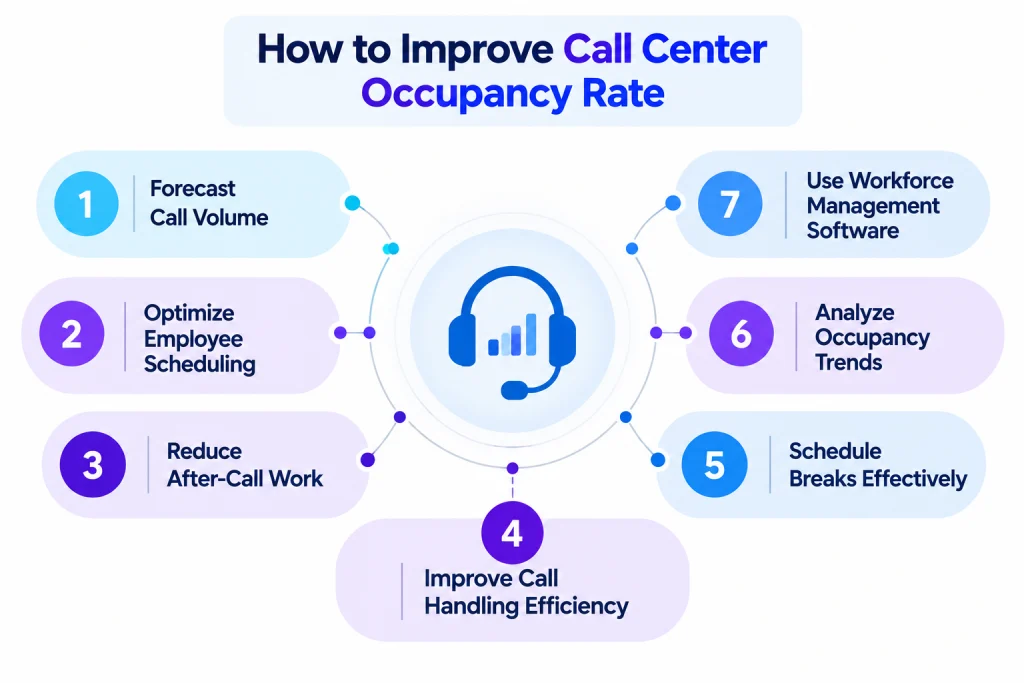
1. Forecast Call Volume
Analyze historical call data to identify patterns in customer demand. Understanding when call volumes typically increase or decrease helps you plan staffing levels more accurately and reduce unnecessary idle time. Accurate forecasting also helps you prepare for seasonal peaks and unexpected changes in demand.
2. Optimize Employee Scheduling
Align employee schedules with expected call volumes. Schedule enough employees during peak periods and adjust coverage during quieter hours to maintain an appropriate occupancy rate throughout the day. This helps you maintain the right level of coverage without overstaffing or understaffing your team.
3. Reduce After-Call Work
Lengthy after-call tasks can reduce employee availability. Simplify repetitive processes, use templates, and automate routine tasks where possible so employees can complete their work efficiently and become available for the next interaction. Reducing unnecessary administrative work also gives employees more time to focus on customer needs.
4. Improve Call Handling Efficiency
Provide employees with the right tools, information, and training to resolve customer issues efficiently. Call center monitoring software can help you simplify daily workflows and give employees easier access to the information they need. This can reduce unnecessary delays while helping employees maintain consistent service quality.
5. Schedule Breaks Effectively
Break schedules can affect occupancy and customer coverage. Plan breaks around expected call volumes to ensure employees have adequate rest without creating staffing gaps during busy periods. A well-planned schedule supports employee well-being while maintaining consistent customer service.
6. Analyze Occupancy Trends
Review occupancy rates across employees, teams, shifts, and time periods. Regular analysis can help you identify staffing gaps, periods of low demand, and workload patterns that require attention. These insights can help you make more informed staffing and scheduling decisions.
7. Use Workforce Management Software
Workforce management software can provide visibility into staffing levels, employee availability, workloads, and demand patterns. For BPOs and outsourced support teams, BPO time tracking software can also help track employee work hours and improve workforce visibility. This allows you to make data-driven scheduling decisions and use your workforce more efficiently.
Want to manage your call center more effectively?
Start your free trial with Time Champ to monitor employee activity, manage workloads, and improve workforce efficiency.

Monitor Call Center Performance
Track agent activity, workloads, and occupancy in real time.
See Call Center Monitoring →