What Is Task Mining: Definition, Benefits, Challenges & Uses
Task mining provides visibility into how tasks are completed. See its benefits, challenges, use cases, working processes, and value for better workflows.
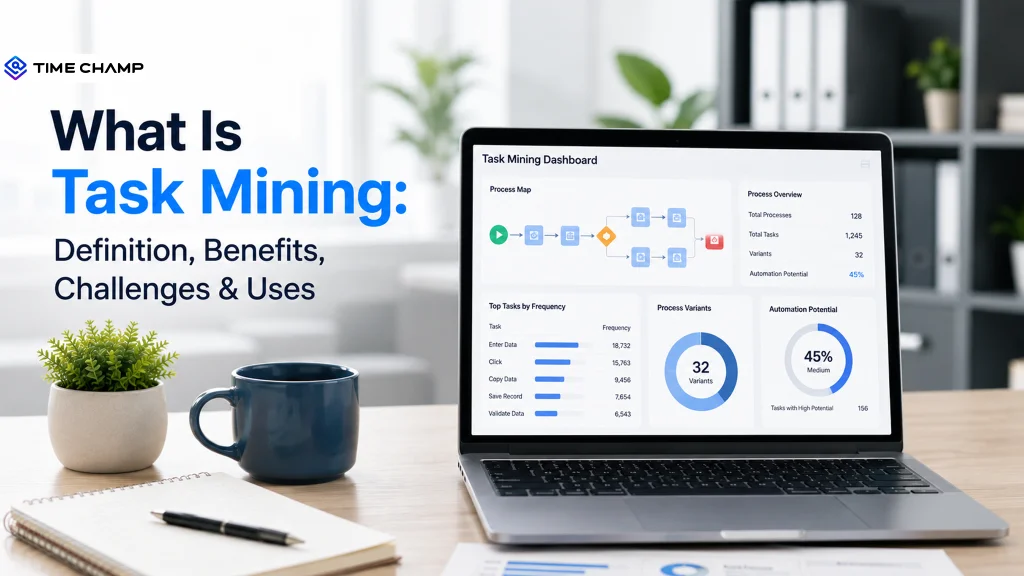
Work often looks simple from the outside. A task is assigned, completed, and marked done. But in reality, the path between those points is not smooth. Employees switch between multiple tools, repeat manual steps, wait for approvals, and correct small errors that often go unnoticed in system reports.
Task mining brings these hidden actions into view. It captures and analyzes how work is actually performed at the desktop level, helping you uncover inefficiencies, understand real user behavior, and identify opportunities for optimization and automation.
In this guide, you’ll learn how task mining works, what insights it can reveal, and where it adds the most value in improving everyday workflows.
What is Task Mining?
Task mining is a process intelligence technology that captures and analyzes desktop activity such as clicks, keystrokes, data entries, and application interactions to show how a task actually happens. It helps you spot repeated steps, bottlenecks, variations, and other workflow issues that broader process data may not reveal.
When you use task mining, you get a closer view of the work happening inside individual tasks. Task mining tools can organize interaction data into task patterns and use technologies such as optical character recognition (OCR) and machine learning to add context and identify meaningful variations.
Think of it as a bottom-up view of your workflow. Instead of looking only at the larger process, you can examine the actions that make up each task. This helps you see where unnecessary steps, rework, or repeated actions slow the workflow and where you may have an opportunity to standardize or automate the work.

Did You Know
The task mining software market is seeing strong growth due to the rising demand for process optimization and automation across different industries. The market, valued at around $2 billion in 2025, is expected to grow at a steady compound annual growth rate (CAGR) of 25% from 2025 to 2033, reaching about $10 billion by 2033.
Task Mining Vs Process Mining: Key Differences
Process mining gives you the bigger process picture, while task mining takes a closer look at individual tasks. The table below shows how they differ.
| Aspect | Process Mining | Process Mining |
|---|---|---|
| Focus | Looks at the overall process from start to finish | Looks at individual tasks within the process |
| Data Source | Uses event logs from ERP, CRM, ticketing, and workflow systems | Uses desktop activity such as clicks, keystrokes, app switching, and data entries |
| Level of Detail | Shows how cases move through the broader workflow | Shows how specific tasks get completed |
| Main Insight | Reveals process delays, bottlenecks, and deviations | Reveals repetitive actions, task variations, and inefficiencies |
| Best Use | Helps improve end-to-end process performance | Helps improve individual tasks and identify automation opportunities |
For a deeper look, check our detailed comparison guide, "Process Mining vs. Task Mining. "
How Does Task Mining Work?
Task mining follows a simple path from raw desktop activity to useful task insights. It captures what happens during digital work, adds context to those actions, groups them into recognizable tasks, and analyzes the results to reveal where work slows down or varies. Here is how the process typically works.
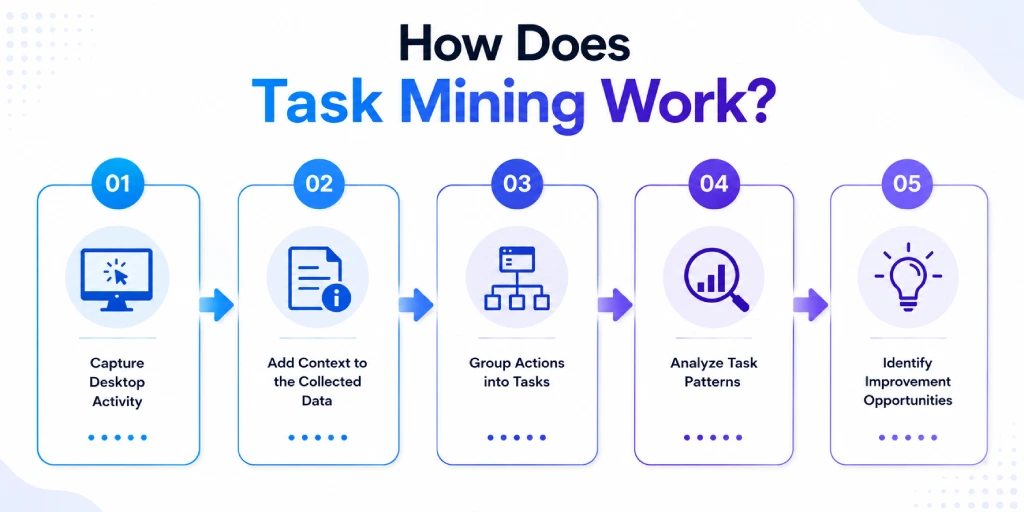
1. Capture Desktop Activity
A lightweight recorder or agent runs on the desktop and logs every interaction you make while working. It records mouse clicks, keystrokes, data entries, and screenshots as you move through an application. This runs in the background, so you can continue your work as usual while the tool creates a simple record of everything happening on your screen.
If you're curious about how your everyday computer actions are captured and turned into insights, the desktop monitoring software guide explains it in a clear and simple way.
2. Add Context to the Collected Data
Raw actions alone do not tell the full story. Task mining tools add context to help connect individual interactions with the work you are performing. For example, optical character recognition can read information shown on the screen. Timestamps and other data can also show the order and timing of each action.
3. Group Actions into Tasks
Once the system structures the activity data, machine learning can identify recurring patterns and group related actions into recognizable tasks.
For example, a task like submitting a purchase order may involve several actions performed across different applications. This step helps separate individual actions from the larger pieces of work they create.
4. Analyze Task Patterns
The system then examines the identified tasks to reveal patterns, variations, delays, rework, and other sources of friction. You can see which tasks take longer, which steps repeat, and where different approaches create inconsistent results.
You can also combine task-level data with process event logs when you need to connect detailed desktop activity with the wider business process.
5. Identify Improvement Opportunities
The final step turns those findings into practical actions. You can use the insights to document how work happens, standardize inconsistent steps, remove unnecessary effort, or identify tasks that could benefit from automation.
This gives you a clearer basis for deciding what to improve instead of relying only on assumptions about how a task should work.
Want a clearer picture of where your work time is going?
Try Time Champ to track activity patterns and turn everyday work data into useful insights.
What Are the Benefits of Task Mining?
Knowing how a task actually happens gives you more than a record of completed work. It shows where time goes, which steps create problems, and where your workflow can work better.
Here are the main ways task mining can add value to your workflows.
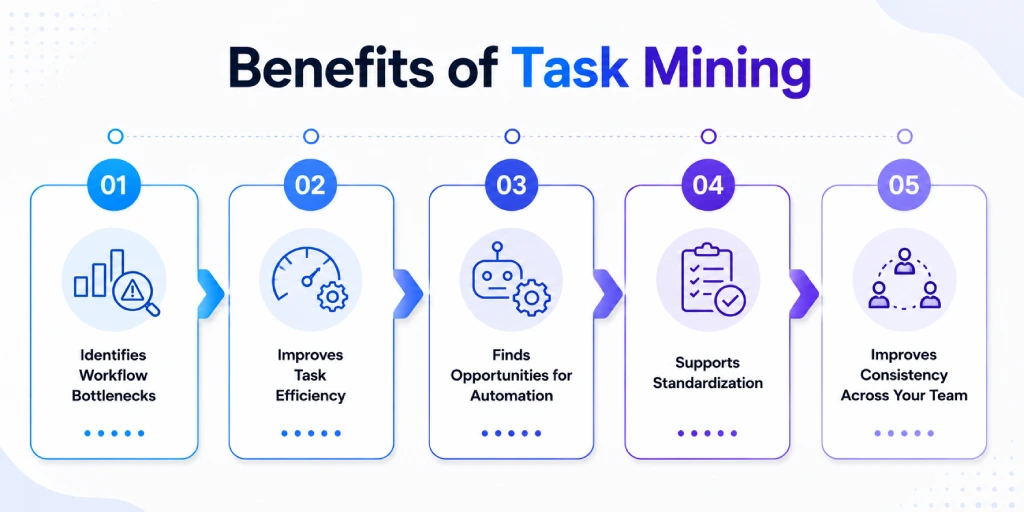
1. Identifies Workflow Bottlenecks
Task mining helps you spot steps that slow down a task. You can see repeated actions, delays, rework, and unnecessary movement between applications that may not appear in broader process data. This gives you a clearer starting point for removing inefficiencies and improving how a task moves from one step to the next.
2. Improves Task Efficiency
Small inefficiencies can add up when you repeat the same task at scale. By analyzing actual task patterns, you can identify unnecessary actions and compare different ways of completing the same work. You can then focus your improvement efforts on the steps that consume the most time or create the most delays.
3. Finds Opportunities for Automation
Not every repetitive task makes a good automation candidate. Task mining helps you examine actual task behavior before deciding what to automate. You can identify repetitive patterns, assess where automation could have the most impact, and prioritize suitable tasks instead of choosing candidates based only on assumptions. McKinsey's research found that technologies available at the time could technically automate 45% of work activities, while around 60% of occupations had at least 30% of their activities that could be automated.
4. Supports Standardization
The same task can take different paths in real work. Task mining helps you see these different approaches clearly and understand which steps work better and which ones create confusion or delays.
These insights help you build a more consistent way of working. You can align tasks with standard operating procedures (SOPs), so everyone follows a similar method. This reduces variation in how people perform the work and makes the process smoother, more reliable, and easier to manage.
What Are the Challenges of Task Mining and How Can You Overcome Them?
Task mining can give you a detailed view of how work happens, but that level of visibility also creates practical challenges. You need to handle the collected data carefully, account for changes in workflows, and make sure task-level findings fit the bigger business picture.
Here are the main challenges of task mining, along with practical ways to overcome them:
1. Protecting Privacy and Building Trust
Task mining can capture detailed desktop activity, including clicks, keystrokes, screenshots, and application interactions. That level of data collection can raise valid privacy concerns, especially when captured information contains personal or sensitive data.
How to Overcome: You should define a clear purpose for collecting the data, explain how you will use it, and apply appropriate controls such as consent and anonymization. A transparent approach can also help you build trust before you introduce task mining into daily workflows.
2. Managing Large Volumes of Activity Data
A task mining system can collect a large amount of interaction data across applications and tasks. Raw activity alone does not provide useful insight, so you need the right methods to organize, filter, and analyze it. Without a clear scope, you can end up with more data than you need and struggle to separate meaningful patterns from routine activity.
How to Overcome: Start with specific tasks and define what you want to measure before collecting data. Use filters and clear criteria to focus on relevant activity, then prioritize the patterns that have the biggest impact on your workflow.
3. Managing Employee Resistance to Change
Introducing task mining can make some employees uncomfortable because they may worry about how the company will collect or evaluate their activity data. Resistance can make adoption harder, especially when employees do not understand its purpose.
How to Overcome: You can address this concern by explaining why you need the data, what you will measure, and how you will protect privacy. Focus the conversation on improving workflows rather than monitoring individual performance, and involve your team early in the rollout.
4. Avoiding the Loss of the Bigger Picture
Task mining focuses closely on individual tasks, which can make it easy to overlook what happens before or after that task. A change that improves one step may not improve the overall process.
How to Overcome: Connect task-level findings with the wider workflow before making improvement decisions. You can combine process mining and task mining to see both the detailed actions within a task and how that task fits into the end-to-end process.
5. Handling Implementation Complexity
Setting up task mining requires more than installing a recorder. You need to decide which tasks to capture, configure data collection, establish privacy controls, and determine how you will analyze the resulting information.
How to Overcome: A focused starting point can make the process easier. Begin with a high-volume or repetitive task where you have a clear improvement goal, then expand the scope once you can show useful results.
Do you have enough visibility to know where everyday work slows down?
Try Time Champ to uncover time usage, app activity, and productivity patterns with ease.
Task Mining Use Cases and Examples
Below are the situations where task mining is most useful, along with a real example for each one so you can clearly see how it works in practice instead of just reading a definition.
1. Identifying High-Value Automation Opportunities
One of the main reasons teams use task mining tools is to avoid guessing which tasks to automate. Instead of choosing a process just because it seems repetitive, you can see exactly how often each step happens, how long it takes, and how many people take part in it.
For example, insurance companies use this approach to study claims processing. It can show when an adjuster is copying the same data across multiple systems. This gives clear, real evidence that the task is a good candidate for an RPA bot, instead of just assuming it is.
2. Documenting How Work Actually Happens
If you ask five employees to explain how they do a task, you will often get five different answers. None of them may fully match what they actually do on their screens. Task mining removes this guesswork by showing the real steps people take while working.
You can then use this information to create onboarding material or training guides based on real work. This helps new employees learn how the task is actually done today, not how an old manual says it should be done.
3. Supporting Compliance and Governance
Some workflows require specific steps, checks, or controls. Task mining can help you identify where actual task execution differs from the expected procedure.
For example, you could examine a regulated data-handling task and identify steps that consistently deviate from the approved workflow. This gives you a clearer starting point for reviewing the process and addressing potential control gaps.
Use Task Mining to Improve Workflows with Time Champ
Task mining can show you how individual tasks happen, while Time Champ adds another layer of visibility around the time and activity behind that work. By bringing task insights together with app usage, time patterns, and productivity signals, you can get a clearer picture of where work flows well and where it needs attention.
Here are the key features that help you understand work patterns more clearly.
- Track App and Website Usage: See which applications and websites take up the most time during daily work. This helps you connect task activity with the tools involved and spot patterns such as excessive application switching or time spent on low-value activities.
- Capture Screenshots and Screen Recordings: Periodic screenshots and screen recordings give you visual context around work activity. Anomaly detection can help flag unusual activity patterns, making it easier to review tasks where something looks different from the usual workflow.
- Analyze Keystroke and Mouse Activity: Keystroke and mouse activity analysis helps you identify repeated actions, changes in work patterns, and areas that may need attention. This helps you spot periods of high activity, repeated actions, and changes in work patterns that may need a closer look.
- Use Activity Heatmaps: Color-coded activity heatmaps make activity patterns easier to see at a glance. You can quickly identify periods of high and low activity and compare them with task timelines to understand how work progresses throughout the day.
- Measure Productivity Patterns: Productivity tracking helps you distinguish productive and unproductive application activity. Compare these patterns with your task insights to see whether certain workflows involve unnecessary tool usage or activity that does not contribute to the intended work.
- Spot Idle Time and Activity Gaps: Idle-time detection highlights periods when activity drops during tracked work. Comparing these gaps with task patterns can help you investigate delays, interruptions, or workflow steps that may require additional attention.
- Task and Project Management: Create, assign, and track tasks with priorities, deadlines, and status updates, then organize them into projects with milestones, timelines, and dependencies. This helps you monitor task progress and see how individual tasks contribute to overall project goals.
Still relying on assumptions to see where your workflows lose time?
Use Time Champ to uncover work patterns and make better decisions with real activity data.
Conclusion
Task mining gives you a closer look at how work happens, helping you spot repetitive steps, bottlenecks, variations, and opportunities for improvement. The right approach can turn those insights into better workflows, clearer processes, and smarter automation decisions.
With Time Champ, you gain visibility into app usage, time spent on tasks, productivity patterns, and idle time. This helps you understand how work is actually being performed across your team. It provides deeper context around everyday work activity, making it easier to identify inefficiencies and improve focus.

Thasleem Shaik

Table of Content
 What is Task Mining?
 - Task Mining Vs Process Mining: Key Differences
- How Does Task Mining Work?
- What Are the Benefits of Task Mining?
- What Are the Challenges of Task Mining and How Can You Overcome Them?
- Task Mining Use Cases and Examples
- Use Task Mining to Improve Workflows with Time Champ
- Conclusion
Instant Signup
Thank you for your request!
We have received your signup request and our team will get back to you soon. In the meantime, you can book a demo to see Time Champ in action.
Book a DemoFree trial. No credit card required. Prefer a walkthrough? Book a demo.
Related Blogs

Choose the right task tracker with insights into its features, benefits, and how it helps your teams simplify task tracking and improve overall productivity.
Anjali | Aug 05, 2026
Curious about task management? Discover what it is, why it matters, along with its key benefits and proven best practices to stay organized and get more done.
Chetana Choudary | July 24, 2025
Unleash methods and tips for employee task tracking to enhance productivity, with top tools for streamlining task management and improving team efficiency.
Chethana Choudary | July 24, 2025
Use our effective task management strategies to stay organized, reduce stress, and boost team’s productivity by prioritizing tasks and managing time effectively.
Guna Lakshmi | July 01, 2025
Top task management software tools that help organize work, streamline collaboration, improve productivity, enhance clarity, and simplify team workflows.
Thasleem Shaik | June 30, 2025
Learn how to track your time spent on tasks more accurately to improve billing and productivity with practical tracking methods and tools.
Guna Lakshmi | May 28, 2026


 4.7/5 avg.
Ready to Manage Your Workforce Smarter?
Join our family of 1500+ companies using smart insights to redefine workforces!

Free Trial
No Credit Card Required