Task Tracker Guide: Benefits, Features & How It Works
Choose the right task tracker with insights into its features, benefits, and how it helps your teams simplify task tracking and improve overall productivity.

When the work is spread across teams, tools, and shifting priorities, it’s easy for even well-planned tasks to lose clarity and momentum. Without a reliable task tracker, it becomes difficult to monitor progress, keep your teams aligned, and ensure important work gets completed on time.
Whether you're managing your own workload or coordinating an entire team, the right task tracker can make it easier to organize and follow through on work. This guide will help you understand how task tracking works, why it matters, and how to choose a solution that keeps every task moving forward.
What is a Task Tracker?
A task tracker is a digital tool that helps individuals and teams plan, assign, monitor, and complete tasks in an organized way. It provides a clear view of task progress, priorities, deadlines, and responsibilities, making it easier to stay on schedule, improve collaboration, and ensure work is completed efficiently.
What are the Benefits of Task Tracking
Keeping work organized is easier when every task has a clear owner, priority, and deadline. A task tracker gives you complete visibility into ongoing work, helping you reduce delays, improve collaboration, and ensure projects move forward without unnecessary confusion. Here are the key benefits of task tracking.
Improves Productivity and Keeps Teams Focused
Task tracking breaks large projects into smaller, manageable tasks, making it easier for you to focus on what needs to be done first. With clear priorities and timelines, your team spends less time switching between tasks and more time completing meaningful work.
Increases Accountability Across Teams
When every task is assigned to a specific person with a defined deadline, everyone knows their responsibilities. This creates greater accountability, reduces missed handoffs, and helps your team deliver work on time with fewer follow-ups.
Reduces Unnecessary Meetings and Status Updates
A centralized task tracker lets everyone view task progress in real time. Reducing the need for frequent meetings or update requests can help you quickly check project status and save valuable time for productive work.
Supports Better Planning and Decision-Making
Tracking task progress over time helps you identify workloads, estimate project timelines more accurately, and allocate resources effectively. These insights enable you to make informed decisions that keep projects on schedule and prevent team burnout.
Strengthens Team Collaboration
Task tracking keeps conversations, updates, files, and dependencies connected to the right tasks. This makes it easier for your team to collaborate, resolve blockers quickly, and stay aligned without relying on scattered emails or multiple communication channels.
Struggling to keep track of tasks across your team?
Organize work, monitor progress, and complete every task on time with Time Champ.
How Does a Task Tracker Work?
A task tracker follows a structured workflow that helps you organize, assign, monitor, and complete work efficiently. Every task moves through a series of stages, giving your team clear visibility into progress while ensuring nothing gets overlooked.

- Identifies the Work: The system begins by listing the tasks, requests, or project activities that need to be completed.
- Creates and Defines Each Task: Each task is created with a clear title, description, supporting details, attachments, or any information required to complete the work.
- Assigns Ownership: Tasks are allocated to the appropriate team members, so responsibilities are clearly defined from the beginning.
- Establishes Priorities and Deadlines: Priority levels and due dates are assigned to ensure focus on the most important work first.
- Collaborates Throughout the Task: All task updates, discussions, and supporting files stay connected to the task, making collaboration clear and efficient.
- Monitors Task Progress: Each task is tracked as it moves through different stages, such as To Do, In Progress, Review, and Completed, to ensure work stays on schedule.
- Completes, Reviews, and Analyzes: Once a task is finished, the outcome is reviewed, and its history is retained for reporting, performance analysis, and future planning.

Did You Know?
The U.S. federal government invests more than $100 billion annually in IT, yet the Government Accountability Office (GAO) found that poor project oversight continues to contribute to projects being delivered late and over budget. This shows that clear task tracking and regular progress monitoring help to reduce these risks.
Strategies to Track Tasks at Work More Effectively
Tracking tasks isn’t just about creating a to-do list. An effective approach helps you stay organized, improve accountability, and ensure work progresses without delays. Following a few proven strategies can help you gain better visibility into your team’s work, meet deadlines consistently, and complete projects more efficiently.
Break Large Projects into Smaller Tasks
Large projects can quickly become difficult to manage. Divide them into smaller, actionable tasks with clear objectives, so your team knows exactly what needs to be completed at each stage.
Set Clear Priorities and Deadlines
Not every task has the same level of urgency. Assign priority levels and realistic due dates to help your team focus on high-impact work first and reduce the risk of missed deadlines.
Assign Clear Ownership
Every task should have one responsible owner. Clear ownership eliminates confusion, improves employee accountability, and ensures someone is always responsible for driving the task to completion.
Monitor Progress Regularly
Review task progress frequently to identify delays, resolve blockers, and keep projects moving forward. Regular monitoring helps you address issues early before they affect deadlines.
Keep All Task Updates in One Place
Store comments, files, status updates, and related discussions within the task itself. Having all information in one location makes collaboration easier and prevents important details from getting lost across emails or chat platforms.
Review Completed Tasks and Improve Your Process
Once tasks are completed, evaluate what went well and where improvements can be made. Reviewing completed work helps you identify recurring bottlenecks, improve future planning, and create more efficient workflows over time.
How To Choose the Best Task Tracker?
Choosing the right task tracker can make a significant difference in how your team plans, executes, and completes work. Before making a decision, evaluate your team’s workflows, collaboration needs, and long-term goals to ensure the solution supports both your current and future requirements.
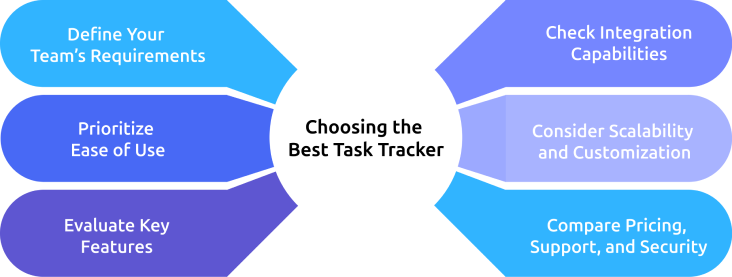
Define Your Team's Requirements
Start by identifying how your team works and the challenges that you want to solve. Consider the size of the team, the complexity of projects, and whether you need task tracking for daily work, cross-functional collaboration, or long-term project management.
Prioritize Ease of Use
Choose a solution that is simple to set up and easy for everyone to use. An intuitive interface encourages faster adoption, reduces training time, and helps your team stay productive from day one.
Evaluate Key Features
Look for features that support your daily workflows and improve visibility across tasks such as,
- Task creation and assignment
- Priority levels and due dates
- Progress tracking with task statuses
- Team collaboration through comments and file sharing
- Notifications and reminders
- Dashboards and reporting
- Time tracking and productivity insights
- Mobile accessibility
Check Integration Capabilities
Ensure your task tracker integrates seamlessly with the tools your team already uses, such as communication platforms, calendars, cloud storage, CRM systems, and project management software. This will help reduce manual work and keep information synchronized across your workflows.
Consider Scalability and Customization
Select a solution that has the potential to grow with your business. The ability to customize workflows, task statuses, user roles, and reports ensures the software continues to meet your needs as the team and projects expand.
Compare Pricing, Support, and Security
Compare pricing plans to ensure they fit your budget and evaluate the level of customer support available before making a final decision. Also, verify that the platform offers strong security features, including role-based access, data protection, and regular backups to safeguard your business information.
How Time Champ Simplifies Task Tracking for Teams
Managing tasks across multiple employees, projects, and deadlines becomes challenging when updates are scattered, and progress isn't visible. Without a centralized system, you may struggle to know who is working on what, identify bottlenecks, and keep projects progressing smoothly toward deadlines. Time Champ is comprehensive employee monitoring software with built-in task tracking capabilities that help you organize work, monitor progress, and improve team accountability from a single platform.
With Time Champ, you can easily manage tasks, track progress, and boost team productivity:
- Keeps Every Task Organized: Helps you create, assign, prioritize, and schedule tasks, ensuring every team member knows what to do and when to do it.
- Monitors Task Progress in Real Time: Gives you real-time visibility into task progress, helping you identify delays early and keep projects on track.
- Tracks Time Spent on Every Task: Tracks the time spent on each task, helping you improve planning, optimize workloads, and increase productivity.
- Improves Team Accountability: Provides clear visibility into task ownership and progress, helping teams stay accountable and managers monitor work more effectively.
- Collaborates Without Losing Context: Keeps task updates, comments, and activities in one place, making collaboration smoother and reducing unnecessary follow-ups.
- Gives Complete Performance Visibility: Combines task tracking with productivity insights, attendance, and work patterns, giving you a complete view of team performance.
- Access Actionable Reports and Dashboards: Delivers detailed task and productivity reports that help you make informed decisions and improve project outcomes.
Looking for a smarter way to manage tasks and improve team accountability?
Track tasks and keep every project on schedule with Time Champ.
Conclusion
A task tracker helps you organize work, assign responsibilities, monitor progress, and keep projects moving in the right direction. When combined with clear priorities, regular progress reviews, and effective collaboration, it enables teams to stay accountable and complete work more efficiently. Choosing the right solution depends on your team’s goals, workflow, and business requirements. Take the time to evaluate your needs, compare the options available, and adopt a tool that supports both your current processes and future growth. The right choice today can lead to more organized work and better results tomorrow.
Table of Content
 What is a Task Tracker?
- What are the Benefits of Task Tracking
- How Does a Task Tracker Work?
- Strategies to Track Tasks at Work More Effectively
- How To Choose the Best Task Tracker?
- How Time Champ Simplifies Task Tracking for Teams
- Conclusion
Instant Signup
Thank you for your request!
We have received your signup request and our team will get back to you soon. In the meantime, you can book a demo to see Time Champ in action.
Book a DemoFree trial. No credit card required. Prefer a walkthrough? Book a demo.
Related Blogs
Use our effective task management strategies to stay organized, reduce stress, and boost team’s productivity by prioritizing tasks and managing time effectively.
Guna Lakshmi | July 01, 2025
Track employee working hours accurately, improve productivity, reduce time waste, and gain better visibility into team performance with a work time tracker.
Anjali | Jun 08, 2026
Still relying on manual time tracking? Discover 10 proven time tracking use cases that boost productivity, reduce inefficiencies, and drive real ROI.
Guna Lakshmi | Jun 20, 2026
Learn what time batching is, how it works, and why it's the best productivity technique. Explore its benefits, examples, and best practices to improve focus.
Jahnavi Pulluri | Jun 11, 2026
What is time blocking? Learn how to plan focus blocks, choose a method that fits your day, and audit whether your blocks actually held to get more done.
Shaik Shabana | Jun 08, 2026
Want to get more done without working longer hours? Here are 12 practical ways to increase productivity at work and how to spot what’s really slowing you down.
Guna Lakshmi | Jul 06, 2026


 4.7/5 avg.
Ready to Manage Your Workforce Smarter?
Join our family of 1500+ companies using smart insights to redefine workforces!

Free Trial
No Credit Card Required