What Is Time Batching and How Can It Improve Productivity?
Learn what time batching is, how it works, and why it's the best productivity technique. Explore its benefits, examples, and best practices to improve focus.

What Is Time Batching? A Complete Guide to Improving Productivity
It doesn't take much to pull your attention away from the task at hand. A simple glance at your phone, a coworker stopping by, or even a random thought can pull you away from what you’re doing. And once that happens, getting back into a focused state takes more effort than we usually expect.
Most workdays don’t really feel like long stretches of progress anymore. They end up being a series of small interruptions that keep breaking your rhythm.
Then, what helps?
Time batching is one way to bring structure back into your day and reduce constant task switching.
In this blog, I’ll explain what time batching is, how it works, and how you can use it to get more done with less effort.
What is Time Batching?
Time batching is a time management method where you group similar tasks together and complete them in a single dedicated block, instead of handling them one by one throughout the day. The goal is to reduce constant task switching so your attention stays in one mode for longer and you can finish work more efficiently.
You may also hear it referred to as task batching, batch working, or task theming. The concept comes from computing, where a “batch” refers to a group of similar jobs processed together rather than individually.
The same idea applies to how we work. When you stay within one type of task for a longer stretch, you avoid the mental cost of repeatedly switching gears and starting from scratch each time.
Why Does Time Batching Work?
Time batching works because every time you switch between unrelated tasks, your brain pays a mental cost. Part of your attention stays tied to the previous task, which slows you down and increases mistakes in the next one. Reducing these switches helps protect both focus and mental energy.
The Hidden Cost of Switching Tasks
Switching between tasks may feel harmless, but it comes with a real productivity cost. The American Psychological Association notes that these mental shifts can reduce productivity by up to 40%.
Even small interruptions add up. Research by Gloria Mark at the University of California, Irvine, found it takes about 23 minutes and 15 seconds to fully return to a task after being interrupted. A few interruptions can easily take up a large part of your day.
Attention Residue
There is also a name for what happens mentally during these switches: attention residue. Coined by researcher Sophie Leroy, it describes the way a part of your mind stays stuck on the previous task even after you’ve moved on to something new.
That means you’re never fully focused on what you’re doing. Time batching reduces this by keeping your attention on one type of work longer.
How These Time Management Techniques Differ
Time management methods may sound similar, but they solve different problems in very different ways. Understanding how they differ helps you choose the right approach for your workflow.
| Method | What You Decide | Best For | Quick Example |
|---|---|---|---|
| Time batching | Which similar tasks to group together | Reducing context switching | Handling all emails and Slack messages in two daily windows |
| Time blocking | When tasks happen on your calendar | Protecting time for priorities | 9–11 a.m. reserved for writing a report |
| Timeboxing | A fixed time limit for a task | Preventing tasks from dragging on | 30 minutes max for a weekly update |
If you want a deeper understanding, we’ve covered time blocking and timeboxing in detail in separate guides. You can check them out for more insights.
Benefits of Using Time Batching
Time batching improves focus, reduces mistakes, and helps you manage your energy better throughout the day. These benefits make your work feel smoother and less overwhelming overall.
1. Deeper Focus
When you stay on one type of task for a longer time, your mind doesn’t have to constantly reset. This makes it easier to enter a focused state and stay there without losing momentum. Over time, work feels more natural because you’re not repeatedly switching mental gears.
2. Fewer Mistakes
Switching between different kinds of tasks creates mental clutter. Time batching reduces that clutter and allows you to stay more consistent and attentive. As a result, tasks are completed with fewer errors and less need for rework.
3. Less Decision Fatigue
A big part of daily exhaustion comes from constantly deciding what to do next. With time batching, you make that decision once for a block of time, then simply follow through. This removes unnecessary mental effort throughout the day.
4. Faster Delivery
Every time you switch tasks, you lose time getting back into flow. When those switches are reduced, that lost time adds up significantly over the course of a week, helping you complete work faster overall.
5. A Calmer Day
Managing multiple unfinished tasks at once can make the day feel scattered, while a structured approach makes it more predictable. This creates a sense of control and reduces the feeling of being overwhelmed by scattered work.
6. Better Time Management
When similar tasks are grouped, it becomes easier to understand how long they actually take. This leads to more realistic planning and helps you avoid underestimating your workload.
How To Start Time Batching In 6 Steps?
Starting time batching doesn’t have to feel complicated. With a simple structure, you can quickly turn scattered tasks into focused, manageable blocks.

1. Find Your Real Pattern First
Before changing anything, observe where your attention breaks during the day. Which hours feel heavy? What keeps pulling you away from your work? You can’t fix or batch what you haven’t yet clearly noticed.
2. List and Sort Your Tasks by Type
Write down everything you typically do in a week, then categorize each task, communication, deep work, admin, meetings, or creative work. These categories will become the foundation of your batches.
3. Group Similar Tasks Together
Combine all tasks of the same type into a single batch. For example, handle emails and messages together, and group admin work separately. Aim for just two to four batches a day rather than spreading them thin.
4. Match Batches to Your Energy Levels
Place your most focused work in your peak energy hours, and reserve lower-energy periods for lighter tasks. Working against your natural flow makes batching harder than it needs to be.
5. Block and Protect Your Time
Schedule each batch on your calendar like a real appointment. Turn off distractions, silence notifications, and set boundaries to stay fully focused during those blocks.
6. Review and Adjust Weekly
At the end of each week, review what worked and what got interrupted. Adjust your batches, shift timing, or combine blocks if needed. Time batching improves over time, it’s a system you refine, not a fixed rule.
When Does Time Batching Not Work?
Time batching is not a perfect system and doesn’t work in every situation. There are certain work environments and habits where it can actually become less effective.
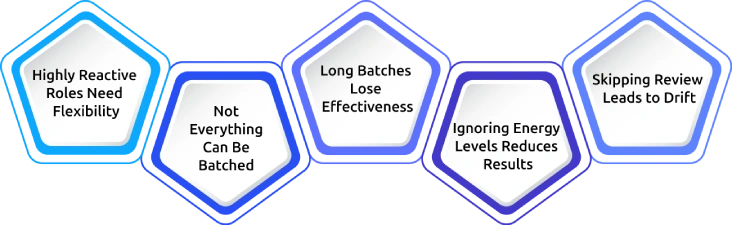
1. Highly Reactive Roles Need Flexibility
Jobs like on-call engineering or customer support can’t disappear into long focus blocks. In these cases, shorter and more frequent response windows work better than extended batching sessions.
2. Not Everything Can Be Batched
Some tasks are genuinely urgent and require immediate attention. Keeping a small buffer in your schedule ensures these don’t get ignored while still maintaining structure.
3. Long Batches Lose Effectiveness
When a batch runs too long, focus naturally drops and the work starts to feel draining. Most people perform best when batches stay within a 60-minute to 3-hour range.
4. Ignoring Energy Levels Reduces Results
Placing deep-focus work during low-energy periods often leads to poor output. Matching demanding tasks with your peak energy hours makes batching far more effective.
5. Skipping Review Leads to Drift
Without regular check-ins, your schedule slowly slips back into heavy work. A simple weekly review helps keep your batching system aligned with reality.
How Time Champ Helps You Protect Batched Focus Time
Time Champ is a time tracking and employee monitoring software that goes beyond basic activity tracking. It helps you understand whether focused work is actually happening, rather than just measuring surface-level activity like clicks or idle time.
Here are the key features that Time Champ provides:
1. Idle Vs Active Time Tracking
Tracks active work periods and periods of inactivity, making it easier to understand where time is truly spent.
2. Focus Blocks
Measure how much uninterrupted work is happening during the day and how long deep work sessions actually last, helping identify whether focus time is truly being protected.
3. App and Website Usage
See where time is actually being spent during work hours, making it easier to separate productive work tools from low-value distractions.
4. Productivity Trends
Provides a breakdown of productivity activity and shows how time is distributed across different categories, helping identify where most attention is being spent.
Protect Your Focus Time with Time Champ!
Track focus sessions, find distractions, and build more productive work habits.
Conclusion
Time batching is a simple way to reduce constant task switching and bring more structure to your workday. Grouping similar tasks into focused blocks helps protect your attention and allows you to get work done more efficiently. Over time, it improves focus, reduces mistakes, and makes your day feel less scattered. When used consistently, it becomes a practical system for doing more essential work with less mental fatigue.

Jahnavi Pulluri

Table of Content
 What Is Time Batching? A Complete Guide to Improving Productivity
- What is Time Batching?
- Why Does Time Batching Work?
- How These Time Management Techniques Differ
- Benefits of Using Time Batching
- How To Start Time Batching In 6 Steps?
- When Does Time Batching Not Work?
- How Time Champ Helps You Protect Batched Focus Time
- Conclusion
Instant Signup
Thank you for your request!
We have received your signup request and our team will get back to you soon. In the meantime, you can book a demo to see Time Champ in action.
Book a DemoFree trial. No credit card required. Prefer a walkthrough? Book a demo.
Related Blogs

Learn about time management for employees, its challenges, and effective tips to improve productivity, work efficiency, and overall workplace performance.
Jahnavi Pulluri | May 21, 2026
Discover practical time management techniques to improve focus, prioritize tasks, reduce distractions, and manage your workday more effectively.
Thasleem Shaik | May 21, 2026
Explore the essentials of project time management, its importance, best processes and top tips to meet deadlines without fail and boost workforce productivity.
Shabana Shaik | Oct 10, 2024
Learn how to build a time management plan that aligns roles, goals, and schedules. A practical, step-by-step guide to lead your team with clarity.
Thasleem Shaik | May 25, 2026
Compare the 10 best time management apps for 2026, with free plans, pricing, and what each tool is best for, so you can pick the right one for your team fast.
Guna Lakshmi | May 26, 2026
Setting the right time management goals can improve focus, organize priorities, and help you manage work with more clarity and consistency every day.
Thasleem Shaik | May 27, 2026


 4.7/5 avg.
Ready to Manage Your Workforce Smarter?
Join our family of 1500+ companies using smart insights to redefine workforces!

Free Trial
No Credit Card Required