Task Mining vs Process Mining: What's the Difference
Understand the difference between task mining Vs. process mining, how each works, and when to use them to improve organizational productivity.
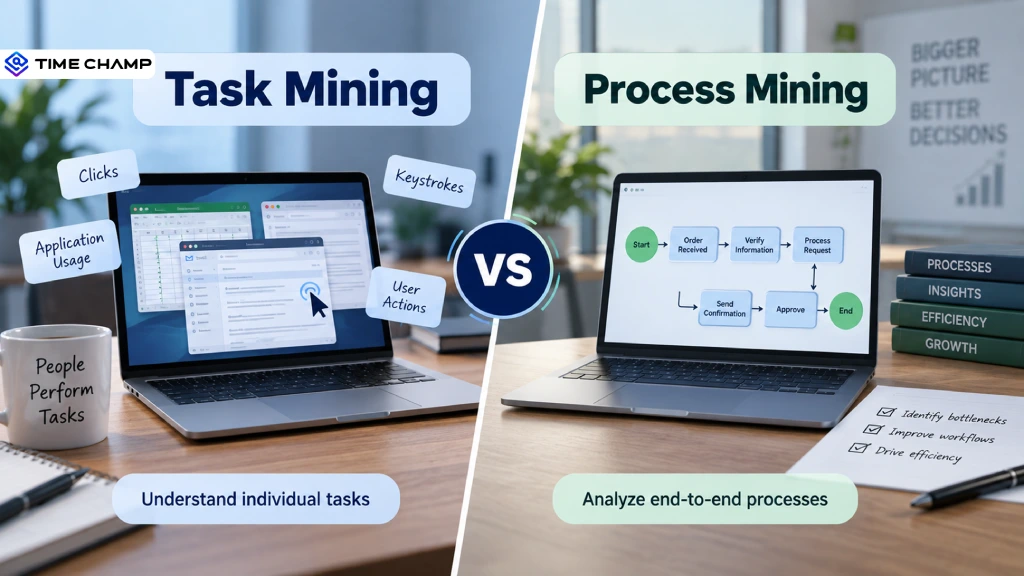
Task mining and process mining may sound similar, but they answer different questions about how work gets done. Task mining looks at the actions involved in completing specific tasks, while process mining looks at the flow of an entire process. Understanding task mining vs process mining can help you see which approach fits your goals. Task mining analyses how one person completes a task, process mining analyses how a case flows through an entire process.
To help you choose the right one, this guide breaks down the key differences, use cases, and how both approaches can work together.
What Is Task Mining?
Task mining means analyzing how a person completes a specific task. It captures the individual actions involved, such as clicks, keystrokes, application usage, and the order of steps taken to complete the task. This helps you find repetitive actions, unnecessary steps, and task-level inefficiencies. You can then simplify those tasks or identify opportunities for automation.
What Is Process Mining?
Process mining means analyzing how an entire business process moves from start to finish. It uses data from business systems to show the sequence of activities, the time each step takes, and how different cases move through the process. This helps you identify bottlenecks, delays, and deviations across the wider workflow. You can then improve the overall process and make it more efficient.

Did You Know?
Gartner reported that the worldwide process mining software market grew 39.5% in 2023, reaching $871.6 million!
Task Mining Vs Process Mining: Key Differences
Task mining and process mining both help you understand how work gets done, but they focus on different levels of activity. Here are the main differences between task mining and process mining.
| Aspect | Task Mining | Process Mining |
|---|---|---|
| Main focus | Individual tasks and user actions | End-to-end business processes |
| What it analyzes | How people complete specific tasks | How activities flow across a process |
| Data source | User activity data such as clicks, keystrokes, and application usage | Event logs from business systems and applications |
| Level of analysis | Task level | Process level |
| Key insights | Repetitive actions, unnecessary steps, and task inefficiencies | Bottlenecks, delays, process variations, and deviations |
| Typical use cases | Task optimization, workflow improvement, and automation opportunities | Process optimization, compliance, and bottleneck identification |
| Main question it answers | “How is this task being done?” | “How does this process actually work?” |
| Best suited for | Improving individual tasks and employee workflows | Improving end-to-end business processes |
In simple terms, task mining gives you a closer look at individual actions, while process mining gives you a broader view of the entire workflow.
Want to see what’s really happening across your team's daily work?
Explore Time Champ to turn employee activity into clearer, more actionable workforce decisions.
When Should You Use Task Mining vs Process Mining?
The right choice depends on what you want to understand and improve. If you want to see how people perform specific tasks, task mining gives you the detailed view you need. If you want to understand how work moves across an entire business process, process mining gives you the bigger picture.
When to Use Task Mining?
- Understand how employees perform specific tasks and identify unnecessary steps.
- Find repetitive activities that take up time during everyday work.
- Identify task-level inefficiencies and opportunities to simplify workflows.
- Discover automation opportunities by finding repetitive, rule-based tasks.
- Improve individual workflows within applications and across desktop activities.
When to Use Process Mining?
- Understand an entire process from start to finish across different systems.
- Find bottlenecks and delays that slow down business processes.
- Identify process variations and deviations from the expected workflow.
- Compare actual processes with the intended process to find gaps.
- Improve end-to-end processes across teams, departments, or systems.
Struggling to understand where your team is losing time?
Use Time Champ to uncover workforce activity patterns, identify inefficiencies, and improve how work gets done.
How Task Mining and Process Mining Work Together
Task mining and process mining work best when you use them together. Process mining gives you a clear view of an entire process, while task mining helps you understand the individual actions happening within that process. Together, they help you move from identifying a process problem to understanding what causes it.
Example
Why Invoice Approvals Take Too Long
Process mining can show that invoices spend too much time at the approval stage. Task mining can reveal the causes of these delays, such as employees spending extra time entering invoice details, switching between applications, or completing repetitive checks. Together, these insights help you identify the real cause of the delay and find ways to improve the process.
You can use both approaches to:
- Identify process bottlenecks with process mining and investigate the tasks behind them with task mining.
- Understand the root cause of process delays and inefficiencies.
- Find automation opportunities at both the task and process levels.
- Improve workflows based on a complete view of how work happens.
How Time Champ Supports Task and Process Mining with Workforce Analytics
Task mining shows what employees do, while process mining shows how work flows. But what about the time spent on that work? Workforce activity analytics helps you see where time goes and where inefficiencies affect productivity. Time Champ is built to give you this visibility.
As an employee monitoring and workforce analytics tool, Time Champ helps you understand employee activity across applications, websites, tasks, and work hours. This makes it easier to spot time-consuming activities, identify productivity gaps, and take action before small inefficiencies become bigger problems.
You Can Use These Insights To
- Visualize Work Patterns: Use the timeline view to see activity hour by hour clearly.
- Spot Activity Trends: Use activity heatmaps to identify high and low activity periods.
- Detect Idle Time: Set thresholds to identify extended periods of inactivity.
- Analyze Activity Intensity: Review keystroke and mouse activity to understand work patterns.
- Track Time Across Tasks: Use automatic time tracking to measure time spent on tasks and projects.
- Spot Workflow Interruptions: Identify frequent app switching and other patterns that slow work.
- Balance Workloads: Compare activity and time data to identify workload imbalances.
- Improve Processes: Use productivity analytics to identify patterns and improve workflows.
Ready to improve your team's productivity before inefficiencies grow?
Start your Time Champ trial today and get clearer insights into how your team works.
Conclusion
Choose task mining if you want to understand how individual tasks are performed. Choose process mining if you want to see how workflows move from start to finish. Choose both if you want to understand task-level activities and end-to-end processes together.
If you are looking for an automated solution to turn workforce activity into actionable insights, Time Champ can help you identify inefficiencies, improve workflows, and make better productivity decisions.

Guna Lakshmi

Table of Content
 What Is Task Mining?
- What Is Process Mining?
- Task Mining Vs Process Mining: Key Differences
- When Should You Use Task Mining vs Process Mining?
- How Task Mining and Process Mining Work Together
- How Time Champ Supports Task and Process Mining with Workforce Analytics
- Conclusion
Instant Signup
Thank you for your request!
We have received your signup request and our team will get back to you soon. In the meantime, you can book a demo to see Time Champ in action.
Book a DemoFree trial. No credit card required. Prefer a walkthrough? Book a demo.
Related Blogs
Learn the basics of process mapping with the help of effective strategies and also case studies to improve your workflows and boost your productivity.
Hima Bindhu Nara | Feb 02, 2024
Learn what workflow automation is, why it’s important, its types, examples, benefits, challenges, and how it differs from business process automation.
Anjali | Apr 08, 2026
Activity tracking software shows you how work actually happens across your team. See what it tracks, how it differs from time tracking, and why it matters.
Guna Lakshmi | Apr 17, 2026
Operational efficiency helps you get more value from time, money, and resources. See how to measure it, reduce waste, and improve daily workflows.
Thasleem Shaik | Oct 09, 2026
Learn how to analyze productivity data, identify patterns, avoid common mistakes, and build reports that turn insights into clear, actionable decisions.
Thasleem Shaik | May 01, 2026


 4.7/5 avg.
Ready to Manage Your Workforce Smarter?
Join our family of 1500+ companies using smart insights to redefine workforces!

Free Trial
No Credit Card Required