Healthcare Time Tracking: A Practical 2026 Guide
Healthcare time tracking designed for 12-hour shifts, staff reassignments, and HIPAA compliance, with the 6 key features and rollout steps that matter most.

Hospital staff are already exhausted due to long shifts, constant schedule changes, overtime approvals, payroll runs, and compliance checks across multiple departments and sites.
Yet many hospitals still rely on manual methods to track employee hours. Studies also show that poor time planning and heavy workloads in healthcare are linked to reduced productivity and missed patient-care time, leading to missed punches, payroll errors, and scheduling confusion.
A healthcare time tracking system helps address this by tracking hours accurately, managing shift changes smoothly, reducing payroll mistakes, and keeping compliance documentation clean.
This blog covers what makes healthcare time tracking different, the key features to look for, and how to roll it out without resistance in clinical settings.
What is Healthcare Time Tracking?
Healthcare time tracking is the process of recording and managing employee work hours in hospitals, clinics, and other healthcare organizations. It helps teams track attendance, shifts, overtime, payroll, and compliance in a more accurate and structured way.
What separates it from standard time tracking is complexity. Healthcare doesn't run 9-to-5, it runs on rotating shifts, overnight schedules, on-call arrangements, float pool assignments, and last-minute swaps. A system that can't handle that isn't really built for healthcare, it's just a generic tool wearing a healthcare badge.
Why Standard Tracking Tools Do Not Work Well in Healthcare
Healthcare operations run 24/7, and staffing models shift constantly. Compliance requirements are strict, and they vary by role, shift type, and location. Generic workforce tools weren't designed with any of that in mind.
Think about what a single shift can involve: overtime hours, a mid-shift role change, a missed break that needs documentation, patient charting, and admin tasks layered on top. Trying to capture all of that manually is how payroll errors happen, and how compliance violations quietly rise until an audit catches them.
Here are the three areas where standard tools tend to break down hardest:
1. Managing Complex Shift Schedules
Rotating schedules, overnight shifts, weekend rotations, float pools, last-minute swaps, and most basic time tracking tools weren't built for any of these. They assume predictable Monday-through-Friday patterns that simply don't exist in healthcare. When the tool can't keep up with how shifts actually work, inaccurate records become the norm, and payroll mistakes follow.
2. Handling Compliance and Payroll Accuracy
Healthcare payroll isn't simple. Overtime rules, break policies, union agreements, shift differentials, holiday rates, there's a lot that has to be calculated correctly every single pay cycle. Missing even one rule consistently creates financial exposure and compliance risk. Small errors add up quickly when payroll is running hundreds of clinical staff.
3. Limited Visibility into Staff Hours
Most organizations can pull a total hours report. What they often can't see is how those hours are distributed, which departments are consistently running overtime, which shifts are understaffed, and where scheduling inefficiencies are quietly scaling labor costs. Without that visibility, you're making workforce decisions with incomplete data.
Features to Look for in Healthcare Time Tracking Software
Not every feature marketed to healthcare organizations is worth prioritizing. These are the ones that make a real operational difference:
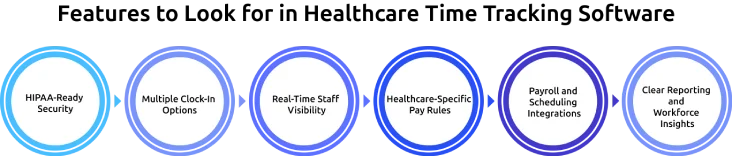
1. HIPAA-Ready Security
Healthcare time tracking systems need encrypted data, role-based access, and audit logs to ensure full compliance and data protection.
2. Multiple Clock-In Options
The system has to support mobile, kiosk, and location-based clock-ins so staff can record time easily across different work settings.
3. Real-Time Staff Visibility
Live dashboards help managers see who is on shift, spot staffing gaps, and respond quickly to coverage issues.
4. Healthcare-Specific Pay Rules
The software must automatically handle overtime, shift differentials, breaks, and on-call pay to avoid payroll errors.
5. Payroll and Scheduling Integrations
Seamless integration with payroll and scheduling tools ensures accurate hours flow directly into payroll without manual work.
6. Clear Reporting and Workforce Insights
Reports need to clearly show overtime, attendance, staffing trends, and labor costs in a simple format that supports decision-making.
Need a Better Healthcare Time Tracking System?
Track every shift accurately, simplify payroll, and stay compliant with ease.
How to Roll Out Healthcare Time Tracking Without Employee Resistance
The software itself is usually not the hard part. The hard part is getting clinical staff to actually use it consistently and getting administrators to configure it correctly before it goes live.
Here's what a smooth rollout actually looks like.
1. Define Clear Goals Before Implementation
What are you actually trying to fix? Missed punches? Payroll errors? Over time, you can't account for? Scheduling gaps that only show up after a shift starts? You need to know the answer before implementation starts, because it shapes how you configure the system, and gives you a benchmark to measure success against once it's live.
2. Involve Clinical and Administrative Teams Early
Charge nurses, HR teams, payroll staff, department managers, and field employees often deal with time tracking issues directly. If these people aren't involved in the rollout process from the start, you'll miss real workflow issues that only become obvious once the system is live, and you'll get resistance because nobody likes surprises.
3. Start with a Small Pilot Program
Instead of rolling out the system across the entire organization at once, it is more effective to begin with a single department or location. This helps to identify workflow issues, test scheduling rules, and improve processes before expanding further.
4. Configure Payroll and Shift Rules Carefully
This is where most implementations stumble. Overtime calculations, shift differentials, on-call minimums, holiday pay, break policies, all of them need to be properly configured in the system before a single shift is tracked. Trying to fix payroll rules after employees have already been paid incorrectly is a trust problem, not just a technical one.
5. Keep Training Simple and Practical
Short, practical training sessions during shift changes are often more effective than long meetings. Staff members also adapt faster when they use the actual devices and workflows they will see during daily operations.
6. Monitor the First Few Payroll Cycles Closely
Most payroll or scheduling issues appear during the first few pay cycles after implementation. Reviewing reports closely during this period helps to identify errors early and improve system accuracy faster.
A successful time tracking rollout usually depends less on the software itself and more on how well the implementation process is managed across teams and departments.
Common Mistakes Healthcare Organizations Make with Time Tracking
Even the right healthcare time tracking software can fail if the rollout process is not managed properly. Here are some common mistakes to avoid:
- A system may look smooth during a demo, but fail during real hospital workflows with shift changes or busy hours.
- Overtime rules, shift differentials, on-call hours, and break policies need to be set up before going live to avoid payroll errors later.
- Launching across all departments at once can create confusion. Starting with one unit helps identify issues early and improves system stability.
- Clinical leaders, department managers, payroll teams, and staff need to be involved during implementation, as these are the people who find errors first.
- Staff adoption improves when employees clearly understand why the system is being introduced and how it supports fair scheduling, accurate pay, and smoother operations.
Avoiding these mistakes can make healthcare time tracking implementation smoother and more effective across teams.
Why Time Champ is the Best Healthcare Time Tracking Software
Time Champ is an employee monitoring software with advanced workforce intelligence features. It is designed to simplify healthcare time tracking and help hospitals, clinics, and healthcare teams manage employee hours, shift schedules, payroll, and overall workforce operations with better accuracy and less manual effort.
Here are some of the key features that make Time Champ a strong fit for healthcare organizations:
Easy Clock-In and Clock-Out
Time Champ allows employees to quickly clock in and out using a simple, device-friendly system that ensures accurate attendance during shift changes.
Automated Time Tracking
The system automatically records working hours, breaks, and shift durations in real time, reducing manual errors and timesheet effort.
Simple Shift Scheduling
Administrators can easily create, assign, and update shifts based on roles, availability, and location to manage changing schedules efficiently.
Real-Time Workforce Visibility
Managers get live visibility into attendance, active shifts, and staffing gaps to handle absences and workload changes quickly.
Payroll and Timesheet Automation
Approved work hours are automatically converted into timesheets and synced with payroll systems to reduce manual processing.
GPS-Based Field Staff Tracking
GPS and geofencing features help verify attendance and track field staff working across multiple healthcare locations.
Workforce Analytics and Reporting
The system provides clear reports on attendance, overtime, and workforce trends to support better staffing decisions.
HIPAA-Ready Security and Compliance Support
Time Champ ensures data security with role-based access, encryption, and audit logs to support healthcare compliance requirements.
Overall, Time Champ brings healthcare time tracking, shifts, payroll, and workforce management into one system with better accuracy and less manual effort.
Ready to Get Your Healthcare Time Tracking Right?
Track time, manage payroll, and handle schedules with ease.
Conclusion
Healthcare time tracking works best when it is treated as an operational improvement rather than just a software upgrade. When implemented correctly, it helps healthcare organizations reduce payroll errors and gain better visibility into workforce activity. The real value comes from choosing the right system and maintaining smooth adoption across teams. With the right approach, you can move from manual, error-prone processes to more accurate and reliable workforce management.

Jahnavi Pulluri

Table of Content
 What is Healthcare Time Tracking?
- Why Standard Tracking Tools Do Not Work Well in Healthcare
- Features to Look for in Healthcare Time Tracking Software
- How to Roll Out Healthcare Time Tracking Without Employee Resistance
- Common Mistakes Healthcare Organizations Make with Time Tracking
- Why Time Champ is the Best Healthcare Time Tracking Software
- Conclusion

Related Blogs

Explore how workforce intelligence supports healthcare organizations in workforce planning, burnout reduction, staffing, and informed HR decision-making.
Chethana Choudary | Feb 11, 2026
Learn how employee monitoring in healthcare protects patient data, tracks admin productivity, detects insider threats, and keeps your organization audit-ready.
Anjali | Apr 20, 2026
Want to know if your team is truly productive and balanced? Explore the 9 organizational health metrics that matter and learn how to track them.
Guna Lakshmi | Apr 20, 2026
Discover essential features of time tracking software and how Time Champ enhances project management, productivity, and accuracy.
Tarun Kumar Reddy | Aug 23, 2024
Uncover the chaos of a day without time tracking. Explore how managers struggle with productivity, accountability, and team coordination in this insightful read.
Jahnavi Pulluri | Oct 25, 2024
Unorganized work hours? Time tracking categories bring clarity, optimize workflows, and boost productivity. Learn how to set them up effectively.
Thasleem Shaik | Nov 08, 2024


 4.7/5 avg.
Ready to Manage Your Workforce Smarter?
Join our family of 1500+ companies using smart insights to redefine workforces!

Free Trial
No Credit Card Required