Shift Monitoring System: Benefits, Features and Setup
Explore shift monitoring system benefits, key features, and set up tips to improve scheduling, track shifts accurately, and manage teams more efficiently.

Managing shifts sounds simple until missed handovers, unclear schedules, and inconsistent tracking start slowing everything down. One small gap in visibility can turn into delayed tasks, payroll confusion, or even team frustration. Many teams don’t realize the issue isn’t effort, it’s the lack of a clear, reliable way to see what’s happening across every shift in real time. This is where a shift monitoring system helps you gain clarity, improve coordination, and keep every shift running smoothly.
This blog explains how a shift monitoring system helps you gain clear visibility, improve control, and manage shifts more effectively. You’ll learn its benefits, key features, and how to set it up to make smarter, data-driven decisions for your team.
What Is a Shift Monitoring System?
A shift monitoring system is a software solution that helps organizations track employee attendance, monitor shift adherence, and manage schedules in real-time. It provides visibility into start and end times, improves coordination, and supports better workforce management decisions.
Importance of Shift Monitoring System:
- Shift monitoring system ensures accurate tracking of employee work hours, reducing errors in attendance records, and improving overall payroll accuracy.
- Helps prevent scheduling conflicts and missed shifts by providing clear visibility into who is working and when.
- Improves team coordination across multiple shifts by giving managers real-time insights into ongoing work and responsibilities.
- Provides real-time visibility into workforce activity, helping managers quickly identify delays, gaps, or inefficiencies in shift performance.
- Helps to control labor costs by offering data-driven insights into staffing needs, overtime usage, and overall workforce efficiency.

Did You Know?
A study by the Washington Center for Equitable Growth found that 68% of U.S. employees report some form of electronic monitoring, highlighting how workforce visibility has become essential for managing shifts effectively and ensuring operational control.
How Is Shift Monitoring Different from Shift Scheduling?
Shift scheduling focuses on planning who works and when, while a shift monitoring system ensures those plans are followed in real-time. Understanding this difference helps you move from simply assigning shifts to managing them effectively.
The table below shows how shift scheduling and a shift monitoring system differ in purpose, timing, and outcomes.
| Aspect | Shift Scheduling | Shift Monitoring System |
|---|---|---|
| Purpose | Assign shifts and plans for employee work hours in advance | Track and manages how shifts are executed in real time using a shift monitoring system |
| Focus | Planning schedules and allocating resources | Monitoring attendance, adherence, and actual work activity |
| Timing | Done before the shift begins | Happens during and after the shift |
| Visibility | Limited to planned schedules | Provides real-time visibility into ongoing shifts and workforce activity |
| Flexibility | Requires manual updates for changes | Adjusts dynamically with real-time data and alerts |
| Outcome | Ensures coverage and staffing | Ensures productivity, accountability, and smooth shift execution |
What are The Biggest Benefits of a Shift Monitoring Software?
A shift monitoring system does more than track shifts, it gives you the clarity and control needed to run operations smoothly. From improving efficiency to supporting better decisions, it helps you manage your workforce with confidence and consistency.
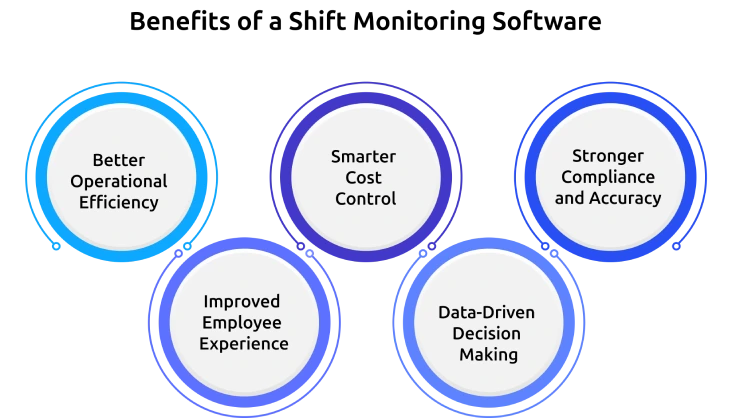
Better Operational Efficiency
Gives you real-time visibility into shift activities, including attendance, start and end times, and ongoing work progress. This helps you quickly identify gaps, avoid delays, and maintain smooth operations across all shifts.
Smarter Cost Control
Reduces labor expenses by identifying overtime trends, idle time, and overstaffing across shifts. Better visibility in workforce usage helps you allocate resources efficiently and avoid unnecessary spending.
Stronger Compliance and Accuracy
Ensures accurate tracking of employee work hours, attendance, and breaks through automated systems. This improves record accuracy, supports compliance, and minimizes the risk of payroll errors or policy violations.
Improved Employee Experience
Improves coordination by providing employees with clear schedules and better shift visibility. This reduces confusion, supports smoother handovers, and creates a more structured and reliable work environment.
Data-Driven Decision Making
Enables better decision-making with insights into shift performance, attendance patterns, and productivity trends. These insights help you optimize planning, improve efficiency, and manage your workforce more effectively.
Features to Look for In a Shift Monitoring System
Choosing the right shift monitoring system depends on how well it supports real-time visibility, accuracy, and ease of management. The right features not only simplify shift tracking but also help you run operations more efficiently.
Flexible Shift Scheduling and Planning
Look for a system that allows you to create, edit, and manage schedules easily without conflicts. Flexible scheduling ensures smooth shift planning, even for complex rotations or last-minute changes.
Mobile Access for Employees
A mobile-friendly system allows employees to check schedules, clock in or out, and request changes directly from their devices. This improves accessibility and keeps everyone aligned without constant manual communication.
Real-Time Attendance and Activity Tracking
Accurate tracking methods such as GPS, biometrics, or digital check-ins help monitor attendance in real time. A reliable shift monitoring system ensures that you always know who is on-site and actively working.
Built-In Compliance and Policy Support
Choose a system that automatically tracks work hours, breaks, and overtime based on labor policies. This helps reduce compliance risks and alerts you to potential violations before they become issues.
Payroll and HR Integration
Integration with payroll and HR systems ensures that attendance data flows directly into salary processing. This reduces manual errors and ensures employees are paid accurately for their work hours.
Advanced Analytics and Reporting Insights
Look for systems that provide detailed reports on attendance, productivity, and labor costs. These insights help you make informed decisions, optimize staffing, and improve overall workforce performance.
Want complete control over employee shifts and daily operations?
Start using Time Champ for real-time insights and alerts.
How to Set Up a Shift Monitoring System for Your Team
Setting up a shift monitoring system requires a structured approach to ensure accurate tracking, smooth coordination, and minimal disruptions. When implemented correctly, it helps you move from manual scheduling to a more controlled and transparent workflow.
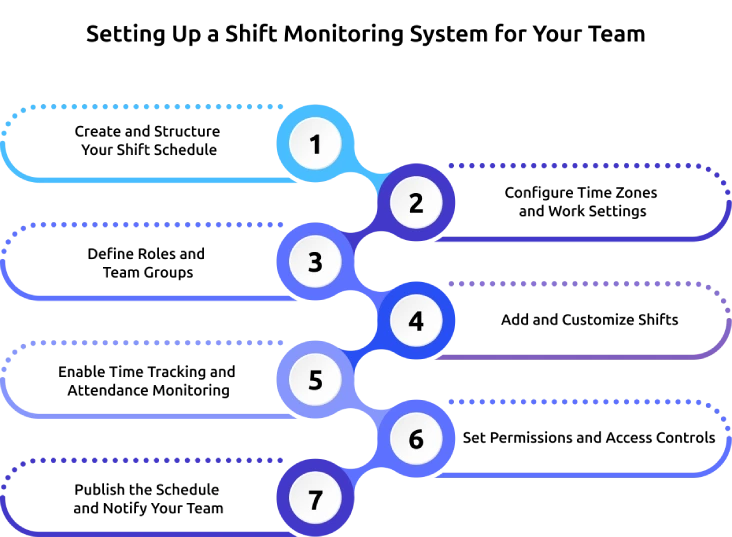
1. Create and Structure Your Shift Schedule
Start by setting up a new schedule within your system and defining the team or department it applies to. Organize shifts clearly so that each role, timing, and responsibility is properly assigned from the beginning.
2. Configure Time Zones and Work Settings
Ensure the correct time zone, location, and working hours are configured for your team. This step is essential for accurate time tracking, especially if you manage distributed or remote employees.
3. Define Roles and Team Groups
Organize employees into specific roles or departments based on their responsibilities. Grouping team members properly makes it easier to assign shifts, manage workloads, and maintain clarity across different functions.
4. Add and Customize Shifts
Create shift slots by defining start times, end times, and any additional notes or instructions. You can also standardize recurring shifts or use templates to save time and maintain consistency.
5. Enable Time Tracking and Attendance Monitoring
Activate time tracking features that allow employees to clock in and out of their shifts. A reliable shift monitoring system may include options like mobile check-ins, location tracking, or biometric verification for better accuracy.
6. Set Permissions and Access Controls
Define who can view schedules, request changes, or manage shifts within the system. Setting clear permissions helps maintain control while allowing employees enough flexibility to manage their schedules when needed.
7. Publish the Schedule and Notify Your Team
Once everything is set up, publish the schedule and notify your team so they can access their assigned shifts. Clear communication at this stage ensures everyone is aligned and ready to follow the planned schedule without confusion.
How Time Champ Supports Shift Monitoring in Your Organization?
Managing shifts often means working across multiple tools, dealing with unclear attendance data, and constantly following up just to understand what’s happening in real-time. When visibility is limited, small issues like late logins or missed shifts can quickly turn into bigger operational problems. Time Champ is an employee monitoring software with shift monitoring features that simplifies everything by bringing scheduling, tracking, and real-time insights into one unified platform.
Time Champ works by combining shift scheduling, live attendance tracking, and real-time monitoring with actionable reporting, so you can always have a clear view of your workforce. You can create and manage shifts using flexible drag-and-drop scheduling, track attendance through web check-ins, mobile, biometric, or clock-ins, and receive instant alerts for late arrivals, missed shifts, or overtime risks. It also supports compliance tracking for breaks and working hours, offers detailed exportable reports for payroll and audits, and provides mobile access with GPS verification and offline sync for distributed teams. With a quick setup and compatibility across devices, Time Champ helps you manage shifts efficiently without switching between multiple tools.
Struggling to track shifts clearly and missing real-time visibility?
Time Champ gives you clear, live insights to monitor every shift with confidence.
Conclusion
Managing shifts becomes much easier when you have clear visibility and control in place. A shift monitoring system helps reduce manual effort, minimizes scheduling gaps, and keeps every shift running as planned. When you combine clear tracking with real-time insights, you can improve team coordination, control labor costs, and make better decisions. You can stay proactive, address issues early, and keep operations running smoothly. Choosing the right system helps you build a more structured, transparent, and efficient work environment that supports both your team and the long-term business goals.

Anjali


Table of Content
-
 What Is a Shift Monitoring System?
-
How Is Shift Monitoring Different from Shift Scheduling?
-
What are The Biggest Benefits of a Shift Monitoring Software?
-
Features to Look for In a Shift Monitoring System
-
How to Set Up a Shift Monitoring System for Your Team
-
How Time Champ Supports Shift Monitoring in Your Organization?
-
Conclusion
Related Blogs
Explore key types and strategies for employee performance monitoring to boost productivity and align team goals with company success.
Jahnavi Pulluri | January 21, 2025
Find the 10 best employee scheduling software for 2025. Compare features, pricing, pros & cons to boost productivity and manage teams better.

Choose the right employee monitoring tool for your team with this 2026 guide. Explore types, key features, a 5-step framework, and top software options.
Jahnavi Pulluri | June 7, 2023
Explore the best remote employee management software systems for productivity, collaboration, and performance tracking.
Jahnavi Pulluri | March 12, 2025
Maximize productivity with comprehensive PC Activity Monitoring. Track, analyze, and optimize work habits for peak efficiency and performance.
Mounika Sai | January 9, 2024
Learn how to choose the right remote employee monitoring software with the right features, scalability, and usability to manage remote teams effectively.
Guna Lakshmi | April 14, 2026


 4.7/5 avg.
Ready to Manage Your Workforce Smarter?
Join our family of 1500+ companies using smart insights to redefine workforces!

Free Trial
No Credit Card Required