Mobile Workforce Management: What it is & How to Manage
Learn what mobile workforce management is, why it matters, key challenges, must-have features, and how to manage your mobile team without losing visibility.

If you run a small team that works outside the office, then you already know the daily struggle that goes behind managing a mobile workforce.
Most of the time, schedules keep skipping, workdays stretch long, someone is stuck in traffic, another is on a site with no signal, and by 5 PM, half of your day has been spent chasing updates from each employee, instead of actually moving things forward.
This mess actually has a name, and it is fixable, too. It’s called mobile workforce management, and it’s how small teams or field workers, technicians, drivers, sales reps, and on-site crews go from "guessing it on group chats" to running like a coordinated unit.
The world is leaning into this fast: roughly 80% of the global workforce, around 2.7 billion people, are deskless, and the businesses that figure out how to support them are the ones rising to the top.
I’ll break down everything related to mobile workforce management, from what it is, how to track the right way, the strategies, to must have features to look for in an MWM tool.
What Is Mobile Workforce Management?
Mobile workforce management is how a business plans, supports, and coordinates employees who do most of their work outside the office. Think of field technicians fixing a router, sales reps running customer meetings, delivery drivers on a route, home health nurses on visits, or merchandisers checking store shelves. Their "office" is a phone, a tablet, and the next location on the schedule.
Mobile workforce management software helps teams manage schedules, track tasks, communicate, and access important data directly from their phones. Simply put, it runs the day-to-day work for teams that aren’t desk-based.
Mobile Workforce Management vs. Field Service Management
People keep mixing these terms up all the time, so here is a simple split. Field service management is one slice of mobile workforce management, focused on technicians who repair, install, or service equipment (HVAC, telecom, utilities, that sort of thing). Mobile workforce management is the larger umbrella that covers field service plus drivers, sales reps, healthcare workers, auditors, retail merchandisers, and pretty much anyone whose job runs through a phone away from a desk.
Every field service team is a mobile workforce, but not every mobile workforce is doing field service.
Who Counts as A Mobile Workforce
If your team works mostly outside the office and uses a phone or tablet to do their job, they're a mobile workforce. This is a short list of who fits:
- HVAC, electrical, plumbing, and telecom technicians
- Delivery drivers, last-mile couriers, and fleet operators
- Traveling sales reps and account managers
- Home health and hospice nurses
- Auditors, inspectors, and surveyors
- Real estate agents and property managers
- Cleaning, landscaping, and pest control crews
- Retail merchandisers, brand reps, and field marketing teams
What a Mobile Workforce Management System Actually Does
A mobile workforce management system is the layer that connects your office to your field. It takes job requests, plans the schedule, sends work to the right person based on skill and location, lets that person check in, fill out forms, and capture proof on their phone, and pushes everything back to billing, payroll, and reporting.
In day-to-day terms, that means GPS-backed check-ins, mobile timesheets, digital job sheets with photos and signatures, route planning, two-way messaging, and analytics, all in one app. The good ones also work offline, so a worker in a basement or a rural site doesn't lose progress when bars disappear.
Why Mobile Workforce Management Matters in 2026
Mobile teams now make up the majority of the global workforce, and the businesses that manage them well are quietly overcoming the ones that don't. The mobile workforce management market itself jumped from about $7.18 billion in 2025 to $8.1 billion in 2026, growing at a 12.8% CAGR. That's not hype, that's a lot of teams realizing that spreadsheets, group texts, and end-of-day catch-ups can't carry the weight anymore.
The payoff is real. Around 75% of field service businesses using mobility tools report increased employee productivity, and organizations adopting mobile workforce optimization typically see 20% to 30% productivity gains alongside 20% to 30% drive time reductions, with significant downstream savings on fuel and overtime as schedules tighten up. And on the worker side, 70% of deskless workers say better tech would help them perform better, which means investing here is also one of the most direct retention plays you can make.
The Cost of an Uncoordinated Mobile Team
Without a system in place, the symptoms are always the same. Jobs keep running late, customers chase updates that never come, timesheets land on Monday, and nobody can verify them. Two technicians end up at the same job. A reschedule on Tuesday quietly breaks a route on Thursday. The first-time fix rate, a key field-service metric, hovers around 75% on average, and every percentage point left on the table is a callback you didn't need. None of it looks like a crisis on its own. Together, it adds up to lost revenue, frustrated workers, and a slower business.
Industries That Lean on Mobile Workforce Management
Some industries simply cannot run without it. Construction, utilities, telecom, logistics, healthcare, retail merchandising, hospitality, housekeeping, facility management, security services, and on-demand home services all depend on mobile teams hitting the right place at the right time. If competitors in your space already use a mobile workforce management solution, you're effectively running the slower version of the same business.
Core Features of Mobile Workforce Management Software
Not every mobile workforce management software does everything, but the strong ones share a familiar feature set. Salesforce groups them around four jobs: planning the work, doing it, capturing the proof, and learning from the data. Here is the practical version.
| Feature | What it does | Why it matters for a small team |
|---|---|---|
| Scheduling and dispatch | Assigns jobs by skill, availability, and location | Cuts windshield time and overtime |
| GPS and geofencing | Confirms arrivals and triggers auto check-ins on site | Replaces "Are you there yet?" texts with live answers |
| Mobile time tracking | Lets workers clock in and out from their phone | Clean payroll, no paper timesheets |
| Digital forms and proof of work | Captures inspections, photos, and signatures | Audit-ready records for every job |
| Real-time communication | Two-way messaging tied to the job, not a random chat | One thread per job, no scattered texts |
| Route optimization | Plans the fastest sequence of stops | Saves fuel and squeezes in extra jobs |
| Offline mode | Works without signal, syncs later | Keeps remote sites and basements productive |
| Customer and asset data on mobile | Job history, parts, and notes inside the app | Workers walk into a job already up to speed |
| Analytics and reporting | KPIs, trends, and live dashboards | Daily activity becomes weekly decisions |
| Integrations | Connects to payroll, CRM, accounting, and ERP | Stops data getting stuck in silos |
You don't need every feature on day one. Start with the two that remove the most pain (usually scheduling plus mobile time tracking) and layer the rest in.
How to Track Mobile Workforce
"Tracking" sounds heavy at first, but the goal here isn't big brother range surveillance, it's coordination. You want to know where the next job stands, who's free, when the last one will wrap, and whether you can promise a customer a 4 PM arrival. Here's a five-step approach for mobile workforce tracking that supports the team instead of crowding them.
Step 1: Decide What You Actually Need to See
Before you switch anything on, write down the three or four questions you want answered the most every day. "Did the technician arrive on time?" "How many jobs did we close?" "Where is the nearest available driver?" "Did anyone log overtime today?" Those questions become your KPIs, and your KPIs decide what you track. Without that filter, every dashboard ends up bloated and ignored.
Step 2: Pick the Right Mix of Tracking Methods
Different jobs need different tools. The four most common workforce tracking mobile methods:
- GPS location tracking for live routes, ETAs, and arrival confirmation
- Geofencing for automatic clock-ins when a worker enters a job site
- Mobile time clocks for hours, breaks, and overtime
- Job and task status for proof of completion and progress
Most small teams blend two or three, a delivery operation leans on GPS and geofencing, a sales team leans on app activity and time, A maintenance crew leans on all four.
Step 3: Run it Through One Mobile Workforce Management App
If your team has to bounce between four apps to do their job, you don't have a system, you have homework. The right mobile workforce management app should run scheduling, time, location, and forms inside one experience. Light on the phone, simple to use, and ready to work offline. Adoption dies the minute people are asked to babysit two passwords.
Step 4: Be Open About What You are Tracking
Tell your team exactly what's being tracked, when, and why, put it in writing, and make it part of onboarding. Most workers are completely fine with mobile workforce tracking when they know it stops at the end of their shift, the data is used to support them, and they know that personal stuff is off limits. Almost all the resentment comes from surprise tracking, not from the tracking itself.
Step 5: Review the Data on a Rhythm, not on Impulse
Pick a cadence, daily for live ops, weekly for coaching and performance, and monthly for strategy. Resist the urge to refresh the dashboard every 20 minutes, because that's how managers start chasing ghosts, and employees start feeling watched. The whole point of a mobile workforce management system is to give you and your employees trust, not anxiety.
Get Instant Visibility into Your Mobile Workforce!
Track attendance, routes, expenses all in a single platform
Strategies to Manage a Mobile Workforce
Tracking is the data layer. Managing a mobile workforce is everything you do with that data. These seven strategies are what separate a small mobile team that hums from one that drags.
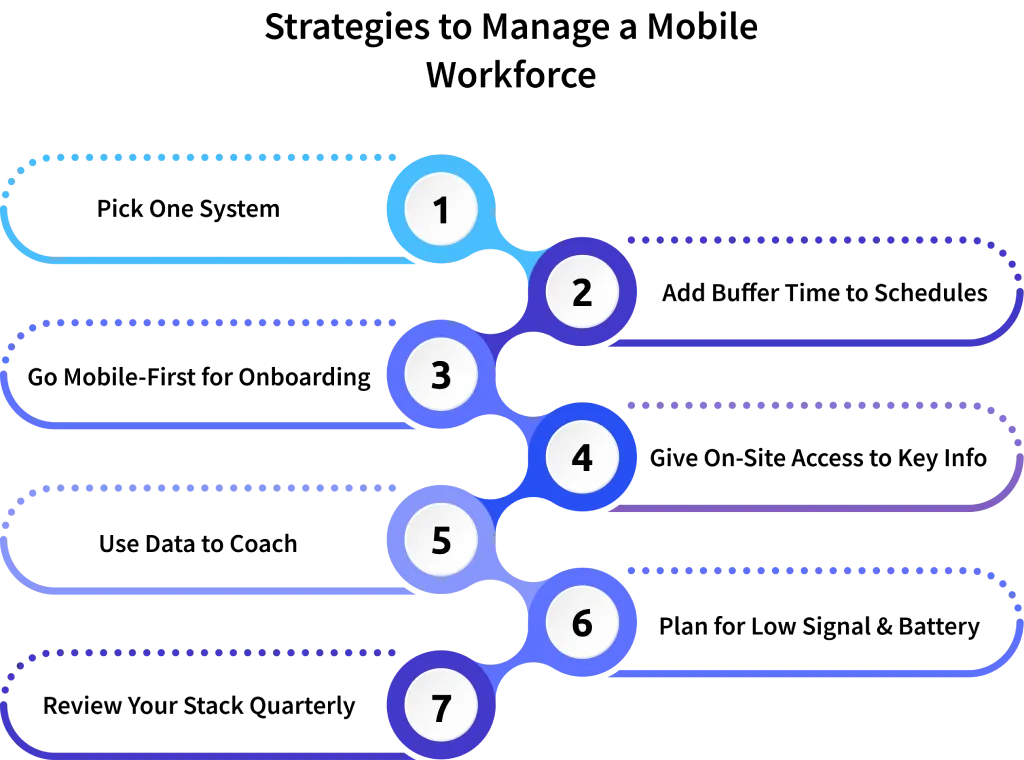
Pick One Operating System, Not Five
The single fastest way to create chaos in a mobile workforce is to spread the work across a scheduler, a chat app, a separate time-tracker, a spreadsheet, and email. Pick one mobile workforce management solution that does the core jobs (schedule, time, location, forms, comms) and consolidate the rest. The clarity is worth far more than the "best of breed" stack.
Build Buffer Time into Every Schedule
The most common mistake in field operations is back-to-back scheduling with zero margin. Traffic, parking, paperwork, and one chatty customer can blow up a whole day. So, build 15 to 20 minutes of buffer between jobs, your on-time rate jumps right away, and your team stops dreading the schedule.
Make Onboarding Mobile-first
Most onboarding is built for someone with two monitors at a desk, that's not a field worker's reality. Build a 30-minute, mobile-friendly onboarding, include the app walkthrough, the schedule rules, the time and location policy, and what to do when the signal drops. New hires tend to hit productivity faster, and you stop losing the first week to confusion.
Equip Workers with the Info They Need on Site
Most managers miss this often: the whole point of a mobile workforce management app is not just to tell a worker where to go, it's to put the customer history, parts list, last service notes, and how-to articles in their pocket before they walk in the door. AI-generated job briefs are starting to do this automatically. Whatever the source is, give the worker context, and the first-time fix rate goes up, easy right!
Coach with the Data, Don't Police With it
Use your dashboards to spot patterns, not punish people. If a technician's job times keep slipping, that's a coaching conversation, or a training gap, or maybe a routing problem. The worst move is opening the dashboard, finding a number you don't like, and firing off a passive-aggressive message. Treat the data as a starting point for a conversation, not the conclusion.
Plan for Dead Zones and Dying Batteries
Field reality includes basements, rural sites, parking garages, and phones that die at 3 PM.
- Choose tools with an offline mode
- Provide chargers (yes, even cheap car chargers count)
- Set the expectation that not every check-in lands in real time
Reports will still come together, and your team won't panic when their bars disappear.
Audit the Stack Every Quarter
Mobile workforce management software keeps changing, or you can say it keeps updating very fast. Every quarter, sit with one or two field workers and ask, "What slowed you down this week?"
- Look at adoption numbers
- Drop the apps nobody opens
- Add the integrations that would actually save time
Because tools quietly rot when nobody actually checks them.
Common Mistakes Managers Make with a Mobile Workforce
Most failures aren't dramatic, they're just tiny little habits that pile up. Make sure you watch out for these:
- Tracking everything just because the software allows it
- Hiding what's being tracked from the team
- Choosing a tool based on a slick demo instead of a real-world pilot program
- Treating the office team as the priority and the field team as an afterthought
- Skipping training because "the app says its intuitive"
- Ignoring offline scenarios and blaming workers when data goes missing
- Confusing activity (location pings) with productivity (jobs completed well)
- Running the same Monday meeting forever, regardless of what the data is saying
Even if you fix any two of these, you'll feel a shift inside a month.
How to Choose a Mobile Workforce Management Solution
A buyer's scorecard helps you compare options without falling for sales theater. Score each tool from 1 to 5 on these ten criteria.
| Criterion | What to Look For |
|---|---|
| Mobile-first design | Built for a phone, not a shrunk-down desktop interface |
| Offline mode | Forms, time, and tasks work without signal |
| GPS and geofencing | Live location plus auto check-in zones |
| Scheduling flexibility | Drag-and-drop, recurring jobs, skill-based dispatch |
| Time and attendance | Mobile clock-in, break tracking, overtime alerts |
| Forms and proof | Digital checklists, photos, and signatures |
| Integrations | Payroll, CRM, accounting, ERP, calendars |
| Reporting | Pre-built and custom dashboards |
| Privacy controls | Tracking limited to work hours and work zones |
| Pricing transparency | Per-user pricing with no surprise add-ons |
A score of 40 or above out of 50 is a serious candidate. If it’s below 30 then, you're just standing in a huge line to buy that headache first.
How Time Champ Helps You Manage a Mobile Workforce
Time Champ pulls scheduling, GPS-backed mobile time tracking, geofenced clock-ins, mobile timesheets, productivity analytics, and reporting into one mobile workforce management app your team will actually open.
- Field workers clock in from a job site in just two taps.
- Managers see who's where, what's done, and what's delayed without chasing anyone.
- Privacy controls keep tracking inside work hours, where they really belong.
Whether you run a five-person crew or a 500-person field team, Time Champ scales with your business and integrates with payroll, CRM, and accounting tools you already use.
Ready to stop running your mobile team on guesswork?
See how your field operations happen in real-time
Wrapping Up
Managing a mobile workforce isn't about watching people. It's about giving a small team that works outside the office the tools, schedules, and information they need to do great work, and giving you the visibility to coordinate it all without burning out. With the global market on track for double-digit growth and 80% of workers already deskless, leaders who get this right will quietly move ahead.
Here’s a small final checklist to remember, even though you forget the whole blog later:
- Start small
- Pick the two questions you most want answered about your field team
- Choose a mobile workforce management app that answers them well
- Be open with your team about what you're tracking and why
- Coach with the data instead of policing with it
- Audit the stack every quarter
That alone will put you ahead of most companies still juggling spreadsheets and group chats

Shabana Shaik

Table of Content
 What Is Mobile Workforce Management?
- Why Mobile Workforce Management Matters in 2026
- Core Features of Mobile Workforce Management Software
- How to Track Mobile Workforce
- Strategies to Manage a Mobile Workforce
- Common Mistakes Managers Make with a Mobile Workforce
- How to Choose a Mobile Workforce Management Solution
- How Time Champ Helps You Manage a Mobile Workforce
- Wrapping Up

Related Blogs
Discover how field service workforce management improves scheduling, boosts team productivity, lowers operational costs, and enhances customer satisfaction.
Jahnavi Pulluri | August 22, 202![Workforce Management vs Workforce Optimisation-[2025]](https://www.timechamp.io/images/workforcemanagement-vs-workforce-optimization.webp)
Workforce Management (WFM) vs Workforce Optimization (WFO). Learn the definitions, key functions, similarities, and best-fit use cases for businesses
Chethana | September 01, 2025
Remote workforce management, also called virtual workforce management, helps teams stay engaged. Explore its definition, benefits, challenges & tools.
Thasleem Shaik | September 16, 2025
Explore the 10 workforce management reports to master your business. They unlock key insights to boost productivity, cut costs & drive business growth.
Chethana Choudary | Oct 01, 2025
Stay ahead with 10 workforce management trends that are redefining business success. From digital tools to staff growth, see what’s driving the future of work.
Guna Lakshmi | September 25, 2025
Discover 10 key workforce planning metrics for 2025. Learn how these analytics metrics impact hiring, retention, productivity & strategic HR planning.
Chethana Choudary | Oct 01, 2025


 4.7/5 avg.
Ready to Manage Your Workforce Smarter?
Join our family of 1500+ companies using smart insights to redefine workforces!

Free Trial
No Credit Card Required