Employee Productivity Tracking Policy: Free Template + Guide
Learn about productivity tracking policy with a downloadable template and 30-day rollout plan to implement tracking clearly and build team acceptance.

Without a clear productivity tracking policy in place before deployment, teams often end up confused about what is being tracked, why it is being tracked, and how the data will be used. This lack of clarity can quickly lead to inconsistent expectations, unnecessary concerns, and friction between employees and managers once the software is switched on.
Preparing to roll out productivity tracking software, writing a policy from scratch is probably not where you want to spend your time. You’re working against a deadline, and compliance language isn’t your day job.
The good news is that you don’t have to start from zero. The template in the blog gives you a ready-to-use policy, the 30-day implementation guide shows you how to roll it out step by step.
Why You Need a Policy Before Deploying Productivity Tracking Software?
A productivity tracking policy is the document that turns monitoring from a risk into a routine. It explains what is being tracked, why it is tracked, and how the data is used. It gives you a consistent framework to make decisions and gives you a legal record if questions or audits come up.
Software alone cannot do this. A policy fills the gaps in three ways:
Defines Lawful Basis
It clearly states what is tracked, why it is tracked, and under what authority. In regions like the UK and EU, this is required under GDPR since productivity data is treated as personal data. In regions of the US, such as New York, Connecticut, and Delaware, employee monitoring laws also require notice. Everywhere else, it remains a strong best practice.
Sets Boundaries
It defines what is tracked, what is not, when tracking happens, and on which devices. Without clear boundaries, you interpret the system differently, and inconsistency becomes the real problem.
Creates Predictability
It gives employees clarity on the rules, ensures you apply them consistently, and provides you with a single reference point. This is what separates a rollout that builds trust from one that creates resistance.
Skipping the policy has real consequences. Legal exposure increases in regions where notice or consent is required. Trust drops when employees are left guessing what is being tracked. And inconsistent enforcement emerges when you rely on your own judgment instead of a shared standard. These issues rarely appear in the first month, but they compound quickly after.
The template gives you a ready starting point. The sections that follow show how to adapt it, roll it out, and handle the questions your team will ask.
Free Productivity Tracking Policy Template
Use the template below to create a clear productivity tracking policy for your organization. It is designed for teams implementing activity tracking, time tracking, app and website monitoring, screenshots, or productivity dashboards.
It works across SMBs, mid-sized companies, and remote or hybrid setups. Replace the placeholders with your details, review it with your legal team if needed, and roll it out with your tracking system.
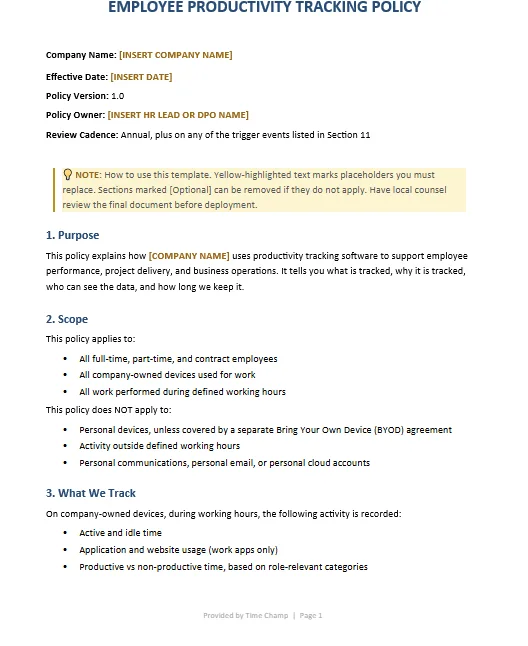
That’s the complete template. The next section shows you what to keep, what to remove, and how to adapt it to your specific setup.
How to Adapt the Template to Your Organization
A template is just a starting point, not a finished policy. The version you use depends on three factors: your team size, where your employees are based, and how deeply you track activity. Work through each of these to shape a policy that fits your setup.
1. By Organization Size
Under 25 Employees
If you operate only in the US, you can simplify Section 5 (lawful basis) instead of removing it entirely. You may also remove the Subject Access Request point in Section 9. Keep the rest as is, the template is already suitable for a small team.
25 to 250 Employees
Add a short note in Section 8 explaining how tracking data supports hiring or capacity planning if relevant. In Section 6, clearly define which roles can access data instead of using general labels.
250+ Employees
Add a section for Works Council consultation if you operate in countries like Germany, France, or Italy. Include data residency details if data is stored across regions. Consider a separate guide for managers outlining their responsibilities.
2. By Jurisdiction
US-Only
Keep a simplified lawful basis section. Add a note in Section 6 about state-level requirements if you employ people in New York, Connecticut, or Delaware, where employers are required to notify employees aboutelectronic monitoring.
UK or EU
Keep Section 5. Reference your Legitimate Interest Assessment and make sure it is documented. Add your Data Protection Officer’s contact details in Section 9.
India
Include a clear notice explaining what is being tracked and why. While regulations are still evolving, employers are expected to inform employees and handle data responsibly under applicable IT and data protection guidelines.
Multi-Region
Use the strictest applicable version across all regions. Then add a short regional appendix to handle country-specific differences. Avoid maintaining separate policies for each location to reduce complexity and inconsistency.
3. By Monitoring Depth
Time Tracking Only
Remove screenshot and keystroke references in Section 3. A simpler policy aligns with lower-risk monitoring.
Activity Tracking with Screenshots
Keep screenshot-related clauses. Clearly define what is blurred, when it is blurred, and how sensitive content is handled.
Full Activity with Keystroke Intensity
Keep all monitoring sections. Add a clear business justification in Section 1 explaining why this level of tracking is necessary. Tools at this level are increasingly under regulatory scrutiny, so documentation and clarity become more important.
4. Sections You Should Never Remove
Some sections are essential regardless of your setup:
Section 4 (What You Do Not Track)
This is critical for building trust. Be specific about exclusions such as personal apps, off-hours activity, or webcams.
Section 6 (Who Can See Data)
Clarity here prevents confusion and reduces the risk of misuse or unexpected access.
Section 11 (Policy Review)
Without regular review, the policy can become outdated. A defined review cycle helps keep it accurate and aligned with how tracking is actually used.
The 30-Day Implementation Plan
A policy on paper does not change behavior, how you roll it out does. Most productivity tracking rollouts fail because the policy is treated as the final step instead of the starting point.
This plan breaks the rollout into four phases over 30 days, with clear ownership at each stage.
Days 1 to 7: Internal Alignment
Owner: HR + Legal
This phase happens before employees hear anything. The goal is to align leadership on what is being introduced and why.
Tasks:
- Adapt the policy template using the decision matrix
- Get sign-off from leadership (CEO/founder, HR, legal)
- Identify 3 to 5 manager champions to support rollout
- Clearly define what is not being tracked and document it
Skipping this phase creates confusion later. Getting it right makes sure the rollout starts with a clear and consistent message.
Days 8 to 14: Manager Briefing
Owner: HR + Manager Champions
You need to be prepared before employees start asking questions. A single focused session is usually enough.
Tasks:
- Conduct a 60-minute briefing with all people-managers
- Share a one-page guide with key talking points
- Prepare managers to handle common employee questions
- Define who handles questions during rollout (HR, managers, or both)
Unprepared managers give inconsistent answers. Early alignment avoids that problem.
Days 15 to 21: Employee Announcement
Owner: CEO + HR
This is when the rollout becomes visible, so the sequence matters.
Tasks:
- Send a pre-announcement from higher authorities explaining the purpose
- Hold an all-hands session within a week
- Open an anonymous channel for questions
- Share the policy and request acknowledgment
- Allow time for employees to review and respond
Focus on three things: why the system is being introduced, what is tracked, and what is not. Everything else is secondary.
Days 22 to 30: Soft Launch
Owner: HR + IT
Start small before expanding across the organization.
Tasks:
- Roll out to a small team
- Hold short daily office hours for support
- Collect feedback and identify gaps
- Expand rollout to all teams by Day 30
Pilot teams help build trust. Feedback from peers carries more weight than top-down communication.
After Day 30: Ongoing Operations
The rollout does not end at deployment, it needs to be maintained.
- Share a monthly summary of insights with employees
- Conduct a 90-day review with anonymous feedback
- Review the policy annually
- Revisit the policy when tracking scope or features change
Without follow-up, adoption drops over time. Small, consistent updates keep the system useful and trusted.
The 8 Questions Every Employee Will Ask
When you announce the policy, the same set of questions comes up almost every time. The answers below are short, specific, and ready to use in your internal wiki or manager talking points.
“What exactly is being tracked?”
The system records active and idle time, apps and websites used during working hours, and time linked to tasks or projects. If screenshots or keystroke intensity are included, they are clearly defined in Section 3 of the policy. The full list is documented and updated whenever the tracking scope changes.
“What is NOT being tracked?”
The system does not track personal devices, off-hours activity, personal messages, email content, webcam or microphone access, or location unless explicitly stated. The complete list is defined in Section 4 of the policy. If something is unclear, HR can confirm what is and is not captured.
“Will this be used to fire people?”
Productivity data is not used as the sole basis for termination decisions. It may highlight patterns that lead to a discussion, but it does not replace that conversation. Employees are given context and an opportunity to respond before any action is taken. This is outlined in Section 8.
“Can I see my own data?”
Yes, employees have access to their own activity dashboard and can review their data directly. If something appears incorrect, it can be raised and reviewed. Section 9 explains this process.
“Who else can see my data?”
Access is limited. Typically, direct managers see relevant team-level insights, while HR or IT may have access for policy enforcement or system administration. Data is not shared externally without consent, except where required by law. Section 6 defines access clearly.
“What about my privacy on personal apps?”
Personal apps are categorized separately, so time spent on them is not treated as productive or unproductive work. The system does not capture the content within those apps. If there are concerns about overreach, they can be raised and reviewed.
“Can I opt out?”
Using the system is generally part of working on company-managed devices, so full opt-out is not typically available. However, specific concerns about tracking scope can be discussed, and adjustments may be considered where appropriate. Section 9 outlines available rights.
“What happens if the data shows something incorrect?”
Corrections can be requested. The policy defines how to review and update inaccurate data. No action is taken on disputed data without first reviewing it and allowing clarification.
These answers cover most employee concerns during rollout. Sharing them with your fellow managers in advance helps keep communication consistent and reduces confusion during the transition.
Common Mistakes When Writing a Productivity Tracking Policy
Most policy failures are not intentional, they happen gradually. A policy that works on day one can become outdated within a few months if it is not reviewed, enforced consistently, or updated when the tracking scope changes.
Five common mistakes usually lead to these issues:

Using The Template Without Legal Review
Employment laws anddata protectionexpectations vary by region, and a generic template may not cover all requirements. Reviewing it with legal counsel before rollout reduces risk.
Letting The Policy Go Outdated
Adding new features often changes how data is collected or used. When that happens, the policy needs to be updated. A simple quarterly review helps keep it aligned with the system.
Keeping “What You Don’t Track” Unclear
Clarity in this section builds trust. General statements like “we respect your privacy” do not help. Clear exclusions, such as personal app content, off-hours activity, or webcam access, set better expectations.
Skipping Required Consultation in EU Environments
In some EU countries, employee representatives or works councils may need to be consulted before introducing monitoring tools. Skipping this step can create compliance issues. It is better to include this early in the rollout process.
Using Data Beyond What the Policy Defines
If the policy defines specific uses (such as planning or billing), using the same data for other purposes without updating the policy can create confusion and risk. Any new use should be reflected in the policy and communicated clearly.
Addressing these early makes rollout smoother and reduces issues later. Most problems do not come from the tool itself, but from how the policy is defined and maintained.
How to Choose Software That Fits Your Policy
Your policy defines commitments, but your software needs to support them in practice. If there is a gap between what your policy states and what your system can actually do, that gap turns into risk.
For example, promising configurable data retention in Section 7 only works if your tool allows it. Offering employee-visible dashboards in Section 9 only works if employees can actually access their own data.
Six core software capabilities directly support key policy sections:
- Configurable data retention → aligns with Section 7
- Role-based access controls → aligns with Section 6
- Employee self-view dashboards → aligns with Section 9
- Screenshot blur for sensitive content → aligns with Section 3
- Audit logs for data access → align with Sections 6 and 10
- Granular feature controls → support clear boundaries in Section 4
These are not advanced features, they are necessary to ensure your policy is enforceable.
Time Champ is an employee monitoring software with a workforce intelligence layer that supports these requirements. It includes configurable retention, role-based access, employee dashboards, screenshot controls, audit logs, and flexible tracking settings as standard. The platform is also ISO 27001 certified, which helps address common concerns around data handling and security during internal reviews.
You do not need to use a specific tool to implement this policy, but the closer your software aligns with what your policy promises, the easier it is to maintain consistency, reduce risk, and build trust over time.
Put Your Policy into Action with the Right Tool
Start your setup and see how it works with real data and controls.
Conclusion
A productivity tracking policy does not need to be long, it needs to be clear and usable. This guide gives you everything required to move from idea to implementation - a ready template, a way to adapt it, a rollout plan, and answers to the questions your team will ask. If you follow the steps in order, you avoid common failure points. Within 30 days, you move from uncertainty to a system that is defined, understood, and consistently applied.

Jahnavi Pulluri

Table of Content
 Why You Need a Policy Before Deploying Productivity Tracking Software?
- Free Productivity Tracking Policy Template
- How to Adapt the Template to Your Organization
- The 30-Day Implementation Plan
- The 8 Questions Every Employee Will Ask
- Common Mistakes When Writing a Productivity Tracking Policy
- How to Choose Software That Fits Your Policy
- Conclusion

Related Blogs

Explore 5 core principles of employee monitoring, emerging AI ethics in 2026, and a practical playbook to balance employee productivity, privacy, and trust.
Anjali | May 07, 2026
Discover how to create an effective employee monitoring policy with our comprehensive guide. Enhance productivity while respecting privacy. Learn best practices today!
Jahnavi Pulluri | Jul 31, 2024
Learn how to create and implement a successful hybrid work policy with our top 7 tips. Boost productivity and keep your team engaged.
Sai Keerthi Uppala | Nov 14, 2024
Create a clear and effective Remote Work Policy with our guide and template. Set expectations, boost productivity, and ensure smooth communication.
Tarun Kumar Reddy | Nov 13, 2024
An Attendance Policy is a carefully made set of rules that an organization creates to control and watch how their employees show up for work.
Vijaya Lakshmi | Feb 13, 2024
Build an effective break time policy with our sample template to ensure compliance and improve workplace efficiency.
Thasleem Shaik | Sep 18, 2024


 4.7/5 avg.
Ready to Manage Your Workforce Smarter?
Join our family of 1500+ companies using smart insights to redefine workforces!

Free Trial
No Credit Card Required