Employee Burnout Detection Software for Remote Teams
Explore employee burnout detection software to help remote teams spot early warning signs, reduce turnover, and protect team well-being with the best tools.

Are you struggling to see when your remote employees are genuinely productive or quietly heading toward burnout? You may notice missed deadlines, low engagement, or sudden drops in performance, but the real issue often stays hidden until it starts affecting your team and business outcomes. Patterns covered under spot monitoring on computer often surface weeks before any obvious incident. For the broader picture across this topic, our enterprise employee monitoring guide brings the moving parts together.
A recent study highlights how serious this issue has become. Fully remote employees report burnout at 61%, and burned-out employees are nearly three times more likely to leave their employer within a year. This makes burnout not just a well-being concern but a direct threat to retention, productivity, and long-term business stability.
This blog explains how employee burnout detection software helps you identify early warning signs, understand workload patterns, and take timely action. I’ll also cover how these tools work, the best available solutions, and how you can implement them effectively without breaking trust.
What Is Employee Burnout Detection Software?
Employee burnout detection software is a digital solution that analyzes work patterns, behavior, and engagement signals to identify early signs of employee burnout. It uses data from productivity tools, communication activity, and workload trends to help organizations take timely preventive action.
Employee burnout detection is important because it helps you identify hidden stress signals before they turn into performance issues or employee exits. It reduces turnover, improves productivity, and supports better decision-making by giving you clear visibility into workload balance, engagement levels, and overall team well-being in remote environments.
Employee burnout detection software works by collecting and analyzing data from daily work activities such as working hours, task patterns, and communication behavior. It uses AI to detect unusual changes, generate burnout risk insights, and provide alerts or dashboards so you can take early, data-driven action.

Did You Know?
A U.S. Travel Association report found that 55% of employees do not use all their paid time off, increasing stress and burnout risk due to a lack of recovery.
Why Do Remote Teams Need Burnout Detection Tools?
Remote teams deal with different kinds of burnout challenges. In an office, you can notice small signs, low energy, skipped breaks, or changes in behavior. In remote work, those signals are not visible. When cameras are off and teams work across time zones, it becomes harder to understand how someone is actually feeling.
You might not see if someone is overworking, skipping meals, or feeling mentally drained. Most of these signs stay hidden until they start affecting performance. That is why burnout in remote teams often goes unnoticed for a long time.
The Hidden Cost of Burnout in Remote Teams
Burnout does not just affect individuals, but it also impacts the entire business. Globally, burnout costs companies around $322 billion in lost productivity each year. The impact goes beyond numbers, as burned-out employees tend to deliver lower-quality work, miss deadlines more frequently, and gradually withdraw from team collaboration, affecting both individual performance and overall team output. It also affects team morale. When one person is clearly struggling, it can influence others and slow down overall progress.
For remote teams, the cost is even higher, as hiring replacements takes longer, onboarding becomes slower without in-person guidance, and building strong team connections is more challenging in a distributed work environment.
Why Traditional Check-Ins Fail for Distributed Teams
Many teams rely on weekly one-on-one meetings or occasional surveys to understand how employees work. The problem is that these methods are often too late.
When someone finally shares that they feel burned out, the problem has usually been building for weeks or even months. Surveys are even less effective because the data becomes outdated by the time you review it.
Burnout detection software helps you solve this gap. It tracks work patterns continuously and highlights risks early. It does not replace conversations but helps you to have them at the right time with better insights.
Remote Burnout vs In-Office Burnout
| Factor | Remote Burnout | In-Office Burnout |
|---|---|---|
| Visibility | Low (cameras off, async work) | High (physical cues visible) |
| Work Boundaries | Blurred (home and work overlap) | Clearer (commute separates work and life) |
| Social Isolation | High | Lower (in-person interaction) |
| Detection Method | Digital signals and software insights | Manager observation + digital tools |
| Burnout Rate | 61% (fully remote) | 55% (in-office) |
Want to detect burnout in your remote team before it leads to resignations?
Time Champ helps you detect burnout early with real-time risk insights.
How Can You Detect Early Signs of Employee Burnout?
Burnout does not appear suddenly. It builds over time through small, often overlooked changes in how employees work, communicate, and respond to pressure. Using employee burnout detection software, you can step in before they start affecting performance and employee well-being.
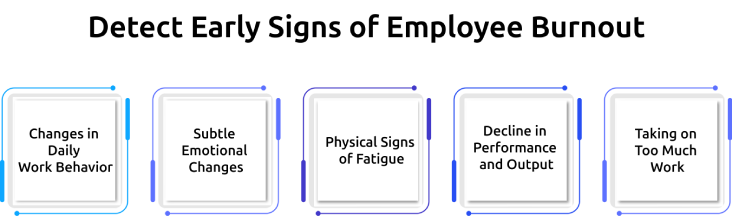
Changes in Daily Work Behavior
One of the first signs appears in changes to work patterns. You may notice employees logging longer hours than usual, switching frequently between tasks, or struggling to stay focused. These changes indicate growing mental fatigue and difficulty managing workload.
Subtle Emotional Changes
Burnout also reflects in how employees communicate and react. A usually engaged team member may become quiet, less responsive, or easily frustrated during discussions. These changes signal emotional exhaustion, but not a lack of interest.
Physical Signs of Fatigue
Even in remote setups, physical strain can become visible in indirect ways. Employees may mention constant tiredness, headaches, or lack of energy during meetings. Over time, this fatigue affects both consistency and overall work quality.
Decline in Performance and Output
A drop in performance is one of the clearest indicators. Tasks may take longer to complete, errors may increase, and deadlines may start slipping. This is not always due to lack of skill, but often a result of sustained stress and exhaustion.
Taking on Too Much Work
In some cases, burnout appears as overcommitment. Employees may continue accepting more tasks, working beyond hours, and avoiding breaks. While it may look like high dedication, employee burnout detection software helps you identify these patterns early, before they lead to serious burnout.
How Does AI-Powered Burnout Detection Work?
AI-powered burnout detection is designed to move beyond simple rule-based alerts and instead relies on pattern recognition across individual work behaviors. The AI systems analyze subtle changes in activity, engagement, and workload patterns over time, allowing you to identify early burnout signals even when they are not immediately visible.
Machine Learning for Workload Pattern Analysis
Work patterns are observed over time to establish a baseline for each employee, including working hours, break frequency, and task flow. Any consistent deviation from this baseline, such as extended work hours combined with reduced breaks, is flagged as a potential burnout risk, with risk scores generated based on the intensity and duration of these changes.
Sentiment Analysis in Team Communication
Communication patterns are evaluated using natural language processing to detect shifts in tone across team interactions. A gradual move from collaborative and positive language to shorter or neutral responses is considered an indicator of possible emotional fatigue, though it is treated as one supporting signal.
Predictive Burnout Risk Scoring
Multiple data points, such as workload intensity, utilization levels, and work consistency, are combined to generate a burnout risk score, usually presented on a standardized scale. When the system detects that certain thresholds are reached, it triggers alerts, enables timely interventions, and uses continuous feedback to improve the accuracy of future predictions.
What Are the Best Burnout Detection Tools for Remote Teams?
The employee burnout detection software market includes tools that approach the problem in different ways. Some focus on work hours and activity patterns, others rely on PTO and leave data, while a few use AI to understand communication trends. Choosing the right tool depends on how you want to measure burnout and the level of insight your team needs.
Time Champ
Time Champ is a workforce intelligence platform that includes built-in burnout risk scoring within its Team Insights and Health Metrics module. It identifies overwork by flagging employees who go beyond safe working hours and calculates burnout risk using factors like hours worked, project pressure, and utilization levels. It also connects burnout insights with capacity planning and workload balancing, helping you link employee well-being directly to business outcomes such as project profitability and team efficiency.
Best for: Agencies, professional services firms, and remote teams that want burnout detection as part of a broader workforce intelligence system.
ActivTrak
ActivTrak helps identify employees at risk of burnout by comparing their working hours with healthy limits. Its personal insights feature allows employees to view their own work habits, focus time, and burnout risk scores, encouraging awareness alongside managerial oversight. While it offers strong analytics dashboards, it does not include built-in PTO tracking or sentiment analysis.
Best for: Mid-size to enterprise remote teams that focus on productivity analytics with added burnout prevention.
Intelogos
Intelogos uses AI to evaluate performance factors such as focus, stamina, and availability alongside burnout indicators. Without relying only on time tracking, it looks at cognitive load and work intensity patterns to provide deeper insights. This makes it a good fit for teams that need meaningful data without a complicated setup process.
Best for: Small to mid-size remote teams looking for AI-driven burnout and performance insights in one platform.
Vacation Tracker
Vacation Tracker takes a different route by focusing on time-off patterns. Its Recharge feature measures employee energy levels based on PTO usage, compares them across teams, and flags individuals who are not taking enough time off. This approach works well if you prefer to avoid activity tracking altogether.
Best for: Remote teams that prioritize privacy and need burnout detection based on PTO and leave behavior.
WorkTime
WorkTime analyzes productivity patterns to identify burnout risks using a non-invasive method. It tracks active time, idle time, and overtime without capturing screenshots or recording keystrokes. The platform generates a burnout score for each employee and lets you configure your own alert thresholds.
Best for: Remote teams that want burnout insights with minimal data collection and no intrusive monitoring.
Worktivity
Worktivity combines AI coaching with burnout detection and offers it at a more affordable price point. It includes automatic productivity alerts, burnout risk indicators, and AI-based suggestions for adjusting workloads. The platform also supports on-premise deployment, which suits teams with strict data requirements.
Best for: Budget-conscious remote teams that want AI coaching along with employee burnout detection software at a lower cost.
Burnout Detection Tools Comparison Table:
| Feature | Time Champ | ActivTrak | Intelogos | Vacation Tracker | WorkTime | Worktivity |
|---|---|---|---|---|---|---|
| Burnout Risk Score | Yes | Yes | Yes | Energy Score | Yes | Yes |
| AI-Powered | Yes | Partial | Yes | AI Suggestions | No | Yes |
| PTO Tracking | Yes | No | No | Core Feature | No | No |
| Sentiment Analysis | No | No | Partial | No | No | No |
| Capacity Planning | Yes | No | No | No | No | No |
| Non-Invasive | Yes | Moderate | Yes | Yes | Yes | Moderate |
| Remote-First | Yes | Yes | Yes | Yes | Yes | Yes |
How to Implement Burnout Detection Software Without Breaking Trust?
Introducing employee burnout detection software requires more than just deployment. You need a clear plan that balances visibility with respect for employee privacy. When you approach implementation with transparency and purpose, you can build trust while gaining meaningful insights.
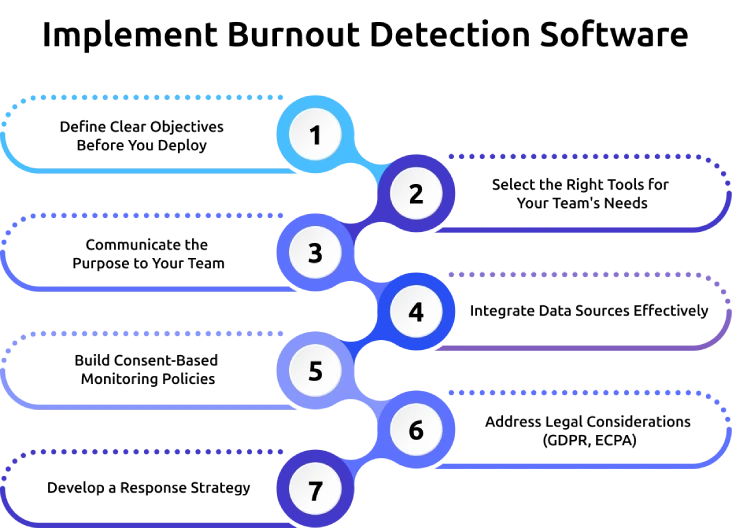
Define Clear Objectives Before You Deploy
Clearly define what you want to achieve before introducing any tool. Focus on goals like reducing burnout risk, improving workload balance, or increasing team well-being. Clear objectives help you avoid misuse and guide how you interpret the data.
Select the Right Tools for Your Team's Needs
Choose a tool that fits your team size, workflow, and privacy expectations. Look for the features that align with your goals, such as workload tracking, burnout risk scoring, or PTO insights. The right tool makes adoption easier and ensures relevant insights.
Communicate the Purpose to Your Team
Explain why you are using employee burnout detection software and how it benefits your employees. Be transparent about what data you collect and how you use it. Clear communication reduces fear and encourages acceptance across the team.
Integrate Data Sources Effectively
Connect relevant systems like project management tools, time tracking platforms, and communication channels. This helps you get a complete view of workload and engagement patterns. Proper integration ensures accurate and actionable insights.
Build Consent-Based Monitoring Policies
Create policies that respect employee consent and privacy. Clearly outline what you track, why you track it, and how long you store the data. Consent-based policies help to build employee trust and prevent resistance.
Address Legal Considerations (GDPR, ECPA)
Follow data protection laws like GDPR and ECPA. Ensure your monitoring practices comply with regional regulations. Legal compliance helps to protect both your organization and employees.
Develop a Response Strategy
Plan how to act when the system flags burnout risks. Define steps like workload redistribution, manager check-ins, or encouraging time off. A clear response strategy ensures the data leads to meaningful action, not just observation.
How Do You Measure the ROI of Burnout Detection Software?
The ROI of employee burnout detection software becomes clear when you look at business outcomes like reduced turnover, improved productivity, and lower burnout-related costs. When you track the right metrics, you can directly connect these improvements to measurable financial returns.
Metrics That Prove Burnout Detection Is Working
You must compare key metrics before and after implementation to see the real impact.
- Turnover Rate: A drop in employee exits directly saves hiring and replacement costs.
- Work Hours: Balanced hours (40–45/week) show better workload management.
- PTO Usage: Higher usage indicates healthier work habits and reduced stress.
- Burnout Alerts: Fewer alerts over time mean issues are getting resolved early.
Cost of Burnout vs Cost of Prevention
| Cost of Burnout | Cost of Prevention | ROI Impact |
|---|---|---|
| High replacement costs (50%–300% salary) | $4–$20/user/month | One saved resignation covers long-term cost |
| Productivity drop (20%–40%) | Low annual spend | Improved output increases ROI |
| Loss of morale and knowledge | Early intervention | Better retention and performance |
How Time Champ Helps Remote Teams Prevent Burnout?
What if you could spot burnout in your team before it starts affecting performance or leading to resignations? Time Champ gives you clear visibility into how your team works every day, so you can catch early warning signs and take action before they turn into bigger problems. It tracks working hours, workload patterns, and utilization levels, then turns that data into simple burnout risk scores. You can quickly see who works beyond safe limits, who skips breaks, and where workload imbalances exist, helping you act at the right time.
Time Champ also helps you move from detection to prevention by connecting burnout insights with capacity planning and workload distribution. You can rebalance tasks, adjust timelines, and support employees with data. This approach not only protects employees but also improves productivity, retention, and overall team performance.
Ready to see how burnout detection fits into your workforce strategy?
Time Champ shows how burnout risk scoring, capacity planning, and team health metrics work together.
Wrap Up
Burnout in remote teams often builds quietly, making it harder to detect without the right tools. When you rely only on observation or delayed feedback, you risk missing early warning signs that impact performance and retention. Employee burnout detection software helps you take a proactive approach by identifying risks early, improving workload balance, and supporting healthier work habits. With the right strategy and tools, you can protect your team’s well-being while maintaining consistent productivity. Investing in burnout detection is not just about monitoring, it is about creating a sustainable and high-performing work environment.

Anjali


Table of Content
-
 What Is Employee Burnout Detection Software?
-
Why Do Remote Teams Need Burnout Detection Tools?
-
How Can You Detect Early Signs of Employee Burnout?
-
How Does AI-Powered Burnout Detection Work?
-
What Are the Best Burnout Detection Tools for Remote Teams?
-
How to Implement Burnout Detection Software Without Breaking Trust?
-
How Do You Measure the ROI of Burnout Detection Software?
-
How Time Champ Helps Remote Teams Prevent Burnout?
-
Wrap Up
Instant Signup
Thank you for your request!
We have received your signup request and our team will get back to you soon. In the meantime, you can book a demo to see Time Champ in action.
Book a DemoFree trial. No credit card required. Prefer a walkthrough? Book a demo.
Related Blogs

Companies are watching remote workers more than ever. But is it ethical? We break down where monitoring is justified and where it crosses the line.

Learn how to address employee monitoring concerns with transparency, clear policies, and trust-building practices that improve engagement and reduce resistance.
From AI-powered behavior analytics to no-code workflow builders, explore the top 10 automation trends that are reshaping employee monitoring in 2026.

Learn how employee monitoring in healthcare protects patient data, tracks admin productivity, detects insider threats, and keeps your organization audit-ready.
Anjali | Apr 20, 2026
Compare employee monitoring software costs in 2026. Explore pricing factors, models, tiers, hidden fees, and the real total cost of ownership for any team.

The cause of employee burnout has become very common these days. Employees are getting burned out during the working hours for several reasons.


 4.7/5 avg.
Ready to Manage Your Workforce Smarter?
Join our family of 1500+ companies using smart insights to redefine workforces!

Free Trial
No Credit Card Required