DLP Implementation: Guide for Secure Data Protection
Build a successful DLP implementation with a phased rollout plan, practical steps, AI guidance, and proven best practices for every team with confidence.
What if your data protection tool is actually overwhelming the security team with constant alerts and leaving employees frustrated? You may invest in data loss prevention (DLP) tools expecting instant security, only to end up with overwhelmed security teams, annoyed users, and endless false alerts. The problem isn’t the technology, but it’s all about the rollout process. A well-planned DLP implementation helps you introduce controls gradually, reduces disruptions, and builds confidence before full enforcement, making the program more effective initially.
Here you’ll learn how to implement DLP through a phased rollout strategy and communicate changes effectively to employees. You’ll also learn how DLP manages employees who use AI tools.
What is DLP Implementation?
DLP implementation is the structured process of planning, deploying, testing, and enforcing Data Loss Prevention (DLP) policies to protect sensitive information across endpoints, networks, cloud applications, and email. It combines technology, security policies, governance, and employee awareness to reduce the risk of data loss while minimizing business disruption through a phased rollout.
How to Communicate a DLP Rollout to Employees
Introducing DLP without clear communication can cause confusion and resistance. Employees accept it better when they understand why it’s needed and how it affects their work. Here’s how to communicate your DLP rollout effectively and drive adoption.

Explain the Business Value Behind the Rollout
Start by clearly explaining why you’re introducing DLP and the risks it is intended to mitigate. Emphasize protection of customer data, confidential business information, and compliance requirements, not employee monitoring. This helps employees see DLP as a safeguard that supports secure work, not a restrictive control.
Notify Employees Before New Policies Take Effect
Communicate the rollout plan in advance so employees know what is coming and when. Include timelines, affected teams, and key changes they should expect during each phase. Early notice reduces confusion, builds trust, and helps employees adjust smoothly to new security expectations.
Provide Practical Training with Everyday Examples
Offer short, simple training materials and avoid long, hard-to-follow policy documents. Use real-life scenarios like sending emails, sharing files, or uploading to cloud services to show how DLP applies in daily work. This makes the guidance easier to understand and reduces accidental policy violations.
Start with Guidance Before Restricting Actions
Begin the rollout with warnings, tips, or notifications before immediately blocking user actions. This allows employees to learn from feedback and correct their behavior without disrupting their work. It also gives security teams time to refine rules before enforcing stricter controls.
Make Support Easy to Access
Set up a clear and responsive support channel where employees can ask questions or report blocked activities. Quick help with exceptions or false positives ensures work is not unnecessarily delayed. It also builds confidence that the system is designed to support, not hinder, productivity.
Reinforce Good Practices Throughout the Rollout
Continue sharing updates, reminders, and data loss prevention best practices even after the rollout begins. Regular communication helps employees stay aware of policy expectations and improves long-term security habits. This ongoing reinforcement ensures smoother adoption as DLP expands across the organization.

Did You Know?
IBM’s Cost of a Data Breach Report found that organizations making extensive use of AI and security automation saved an average of USD 1.9 million per breach, highlighting the value of continuously monitoring and refining DLP policies.
How to Implement DLP: A Step-by-Step Implementation Strategy
Successful DLP implementation is a gradual process, not a one-time deployment. Rolling out policies in phases helps reduce business disruptions, improve policy accuracy, and give employees time to adapt. Follow these steps to build a DLP program that protects sensitive data while supporting everyday operations.
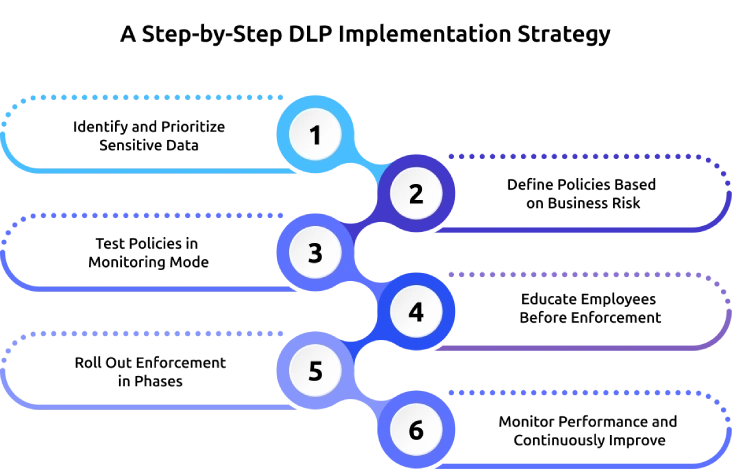
Step 1: Identify and Prioritize Sensitive Data
Start by listing the types of sensitive data your organization handles, such as customer, financial, or employee information. Identify where this data is stored and who can access it. Track how it moves across systems like email, cloud apps, and devices. This helps you create clear and targeted DLP policies.
Step 2: Define Policies Based on Business Risk
Create DLP policies based on real business risks, avoiding attempts to cover everything. Focus on key actions like sending sensitive files outside the organization, copying data to USB devices, or uploading to unapproved cloud apps. Set clear rules for monitoring, warning, or blocking these actions. Start with a simple set of policies so they are easy to manage and improve.
Step 3: Test Policies in Monitoring Mode
Deploy policies in monitoring or audit mode before enabling enforcement. During this phase, collect information about policy matches, review false positives, and identify workflows that could be affected. Monitoring allows security teams to adjust thresholds and conditions without interrupting employees’ work, resulting in more accurate enforcement later.
Step 4: Educate Employees Before Enforcement
Prepare employees before stricter controls are introduced. Explain the purpose of each policy, demonstrate common scenarios that may trigger alerts, and provide clear guidance on approved ways to handle sensitive information. When employees understand the expected behavior, policy violations decrease, and adoption improves across the organization.
Step 5: Roll Out Enforcement in Phases
Begin enforcement with a small group of users, a specific department, or the highest-risk data before expanding organization-wide. This phased approach allows security teams to monitor the impact of policies, resolve unexpected issues, and fine-tune configurations before broader deployment. Gradual enforcement minimizes disruption while increasing confidence in the DLP program.
Step 6: Monitor Performance and Continuously Improve
DLP implementation does not end after deployment, it requires ongoing monitoring and refinement. Regularly review incident reports, policy matches, exception requests, and user feedback to evaluate how effectively your policies are working. Continuously update rules as business needs and regulations change to maintain accuracy, reduce false alerts, and strengthen long-term data protection.
Is your DLP rollout creating more confusion than protection?
Time Champ helps you secure data with complete visibility.
How DLP Handles Employees Using AI Tools
AI tools are now widely used at work for writing, analysis, and automation. But they can also expose sensitive company data if not used carefully. DLP helps employees use AI safely while protecting confidential information.
Monitors AI Tool Usage
Tracks which AI applications employees access and flags approved and unapproved tools across the organization. This visibility helps security teams understand usage patterns, detect shadow AI activity, and enforce governance before data exposure risks grow.
Protects Sensitive Prompts and File Uploads
Examines prompts, pasted text, and uploaded files in real time to detect confidential information such as customer data, financial records, source code, or intellectual property. When sensitive content is identified, it can trigger alerts, block the action, or apply predefined security controls based on policy.
Applies Policies Based on Data Sensitivity
Enforces different rules depending on the sensitivity of the data being used. Public information may be allowed without restriction, while confidential or regulated data is automatically subject to stricter controls. This ensures protection is proportional to risk without disrupting normal workflows.
Guides Employees with Real-Time Notifications
Provides instant warnings or policy prompts when employees attempt to share sensitive data with AI tools. These real-time notifications help users understand risks immediately, correct their actions, and follow secure data-handling practices before any exposure occurs.
Restricts High-Risk AI Activities
Enforces stronger controls when high-risk data is being sent to unapproved or unmanaged AI applications. It can block submissions, restrict access, or limit functionality while still allowing secure use of approved AI platforms that meet organizational standards.
Reviews AI Activity and Improves Policies
Continuously tracks AI-related events, policy violations, and user behavior to identify emerging risks. Security teams use this insight to refine rules, update controls, and adapt policies as AI usage evolves across the organization.
How Time Champ Supports a Phased DLP Implementation
Managing a DLP rollout becomes difficult when you lack visibility into how employees access, share, and handle sensitive information. Without the right insights, it is harder to identify risky behavior, validate policies, and improve security without disrupting productivity. Time Champ is comprehensive employee monitoring software with built-in DLP features that gives you the complete visibility needed to support every stage of a phased DLP implementation while helping your employees work securely and responsibly.
Here are the key features of Time Champ that help you implement a phased DLP rollout with better visibility and control.
- Monitors Employee Activity in Real Time: Tracks application usage, websites, file activities, and work patterns to help identify risky behavior before it leads to data exposure.
- Prevents Unauthorized Data Transfers: Detects and restricts actions such as copying sensitive files to USB devices, transferring data to unapproved locations, or other policy violations to reduce data loss risks.
- Provides Detailed Audit Trails: Maintains comprehensive activity logs that simplify incident investigations, compliance reporting, and policy reviews.
- Delivers Actionable Alerts and Reports: Generates instant alerts for suspicious activities and provides detailed reports that help security teams respond quickly and refine DLP policies.
- Improves Employee Awareness: Encourages secure work habits by providing visibility into risky activities and reinforcing responsible data-handling practices across the workforce.
- Supports Continuous DLP Optimization: Offers ongoing workforce insights that help you evaluate policy effectiveness, identify new risks, and strengthen data protection as business needs evolve.
Finding it hard to prevent data leaks without slowing work?
Time Champ keeps your data secure while your teams stay productive.
Conclusion
A successful DLP implementation is built through careful planning, gradual rollout, continuous policy refinement, and clear employee communication. Taking a phased approach helps reduce false positives, minimize workflow disruptions, and strengthen data protection as your organization grows. As AI tools and modern collaboration platforms become part of everyday work, regularly reviewing and updating your DLP strategy is essential to stay ahead of evolving risks. Pairing a structured implementation plan with the right visibility and monitoring solution enables your teams to protect sensitive information confidently while maintaining productivity. Start building a smarter DLP program today with the right strategy and tools.

Anjali

Table of Content
 What is DLP Implementation?
- How to Communicate a DLP Rollout to Employees
- How to Implement DLP: A Step-by-Step Implementation Strategy
- How DLP Handles Employees Using AI Tools
- How Time Champ Supports a Phased DLP Implementation
- Conclusion
Instant Signup
Thank you for your request!
We have received your signup request and our team will get back to you soon. In the meantime, you can book a demo to see Time Champ in action.
Book a DemoFree trial. No credit card required. Prefer a walkthrough? Book a demo.
Related Blogs

Learn how remote employee tracking and DLP work together to prevent data leaks, secure remote teams, and support privacy, compliance, and safer workflows.
Anjali | May 09, 2026
Learn what unintentional insider threats are, the top causes, real examples of accidental data leaks, and how to prevent security risks at work effectively.
Anjali | May 09, 2026
Concerned about sensitive data leaving your network? See how network data loss prevention helps to reduce risks with the right features and practices.
Anjali | Aug 26, 2026
Learn what endpoint data loss prevention is, how it works, its key features, and how to protect sensitive data from unauthorized access.
Guna Lakshmi | Aug 18, 2026
Discover the top 10 Data Loss Prevention tools to safeguard sensitive information and ensure workplace security with essential features and practical tips for selection.
Tarun Kumar Reddy | Jan 21, 2025
Data loss costs more than you think. Learn what causes it, how employee monitoring reduces data exfiltration risk, and how to protect your business.
Thasleem Shaik | Apr 17, 2026


 4.7/5 avg.
Ready to Manage Your Workforce Smarter?
Join our family of 1500+ companies using smart insights to redefine workforces!

Free Trial
No Credit Card Required