What Is Data Egress? Meaning, Risks, and Prevention
Learn what data egress is, how it works, its security risks, common channels, and practical strategies to prevent unauthorized data exposure with practices.

Every day, sensitive business data leaves your organization through emails, cloud storage, collaboration apps, and AI tools. This movement of data is known as data egress, and while most of it is a normal part of business operations, not all of it is intentional or secure. A single file shared to a personal Google Drive or a prompt pasted into an AI chatbot can expose confidential information without anyone noticing until it's too late.
So, when does routine data movement become a security risk?
In this blog, you'll learn what data egress is, how it differs from data ingress and data exfiltration, the most common ways data leaves an organization, the risks businesses face, and the practical steps you can take to prevent unauthorized data exposure.
What Is Data Egress?
Data egress is the movement of data from an organization's internal network, systems, or devices to an external destination, such as the internet, a cloud service, a third-party application, a personal device, or another network. Simply put, whenever data leaves your organization, it's considered data egress. It is the opposite of data ingress, which refers to data entering a network.
How Data Egress Works
Data egress happens whenever data leaves your organization's network. This includes sending emails, uploading files to cloud storage, sharing documents, or syncing data between business apps.
Before the data leaves, it usually passes through security tools like firewalls, proxies, or cloud gateways. These tools check outgoing data using egress filtering. If the data is being sent to an unapproved location or contains sensitive information, the transfer can be blocked, recorded, or flagged for review.
Ingress vs. Egress - Quick Comparison
| Aspect | Data Ingress | Data Egress |
|---|---|---|
| Direction | Data entering the network | Data leaving the network |
| Source | Internet, third-party apps, or external users | Employees, business apps, or internal systems |
| Examples | Incoming emails, file downloads, API requests | Outgoing emails, cloud uploads, USB transfers, API requests |
| Main Risk | Malware, phishing attacks, unauthorized access | Data leaks, compliance issues, loss of sensitive information |
| Security Controls | Firewalls, spam filters, intrusion detection systems | Egress filtering, data loss prevention (DLP), access controls |
Common Types of Data Egress (Channels)
Data can leave an organization in many different ways. While most of these activities are part of everyday work, they can become a security risk if sensitive information is shared through unapproved or unsecured channels. Below are some of the most common ways data leaves a network.
| Data Egress Channel | Example | Risk Level |
|---|---|---|
| Sending client files or forwarding internal reports | Medium–High | |
| Cloud Storage | Uploading work files to a personal Google Drive or Dropbox | High |
| USB Drives | Copying company data to a personal USB device | High |
| AI Tools | Pasting confidential data or source code into a public AI chatbot | High |
| Messaging Apps | Sharing sensitive information through WhatsApp or Slack messages | Medium |
| Printing | Printing confidential documents on an unsecured printer | Low–Medium |
| APIs & Integrations | A third-party app accessing or transferring more data than allowed | Medium |
Why Data Egress Is a Growing Security Risk
As organizations depend more on cloud services, remote work, SaaS applications, and AI tools, data leaves business networks more often than ever before. While most of this activity is legitimate, it also creates more opportunities for sensitive information to be exposed or shared without authorization.
Recent reports highlight the growing impact of data egress risks:
- The average cost of a data breach reached USD 4.44 million in 2025, with malicious insider incidents averaging USD 4.92 million.
- Insider threats now cost organizations USD 19.5 million annually on average.
- Personal cloud storage accounts for 22.7% of insider data exfiltration incidents.
- Organizations experience a 720% increase in data exfiltration activity in the 24 hours before an employee is laid off.
1. Malicious Insiders
Employees or contractors with legitimate access can intentionally copy or share sensitive data. Since they already have permission to access company systems, these incidents are often difficult to detect.
2. Negligent Employees
Many data egress incidents happen by mistake. Sending files to the wrong recipient, uploading work documents to personal cloud storage, or accidentally changing file-sharing permissions can all expose sensitive information.
3. Compromised Credentials and Shadow AI
Attackers who steal employee login credentials can move data without raising immediate suspicion. At the same time, employees using unauthorized AI tools may unknowingly paste confidential information into platforms that aren't approved by the organization.
4. Third-Party and SaaS Sprawl
Businesses use dozens of cloud applications and third-party integrations. If these tools are poorly configured or lack proper security controls, they can become additional paths for sensitive data to leave the organization.
Cloud Data Egress Costs (A Quick Note)
The term data egress is also used in cloud computing. Many cloud providers charge egress fees when data is transferred out of their cloud environment, such as to another cloud provider, a different region, or on-premises infrastructure.
These charges are related to cloud usage and billing, not cybersecurity. While cloud egress costs can affect IT budgets, they are different from data egress security risks, which involve sensitive information leaving an organization through unauthorized or unmonitored channels.
Although the same term is used in both cases, the context is completely different.
Best Practices to Prevent Data Egress Risk
Preventing data egress isn't just about installing security software. It starts with understanding what sensitive data you have, who can access it, and where it's allowed to go.
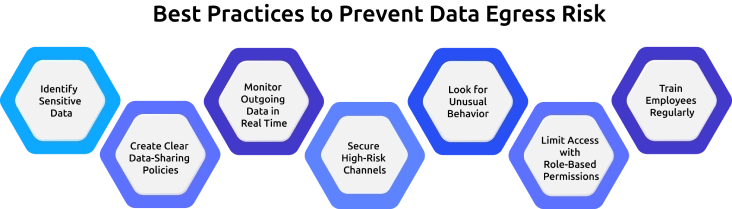
- Identify Sensitive Data: Classify customer information, financial records, credentials, and intellectual property so they receive the right level of protection.
- Create Clear Data-Sharing Policies: Define which channels employees can use to share different types of data. For example, block customer data from being uploaded to personal cloud storage or public AI tools.
- Monitor Outgoing Data in Real Time: Track file transfers, USB usage, email attachments, and cloud uploads so suspicious activity can be detected before data leaves the organization.
- Secure High-Risk Channels: Restrict or monitor USB drives, personal cloud storage, and other common paths used to move sensitive data.
- Look for Unusual Behavior: Large downloads, after-hours file transfers, or sudden increases in data movement may indicate potential risk and should be investigated.
- Limit Access with Role-Based Permissions: Give employees access only to the data they need to perform their jobs.
- Train Employees Regularly: Help employees understand approved ways to share data and the risks of using personal devices, cloud storage, or unauthorized AI tools.
How Time Champ Helps You Control Data Egress Risk
Preventing data egress requires more than policies; it requires visibility into how data is accessed, used, and shared. Time Champ is an employee monitoring software with data loss prevention capabilities that helps organizations monitor high-risk activities and detect potential data loss before it becomes a security incident.
With Time Champ's data loss prevention (DLP) features, you can:
- Monitor and block unauthorized USB devices to prevent sensitive data from being copied to external drives.
- Track website access violations with detailed, exportable audit logs.
- Monitor file activity by recording file creation, modification, deletion, and transfer events.
- Receive real-time alerts when suspicious file transfers or policy violations occur.
- Control access with role-based permissions so only authorized users can view sensitive logs and reports.
- Generate compliance-ready reports to simplify security audits and investigations.
Time Champ also provides workforce insights, such as unusual file activity, after-hours work, and changes in employee behavior. This additional context helps security and IT teams identify potential risks early and respond before sensitive data leaves the organization.
Prevent Data Loss Before It Becomes a Security Incident
Monitor file transfers, USB activity, and high-risk user behavior, all from a single platform
Conclusion
Data egress is a part of business operations, but without the right controls, it can quickly become a security risk. Understanding how data moves, monitoring high-risk channels, and enforcing clear security policies can help prevent sensitive information from falling into the wrong hands. When paired with employee awareness and the right security tools, you can protect sensitive information without disrupting collaboration.

Jahnavi Pulluri

Table of Content
 What Is Data Egress?
- How Data Egress Works
- Common Types of Data Egress (Channels)
- Why Data Egress Is a Growing Security Risk
- Cloud Data Egress Costs (A Quick Note)
- Best Practices to Prevent Data Egress Risk
- How Time Champ Helps You Control Data Egress Risk
- Conclusion
Instant Signup
Thank you for your request!
We have received your signup request and our team will get back to you soon. In the meantime, you can book a demo to see Time Champ in action.
Book a DemoFree trial. No credit card required. Prefer a walkthrough? Book a demo.
Related Blogs

Learn how to ensure data privacy in productivity tracking with key controls, vendor evaluation, and setup steps that reduce risk and protect employee data.
Guna Lakshmi | May 02, 2026
Data encryption in employee monitoring is non-negotiable. Learn the standards, certifications, and six questions to ask before signing with any vendor.
Sai Keerthi Uppala | May 07, 2026
Learn how AI-powered workplace productivity monitoring affects employee data privacy, compliance, transparency, accountability, and trust in organizations.
Jahnavi Pulluri | May 11, 2026
Protect sensitive business data in hybrid work environments with strong security controls and practical strategies to prevent data breaches.
Guna Lakshmi | Jun 10, 2026
A data breach is unauthorized access to private data. Learn the common causes, the real impact on people and companies, and what to do in the first 72 hours.
Shabana Shaik | Jul 31, 2026
Protect your business from data theft with proven prevention strategies. Learn key risks, security best practices, and how to safeguard sensitive data.
Jahnavi Pulluri | Aug 31, 2026


 4.7/5 avg.
Ready to Manage Your Workforce Smarter?
Join our family of 1500+ companies using smart insights to redefine workforces!

Free Trial
No Credit Card Required