Customer Data Protection: How to Build Lasting Trust
Strengthen customer data protection with practical steps, stronger access controls, risk prevention, and proven ways to build lasting customer trust today.
Are you confident that the customer data is truly safe from breaches, leaks, or accidental exposure? Many businesses believe it is, until a single incident reveals hidden vulnerabilities. With rising cyber threats and increasing privacy expectations, even small security gaps can quickly turn into serious risks that affect your reputation and customer trust. Customer data protection is a key solution for building trust and maintaining credibility with your customers. It goes beyond IT tasks and helps you safeguard relationships and reputation.
In this blog, you’ll understand why protecting customer data is essential to building lasting trust and business growth. You’ll also see the practical strategies, common risks, and proven best practices to help strengthen your data security with confidence.
What Is Customer Data Protection?
Customer data protection is the practice of securing customers’ personal and sensitive information from unauthorized access, theft, misuse, loss, or disclosure through security controls, policies, and processes. It helps businesses protect data throughout its lifecycle, comply with privacy regulations, reduce security risks, and build lasting customer trust.
How Does Customer Data Protection Build Trust?
Customers trust businesses with their personal information when they make purchases, create accounts, or use services. This trust grows when companies protect data from misuse, unauthorized access, and cyber threats. Good data protection shows responsibility and helps you build long-term customer relationships.
Customer data protection builds trust in several important ways:
- Demonstrates a Commitment to Customer Privacy: Protecting personal information shows customers that their privacy is a priority, making them more confident about sharing their data with your business.
- Improves Transparency and Accountability: Clearly explaining what data you collect, why it is collected, and how it will be protected helps customers understand your practices and reduces uncertainty. Transparent communication is one of the strongest drivers of customer trust.
- Reduces the Risk of Data Breaches: Strong security measures such as encryption, access controls, and continuous monitoring minimize the chances of customer information being exposed. Fewer security incidents help preserve your reputation and customer confidence.
- Gives Customers Greater Control Over Their Information: Allowing customers to manage their privacy preferences, update their data, or withdraw consent reinforces that they remain in control of their personal information.
- Shows Compliance with Privacy Regulations: Following data protection laws such as GDPR and other applicable regulations demonstrates responsible data handling and reassures customers that their information is managed according to recognized standards.
- Strengthens Long-term Customer Loyalty: Customers are more likely to continue doing business with organizations they trust. Consistently protecting customer data strengthens credibility, encourages repeat business, and creates positive word-of-mouth recommendations.
How to Protect Customer Data in Five Practical Steps
Protecting customer data is not just about using security tools or meeting compliance rules. It requires a clear, structured approach that reduces risk at every level of your business. Following a few essential practices can help you keep customer information safe and build stronger trust.

1. Identify and Classify Customer Data
Start by understanding what customer data you collect, where it is stored, and who can access it. Classify sensitive data, such as personal details, payment information, and login credentials, so you can apply stronger protection where needed. Regularly update your data records and securely remove any information that is no longer required.
2. Encrypt Sensitive Data and Secure Every Access Point
Protect customer data by encrypting it both during storage and transmission. Use secure protocols, strong encryption methods, and multi-factor authentication to prevent unauthorized access. Also, keep all systems and software up to date to close security gaps before they can be exploited.
3. Limit Access Based on Roles and Responsibilities
Ensure employees can only access the data they need for their specific roles. Use role-based access controls and review permissions regularly to maintain proper security. Immediately remove access when employees change roles or leave the organization to keep risk minimal.
4. Train Employees to Handle Customer Data Responsibly
Provide training to employees who play a key role in data security. Teach them how to recognize phishing attempts, use strong passwords, and follow safe data handling practices. Encourage them to report suspicious activity quickly to prevent potential breaches.
5. Monitor, Back Up, and Respond to Security Threats
Continuously monitor systems for unusual activity and maintain secure backups of important data. Create a clear incident response plan so your team knows how to act during a security issue. Regular audits and testing help you detect threats early and recover quickly if something goes wrong.
Concerned about customer data leaks and security risks?
Protect sensitive information with Time Champ’s smart DLP features and real-time monitoring.
How to Restrict Customer Data Access Without Affecting Productivity?
Balancing employee access to customer data is essential for maintaining both security and efficiency. This section explains how you can provide employees with only the access they need while keeping sensitive information secure and preserving productivity and customer trust.
Use Role-Based Access Control (RBAC)
Assign data access based on each employee’s job responsibilities. This ensures employees only view or manage the information required for their role, reducing unnecessary exposure to sensitive customer data.
Apply the Principle of Least Privilege
Grant the minimum level of access needed to complete specific tasks. Review permissions regularly and remove unnecessary access whenever roles or responsibilities change.
Enable Multi-Factor Authentication (MFA)
Require users to verify their identity with an additional authentication factor before accessing sensitive systems. MFA adds an extra layer of security, even if your passwords are already compromised.
Monitor and Audit Data Access
Keep track of which employees access customer data, when they access it, and what changes they make. Regular audits help identify unusual behavior early and support compliance efforts.
Separate Sensitive Data by Department
Store highly sensitive customer information in restricted systems or folders. Allow access only to authorized teams, such as finance, legal, or customer support, to reduce the risk of accidental exposure.
Revoke Access Immediately When Needed
Remove system access as soon as an employee changes roles, leaves the organization, or no longer requires certain permissions. Timely access removal prevents unauthorized access and strengthens overall data security.
What Are the Biggest Customer Data Security Risks?
Customer data faces constant threats from both external attackers and internal mistakes. A single security gap can expose sensitive information, disrupt business operations, and damage customer trust. Understanding the most common risks helps you strengthen your defenses before they become costly incidents.
Phishing and Social Engineering
Cybercriminals often trick your employees into revealing login credentials or downloading malicious files through fake emails, messages, or websites. These attacks remain one of the leading causes of data breaches.
Insider Threats
Employees, contractors, or third-party users with authorized access can intentionally or accidentally expose customer data. Poor access controls and human error make insider threats difficult to detect.
Weak Passwords and Stolen Credentials
Using weak, reused, or compromised passwords makes it easier for attackers to access customer accounts and business systems. Strong password policies and multi-factor authentication help reduce this risk.
Malware and Ransomware Attacks
Malicious software can steal, encrypt, or lock customer data, disrupting business operations and demanding ransom payments. Regular software updates and endpoint protection help prevent these attacks.
Unpatched Software Vulnerabilities
Outdated software often contains security flaws that attackers can exploit. Applying security patches promptly helps close these vulnerabilities before they are used against your business.
Third-Party and Vendor Risks
Businesses often share customer data with vendors, cloud providers, or external partners. If these third parties have weak security practices, they can become an entry point for attackers and expose sensitive information.

Did You Know?
Verizon’s Data Breach Investigations Report found that 30% of breaches involved third parties, while credential abuse and vulnerability exploitation remained the leading attack vectors.
Common Data Protection Mistakes That Reduce Customer Trust
Even businesses with good security tools can lose customer trust by making avoidable data protection mistakes. Identifying and correcting these issues helps you strengthen security, improve compliance, and reassure customers that their information is handled responsibly.
- Collecting More Data Than Necessary: Only collect the customer information your business genuinely needs. Excessive data collection increases security risks and compliance responsibilities.
- Using Weak Access Controls: Giving too many employees access to sensitive customer data increases the chances of accidental exposure or misuse. Limit access based on job roles.
- Failing to Encrypt Sensitive Information: Storing or transmitting customer data without encryption makes it easier for attackers to access valuable information if systems are compromised.
- Ignoring Software Updates: Delaying security patches leaves known vulnerabilities open for cybercriminals to exploit. Keep the systems and applications updated regularly.
- Not Training Employees on Data Security: Employees who are unaware of phishing attacks, password security, or safe data handling practices can unintentionally create security risks.
- Being Unclear About Data Usage: Customers expect transparency. Failing to explain how their data is collected, stored, and used can quickly reduce confidence in your business.
How Can You Measure Customer Trust Over Time?
Building customer trust is an ongoing process, and measuring it helps you understand whether your customer data protection efforts are making a positive impact. Tracking the right indicators can help you identify areas for improvement and strengthen long-term customer relationships.
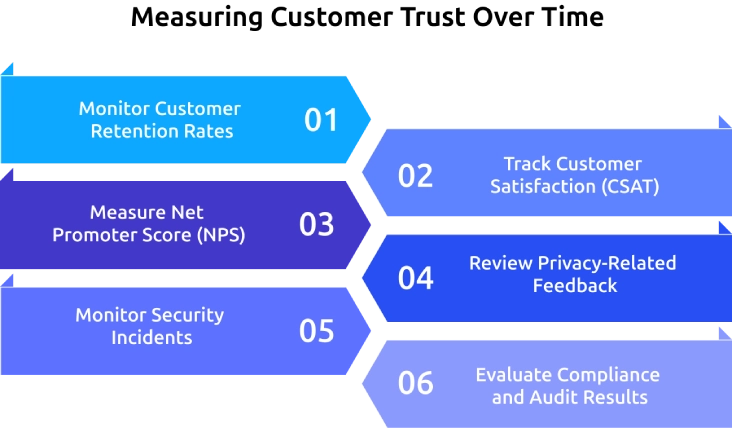
1. Monitor Customer Retention Rates
Customers who continue using your products or services over time are more likely to trust your business. A high retention rate often reflects confidence in how you handle their information.
2. Track Customer Satisfaction (CSAT)
Regular customer satisfaction surveys help you understand how customers feel about their overall experience, including their confidence in your security and privacy practices.
3. Measure Net Promoter Score (NPS)
Net Promoter Score shows how likely customers are to recommend your business to others. Higher scores generally indicate stronger trust and loyalty.
4. Review Privacy-Related Feedback
Monitor customer reviews, support tickets, and survey responses for comments related to privacy, security, or data handling. This feedback helps you identify trust concerns before they become larger issues.
5. Monitor Security Incidents
Track the number of data breaches, unauthorized access attempts, and security-related complaints. Fewer incidents indicate that your customer data protection measures are becoming more effective.
6. Evaluate Compliance and Audit Results
Regular security audits and compliance assessments help confirm that your data protection practices meet industry standards and continue to support customer confidence.
How Time Champ Helps Protect Customer Data and Build Trust
You may struggle to protect sensitive customer information without disrupting daily work or creating unnecessary complexity. Relying on disconnected security tools often leaves blind spots that increase the risk of data leaks and insider threats. Time Champ is a smart employee monitoring software with built-in DLP features that gives complete visibility into data activity while helping you protect customer information and strengthen trust.
Here are the key features of Time Champ that can help you track time effectively and improve overall productivity.
- Prevents Data Leaks Before They Happen: Monitors file activity, website access, USB usage, and data transfers in real time to identify and stop risky actions before sensitive customer information is exposed.
- Detects Suspicious Activity Instantly: Provides real-time alerts for unauthorized access, repeated policy violations, unusual file movements, and other suspicious behavior, allowing your team to respond quickly.
- Controls Access with Role-Based Permissions: Restricts access to sensitive customer data based on user roles, teams, or departments, ensuring only authorized employees can view or manage critical information.
- Tracks Complete File Activity: Helps you monitor detailed logs of file creation, modification, deletion, uploads, and downloads with timestamps, making it easier to investigate incidents and maintain accountability.
- Strengthens Compliance with Audit-Ready Reports: Generates detailed reports on file activity, website violations, USB events, and security incidents to simplify compliance audits and demonstrate responsible data governance.
- Protects Customer Data Without Disrupting Productivity: Applies security policies in the background while employees continue working normally, helping you maintain strong data protection without creating friction in everyday workflows.
Want to strengthen customer trust without slowing your team down?
Use Time Champ to secure customer data, prevent data loss, and stay in control.
Conclusion
Protecting customer information is no longer optional; it is essential for earning and keeping customer trust. Following strong security practices, limiting data access, training employees, and monitoring potential risks can help you reduce the chances of costly breaches while building lasting credibility. A proactive approach to customer data protection not only safeguards sensitive information but also strengthens your reputation and customer relationships. You can further enhance security posture by adopting solutions that provide greater visibility, continuous monitoring, and robust data loss prevention capabilities to help you protect sensitive information with confidence.

Anjali

Table of Content
 What Is Customer Data Protection?
- How Does Customer Data Protection Build Trust?
- How to Protect Customer Data in Five Practical Steps
- How to Restrict Customer Data Access Without Affecting Productivity?
- What Are the Biggest Customer Data Security Risks?
- Common Data Protection Mistakes That Reduce Customer Trust
- How Can You Measure Customer Trust Over Time?
- How Time Champ Helps Protect Customer Data and Build Trust
- Conclusion
Instant Signup
Thank you for your request!
We have received your signup request and our team will get back to you soon. In the meantime, you can book a demo to see Time Champ in action.
Book a DemoFree trial. No credit card required. Prefer a walkthrough? Book a demo.
Related Blogs
Data loss prevention helps protect sensitive business data from leaks, theft, and misuse. See how DLP works, its benefits, challenges, and best practices.
Thasleem Shaik | Aug 21, 2026
Learn how remote employee tracking and DLP work together to prevent data leaks, secure remote teams, and support privacy, compliance, and safer workflows.
Anjali | May 09, 2026
Discover the top 10 Data Loss Prevention tools to safeguard sensitive information and ensure workplace security with essential features and practical tips for selection.
Tarun Kumar Reddy | Jan 21, 2025
Employee monitoring software can catch insider data breaches early, if you configure it right. See what it catches, what it misses, and how to roll it out.
Jahnavi Pulluri | Apr 16, 2026
Learn the difference between data leak prevention vs. data loss prevention and explore effective strategies to protect sensitive business information.
Sai Keerthi Uppala | Jan 22, 2025
Data encryption in employee monitoring is non-negotiable. Learn the standards, certifications, and six questions to ask before signing with any vendor.
Sai Keerthi Uppala | May 07, 2026


 4.7/5 avg.
Ready to Manage Your Workforce Smarter?
Join our family of 1500+ companies using smart insights to redefine workforces!

Free Trial
No Credit Card Required