How to Choose the Best Hybrid Work Software for Teams
Looking for the best hybrid work software? Compare key features, software types, and selection criteria to build a productive and connected hybrid workplace.

Managing hybrid teams can be challenging when communication is scattered, productivity is difficult to measure, and employees work across different locations and schedules. Without the right systems in place, it becomes harder to maintain visibility, coordinate work, and keep teams aligned. Choosing the right hybrid work software can address these challenges by bringing collaboration, productivity tracking, scheduling, and workforce management into a unified experience.
Whether you’re selecting your first solution or replacing an existing one, knowing what to evaluate can make the decision much easier. This article covers the main types of hybrid work solutions and the features that matter most. It also outlines the key factors to consider when choosing the right platform for your team and building a productive hybrid workplace.
What Is Hybrid Work Software?
Hybrid work software is a collection of workplace technologies that help your teams stay connected, coordinated, and productive across office and remote environments. It supports collaboration, scheduling, workforce visibility, and performance management, enabling organizations to manage distributed teams efficiently while maintaining a consistent employee experience.
What Are the Main Types of Hybrid Work Software?
Hybrid work software includes various tools that help you manage collaboration, productivity, scheduling, and workforce operations across hybrid work environments. To run a successful hybrid workplace, you need different solutions for communication, productivity, scheduling, and team management. Knowing the main types can help you choose the right tools for your team's needs.
Collaboration and Communication Software
It helps hybrid teams stay connected through messaging, video conferencing, file sharing, and real-time discussions. These tools reduce communication challenges and improve coordination between remote and in-office employees.
Best for
Consulting and professional service organizations rely on continuous communication and knowledge sharing across distributed teams and client locations.
Project Management Software
This software helps your teams organize tasks, track project progress, manage deadlines, and coordinate work across departments. It provides visibility into responsibilities and ensures projects stay on schedule.
Best For
IT and software development teams use project management platforms to manage agile workflows, track deliverables, and coordinate complex projects involving multiple stakeholders.
Time Tracking and Productivity Management Software
Monitoring how employees spend their work hours is essential for maintaining productivity in a hybrid environment. These solutions track time, measure activity levels, and provide actionable insights that help you improve accountability, optimize workflows, and make better workforce decisions.
Best For
Remote-first and hybrid organizations with distributed workforces use these tools to maintain visibility into work patterns, resource utilization, and employee productivity.
Workforce Scheduling and Attendance Software
Balancing office schedules, remote workdays, and shift coverage can quickly become complicated as teams grow. Workforce scheduling and attendance software simplifies this process by helping you manage employee schedules, shift assignments, office attendance, and hybrid work arrangements while ensuring adequate staffing and workplace flexibility.
Best For
Healthcare and retail businesses depend on accurate scheduling and attendance management to maintain operational coverage and service quality.
Employee Engagement and Performance Management Software
These tools help you track employee goals, gather feedback, conduct performance evaluations, and recognize achievements. They play an important role in keeping hybrid teams motivated, aligned, and focused on continuous improvement.
Best For
Human resources and enterprise organizations use these tools to manage employee development, improve retention, and create consistent performance management processes.
Workplace Management and Desk Booking Software
This allows employees to reserve desks, meeting rooms, and office resources before coming on-site. It helps you optimize office space and support flexible workplace strategies.
Best For
Corporate Offices and Coworking Spaces with flexible seating arrangements use these solutions to maximize office utilization and improve workplace planning.
Struggling to manage productivity across office and remote teams?
Gain workforce visibility and productivity insights with Time Champ.
How To Choose the Right Hybrid Work Software for Teams?
Choosing hybrid work software is not just about comparing features. The right solution should address your team's challenges, integrate with existing workflows, and support both remote and in-office employees. Following a structured evaluation process can help you select a platform that delivers long-term value.
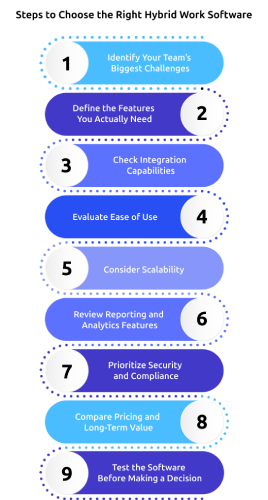
1. Identify Your Team’s Biggest Challenges
Start by identifying the specific challenges your team faces in a hybrid work environment. Assess issues such as communication gaps, lack of productivity visibility, scheduling difficulties, or project management inefficiencies, and use these insights to determine what type of software you need.
2. Define the Features You Actually Need
Create a list of must-have features based on your team's daily workflows and business goals. Prioritize capabilities such as time tracking, productivity monitoring, project management, collaboration, attendance tracking, scheduling, reporting, and workforce analytics.
3. Check Integration Capabilities
Review whether the software integrates with the tools your organization already uses. Ensure it connects seamlessly with communication platforms, project management applications, HR systems, payroll software, and cloud storage solutions to streamline operations.
4. Evaluate Ease of Use
Choose software that is simple and easy for you and your employees. Look for a user-friendly interface that requires minimal training and encourages quick adoption across the organization.
5. Consider Scalability
Select a solution that can grow alongside your business. Confirm that the software can support additional employees, teams, locations, and changing operational requirements without disrupting existing workflows.
6. Review Reporting and Analytics Features
Examine the reporting and analytics capabilities offered by the platform. Look for detailed insights into productivity, attendance, workload distribution, and team performance to support informed decision-making.
7. Prioritize Security and Compliance
Verify that the software meets your security and compliance requirements. Check for features such as data encryption, role-based access controls, secure data storage, and compliance with relevant industry standards.
8. Compare Pricing and Long-Term Value
Compare pricing plans carefully and assess the overall value each solution provides. Consider factors such as productivity gains, time savings, operational efficiency, and reporting capabilities when evaluating return on investment.
9. Test the Software Before Making a Decision
Use free trials, demos, or pilot programs to evaluate the software before making a final decision. Involve actual users in the testing process and assess its usability, performance, and overall fit for your team's requirements.

Did You Know?
A recent Cisco study found that 73% of employees say they are more productive in a hybrid work environment. This shows why organizations need the right tools to keep teams connected and productive across different work locations.
What Features Should the Best Hybrid Work Software Have?
The best hybrid work software combines multiple capabilities that help your teams stay connected, productive, and coordinated across office and remote environments. While feature requirements vary by organization, the following features are considered essential for supporting a successful hybrid workplace.

1. Workspace and Resource Management
Hybrid teams need an efficient way to manage office space and shared resources. Workspace management features allow your employees to reserve desks, meeting rooms, and collaboration spaces before coming onsite. This helps you optimize office utilization, reduce scheduling conflicts, and create a smoother workplace experience.
2. Communication and Collaboration Tools
Effective communication is essential when employees work from different locations. Collaboration features such as instant messaging, video conferencing, file sharing, and shared workspaces help your teams stay connected throughout the day. These tools improve information flow, strengthen teamwork, and reduce communication barriers.
3. Project and Task Management
Project and task management capabilities help your teams organize work, assign responsibilities, and track progress in real time. Employees can clearly understand priorities, deadlines, and project status without relying on constant follow-ups. This improves accountability and keeps projects moving efficiently across distributed teams.
4. Security and Access Controls
Hybrid work increases the need for strong data protection and secure access management. Features such as role-based permissions, multi-factor authentication, secure logins, and activity monitoring help you safeguard sensitive business information. Strong security controls also support compliance requirements and reduce organizational risk.
5. Workforce Analytics and Performance Insights
You may need reliable data to understand how teams perform in a hybrid environment. Analytics and reporting features provide visibility into productivity, attendance, resource utilization, and work trends. These insights help you identify opportunities for improvement and make informed workforce decisions.
6. Employee Feedback and Goal Tracking
Maintaining employee engagement can be challenging when teams are split between remote and office locations. Feedback and goal-tracking features enable regular check-ins, performance discussions, recognition programs, and progress monitoring. This helps your employees stay aligned with organizational objectives while supporting continuous development and engagement.
How Time Champ Fits into Your Hybrid Work Stack
Managing a hybrid workforce becomes difficult when employee activity, attendance, and productivity data are spread across multiple tools. Without clear visibility, it is harder to understand performance trends, compare office and remote work outcomes, and make informed workforce decisions. Time Champ is a smart employee monitoring software with dedicated hybrid work management features that help you manage hybrid teams with greater clarity and confidence.
Some of the capabilities that make Time Champ particularly valuable for hybrid workplaces include:
- Unified Visibility Across Work Models: Combines productivity, attendance, and activity data from office, remote, and hybrid employees into one dashboard for easier workforce visibility.
- Focus Time and Application Usage Insights: Track productive hours, idle time, and app usage to understand work habits, identify distractions, and improve team productivity.
- Automatic Time Tracking and Attendance Management: Automatically records employee work hours and attendance across locations, reducing manual effort and ensuring accurate workforce records.
- Productivity Trends and Work Pattern Analysis: Provides productivity trends and heatmaps that help you identify peak focus periods and optimize team schedules effectively.
- Transparent Employee Experience: Employees can access their own work data, promoting accountability, self-improvement, and trust through greater visibility into performance metrics.
Time Champ combines workforce visibility, productivity intelligence, and automated tracking in one platform, helping you build a more productive, data-driven, and well-coordinated hybrid workplace.
Finding it difficult to measure performance in a hybrid workplace?
Use Time Champ to track work patterns, simplify attendance, and make smarter workforce decisions with confidence.
Conclusion
Choosing the right hybrid work software is an important step toward building a productive, connected, and efficient workplace. The best solution should align with your team's needs, support collaboration across locations, and provide workforce visibility, and help you make informed decisions with accurate data. Focus on features that improve productivity, simplify management, and scale with your organization. Taking a structured approach to software selection will help you invest in a platform that delivers long-term value and supports the success of your hybrid workforce.

Anjali

Table of Content
 What Is Hybrid Work Software?
- What Are the Main Types of Hybrid Work Software?
- How To Choose the Right Hybrid Work Software for Teams?
- What Features Should the Best Hybrid Work Software Have?
- How Time Champ Fits into Your Hybrid Work Stack
- Conclusion

Related Blogs
Remote workforce management, also called virtual workforce management, helps teams stay engaged. Explore its definition, benefits, challenges & tools.
Thasleem Shaik | September 16, 2025
Learn to design an effective hybrid work schedule that balances flexibility and productivity, with best practices to fit your team’s needs.
Jahnavi Pulluri | Oct 26, 2024
Learn about employee rights in hybrid work, including pay, benefits, overtime, privacy, workplace safety, promotions, accommodations, and compliance laws.
Anjali | Jun 05, 2026
See what the data says about hybrid work productivity gains, including productivity, retention, engagement, cost savings, and long-term business impact.
Thasleem Shaik | Jun 08, 2026
Learn what a hybrid work policy is, see the 9 essential components to include, and download, edit, and use your free hybrid work policy template.
Guna Lakshmi | Jun 13, 2026
Discover the hybrid work model, which blends office and remote environments for greater flexibility and productivity.
Thasleem Shaik | Oct 25, 2024


 4.7/5 avg.
Ready to Manage Your Workforce Smarter?
Join our family of 1500+ companies using smart insights to redefine workforces!

Free Trial
No Credit Card Required