Call Center Knowledge Management: A Practical Guide
Agents waste minutes hunting for answers on every call. Here's what a call center knowledge management system should include and 7 steps to build it.
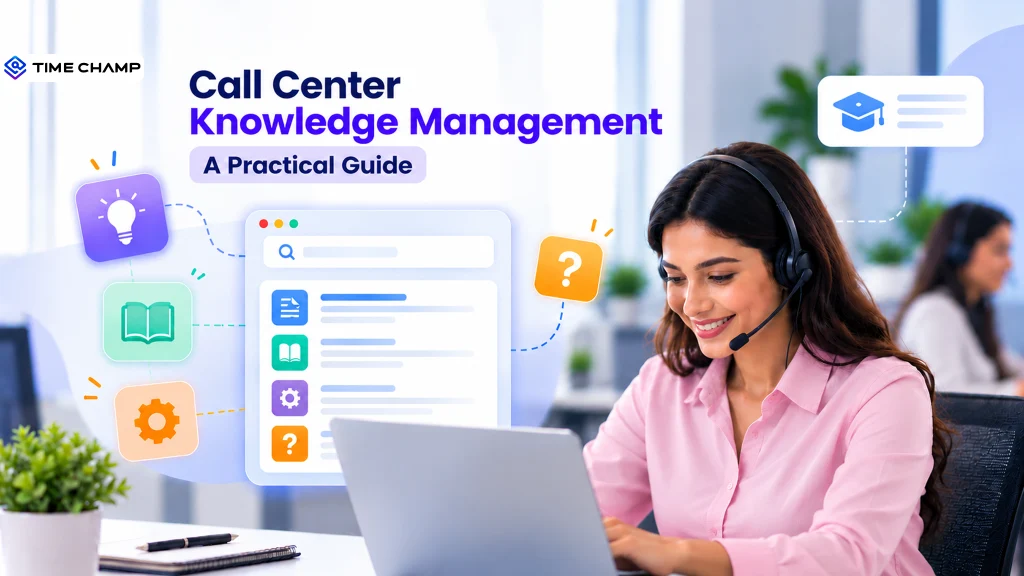
A customer may ask a question in seconds, but finding the right answer can take an agent minutes of searching across outdated documents and disconnected systems. Every extra search adds friction to the conversation, increases handling time, and raises the risk of an inconsistent answer. Call center knowledge management brings essential information into one organized, accessible system so agents can find accurate answers quickly. It helps teams deliver consistent support while reducing time spent searching for information.
This guide covers the knowledge a call center needs to manage and the key features of an effective knowledge management system. It also explains 7 implementation steps, ways to measure success, and practical best practices for contact centers.
What Is Call Center Knowledge Management?
Call center knowledge management is the structured process of capturing, organizing, updating, and delivering customer service information so agents can quickly access reliable answers during interactions. It brings FAQs, policies, product details, troubleshooting guides, and procedures into an accessible knowledge system, improving response consistency, resolution speed, and agent efficiency.
What Knowledge Does a Call Center Actually Need to Manage
A call center needs product information, policies, procedures, troubleshooting guidance, and frontline experience to resolve customer issues accurately and consistently.
- Product and Service Information: Product features, specifications, pricing, availability, service details, and usage information that agents need to answer customer questions.
- FAQs and Common Customer Questions: Frequently asked questions and approved answers that help agents handle repetitive queries quickly and maintain consistent responses.
- Troubleshooting Knowledge: Step-by-step solutions for common technical issues, errors, account problems, and service disruptions.
- Policies and Guidelines: Current information on refunds, returns, cancellations, warranties, eligibility, payments, and other customer-facing policies.
- Standard Operating Procedures (SOPs): Clear instructions for completing routine tasks, processing requests, handling exceptions, and following internal workflows.
- Escalation Procedures: Criteria for identifying issues that require escalation, along with the correct team, process, and next steps.
- Compliance and Regulatory Information: Required disclosures, verification procedures, security rules, and industry-specific requirements that agents must follow during customer interactions.
What Should a Call Center Knowledge Management System Include
A call center knowledge management system should give agents fast, reliable access to the information they need, helping them resolve customer issues efficiently, follow the correct processes, and deliver consistent support without switching between multiple tools. This section discusses the key features and capabilities such a system should include.
- Centralized Knowledge Base: FAQs, product information, policies, SOPs, troubleshooting guides, scripts, and other support resources organized in one source of truth.
- Fast, Intelligent Search: Natural-language search, filters, keywords, and AI-powered search that help agents find relevant answers, even when they do not know the exact wording of an article.
- Guided Workflows and Decision Trees: Step-by-step instructions for handling complex issues and following the correct support process.
- Content Creation and Management: Tools for creating, categorizing, editing, publishing, archiving, and organizing knowledge articles as processes and products change.
- Version Control and Approval Workflows: Change tracking, reviewer assignments, version history, and approval controls that ensure agents access current, approved information.
- CRM and Contact Center Integrations: Knowledge surfaced within CRM, ticketing, telephony, and agent desktop workflows to reduce unnecessary screen switching.
- Role-Based Access and Permissions: Controls that determine who can view, create, edit, approve, or publish content based on role, team, or responsibility.
- Agent Feedback and Content Ratings: Features for flagging inaccurate, outdated, or unclear information and identifying content gaps.
- Knowledge Analytics: Reporting on searches, article usage, failed searches, feedback, and content gaps to show how the knowledge base is being used and where it needs improvement.
- Omnichannel Access: Consistent access to approved knowledge across voice support, chat, email, help centers, and self-service channels.
How to Implement Knowledge Management in a Call Center: 7 Steps
Effective knowledge management is not about moving existing documents into a new platform and calling the job done. It requires a clear focus on the knowledge agents need, a reliable process for creating and maintaining it, and regular measurement to keep the system useful.
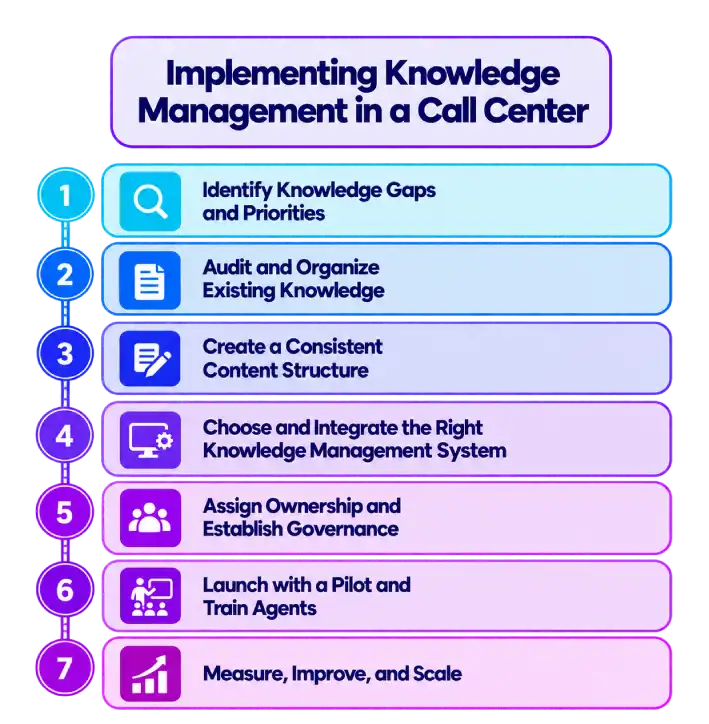
1. Identify Knowledge Gaps and Priorities
Start by analyzing call data, customer questions, support tickets, QA findings, and agent feedback. Identify the issues that generate the most contacts and the information agents struggle to find. Prioritize high-volume, high-impact topics first so the knowledge system delivers value quickly.
2. Audit and Organize Existing Knowledge
Map where information currently lives, including shared drives, PDFs, emails, chat messages, wikis, and agents’ personal resources. Remove duplicates, flag outdated material, identify missing information, and group useful content into clear categories. This creates a cleaner foundation before new content is added.
3. Create a Consistent Content Structure
Define templates, naming conventions, categories, tags, and writing standards for knowledge articles. Keep content concise and action-oriented, with the answer or resolution easy to find. Use FAQs for quick answers and decision trees or guided workflows for issues that require multiple steps.
4. Choose and Integrate the Right Knowledge Management System
Select a system that provides fast search, centralized content, permissions, version control, analytics, and integrations with the tools agents already use. Connect the knowledge base with your CRM, ticketing platform, or agent desktop so employees can access relevant information without breaking their workflow.
5. Assign Ownership and Establish Governance
Give specific people responsibility for creating, reviewing, approving, updating, and retiring knowledge. Set review schedules and approval workflows to prevent outdated information from remaining available. A defined governance structure keeps content accurate, improves accountability, and supports the knowledge base as it grows.
6. Launch with a Pilot and Train Agents
Start with one team or a high-volume service area without migrating everything at once. Train agents on how to search, use, flag, and contribute to knowledge, then gather feedback during the pilot. Use what you learn to improve the system before expanding it across the call center.

Did You Know?
Gartner’s 2026 survey found that 58% of customer service leaders plan to upskill agents into knowledge management specialists, highlighting the growing need for accurate, continuously updated knowledge across AI and self-service channels.
7. Measure, Improve, and Scale
Track metrics such as knowledge usage, search success rate, failed searches, article feedback, average handle time, and first-contact resolution. Review these insights regularly to find content gaps and update weak articles. Once the process works consistently, expand it to additional teams, topics, and channels.
How to Measure Whether Knowledge Management Is Working?
A knowledge management system is only valuable when it improves how quickly agents find answers and how effectively they resolve customer issues. Measuring both knowledge-based activity and call center outcomes shows whether the system is genuinely helping or simply storing information.
Track these key metrics to measure its effectiveness:
Search Success Rate
Measures how often agents find relevant results after searching. A low rate may indicate missing content, poor search relevance, or unclear article titles.
Knowledge Base Usage
Includes searches, article views, and active users. Tracking these activities shows whether agents regularly rely on the system. Low usage may indicate poor discoverability, limited trust, or inadequate training.
Average Handle Time (AHT)
Compare the time agents spend handling customer interactions before and after implementing or improving the knowledge system. A reduction may indicate that agents spend less time searching for information.
Did You Know?
ICMI’s 2025 research found that 84% of contact centers measure average handle time, 77% measure quality, and 74% track agent productivity, showing how widely operational performance metrics are used to evaluate contact-center effectiveness.
First Contact Resolution (FCR)
Measure whether customer issues are resolved during the first interaction. An improvement may indicate that agents have the information needed to provide complete answers without requiring repeated contacts.
Article Helpfulness
Use agent ratings and feedback to identify content that is unclear, incomplete, or outdated. Prioritize frequently used articles with poor feedback for review and update them to address unclear, incomplete, or outdated information.
Failed Searches and Content Gaps
Track searches that return no useful results. Review these queries to identify topics where agents need additional support and create or improve knowledge content accordingly.
Content Freshness
Monitor article age, review dates, and outdated information. Assign content owners and establish regular review cycles to keep important information accurate and reliable.
Agent Adoption Rate
Measure how consistently agents use the knowledge base during their work. Strong adoption combined with improved operational results is a more meaningful indicator of success than login or article-view counts alone.
Not sure where your agents lose time during customer interactions? Track activity and performance with Time Champ to uncover improvement areas.
Contact Center Knowledge Management Best Practices
A knowledge base can quickly lose its value when information becomes outdated, difficult to find, or disconnected from agents’ daily workflows. Strong contact center knowledge management keeps information accurate, accessible, and closely aligned with the issues agents handle every day.
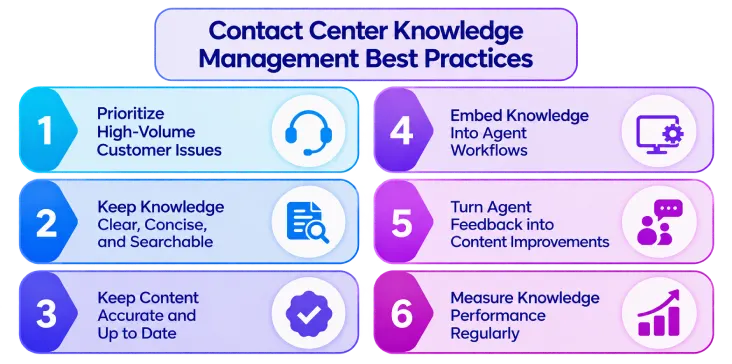
1. Prioritize High-Volume Customer Issues
Start by documenting the questions and problems agents encounter most often. Review call reasons, support tickets, search queries, and agent feedback to identify high-impact topics, then build clear resources around them before expanding into less common issues.
2. Keep Knowledge Clear, Concise, and Searchable
Write articles so agents can scan them during live interactions. Use descriptive titles, short sections, bullet points, step-by-step instructions, relevant keywords, and clear categorization to make the right information easier to find.
3. Keep Content Accurate and Up to Date
Assign owners to important knowledge articles and establish regular review cycles. Update information whenever products, policies, processes, or systems change, and retire content that is no longer relevant.
4. Embed Knowledge Into Agent Workflows
Agents should be able to access relevant knowledge from the tools they already use during customer interactions. Integrating knowledge with CRM, ticketing, and contact center platforms reduces unnecessary navigation and makes information available when it is needed.
5. Turn Agent Feedback into Content Improvements
Give agents an easy way to flag inaccurate, incomplete, or confusing articles. Review this feedback alongside failed searches and recurring customer questions to identify knowledge gaps and continuously improve the content.
6. Measure Knowledge Performance Regularly
Track search success, knowledge-base usage, failed searches, article helpfulness, agent adoption, AHT, and FCR. Connecting knowledge metrics with contact center outcomes helps identify what is working and where the knowledge experience needs improvement.
How Time Champ Supports Call Center Knowledge Management
You may struggle to see where your agents lose time or need better training. Without clear activity insights, it can be difficult for you to improve performance and support better customer interactions. Time Champ is smart employee monitoring software with call center monitoring features that provides real-time visibility into agent activity, productivity, calls, and work patterns. Its call and time tracking tools help you identify gaps, coach agents effectively, and build a more efficient support operation.
Here are the key Time Champ features that help your call center teams improve performance and knowledge management.
- Real-time Agent Activity Monitoring: Tracks what agents are working on across tasks, websites, and applications in real time, helping you identify workflow delays, excessive idle time, and areas where agents need additional support.
- Call Recording and Talk-time Insights: Records calls and tracks talk time to help you evaluate conversation quality, agent performance, and customer interactions while identifying recurring issues and knowledge gaps.
- Productivity and Performance Analytics: Analyzes work patterns, productivity trends, task activity, and idle time to help you identify performance gaps and improve processes or knowledge resources.
- Performance Reports and Agent Scorecards: Organizes call quality, productivity, and performance data into reports and scorecards, helping you provide targeted coaching and track agent improvement.
- Automated Alerts: Sends notifications about idle time, missed targets, late logins, and productivity drops, helping you address performance issues before they affect service consistency.
- Task and Time Tracking: Tracks how long agents spend on calls, follow-ups, wrap-ups, and other tasks, helping you understand how working time is used and identify processes that need streamlining.
Are you struggling to spot agent performance and knowledge gaps?
Use Time Champ to monitor activity, analyze calls, and coach your team better.
Conclusion
Effective knowledge management helps call centers give agents the right information when they need it. A well-organized knowledge base reduces search time, improves response consistency, supports faster resolutions, and makes agent training easier. However, success depends on keeping knowledge accurate, accessible, and aligned with real customer needs. Identifying knowledge gaps, establishing clear ownership, integrating useful tools, and measuring key performance outcomes help your teams continuously improve their support operations. Call center knowledge management turns scattered information into a reliable resource that helps agents work confidently, resolve issues efficiently, and deliver a better customer experience at scale.

Anjali

Table of Content
 What Is Call Center Knowledge Management?
- What Knowledge Does a Call Center Actually Need to Manage
- What Should a Call Center Knowledge Management System Include
- How to Implement Knowledge Management in a Call Center: 7 Steps
- How to Measure Whether Knowledge Management Is Working?
- Contact Center Knowledge Management Best Practices
- How Time Champ Supports Call Center Knowledge Management
- Conclusion

Related Blogs
Discover the 10 best call centre quality assurance software for 2025. Compare features, pricing, pros, and cons to boost service quality and performance.
Thasleem Shaik | Nov 07, 2025
See how employee monitoring strengthens accountability, improves transparency, and helps teams perform better without crossing into workplace surveillance.
Anjali | Jul 01, 2026
Track team productivity without watching people: 8 metrics with formulas, the three that fit your team, and how to spot when your numbers are being gamed.
Shabana Shaik | Aug 31, 2026
Want to simplify measuring employee productivity? Explore common challenges and effective approaches to improve team performance.
Guna Lakshmi | Aug 07, 2026
Understand what employee performance tracking is, along with proven methods, metrics that matter, and the best tools to track performance fairly in 2026.
Shabana Shaik | Jul 15, 2026
Learn what employee activity monitoring software is, how it works, what data it captures, the main types, legal use, and how it differs from time tracking.
Guna Lakshmi | Jul 28, 2026


 4.7/5 avg.
Ready to Manage Your Workforce Smarter?
Join our family of 1500+ companies using smart insights to redefine workforces!

Free Trial
No Credit Card Required