What are Contact Center Services: Types, Benefits & Examples
Contact center services help businesses manage customer support across multiple channels. Compare types, benefits, costs, technologies, and AI trends.

How easy is it for your customers to reach you when they need help?
If the answer depends on the channel they choose, there is room for improvement. Phone calls, emails, chat, social media, and messaging apps all play a role in customer support today. Managing each one separately often leads to delays, repeated conversations, and inconsistent experiences.
Contact center services bring these channels together, so every interaction feels connected. This article covers everything from the basics to advanced capabilities, helping you understand how they improve customer support and which solution best fits your business.
What Are Contact Center Services?
Contact center services let you manage customer conversations across multiple communication channels from a single platform. Instead of handling phone calls, emails, live chat, text messages, and social media separately, you can bring every interaction together, giving your support team the context they need to respond quickly and consistently.
Contact Center vs Call Center: What’s the Difference?
Many use the terms contact center and call center interchangeably, but they don't mean the same thing. The biggest difference lies in how you communicate with your customers. A call center focuses on phone conversations, while a contact center lets you manage conversations across multiple channels from one place.
The comparison below highlights the key differences and helps you decide which approach better fits your customer support needs.
| Feature | Call Center | Contact Center |
|---|---|---|
| Primary Communication | Phone calls only | Phone, email, live chat, SMS, social media, messaging apps, and self-service portals |
| Customer Experience | Handles one communication channel | Delivers a connected experience across multiple channels |
| Conversation History | Stores phone interactions | Keeps customer conversations connected across every channel |
| Customer Convenience | Customers must rely on phone support | Customers can choose the communication channel they prefer |
| Core Technology | Telephony system with basic call routing | Omnichannel platform with CRM, AI, automation, analytics, and routing tools |
| Automation | Limited automation | Supports AI assistants, chatbots, workflow automation, and self-service |
| Best For | Businesses that mainly provide phone support | Businesses that want faster, connected, and personalized customer support |
Losing visibility into your support team's performance?
Use Time Champ to track productivity, attendance, and workforce performance with ease.
What are the Types of Contact Centers?
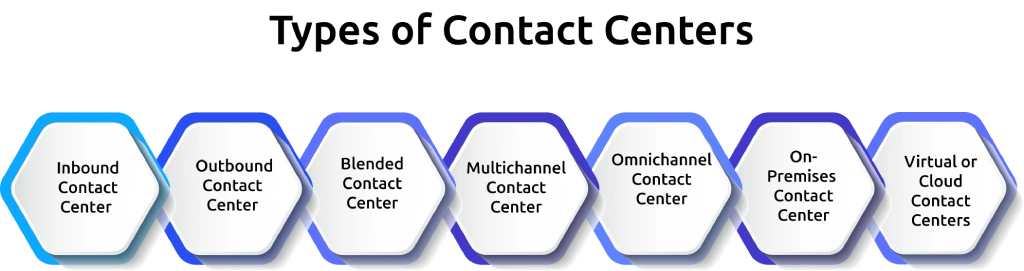
Not every contact center works the same way, and picking the wrong model can cost you both agent hours and customer trust. Your business needs depend on call volume, channel mix, and whether you want an in-house team or somewhere else entirely. Here are the main types you should know about before choosing one for your team.
1. Inbound Contact Center
An inbound contact center focuses on incoming customer requests. Customers reach out for product support, billing questions, technical assistance, appointment scheduling, or general inquiries. Since the goal is to resolve issues quickly and provide a positive experience, these contact centers often rely on features like intelligent call routing, CRM integration, and self-service options.
2. Outbound Contact Center
An outbound contact center primarily contacts customers instead of waiting for incoming requests. Support teams handle sales calls, lead generation, customer surveys, payment reminders, appointment confirmations, and follow-up campaigns. Predictive dialers and automation tools help improve efficiency by reducing manual dialing.
3. Blended Contact Centers
A blended contact center combines inbound and outbound work under one roof. Your agents switch between answering incoming queries and making outgoing calls based on real-time demand. This flexibility helps you get more out of your existing team instead of hiring separate staff for each function.
4. Multichannel Contact Center
A multichannel contact center lets customers contact you through different communication channels such as phone, email, live chat, text messages, or social media. Each channel works independently, giving customers multiple ways to connect with your business.
While this approach improves accessibility, customers may need to repeat information when they switch from one channel to another because conversation history may not stay connected.
5. Omnichannel Contact Center
An omnichannel contact center connects every communication channel into one unified experience. If a customer starts a conversation through live chat and later continues by email or phone, your support team can view the complete conversation history without asking the customer to explain the issue again.
Deloitte reports that 25% of brands have already adopted an omnichannel routing engine, reflecting the growing focus on delivering connected customer experiences.
6. On-Premises Contact Center
An on-premises contact center runs on servers and infrastructure that your company owns and manages. This setup gives you greater control over data, security, and system customization. However, it also requires a larger upfront investment and ongoing maintenance.
7. Virtual or Cloud Contact Centers
A virtual contact center runs entirely on cloud-based software, letting your agents work from anywhere with an internet connection. You skip the cost of physical infrastructure while giving your team the flexibility to log in from home or a remote office. This setup makes it easier to scale your support operations, add new agents quickly, and maintain consistent customer service as your business grows.
What Features Should You Look for in Contact Center Services?
Choosing the right platform goes beyond comparing prices or communication channels. The features you choose directly affect how quickly you respond to customers, how efficiently your support team works, and how smoothly every interaction flows.
Below are the key features that make a modern contact center more effective and easier to manage.
1. Omnichannel Support
Customers expect the freedom to contact you through their preferred channel, whether it's a phone call, email, live chat, text message, or social media. Omnichannel support brings every conversation together, allowing your team to continue the same discussion even when customers switch between channels.
2. Interactive Voice Response (IVR)
An Interactive Voice Response system guides callers through automated menus before connecting them to the right department. This reduces wait times and helps customers reach the right support representative without unnecessary transfers. Teams that move past keypad menus toward an AI-powered IVR typically resolve routine requests without ever transferring the caller, since the system understands plain-language answers and only escalates when intent is unclear.
3. CRM Integration
CRM integration gives your support team instant access to customer information, including previous conversations, purchase history, and open support requests. With the right context available from the beginning, your team can provide faster and more personalized assistance.
4. Automatic Call Distribution (ACD)
Automatic Call Distribution automatically directs incoming calls to the most suitable available agent. Routing decisions can depend on factors such as skills, language, location, or workload, helping customers reach someone who can assist them more efficiently.
5. AI Chatbots and Virtual Assistants
AI-powered chatbots answer common questions, collect customer information, and handle routine requests around the clock. When a customer needs additional support, the conversation can move to a live agent without losing important details.
6. Workforce Management
Workforce management tools help you schedule shifts, forecast customer demand, and monitor team availability. Better planning helps maintain service quality while reducing long wait times during busy periods.
What Are Some Examples of Contact Center Services?
Contact center services support much more than answering customer calls. You can use them to handle sales inquiries, resolve technical issues, schedule appointments, process orders, and provide support across multiple communication channels. Here are some of the most common examples and how they help improve the customer experience.
Example 1: Healthcare
Healthcare providers receive hundreds of appointment requests, follow-up calls, and patient inquiries every day. Managing all of them manually can slow down both staff and patients.
For example, when a patient books an appointment, the system can automatically send a confirmation message, appointment reminders, and updates if the schedule changes. If the patient needs to reschedule, they can do it through a self-service portal without waiting on a phone call.
This approach reduces administrative work while making it easier for patients to manage their appointments.
Example 2: Ecommerce
Online shoppers expect quick answers before and after making a purchase. Questions about product availability, delivery status, returns, and refunds often arrive through different communication channels.
For example, if a customer asks about an order through social media and later follows up through live chat, the support team can continue the same conversation without asking the customer to explain everything again. If the issue involves a damaged product, the team can quickly arrange a replacement or refund from the same platform.
This creates a smoother shopping experience and helps build long-term customer trust.
Is it difficult to track productivity across your team?
Try Time Champ to monitor performance and improve operational efficiency.
What Are the Benefits of Contact Center Services?
Every customer interaction influences how customers view your business. Whether someone needs help with an order, technical support, or a simple question, quick and consistent communication builds trust. Contact center services help you deliver that experience while making your customer support operations easier to manage. Below are some of the key benefits they offer.
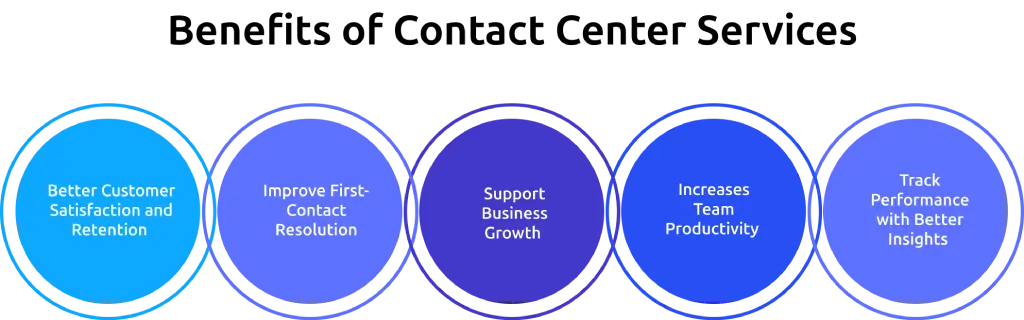
1. Better Customer Satisfaction and Retention
A strong contact center service does more than answer calls. It resolves issues on the first try. Hybrid and remote support models show a 12% jump in first-contact resolution rates compared to traditional setups, based on data from Ringly. When your customers get answers faster, they stick around longer and trust your brand more.
2. Increases Team Productivity
Routine tasks such as routing inquiries, answering common questions, and sending follow-up messages no longer need constant manual effort. Automation handles repetitive work, allowing your support team to spend more time solving complex customer issues.
As workloads become more balanced, your team can handle more conversations without sacrificing service quality. This allows your team to improve productivity by focusing more on customer conversations instead of repetitive administrative tasks.
3. Improve First-Contact Resolution
Customers appreciate solutions during their first interaction. With access to previous conversations, customer details, and support history, your team can resolve more issues without transferring customers between departments or asking the same questions again. This saves time for both your team and your customers.
4. Support Business Growth
As your customer base grows, so do support requests. A modern contact center gives you the flexibility to add communication channels, onboard new team members, and handle higher conversation volumes without disrupting customer service. This makes it easier to support business growth while maintaining service quality.
5. Track Performance with Better Insights
Built-in reporting tools help you monitor important metrics such as response times, resolution rates, customer satisfaction, and conversation volumes. These insights help you identify improvement opportunities, measure performance, and make informed decisions that improve customer support over time.
Which Industries Use Contact Center Services?
Almost every industry relies on customer communication, but the way each one provides support can differ. Here are some of the industries that commonly use contact center services to deliver faster, more connected customer experiences.
- Healthcare: Help patients schedule appointments, answer medical inquiries, send reminders, and provide follow-up support.
- Banking and Financial Services: Assist customers with account information, payment issues, loan inquiries, fraud reporting, and financial support.
- Retail and Ecommerce: Handle product inquiries, order tracking, returns, refunds, and customer feedback across multiple communication channels.
- Telecommunications: Resolve network issues, activate new services, answer billing questions, and provide technical support.
- Travel and Hospitality: Manage reservations, booking changes, cancellations, travel updates, and guest support before and after trips.
How To Choose the Right Contact Center Software?
Choosing the right software can improve both your customer experience and your team's efficiency. Instead of comparing dozens of features, focus on the factors below to find a solution that fits your current needs and supports your future growth.
- Understand Your Business Needs: Start by identifying your support goals, communication channels, team size, and expected customer volume. This helps you choose software that matches your daily operations instead of paying for unnecessary features.
- Choose Omnichannel Support: Look for software that brings phone calls, email, live chat, social media, and messaging apps into one platform. This allows your team to manage every conversation without switching between multiple tools.
- Check Integration Options: Make sure the software connects with the tools you already use, such as CRM systems, help desk platforms, ticketing software, and business applications. Connected systems reduce manual work and improve access to customer information.
- Look for Automation and AI Features: Automation can route inquiries, answer common questions, and handle repetitive tasks. AI-powered features can also help your team respond faster, summarize conversations, and improve overall support quality.
- Review Reporting and Analytics: Choose software that provides detailed reports on response times, customer satisfaction, resolution rates, and conversation volumes. These insights help you measure performance and identify opportunities to improve customer support.
- Compare Pricing and Support: Compare subscription plans, available features, implementation costs, and customer support before making your decision. A free trial or live demo can also help you evaluate whether the software meets your requirements.
What Are the Latest Contact Center Trends in 2026
Customer expectations continue to evolve, and customer support keeps changing with them. Modern contact centers now focus on delivering faster responses, connected experiences, and smarter workflows instead of simply handling more calls. Here are some of the key trends shaping customer support.
1. AI Supports Every Customer Interaction
Voice AI and conversational AI have become essential in modern customer support. According to Zendesk, 90% of CX trendsetters say Voice AI is driving the next phase of customer service.
2. Cloud-Based Contact Centers Continue to Grow
Contact center as a service (CCaaS) continues to grow because it reduces the cost and complexity of managing on-premises hardware. The global CCaaS market reached $7 billion to $9 billion in 2025 and continues to grow at 18% to 21% annually. However, only 30% to 35% of large enterprises have fully migrated to the cloud, leaving significant room for adoption.
3. Omnichannel Experiences Continue to Expand
Customers expect every conversation to continue smoothly, no matter which communication channel they choose. Businesses continue investing in connected customer journeys that combine phone, email, live chat, messaging apps, and social media into one seamless experience. Looking at how an SMS marketing strategy slots into those journeys often reveals where response times and opt-in consent could be tightened.
4. AI and Human Support Will Work Together
AI and human support continue to work side by side instead of replacing one another. 85% of organizations now use a combination of human agents and AI agents to handle customer interactions. For businesses evaluating AI agents for customer support, comparing fin ai alternatives can help identify platforms that fit their automation and human-handoff needs.
As technology continues to evolve, successful contact centers will combine AI, automation, cloud platforms, and human expertise to deliver faster, more connected, and more personalized customer experiences.
How Can Time Champ Improve Contact Center Performance?
Running a successful contact center takes more than answering customer requests. You also need clear visibility into attendance, productivity, workload, and daily performance to keep your support team operating efficiently. Time Champ is an employee monitoring and time tracking software that helps you gain those insights without interrupting everyday work. Below are some of the key features that support better contact center performance.
- Automatic Time and Attendance Tracking: Track work hours, shift timings, breaks, and attendance automatically without relying on manual timesheets. Accurate records help simplify payroll, improve scheduling, and maintain better visibility into daily attendance.
- Productivity Tracking: Understand how work hours are spent throughout the day by tracking productive time, idle time, and application usage. These insights help identify productivity patterns and uncover opportunities to improve overall performance.
- Application and Website Usage Monitoring: See which applications and websites receive the most attention during working hours. This makes it easier to identify work-related activities, reduce unnecessary distractions, and understand how daily tasks consume time.
- Workforce Analytics: Gain detailed insights into workload distribution, working patterns, and team performance through easy-to-read dashboards and reports. These insights support better planning and help balance workloads more effectively.
- Employee Monitoring: View work activity, active hours, and performance trends from a single dashboard. This helps maintain accountability while providing a clear picture of day-to-day operations.
- Shift and Schedule Visibility: Monitor shift adherence, working hours, and attendance patterns across different teams. Better visibility helps identify scheduling gaps and ensures adequate coverage during busy periods.
- Detailed Reports and Performance Insights: Access detailed reports on attendance, productivity, application usage, work hours, and performance trends. These reports support informed decisions and help identify areas that need attention.
- Early Burnout Detection: Long working hours, rising idle time, and changing work patterns often indicate increased workload or fatigue. Early visibility into these trends helps address potential issues before they affect performance or employee well-being.
Need better visibility into your contact center's daily operations?
Try Time Champ to track productivity, attendance, and performance from a single dashboard.
Conclusion
Choosing the right contact center services can make a significant difference in how you communicate with your customers and manage daily support operations. By understanding the different types, features, benefits, and emerging trends, you can select a solution that matches your business needs today and continues to support your growth in the future.
If you want better visibility into your support team's productivity, attendance, workload, and performance, Time Champ can help. It provides the insights you need to track work, identify improvement opportunities, and make informed decisions that improve contact center performance.

Thasleem Shaik

Table of Content
 What Are Contact Center Services?
- Contact Center vs Call Center: What’s the Difference?
- What are the Types of Contact Centers?
- What Features Should You Look for in Contact Center Services?
- What Are Some Examples of Contact Center Services?
- What Are the Benefits of Contact Center Services?
- Which Industries Use Contact Center Services?
- How To Choose the Right Contact Center Software?
- What Are the Latest Contact Center Trends in 2026
- How Can Time Champ Improve Contact Center Performance?
- Conclusion

Related Blogs

Discover the ultimate guide to call centre workforce management. Learn key functions, pros, cons, optimisation tips, and how real-time WFM boosts ROI.
Thasleem Shaik | October 01, 2025
Discover the 10 best call centre quality assurance software for 2025. Compare features, pricing, pros, and cons to boost service quality and performance.
Thasleem Shaik | Nov 07, 2025
Learn simple ways to measure and boost call center productivity, helping your team work more efficiently and improve customer service.
Jahnavi Pulluri | Jan 10, 2025
Discover the 18 global best call center outsourcing companies to optimize customer support. Choose from leading names for exceptional service and efficiency.
Mounika Sai | Nov 16, 2023
"Launch a successful call center with expert guidance! Learn key processes, tips, and essential tools for efficient operations in this comprehensive guide"
Mounika Sai | Nov 28, 2023
Learn why billing breakdowns damage BPO trust, why clients value workforce intelligence billing, how it strengthens billing models & implementation steps.
Thasleem Shaik | Feb 11, 2026


 4.7/5 avg.
Ready to Manage Your Workforce Smarter?
Join our family of 1500+ companies using smart insights to redefine workforces!

Free Trial
No Credit Card Required