How to Start a Call Center: Complete Business Setup in 2026
How to start a call center using a complete setup process covering costs, software, staffing, compliance, operations, and business planning.

Starting a call center can open new business opportunities, but it often raises many questions at the beginning. How much should you invest initially? Which type of call center fits your goals? What software do you need? How many agents should you hire first? When you find clear answers to these questions early, you can make the entire setup process much easier.
This guide walks through every stage of building a call center, including planning, setup, costs, software, staffing, and day-to-day operations. You can also get practical tips to avoid common mistakes and build a strong foundation for long-term success.
What Is a Call Center?
A call center is a dedicated team or business unit that manages large volumes of customer phone calls for support, sales, technical assistance, appointment scheduling, order processing, and other business services. Depending on the business needs, a call center can manage inbound calls, outbound calls, or both through a team of trained agents using specialized call center software.
Modern call centers do much more than answer phone calls. They use cloud-based technology, customer relationship management (CRM) systems, interactive voice response (IVR), and reporting tools to route calls, track customer interactions, and improve service quality. Many businesses now operate virtual or hybrid call centers, allowing agents to work from different locations while maintaining consistent customer support.

Did You Know
Recent research shows that just 25% of call centers have effectively integrated AI automation into their daily operations, while 75% of organizations have AI tools that are not being fully utilized in their workflows.
Types of Call Centers
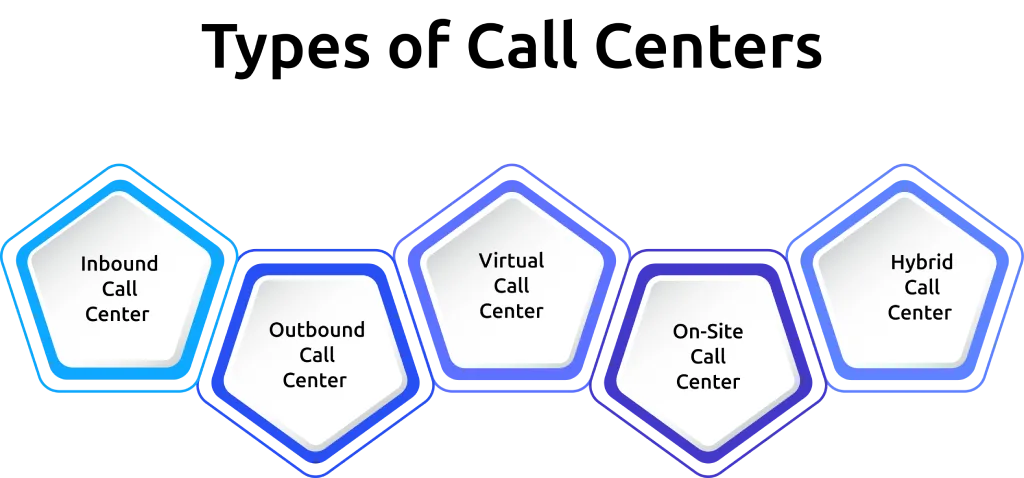
Choosing the right type of call center is one of the first decisions you'll make before you start. Each model handles different business needs, budgets, and customer interactions. Below are the main types of call centers and where each one works best.
1. Inbound Call Center
An inbound call center focuses on receiving incoming calls from customers. These calls usually involve customer support, technical assistance, order inquiries, appointment scheduling, or billing questions. This type of call center is a good choice if your priority is providing quick support and improving customer satisfaction.
2. Outbound Call Center
An outbound call center makes calls to existing or potential customers. Businesses use it for sales, lead generation, appointment booking, market research, customer surveys, and follow-up calls. If your goal is to reach new customers or increase revenue, an outbound call center can help you achieve that.
3. Virtual Call Center
A virtual call center lets agents work remotely while using cloud-based call center software to stay connected. Instead of running everything from one office, your team handles calls online, which helps you lower infrastructure costs and hire talent from different locations. This model works well if you want more flexibility and easier scalability.
4. On-Site Call Center
An on-site call center operates from a physical office where agents work together in the same location. This setup gives you greater control over daily operations, training, collaboration, and supervision. It is often preferred by businesses with strict security requirements or those handling sensitive customer information.
5. Hybrid Call Center
A hybrid call center combines both on-site and remote teams. Some agents work from the office, while others work remotely using the same communication platform and workflows. This model offers greater flexibility, supports business continuity, and allows your call center to adapt as operational needs change.
Managing your call center becomes easier with the right visibility.
Try Time Champ to track productivity, attendance, and daily operations from one platform.
How to Start a Call Center: Step-by-Step Process
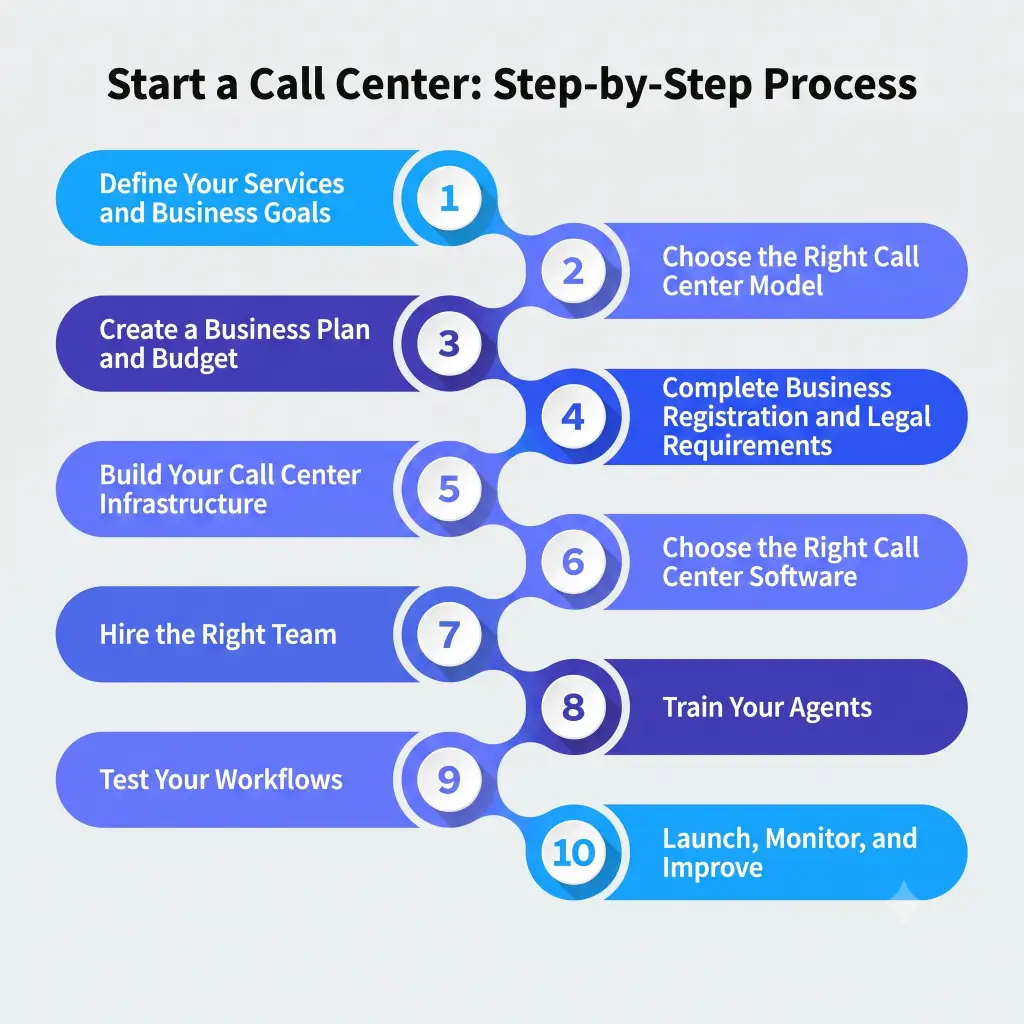
Building a successful call center requires more than purchasing software and hiring agents. Every stage, from planning your services to launching daily operations, plays an important role in long-term success. Follow the steps below to plan, set up, and launch your call center with confidence.
Step 1. Define Your Services and Business Goals
The first step in how to run a call center business is deciding what services you want to offer. Your call center may focus on customer support, sales, lead generation, technical support, appointment scheduling, or a combination of services. Having clear goals makes every decision that follows much easier.
Step 2. Choose the Right Call Center Model
Before moving forward with call center setup, choose the model that best fits your business. You can operate an inbound, outbound, on-site, hybrid, or virtual call center depending on your budget, team structure, and customer requirements. Selecting the right model early helps simplify setting up a call center and supports future growth.
Step 3. Create a Business Plan and Budget
A detailed business plan helps you estimate startup costs and prepare for ongoing expenses. Include equipment, software, internet, office space, hiring, training, and operating costs in your budget. Careful planning gives you a clear financial roadmap for how to set up a call center.
Step 4. Complete Business Registration and Legal Requirements
Register your business and obtain any licenses or permits required in your region. Review labor laws, tax obligations, customer privacy regulations, and data protection requirements before launching operations. Completing these steps early helps you avoid compliance issues later.
Step 5. Build Your Call Center Infrastructure
Prepare the resources needed to support daily operations. This includes computers, professional headsets, a stable internet connection, business phone systems, and a suitable workspace. Whether you're planning an office-based operation or creating a virtual call center, reliable infrastructure is essential.
Step 6. Choose the Right Call Center Software
Choosing the right software is an important part of your call center setup. Look for solutions that provide call routing, IVR, CRM integration, reporting, workforce management, and analytics features. Choosing scalable software now makes it easier to support future business growth without replacing your entire technology stack.
Step 7. Hire the Right Team
Recruit agents with strong communication, listening, and problem-solving skills. Hire based on expected call volume and business needs rather than filling positions quickly. The right team creates better customer experiences from the very beginning.
Step 8. Train Your Agents
Provide structured training before handling live customer calls. Cover product knowledge, communication skills, call handling procedures, customer service standards, and software usage. Ongoing coaching also improves service quality as your business grows.
Step 9. Test Your Workflows
Run a pilot before officially launching your services. Test call routing, response times, reporting, software integrations, and customer interactions to identify any gaps. Making improvements during this stage helps create smoother day-to-day operations after launch.
Step 10. Launch, Monitor, and Improve
Once everything is ready, begin serving customers and monitor performance regularly. Review key metrics, gather customer feedback, and continue refining workflows to improve efficiency. Regularly reviewing your performance helps you identify improvement areas, deliver better customer service, and support long-term business growth.
How Much Does It Cost to Start a Call Center?
The cost of starting a call center depends on the type of setup, team size, location, and technology you choose. A virtual call center usually requires a lower upfront investment than an on-site setup because it eliminates office-related expenses. Estimating your expenses in advance helps you allocate resources wisely and keep your call center operations financially sustainable.
The table below provides a general estimate of the most common costs involved in setting up a call center.
| Expense Category | Estimated Cost |
|---|---|
| Business registration and licenses | $500–$2,000 |
| Computers and hardware | $800–$1,500 per workstation |
| Professional headsets | $50–$200 per agent |
| Call center software | $25–$300 per user/month |
| CRM software | $20–$150 per user/month |
| Internet and network setup | $100–$500 per month |
| Office furniture and equipment | $2,000–$10,000 |
| Agent hiring and training | $1,000–$3,500 per agent |
| Marketing and website | $1,000–$5,000 |
Estimated Startup Costs by Call Center Type
The total investment also changes depending on the type of call center you plan to build.
| Call Center Type | Estimated Startup Cost |
|---|---|
| Virtual call center | $5,000–$15,000 |
| Hybrid call center | $10,000–$30,000 |
| On-site call center | $15,000–$50,000+ |
A virtual call center is often the most affordable option for businesses with a limited budget. Since agents work remotely, you can reduce spending on office space, utilities, and infrastructure while still delivering reliable customer support through cloud-based software.
Factors That Affect Call Center Costs
Your total investment can increase or decrease depending on several factors.
- Number of agents you plan to hire
- Type of call center setup you choose
- Software features and subscription plans
- Office space or remote work model
- Hardware and networking requirements
- Hiring, onboarding, and training expenses
- Compliance, licensing, and security requirements
Planning these costs before opening a call center helps you avoid unexpected expenses and gives you a clearer picture of the budget required for long-term operations. As your customer base grows, you can gradually expand your team, software, and infrastructure instead of making a large investment from the beginning.
Essential Software and Tools to Run a Call Center
The right technology helps your call center deliver better customer service and handle daily operations more efficiently. Instead of choosing software based only on features or pricing, focus on tools that support communication, customer management, reporting, and team performance. Below are the essential software categories every call center should consider.
| Software Category | Purpose | Popular Examples |
|---|---|---|
| Call Center Software | Handles inbound and outbound calls, call routing, IVR, call recording, and queue management. | Talkdesk, Five9, RingCentral, Aircall, Genesys Cloud |
| CRM Software | Stores customer information, tracks conversations, and helps agents provide personalized support. | Salesforce, HubSpot, Zoho CRM, Freshdesk |
| Workforce Management Software | Manages agent schedules, shift planning, attendance, and workload distribution. | Time Champ, NICE, Verint, Genesys WFM, Alvaria |
| Quality Assurance Software | Reviews customer interactions, evaluates call quality, and supports agent coaching. | Playvox, Scorebuddy, Observe.AI, CallMiner |
Is managing daily call center operations becoming overwhelming?
Use Time Champ to stay on top of your team's work every day.
Common Mistakes and Challenges When Starting a Call Center
Starting a call center brings a few challenges, but you can handle most of them with proper planning and the right approach. When you address these issues early, you build a more efficient operation and deliver a better customer experience. Below are some of the most common challenges and practical ways to overcome them.
1. Hiring the Right Agents
Finding agents with strong communication and problem-solving skills can take time. Create a clear hiring process, assess candidates carefully, and provide structured onboarding to build a capable team from the beginning.
2. Managing Startup Costs
Initial expenses can quickly increase if you invest in unnecessary tools or infrastructure. Prepare a realistic budget, prioritize essential resources, and expand your investment gradually as your business grows.
3. Choosing the Right Software
Selecting software without evaluating your business needs can lead to additional costs and operational issues later. Compare features, scalability, integrations, and pricing before choosing a solution for your call center setup.
4. Tracking Performance and Improving Operations
Without clear performance data, it becomes difficult to identify what's working and what needs improvement. Monitor key performance indicators regularly and use those insights to refine workflows and improve overall efficiency.
How Time Champ Helps Manage Call Center Teams
Launching a call center is only the beginning. As your team grows, keeping track of attendance, work hours, task progress, and overall performance becomes more challenging. Having the right system in place helps you stay organized, maintain service quality, and make informed decisions every day.
Time Champ is a modern employee monitoring and productivity tracking software designed to help you manage day-to-day operations with greater visibility. From monitoring work activity to tracking attendance and managing tasks, it gives you the insights needed to keep your call center running smoothly. Here's how Time Champ can support your team.
- Accurate Time Tracking: Automatically record work hours and clearly see how your team uses time across different tasks, projects, and shifts without relying on manual timesheets.
- Employee Productivity Monitoring: Get a clear view of work activity, productive hours, and idle time to identify performance trends and support continuous improvement.
- Attendance and Shift Management: Keep track of attendance, shift timings, working hours, and leave requests while scheduling the right agents for every shift with greater accuracy.
- Task and Project Management: Assign tasks to your team, track their progress, set clear priorities, and organize ongoing work so everyone understands what they need to do.
- Performance Reports and Analytics: Access detailed reports that highlight productivity trends, attendance patterns, and team performance to support better operational decisions.
- Real-Time Visibility into Teams: Manage office-based, remote, and hybrid teams from a single platform while maintaining visibility into daily work activities.
Finding it difficult to manage a growing call center team?
Use Time Champ to simplify tracking, scheduling, and daily operations.
Conclusion
Building a successful call center takes careful planning, the right technology, and consistent improvements as your business grows. Every decision, from choosing the right setup to managing daily operations, plays an important role in creating an efficient and reliable call center.
Time Champ helps you stay in control by providing clear visibility into attendance, productivity, tasks, and team performance. With the right insights at every stage, you can improve operational efficiency, make informed decisions, and build a call center that's ready to grow.

Thasleem Shaik

Table of Content
 What Is a Call Center?
- Types of Call Centers
- How to Start a Call Center: Step-by-Step Process
- How Much Does It Cost to Start a Call Center?
- Essential Software and Tools to Run a Call Center
- Common Mistakes and Challenges When Starting a Call Center
- How Time Champ Helps Manage Call Center Teams
- Conclusion
Instant Signup
Thank you for your request!
We have received your signup request and our team will get back to you soon. In the meantime, you can book a demo to see Time Champ in action.
Book a DemoFree trial. No credit card required. Prefer a walkthrough? Book a demo.
Related Blogs
Learn simple ways to measure and boost call center productivity, helping your team work more efficiently and improve customer service.
Jahnavi Pulluri | Jan 10, 2025
Discover the 18 global best call center outsourcing companies to optimize customer support. Choose from leading names for exceptional service and efficiency.
Mounika Sai | Nov 16, 2023
Discover the 10 best call centre quality assurance software for 2025. Compare features, pricing, pros, and cons to boost service quality and performance.
Thasleem Shaik | Nov 07, 2025
The best virtual assistant software for every job, from Time Champ for task tracking to Calendly for scheduling, find perfect tools to delegate every task.
Shabana Shaik | Feb 25, 2025
Discover the cost of a virtual assistant and the factors influencing their rates. Learn how to budget effectively for remote support services tailored to your needs.
Shabana Shaik | Feb 26, 2024
Discover top online outsourcing platforms. Learn how to effectively utilize these websites for your projects. Find the best freelancers for your tasks.
Mounika Sai | Nov 29, 2023


 4.7/5 avg.
Ready to Manage Your Workforce Smarter?
Join our family of 1500+ companies using smart insights to redefine workforces!

Free Trial
No Credit Card Required