Virtual Assistant Cost: Pricing & Hourly Rates (2026)
Compare virtual assistant cost, hourly rates, pricing models, regional costs, service fees, and payment options to choose the right fit for your budget.

You may struggle to decide how much to spend when hiring a virtual assistant. With rates varying by experience, location, and services, choosing the right option can be confusing. Knowing the virtual assistant cost helps you set a realistic budget, avoid overpaying, and hire the right support for your business needs.
Here you’ll understand how much virtual assistants typically charge, hourly rates, regional costs, and common pricing models. You’ll also know how to calculate costs and choose the best payment option for your business.
What Do Virtual Assistants Do?
Virtual assistants provide remote support for administrative, operational, and specialized business tasks. They can manage emails, schedules, customer service, data entry, bookkeeping, social media, research, and more. Handling these routine tasks saves time, improves productivity, and allows you to focus on growth and high-value activities.
How Much Does a Virtual Assistant Cost?
A virtual assistant typically costs $10 to $100+ per hour, depending on their experience, location, and the type of work they perform. Most small businesses pay $15 to $50 per hour for experienced virtual assistants, while offshore assistants often charge lower rates and highly specialized professionals charge more.
Here is a quick overview of typical virtual assistant hourly rates:
| Type of Virtual Assistant | Typical Hourly Rate | Best For |
|---|---|---|
| Offshore Virtual Assistant | $10-$20 | Administrative tasks, data entry, email management |
| Freelance Virtual Assistant | $15-$40 | Daily business support and general operations |
| Agency Virtual Assistant | $25-$60 | Reliable support with managed services |
| Specialized or U.S.-Based Virtual Assistant | $50-$100+ | Executive assistance, bookkeeping, marketing, technical support |
The actual cost depends on the assistant’s skills, experience, workload, and hiring model. Choosing the right virtual assistant based on your business needs delivers better value than focusing only on the lowest hourly rate.
What Is the Average Virtual Assistant Hourly Rate by Region?
Virtual assistant cost varies by region due to differences in labor costs, market demand, language proficiency, and experience. Hiring from offshore regions is generally more affordable, while assistants based in North America and Europe typically charge higher rates for specialized expertise and local business knowledge.
- United States & Canada: $25-$75+ per hour - Best for executive assistance, project management, bookkeeping, and marketing.
- Europe & United Kingdom: $25-$50 per hour - Commonly hired for administrative support, customer service, and multilingual assistance.
- Latin America: $8-$25 per hour - Popular for customer support, operations, and general administrative tasks.
- Asia (India & Philippines): $5-$20 per hour - A cost-effective choice for data entry, email management, research, administrative support, technical tasks, and customer service or call center outsourcing.
While regional rates can help you estimate costs, hiring the right virtual assistant should also depend on the skills, experience, communication, and ability to meet your business needs.
How To Calculate the General Cost of a Virtual Assistant
Estimating the cost of a virtual assistant is straightforward when you know the requirements. Follow these steps to calculate a realistic budget before hiring.

1. List the Tasks You Need Help With
Write down the tasks you want to delegate, such as email management, scheduling, customer support, bookkeeping, or marketing. Specialized tasks usually cost more than general administrative work.
2. Estimate the Hours Required
Determine how many hours of support you need each week or month. Your total working hours have a direct impact on the overall cost.
3. Choose the Right Experience Level
Decide whether you need an entry-level, experienced, or specialized virtual assistant. Higher expertise generally comes with higher hourly rates but can improve efficiency and work quality.
4. Consider the Assistant’s Location
Virtual assistant costs vary by region. Offshore assistants are often more affordable, while professionals in North America and Europe typically charge higher rates.
5. Select a Pricing Model
Choose whether an hourly, monthly retainer, project-based, or full-time pricing model best suits your workload and budget.
6. Calculate the Total Cost
Multiply the estimated hours by the hourly rate or compare monthly packages to determine your expected cost. This gives you a clear budget before making a hiring decision.
Want to manage virtual assistant costs with confidence?
Track work hours and control costs with Time Champ.
What Is the Cost of Virtual Assistant Services by Task?
Virtual assistant costs vary based on the type of work you need. General administrative tasks are usually more affordable, while specialized services that require advanced skills and experience come at a higher cost. Understanding these differences helps you choose the right support while staying within the budget.
- Basic Administration & Data Entry: $5-$15 per hour
Common Tasks: Email management, calendar scheduling, data entry, file organization, and internet research.
- Specialized Business Support: $20-$40 per hour
Common Tasks: Bookkeeping, project coordination, CRM management, digital marketing, and content management.
- Customer Support & Social Media: $12-$25 per hour
Common Tasks: Responding to customer inquiries, live chat support, social media management, and lead generation.
- Executive & Technical Support: $40-$75+ per hour
Common Tasks: Executive assistance, project management, SEO strategy, graphic design, web development, and other technical or consulting services.
What Are the Common Virtual Assistant Pricing Models?
Choosing the right pricing model is just as important as choosing the right virtual assistant. Each model offers different levels of flexibility, cost, and commitment, making it important to select one that matches your workload and budget.
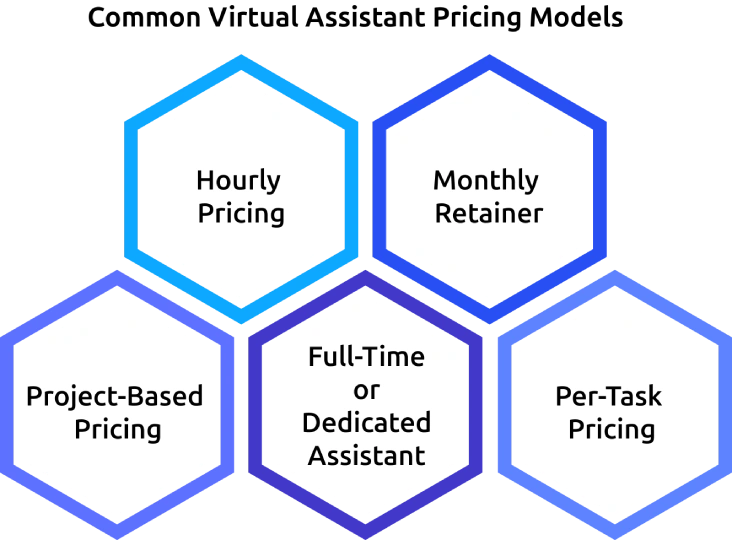
1. Hourly Pricing
You pay only for the time the virtual assistant spends working on your tasks. This model gives you flexibility and is ideal when your workload changes from week to week.
- Typical Cost: $10-$75+ per hour
- Best for: Administrative support, customer service, scheduling, email management, and occasional business tasks.
2. Monthly Retainer
You pay a fixed monthly fee for a set number of hours or ongoing support. This model offers predictable costs and ensures your virtual assistant is available when needed.
- Typical Cost: $300-$2,500+ per month
- Best for: Small businesses, startups, and companies that need ongoing support every month.
3. Project-Based Pricing
You pay a fixed amount for completing a specific project, regardless of the hours required. This makes budgeting easier because the total cost is agreed upon before work begins.
- Typical Cost: $100-$5,000+ per project
- Best for: Website setup, market research, content creation, CRM implementation, process documentation, and one-time projects.
4. Full-Time or Dedicated Assistant
A dedicated virtual assistant works exclusively for your business during agreed working hours. This model provides consistent support and allows the assistant to become familiar with your workflows and business processes.
- Typical Cost: $1,200-$4,500+ per month
- Best for: Growing businesses with daily operational tasks, executive support, and long-term business assistance.
5. Per-Task Pricing
You pay a fixed fee for each completed task, not by the hour. This model works well when tasks have a clearly defined scope and require little variation.
- Typical Cost: $5-$100+ per task
- Best for: Data entry, appointment scheduling, document formatting, online research, file organization, and other repetitive tasks.
How to Pay a Virtual Assistant?
Paying a virtual assistant is simple when you establish clear payment terms from the beginning. Follow these steps to ensure secure, timely, and hassle-free payments.
1. Agree on the Pricing Model
Start by deciding how you’ll pay the virtual assistant. Choose an hourly rate, monthly retainer, project-based fee, or per-task payment based on your workload and budget.
2. Set a Payment Schedule
Decide how often you make payments. Most businesses pay weekly, biweekly, monthly, or after completing a project. A consistent schedule builds trust and avoids payment delays.
3. Choose a Secure Payment Method
Select a payment method that works for both you and your virtual assistant. Common options include:
- Bank transfer
- Wise
- PayPal
- Payoneer
- Freelance platforms such as Upwork or Fiverr (with built-in payment protection)
4. Request an Invoice or Track Hours
Ask for an invoice if you’re paying a fixed amount, or review tracked work hours before making hourly payments. This helps you verify completed work and keeps payment records organized.
5. Review the Work Completed
Confirm that the agreed tasks or project milestones have been completed before sending payment. This helps prevent misunderstandings and ensures you’re paying for the expected deliverables.
6. Make Payments on Time
Process payments according to the agreed schedule. Timely payments strengthen your working relationship and encourage reliable, long-term support from the virtual assistant.
How Time Champ Helps to Optimize Virtual Assistant Costs
Hiring a virtual assistant can reduce your workload, but managing costs becomes difficult when you don’t know how time is being spent. Without clear visibility into work hours, task progress, and productivity, it’s easy to overpay, miss inefficiencies, or lose control of your budget. Time Champ is smart employee monitoring software with time tracking features that help you accurately track work hours, monitor productivity, and optimize virtual assistant costs by providing complete visibility into daily work activities.
Here’s how Time Champ helps optimize virtual assistant costs:
- Automatically tracks every work hour, so you only pay for actual time spent on productive work, eliminating manual timesheets and billing errors.
- Monitors productivity in real time by showing active, idle, and break time, helping you identify productivity gaps and improve work efficiency.
- Tracks time by project and task to show exactly where time is spent, making it easier to measure project costs and allocate budgets effectively.
- Simplifies project and task management by letting you assign tasks to virtual assistants, monitor their progress in real time, track time against each task, and ensure work is completed on schedule and within budget.
- Generates accurate timesheets automatically to simplify payroll, verify billable hours, and reduce the time spent reviewing invoices.
- Provides detailed productivity and time reports that help you analyze work patterns, identify inefficiencies, and make informed staffing decisions.
- Offers app and website usage insights so you can understand how work time is utilized and ensure business hours are focused on productive activities.
- Centralizes workforce management by allowing you to monitor multiple virtual assistants from a single dashboard, making it easier to manage remote teams and control labor costs.
Ready to get more value from every virtual assistant hour?
Monitor time, measure productivity, and optimize labor costs with Time Champ.
Conclusion
Understanding virtual assistant cost is essential for setting a realistic budget and choosing the right support for your business. Comparing pricing models, hourly rates, regional costs, and payment options can help you make informed hiring decisions without overspending. Focus on the value a virtual assistant brings without just choosing the lowest price, as the right skills and experience often deliver better long-term results. Evaluate your business needs, define the workload, and select a pricing model that aligns with your goals to build a productive and cost-effective working relationship.

Anjali

Table of Content
 What Do Virtual Assistants Do?
- How Much Does a Virtual Assistant Cost?
- What Is the Average Virtual Assistant Hourly Rate by Region?
- How To Calculate the General Cost of a Virtual Assistant
- What Is the Cost of Virtual Assistant Services by Task?
- What Are the Common Virtual Assistant Pricing Models?
- How to Pay a Virtual Assistant?
- How Time Champ Helps to Optimize Virtual Assistant Costs
- Conclusion

Related Blogs
Compare the best time tracking tools for virtual assistants to track hours, manage clients, boost productivity, simplify billing, and stay organized.
Thasleem Shaik | Jun 04, 2026
Boost remote team productivity with practical management tips, proven best practices, key metrics, and tools that help your remote teams perform better.
Anjali | Jul 16, 2026
The best virtual assistant software for every job, from Time Champ for task tracking to Calendly for scheduling, find perfect tools to delegate every task.
Shabana Shaik | Feb 25, 2025
Choose the right task tracker with insights into its features, benefits, and how it helps your teams simplify task tracking and improve overall productivity.
Anjali | Aug 05, 2026
Track employee working hours accurately, improve productivity, reduce time waste, and gain better visibility into team performance with a work time tracker.
Anjali | Jun 08, 2026
Time Champ's pricing explained with detailed plan comparisons, features, add-ons, and per-user costs to help businesses choose the right solution.
Thasleem Shaik | May 29, 2026


 4.7/5 avg.
Ready to Manage Your Workforce Smarter?
Join our family of 1500+ companies using smart insights to redefine workforces!

Free Trial
No Credit Card Required