Time Booking: What It Is and Why Your Business Needs It
Understand how time booking works, the best methods to use, and how it helps businesses track billable time accurately and stop losing valuable hours.

Ever wondered why projects take longer than expected or why billable hours seem to disappear? You may lose revenue when work hours go unrecorded, project time isn't tracked properly, or you don't have a clear view of how the team spends its time. Time booking helps you solve these challenges by creating a clear record of the hours employees spend on tasks, projects, and client work. With accurate time records, you can improve billing, monitor project progress, and reduce the risk of losing valuable work hours.
You'll discover what time booking is, how it differs from timekeeping, why it matters for businesses, and the most effective methods for recording work hours. This blog also explains how the right tools can simplify the process, improve billing accuracy, and give you better visibility into employee and project hours.
What is Time Booking?
Time booking is the process of recording the time employees spend on specific tasks, projects, clients, or activities during their workday. You can use it to track work hours accurately, understand where time goes, calculate billable hours, and maintain clear records for payroll, project management, and reporting.
Time booking starts when employees record the hours they spend on different tasks or projects. They may enter time manually, use timesheets, or rely on software that records work activity automatically. You can then review these records to track project progress, measure employee productivity, allocate resources, and ensure clients receive accurate invoices based on the actual time spent on work.
Losing billable hours due to inaccurate time records?
Time Champ tracks and captures every work hour automatically.
Time Booking Vs Timekeeping: Key Differences
You may come across the terms ‘time booking’ and ‘timekeeping’ and assume they mean the same thing, but they serve different purposes. Timekeeping focuses on recording when employees start and finish work, while time booking tracks the time spent on specific tasks, projects, or clients. Understanding this difference helps you choose the right approach for tracking work hours, managing projects, and improving billing accuracy.
Both practices play an important role in workforce management, but they solve different business needs. Knowing when to use each one can help you improve time tracking, reporting, and operational efficiency.
If you'd like to explore this topic further, read our blog on Timekeeping vs. Time Booking, where we break down the differences between the two and explain when businesses should use each method.
Why Is Time Booking Important for Businesses?
Businesses perform better when they have a clear understanding of how employees spend their time. Without accurate work-hour records, it becomes difficult to monitor project progress, manage costs, allocate resources effectively, and maintain billing accuracy. Time booking provides valuable visibility into daily operations, helping businesses make informed decisions based on actual work data without any assumptions.
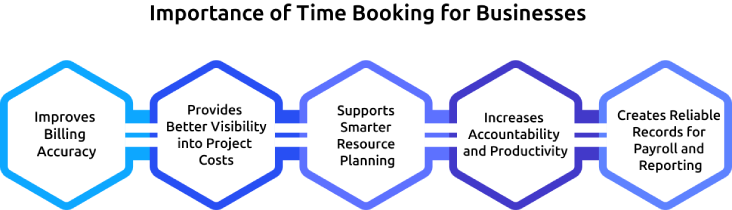
Improves Billing Accuracy
Accurate time records help businesses bill clients based on the actual hours spent on projects and tasks. This reduces the risk of underbilling, missed billable hours, and revenue leakage. Clear records of client work enable businesses to generate accurate invoices and reduce disputes related to billed hours.
Provides Better Visibility into Project Costs
Project costs often increase when businesses lack visibility into how time is being spent. Detailed time records reveal which tasks consume the most hours and resources, making it easier to identify inefficiencies and control project expenses. This information also supports more accurate budgeting and project planning in the future.
Supports Smarter Resource Planning
Time booking helps businesses gain a clear understanding of how workloads are distributed across teams and departments. With accurate time data, businesses can identify resource gaps, prevent workload imbalances, and allocate employees more effectively across projects. This leads to improved operational efficiency, better utilization of available resources, and a reduced risk of employee burnout.
Increases Accountability and Productivity
Time booking creates greater transparency into how work hours are spent across projects and activities. With access to accurate time data, businesses can identify productivity patterns, uncover inefficiencies, and ensure that resources are focused on high-priority work. This improved visibility supports stronger accountability and contributes to higher overall productivity.
Creates Reliable Records for Payroll and Reporting
Accurate work-hour records provide a dependable foundation for payroll processing, reporting, and compliance activities. Businesses can calculate employee hours with greater confidence while reducing errors caused by incomplete or inaccurate timesheets. These records also support audits, workforce analysis, and business reporting by providing trustworthy data whenever it is needed.

Did You Know?
A U.S. survey by QuickBooks Time found that 44% of small businesses say timesheet errors are their biggest time-tracking challenge, highlighting the importance of accurate time booking to reduce errors and maintain reliable work-hour records.
What are the Main Time Booking Methods?
Different businesses use different ways to record employee and project hours. The right method often depends on team size, business needs, and the level of detail required. Understanding the most common time booking methods can help you choose an approach that improves accuracy and makes work-hour tracking easier.
Manual Time Entry
Employees can record their work hours manually using paper logs, notebooks, or simple forms. Small businesses sometimes use this approach because it requires little setup. However, manual records can easily lead to forgotten entries and calculation errors.
Timesheet-Based Time Booking
Many businesses use timesheets to record hours worked on tasks, projects, or client assignments. Employees submit their timesheets daily or weekly, and you can review them before payroll or billing. This method creates a structured process for tracking work hours.
Spreadsheet Time Booking
Some teams use spreadsheets such as Excel or Google Sheets to maintain work-hour records. Spreadsheets offer flexibility and low costs, making them a common choice for smaller organizations. As projects and teams grow, managing large amounts of data can become challenging.
Clock-In and Clock-Out Systems
Clock-in and clock-out systems automatically record when employees start and finish work. You can use punch clocks, biometric devices, or mobile apps for this purpose. These systems reduce manual effort and help maintain more accurate attendance records.
Automated Time Tracking Software
Automated time tracking software records work activity and project hours with minimal manual input from employees. You can gain access to reports, productivity insights, and real-time data while employees spend less time updating records. This method provides one of the most accurate and efficient ways to manage time booking across a business.
How to Start Time Booking Without Annoying the Team?
When you introduce a new tracking process with a goal to improve efficiency and visibility, you may notice some resistance from employees. The key is to keep the process simple, explain its value clearly, and avoid making it feel like extra work.
Here, you can see the practical ways to introduce time booking smoothly and encourage employees to adopt it with less resistance.

1. Begin with a Simple Rollout
Introduce the process to your team or project before expanding it across the organization. This approach helps you identify challenges early and make improvements before wider implementation.
2. Clearly Communicate the Purpose
Explain why employees need to record their work hours and how the information will be used. When employees understand the benefits, they are more likely to participate and follow the process consistently.
3. Keep the Process Quick and Easy
Choose a method that allows your employees to record time without disrupting their daily work. A simple process encourages regular updates and reduces the chances of missing information.
4. Use Automation Whenever Possible
Select tools that automatically capture work activity without relying entirely on manual entries. This reduces the effort required from employees, improves the accuracy of recorded hours, and makes the tracking process easier to maintain across teams.
5. Review Results and Gather Feedback
Regularly evaluate the recorded data to see whether the process is meeting business goals. Ask employees for feedback so you can address concerns and improve the overall experience.
How Time Champ Simplifies Time Booking for Businesses
Managing work hours, project time, and billable effort can become difficult when your team relies on manual records, spreadsheets, or incomplete timesheets. Time Champ is an employee time tracking and monitoring software that helps you simplify time booking, improve work-hour accuracy, and gain a clearer understanding of how employees spend their time throughout the day.
Time Champ automatically captures employee activity in the background, reducing the need for constant manual updates. Employees can book time against specific projects and tasks, ensuring every hour is assigned to the correct client, project, or job. The platform also separates billable and non-billable hours, helping you improve billing accuracy and track project profitability. Detailed reports and automated timesheets provide clear insights into work hours, project effort, and team performance, allowing you to make informed decisions based on accurate data.
Tired of managing timesheets and work-hour records manually?
Time Champ automates time tracking and timesheet management.
Conclusion
Time is one of the most important assets in any business, and tracking it accurately can make a significant difference in daily operations. Without reliable work-hour records, you may lose billable time, face payroll or billing errors, and struggle to manage projects effectively. Time booking provides a structured way to record how employee time is spent, helping you improve visibility and employee accountability. Whether you use timesheets, spreadsheets, or automated software, an effective time booking process supports better billing, resource planning, productivity tracking, and decision-making.
Start evaluating your current time tracking practices and adopt a method that fits your business needs. Taking a proactive approach to time booking can help you improve accuracy, reduce costly errors, and build a stronger foundation for long-term business success.

Anjali

Table of Content
 What is Time Booking?
- Time Booking Vs Timekeeping: Key Differences
- Why Is Time Booking Important for Businesses?
- What are the Main Time Booking Methods?
- How to Start Time Booking Without Annoying the Team?
- How Time Champ Simplifies Time Booking for Businesses
- Conclusion

Related Blogs

Learn what a timesheet is, its uses, and how it improves work hour tracking, project management, and business efficiency.
Jahnavi Pulluri | Oct 26, 2024
Learn how automated time tracking improves team productivity, reduces manual work, builds trust, and delivers smarter workforce insights for managers today.
Anjali | May 15, 2026
Discover essential time-tracking features that improve productivity, payroll accuracy, and workforce visibility, and learn how to use them effectively.
Guna Lakshmi | May 16, 2026
Discover how to use timesheet reports to track progress, manage time effectively, and ensure project success with better planning and efficiency.
Sai Keerthi Uppala | Sep 17, 2024
Improve ROI with productivity tracking software by reducing wasted time, recovering billable hours, and improving workforce efficiency.
Guna Lakshmi | May 11, 2026
Learn how resource efficiency time tracking improves workload balance, productivity, resource utilization, and project outcomes without burnout for teams.
Anjali | May 21, 2026


 4.7/5 avg.
Ready to Manage Your Workforce Smarter?
Join our family of 1500+ companies using smart insights to redefine workforces!

Free Trial
No Credit Card Required