What Is Process Intelligence? A Complete Guide
Learn what process intelligence is, how it works, its key benefits, use cases, and how it helps businesses improve processes and make smarter decisions.
A process map can show you how work is supposed to happen. But it does not show you what actually happens. Tasks can take longer, teams may repeat steps, and employees may follow different approaches. Process intelligence helps you understand these differences using business process data. It shows you how work moves from one step to another, where changes occur, and how those changes can affect the final outcome.
In this guide, we’ve included everything you need to know about process intelligence, from how it works to its benefits, use cases, and implementation.
What Is Process Intelligence?
Process intelligence is the practice of analyzing data from business processes to understand how work actually happens. It helps you see each step, identify patterns and variations, and understand where processes can be improved.
It uses data from systems such as ERP, CRM, and other business applications to give you a clear view of how processes run. You can use these insights to improve workflows, reduce unnecessary steps, and make better process decisions.

Did You Know?
Deloitte found that 80% of organizations say process intelligence helps them identify and qualify more high-value processes for automation.
How Is Process Intelligence Different From Process Mining?
Process intelligence and process mining are closely related, but they are not exactly the same. Here are the main differences between process intelligence and process mining:
| Aspect | Process Intelligence | Process Mining |
|---|---|---|
| Definition | Uses data and analytics to understand, analyze, and improve business processes. | Analyzes event data to discover and understand how processes actually run. |
| Main Focus | Process performance, insights, and improvement. | Process discovery, analysis, and conformance. |
| Data Used | Combines process data with data from different business systems and sources. | Mainly uses event logs from business applications. |
| Scope | Broader and can cover multiple processes and business operations. | More focused on specific processes and their execution paths. |
| Key Output | Actionable insights that help you improve processes and make better decisions. | Process maps, variations, bottlenecks, and deviations from the expected process. |
| Example | Understanding why a customer order process takes longer and deciding how to improve it. | Mapping the actual steps taken to complete customer orders and finding where delays occur. |
How Does Process Intelligence Work?
Process intelligence works by collecting process data, analyzing how work moves through each stage, and turning those findings into useful insights. Here’s how the process works step by step:
1. Collect Process Data
It starts by gathering data from systems such as ERP, CRM, workflow platforms, and other business applications. This information can include task times, approvals, transactions, and user activities. Together, these details show what happens at each stage of the process.
2. Combine and Organize the Data
Data from different sources comes together to create a complete view of the process. This connects activities that may otherwise sit across separate systems. You can then follow the movement of work without switching between different sources.
3. Analyze Process Activities
The data reveals how people complete each task and how much time they spend on it. It also shows whether teams follow the expected steps or take different routes. This helps you understand how the process actually runs in day-to-day work.
4. Identify Patterns and Variations
The analysis brings unusual patterns and repeated activities to your attention. You can spot delays, repeated steps, and different ways of completing the same process. These findings help you understand where the process starts to differ from the expected path.
5. Generate Process Insights
The findings turn into reports, dashboards, and visual process maps that make the results easier to understand. You can compare different process paths and see how they affect outcomes. This gives you clear information to decide what needs attention.
6. Improve the Process
You can use these insights to remove unnecessary steps, simplify tasks, and improve the way work moves between teams. Once you make changes, you can review the results to see what improved and what still needs attention. This creates a continuous way to refine your processes.
What Are the Benefits of Process Intelligence?
Process intelligence can help you understand how your processes perform and where you can make meaningful improvements. Here are the key benefits of using process intelligence:
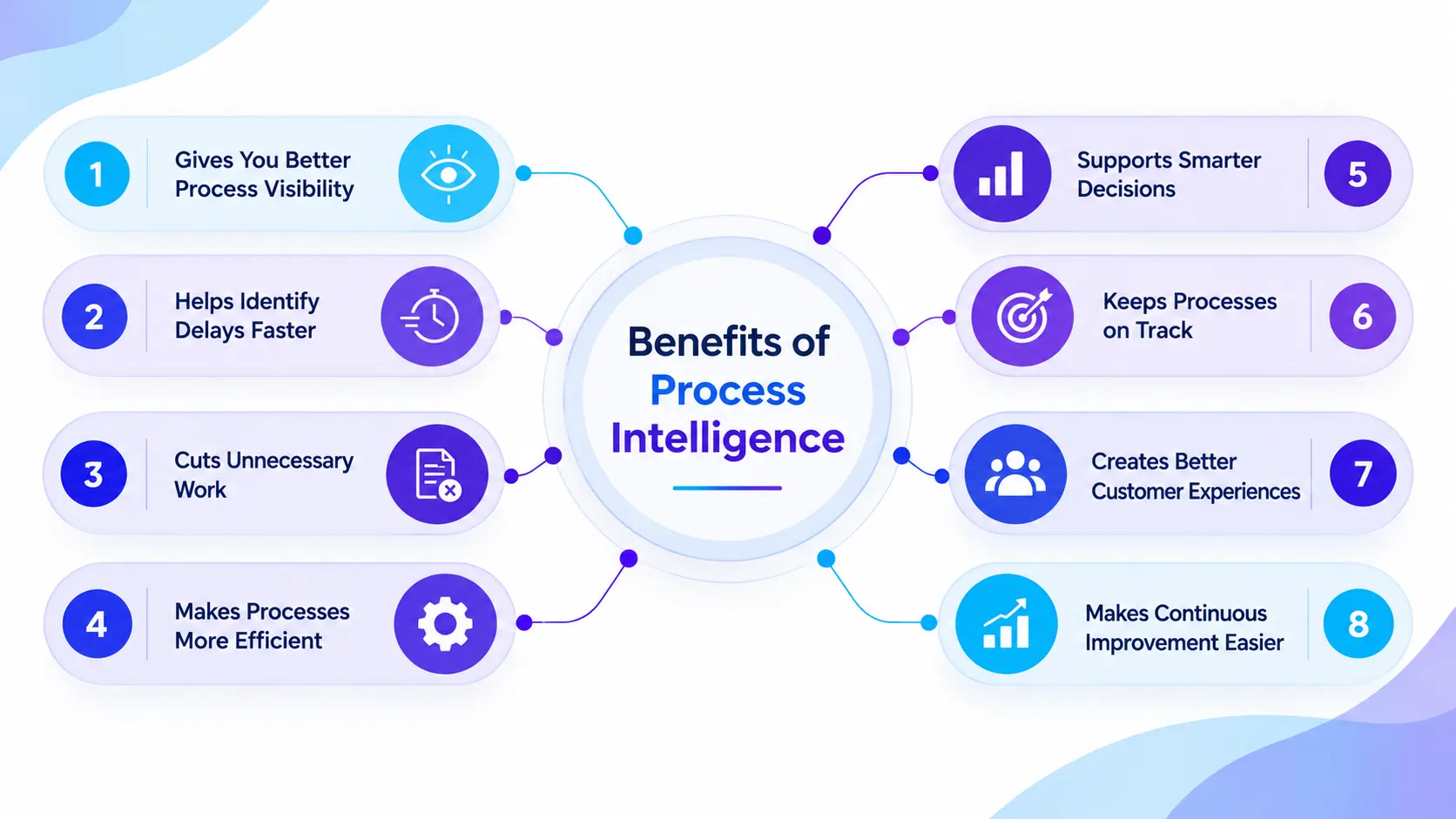
1. Gives You Better Process Visibility
See how work moves through each stage and understand what happens in practice. This makes it easier to compare the planned process with the way teams actually complete their work.
2. Helps Identify Delays Faster
Spot delays that take longer than expected and see where work starts to slow down. This lets you focus your attention on the parts of the process that need improvement.
3. Cuts Unnecessary Work
Repeated tasks, extra approvals, and manual activities can consume valuable time. Process intelligence helps you find these activities so you can remove or simplify them.
4. Makes Processes More Efficient
Clear insights into task times and process paths help you improve the way work gets done. Your teams can spend less time on avoidable work and more time on activities that matter.
5. Supports Smarter Decisions
Instead of relying on assumptions, you can use actual process data to evaluate your options. This gives you stronger evidence when deciding which changes to make.
6. Keeps Processes on Track
You can compare actual activities with your defined rules and procedures. This helps you catch deviations early and keep important processes aligned with your requirements.
7. Creates Better Customer Experiences
Customer-facing processes can directly affect response times and service quality. Finding and fixing delays can help you serve customers faster and deliver a more consistent experience.
8. Makes Continuous Improvement Easier
Process improvement does not end after you make one change. You can keep reviewing process performance, measure the results, and make further improvements as your needs change.
Want to turn process insights into measurable improvements?
Use Time Champ to improve workforce efficiency, optimize work patterns, and keep your teams focused on what matters.
Process Intelligence Use Cases Across Business Functions
Process intelligence can support different areas of a business, from improving everyday operations to managing customer-facing processes. Here are some common use cases where you can apply process intelligence:
1. Customer Service Management
Process intelligence helps customer service teams analyze how requests move from initial contact to resolution. It can reveal long wait times, repeated handoffs, and delays that affect the customer experience.
2. Employee Onboarding
HR teams can analyze the onboarding journey from document submission to training and system access. This helps identify delays and make the onboarding experience smoother for new employees.
3. Hospitality Operations
Hotels and hospitality businesses can analyze processes such as reservations, check-ins, housekeeping, and guest requests. This can help reduce service delays and create a more consistent guest experience.
4. Healthcare Process Management
Healthcare organizations can examine patient journeys, appointment scheduling, claims processing, and administrative workflows. Process intelligence can highlight delays and help teams improve the flow of patient-related processes.
5. Financial Services
Banks and financial institutions can analyze loan approvals, account opening, payment processing, and other financial workflows. This helps identify unnecessary steps, processing delays, and compliance issues.
6. Procurement Management
Procurement teams can examine the journey from purchase requests to approvals, orders, and delivery. This can reveal unnecessary approvals, long waiting periods, and process variations.
7. IT Service Management
IT teams can analyze how service requests move from submission to resolution. This helps identify recurring delays, inefficient handoffs, and areas where support processes can improve.
8. Claims and Case Management
Insurance and other service-based organizations can analyze how claims or cases move from submission to closure. This helps identify repeated reviews, unnecessary handoffs, and delays that extend resolution times.
9. Finance and Accounting
Finance teams can use process intelligence to analyze invoice processing, expense approvals, payments, and accounts payable workflows. These insights can help reduce manual work and improve processing speed.
Did You Know?
McKinsey reports that fully implementing process mining or process intelligence could improve a company’s bottom line by 3% to 5%.
Best Process Intelligence Tools and Platforms
There are several process intelligence tools available, and each one offers different capabilities, integrations, and use cases. Here are some popular process intelligence platforms and what they are best suited for:
| Tool | Best For | Key Strength |
|---|---|---|
| Celonis | Large enterprises and process teams | Large-scale process analysis |
| SAP Signavio Process Intelligence | SAP-based organizations and transformation teams | Process discovery across SAP and other systems |
| Time Champ | HR, workforce, and operations teams | Workforce activity and productivity insights |
| IBM Process Mining | Large enterprises and IBM-focused organizations | Process analysis within the IBM ecosystem |
| Microsoft Process Mining | Microsoft-focused businesses and automation teams | Integration with Power Automate |
| Apromore | Process analysts and data teams | Flexible process analysis |
| QPR Process Analyzer | Process analysts and transformation teams | Process flow and performance analysis |
| UiPath Process Mining | Automation and IT teams | Process insights connected to automation |
1. Celonis
Celonis helps organizations analyze business processes, identify process variations, and find opportunities to improve operations. It is widely used for large-scale process analysis across functions such as finance, procurement, supply chain, and customer operations.
Best For: Large enterprises, process improvement teams, operations leaders, and transformation teams.
2. SAP Signavio Process Intelligence
SAP Signavio Process Intelligence helps organizations discover and analyze business processes across SAP and other systems. It fits well into broader business transformation and process management initiatives.
Best For: SAP-based organizations, enterprise process teams, business transformation leaders, and process managers.
3. Time Champ
Time Champ is a workforce analytics platform that complements process intelligence by showing how people spend their working time. It provides insights into productivity, work patterns, application usage, time spent, and team performance.
Best For: HR teams, workforce managers, operations leaders, project managers, professional services firms, and organizations that want to connect workforce activity with operational performance.
4. IBM Process Mining
IBM Process Mining helps organizations analyze business processes and identify areas that affect operational performance. It can be a strong option for organizations already working within the IBM ecosystem.
Best For: Large enterprises, IT teams, operations leaders, and IBM-focused organizations.
5. Microsoft Process Mining
Microsoft Process Mining helps organizations discover and analyze business processes through the Power Automate ecosystem. Its connection with Microsoft’s automation tools can make it useful for organizations already using Microsoft technologies.
Best For: Microsoft-focused businesses, IT teams, automation teams, and operations managers.
6. Apromore
Apromore provides process mining and process intelligence capabilities for discovering, analyzing, and improving business processes. It can help teams visualize process flows and understand variations across different cases.
Best For: Process analysts, data teams, researchers, and organizations looking for flexible process analysis capabilities.
7. QPR ProcessAnalyzer
QPR ProcessAnalyzer helps organizations discover actual process flows, analyze performance, and identify process variations. It supports organizations that want to use process data to improve operational performance.
Best For: Process analysts, business transformation teams, operations managers, and enterprise organizations.
8. UiPath Process Mining
UiPath Process Mining helps teams visualize how processes run, identify variations, and find opportunities for improvement and automation. It works particularly well when organizations want to connect process insights with automation.
Best For: Automation teams, IT leaders, operations teams, and enterprises using UiPath.
See what’s really happening across your processes and workforce.
Use Time Champ to uncover productivity gaps and make better workforce decisions.
Challenges of Process Intelligence and How to Overcome Them
Process intelligence can bring useful insights, but implementing it successfully requires careful planning. Here are some common challenges you may face and practical ways to overcome them:
1. Poor Data Quality
Process intelligence depends on accurate and complete data. Missing, outdated, or inconsistent information can lead to unreliable process insights. Even small data errors can affect the results and make the actual process harder to understand.
How To Overcome It
Clean your data before analysis and regularly check your data sources for errors or missing information.
2. Difficulty Integrating Multiple Systems
Business processes often involve several systems, such as CRM, ERP, HR, and finance applications. Connecting data from all these sources can be challenging. Disconnected systems can leave gaps in the process and make it harder to follow work from start to finish.
How To Overcome It
Start with the most important systems and connect additional data sources gradually. Use reliable integrations to keep the information consistent.
3. Employee Resistance to Change
Employees may hesitate to adopt new tools or change the way they work. This can slow down implementation and reduce the value of process intelligence. People are more likely to support the change when they understand why the organization is introducing it.
How To Overcome It
Explain the purpose clearly and involve employees from the beginning. Show how the insights can help simplify their work and improve processes.
4. Analyzing Too Many Processes at Once
Trying to analyze every process at the same time can make the project complicated. It can also make it difficult to decide which problems deserve attention first. A broad approach can spread resources too thin and delay meaningful improvements.
How To Overcome It
Start with one or two important processes that have clear improvement opportunities. Expand the analysis after you achieve measurable results.
5. Difficulty Turning Insights Into Action
Finding a problem does not automatically lead to a solution. Teams may identify process issues but struggle to decide what changes to make. Without clear next steps, valuable insights can remain unused.
How To Overcome It
Assign clear ownership for each improvement area and create specific action plans. Prioritize changes based on their potential business impact.
6. Keeping Insights Up to Date
Processes change as business needs, systems, and team structures change. Insights can quickly become outdated if you do not review process performance regularly. Regular reviews help you keep your process information relevant as the business evolves.
How To Overcome It
Review process data regularly and measure performance after making changes. Continue refining processes as new patterns and requirements emerge.
How Workforce Analytics Supports Process Intelligence
Process intelligence shows how a business process moves from one stage to another. Workforce analytics adds another layer to process intelligence by helping you understand how your employees spend their time, use applications, and complete their work.
Together, these insights help you connect process performance with workforce activity. You can identify productivity patterns, workload issues, and activities that may affect how efficiently your processes run.
Time Champ for Workforce Analytics
Time Champ is a workforce analytics tool that helps you understand employee activity, productivity, time usage, and work patterns. It gives you a clearer view of how your workforce contributes to everyday business operations.
This can help you connect workforce activity with process performance and make more informed decisions about how work gets done.
- Application Usage: See where employees spend time and identify apps that affect productivity.
- Productivity Analytics: Find productivity gaps and understand where teams can improve their work.
- Work Timelines: See how employees spend their day and identify where working time gets lost.
- Project & Task Tracking: Compare time spent on work and ensure teams stay focused on priorities.
- Reports & Dashboards: Turn workforce data into clear insights for faster and smarter decisions.
- Productivity Trends: Spot changing work patterns early and take action to improve team performance.
Ready to see how your workforce actually works?
Start your free trial with Time Champ today and turn workforce data into useful insights.
Conclusion
Process intelligence helps you understand how work actually happens, find process variations, improve workflows, and make better decisions. From customer service and finance to healthcare and IT, it can help you improve processes across different areas of your business.
Adding a workforce analytics tool such as Time Champ gives you another layer of visibility into employees’ work and application usage, giving you a more complete view of process and workforce performance.

Guna Lakshmi

Table of Content
 What Is Process Intelligence?
- How Is Process Intelligence Different From Process Mining?
- How Does Process Intelligence Work?
- What Are the Benefits of Process Intelligence?
- Process Intelligence Use Cases Across Business Functions
- Best Process Intelligence Tools and Platforms
- Challenges of Process Intelligence and How to Overcome Them
- How Workforce Analytics Supports Process Intelligence
- Conclusion
Instant Signup
Thank you for your request!
We have received your signup request and our team will get back to you soon. In the meantime, you can book a demo to see Time Champ in action.
Book a DemoFree trial. No credit card required. Prefer a walkthrough? Book a demo.
Related Blogs
Learn the basics of process mapping with the help of effective strategies and also case studies to improve your workflows and boost your productivity.
Hima Bindhu Nara | Feb 02, 2024![What Is Business Process Automation (BPA)? - Guide [2026]](https://www.timechamp.io/images/business-process-automation.webp)
Learn what business process automation (BPA) is, why it matters, examples, how it works, implementation steps, challenges, benefits & BPM differences.
Chethana Choudary | Feb 18, 2026
Understand operational intelligence: definition, real examples, benefits, challenges, how it differs from business intelligence & helps scale businesses.
Anjali | Feb 11, 2026
Learn what workflow automation is, why it’s important, its types, examples, benefits, challenges, and how it differs from business process automation.
Anjali | Apr 08, 2026![11 Best Workflow Automation Software For [2026]](https://www.timechamp.io/images/blog-images/workflow-automation-057b7271.webp)
Find the 11 best workflow automation software for 2026. Compare features, pricing, pros & cons to automate tasks and improve team efficiency.
Guna Lakshmi | Apr 08, 2026
Operational efficiency helps you get more value from time, money, and resources. See how to measure it, reduce waste, and improve daily workflows.
Thasleem Shaik | Oct 09, 2026


 4.7/5 avg.
Ready to Manage Your Workforce Smarter?
Join our family of 1500+ companies using smart insights to redefine workforces!

Free Trial
No Credit Card Required