Time Champ > Blog > What Is Business Process Automation (BPA)? - Guide [2026] > Content
What Is Business Process Automation (BPA)? - Guide [2026]
Learn what business process automation (BPA) is, why it matters, examples, how it works, implementation steps, challenges, benefits & BPM differences.

Business operations become inefficient when critical processes rely on manual coordination, disconnected tools, and repetitive human effort. These inefficiencies slow down execution, raise error rates, and complicate maintaining consistency as organizations grow. Business process automation (BPA) addresses these challenges by using technology to automate structured, rule-based processes across departments and systems.
In this blog, you can explore what BPA is, its importance with real-life examples, the way BPA works, its implementation steps, challenges, benefits, and the difference between business process automation and business process management. At the end, you will have a clear outline to analyze BPA initiatives and know where automation provides quantifiable business value.
What Is Business Process Automation (BPA)?
Business process automation is also known as business automation. BPA aims to boost efficiency, accuracy, and visibility across operations. It enables consistent execution, reduces manual effort, and improves operational efficiency by allowing workflows to run automatically based on predefined logic, triggers, and conditions, without continuous human intervention.
Why Business Process Automation is Important?
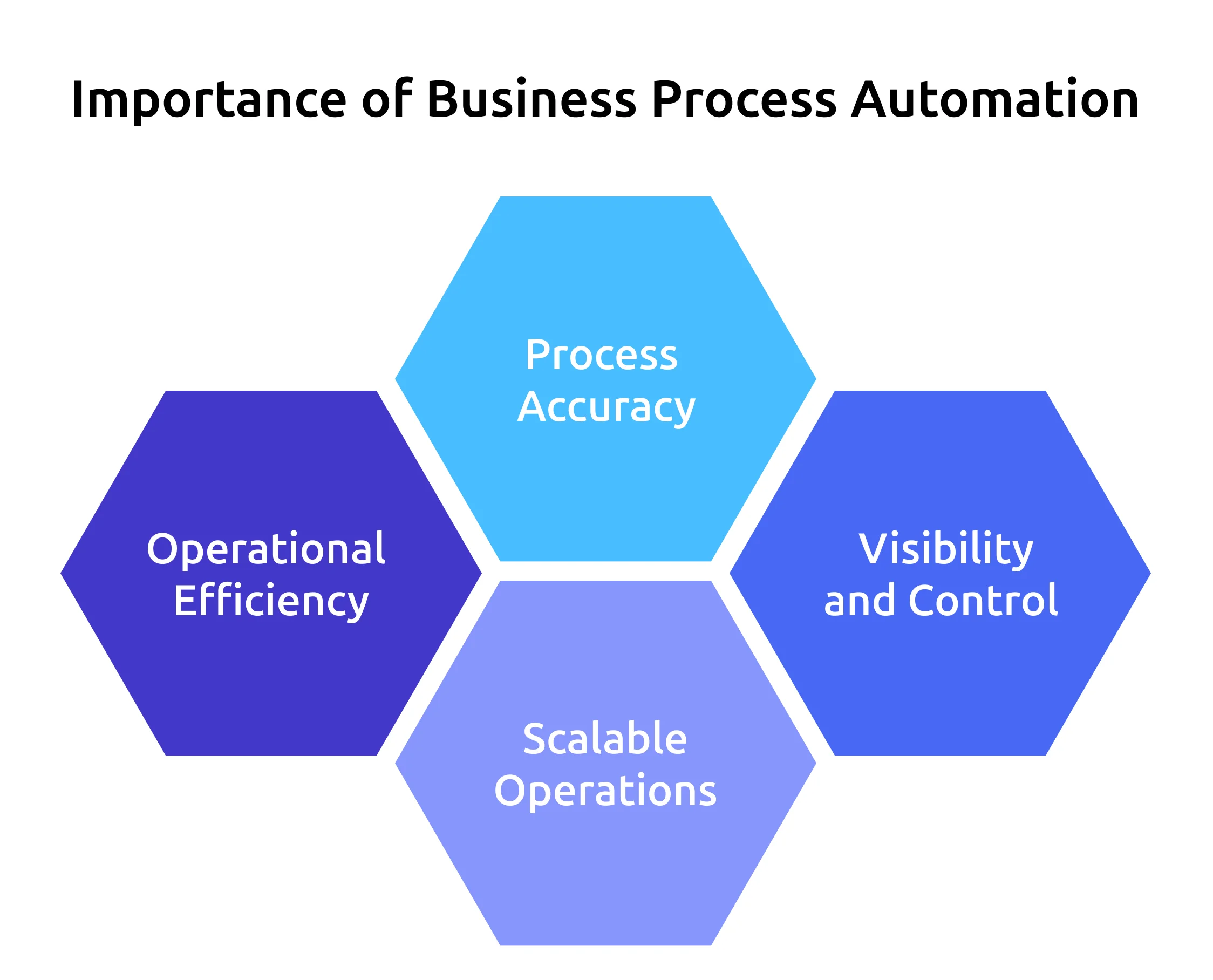
As you scale your organization, manual processes create delays, errors, and operational risk. Automation of business processes introduces structure and uniformity to the workflow between teams and systems.
- Operational Efficiency: Automating business processes eliminates manual effort and minimizes cycle time. According to McKinsey, up to 30% of work hours can be automated by 2030.
- Process Accuracy: Rule-based workflows reduce data entry errors and inconsistent approvals, enhancing overall execution quality.
- Visibility and Control: BPA offers real-time tracking, audit trails, and clear ownership at every stage of a process.
- ·Scalable Operations: Automation enables you to manage increased workloads without proportional rises in staffing.
Want to simplify and automate your business processes?
Time Champ helps structure workflows and improve execution consistency.
What Are Some Examples of Business Process Automation?
Business process automation applies to repetitive, rule-driven workflows that operate at scale. These examples demonstrate how BPA helps real operational use cases across functions.
Employee Onboarding Automation
Business process automation speeds up the onboarding process by automatically initiating document submissions, background checks, access provisioning, and task assignments. This saves on administration costs and provides uniformity, eliminating manual follow-ups and delays that generally increase new-hire preparation and decrease HR workload.
Invoice Processing Automation
Automated processes scan invoice data with OCR and direct documents to approval, cutting the process time from weeks to days. As reported by Parseur, fully automated AP workflows are capable of processing up to 30 invoices per hour, which is 70-80% faster than manual systems.
Leave and Attendance Management
BPA approves leave based on policies, balances, and routes and automatically matches results with payroll systems. This removes manual data entry errors, decreases administrative changes, and enhances precision in attendance records in both the HR and finance departments.
Procurement Request Workflows
Automation standardizes purchase requisitions through budget checks and approval hierarchies. Predefined rules automatically route requests through the required steps, reducing bottlenecks, improving compliance, and accelerating procurement without manual interdepartmental coordination.
Customer Support Ticket Automation
Business process automation groups and prioritize support tickets based on rule engines, allocate work to the appropriate teams quickly, and ensure SLA compliance. Automated routing enhances the response times, decreases backlog and offers uniform service delivery without the use of manual distribution of tickets.
Sales Lead Management Automation
BPA captures leads from multiple sources, qualifies and assigns them to sales representatives, and initiates follow-up actions. This will not miss any opportunities, enhance the speed of response and standardize pipeline advancement to provide a uniform sales experience.
How Does Business Process Automation Work?
Business process automation (BPA) begins with mapping your existing workflows to identify triggers, decision points, rules, and expected outcomes. Once you define these elements, you convert each step into automation logic that governs task flow, approvals, notifications, and data exchange between systems. Unlike basic task automation, BPA focuses on streamlining entire business processes to ensure consistent execution across teams and departments.
After deployment, the automation engine continuously monitors predefined events such as form submissions, status updates, or time-based triggers. Based on the rules you establish, it automatically performs actions like sending notifications, routing approvals, escalating delays, or updating system records. This structured automation makes execution more predictable, reduces manual coordination, and improves operational efficiency. By connecting workflows across multiple systems, automation tools help you eliminate bottlenecks, reduce errors, and increase overall throughput.
How to Implement Business Process Automation (BPA)?
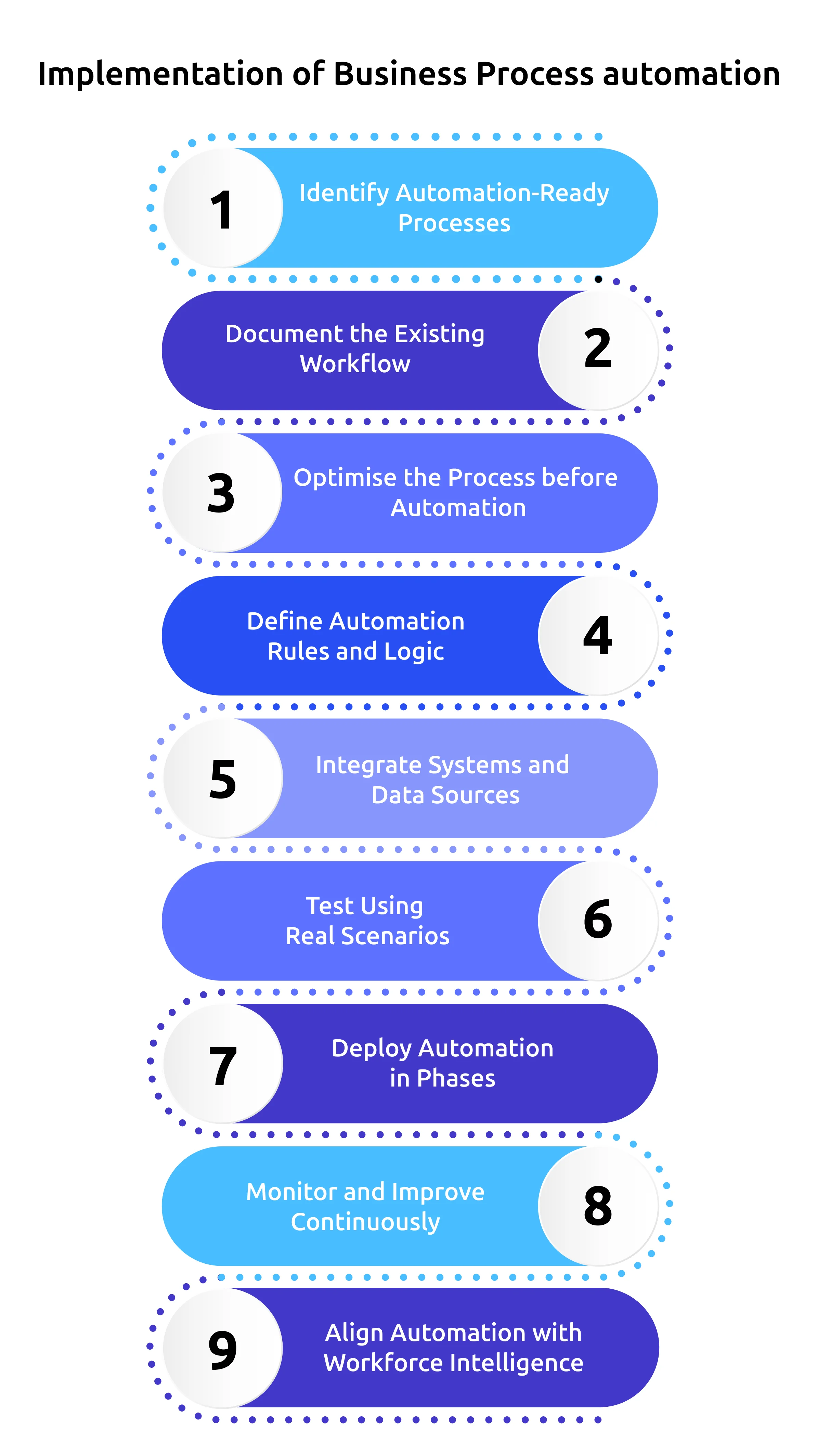
Implementing BPA requires structured planning and data-driven execution. A detailed, structured, step-by-step approach ensures automation improves performance instead of reinforcing inefficiencies.
Step 1: Identify Automation-Ready Processes
Start by identifying processes that are repetitive, rule-based, and executed frequently. These workflows often involve approvals, validations, data transfers, or compliance checks. Prioritizing high-impact processes ensures automation delivers visible value early.
Step 2: Document the Existing Workflow
Map the current process from start to finish, including triggers, decision points, handoffs, exceptions, and dependencies. This documentation also helps uncover hidden delays and informal workarounds that affect process reliability.
Step 3: Optimize the Process Before Automation
Remove unnecessary steps, duplicated effort, and redundant approvals before introducing automation. Simplifying workflows at this stage improves execution speed and reduces long-term maintenance complexity.
Step 4: Define Automation Rules and Logic
Translate the optimized process into clear automation logic by defining triggers, conditions, approval hierarchies, and escalation paths. Well-defined rules reduce ambiguity and prevent workflow breakdowns during edge cases.
Step 5: Integrate Systems and Data Sources
Connect business process automation solutions with core platforms such as HR, finance, ERP, and CRM systems. Strong integrations ensure data consistency and eliminate manual corrections between disconnected tools.
Step 6: Test Using Real Scenarios
Run pilot tests using realistic data volumes and process variations. Testing with real scenarios helps validate exception handling and ensures workflows remain stable under operational pressure.
Step 7: Deploy Automation in Phases
Automate gradually rather than automating all at once. Gradual implementation helps to achieve a more seamless transition and enables teams to change workflows without interfering with the daily routine.
Step 8: Monitor and Improve Continuously
Track workflow performance, detect bottlenecks, and improve automation logic regularly. Continuous improvement keeps automation consistent with shifting business priorities and process requirements.
Step 9: Align Automation with Workforce Intelligence
Use workforce intelligence insights to understand workload allocation, productivity trends, and capacity impact. This alignment ensures automation supports employees while improving operational decision-making.
Still relying on manual processes that slow down your team?
Switch to Time Champ and automate workflows with complete visibility and control!
What Are the Challenges of Implementing Business Process Automation?
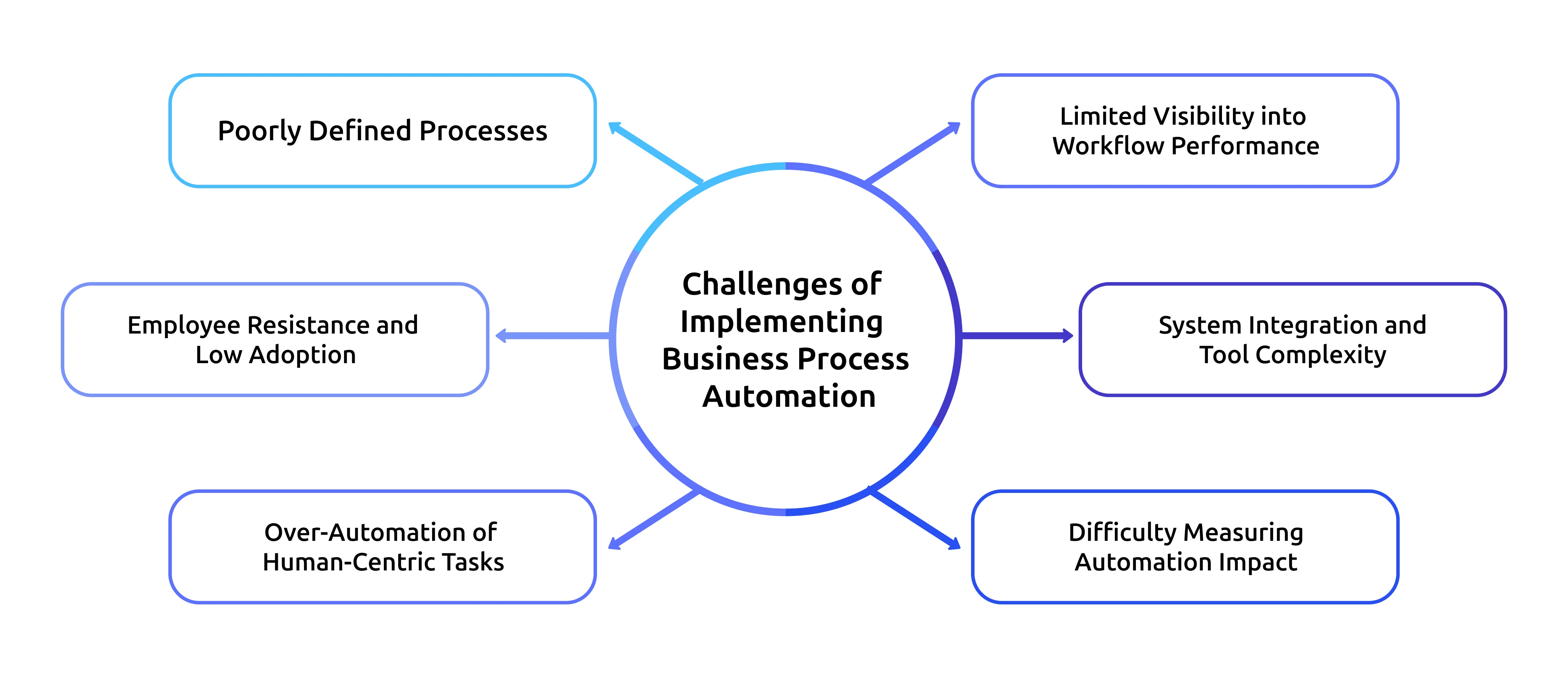
Implementing business process automation can significantly improve efficiency. But poor planning and execution can limit its success. Many organizations encounter challenges related to process clarity, adoption, and visibility, which can limit automation outcomes if not addressed early.
Unclear or Poorly Defined Processes
Automation initiatives often fail when workflows are undocumented or vary across teams, leading to inconsistent execution and unreliable outcomes. Informal practices and manual workarounds further complicate automation design. Process-level insights from workforce intelligence help reveal actual task sequences and execution patterns, enabling you to standardize workflows before automation.
Employee Resistance and Low Adoption
Employees may resist automation when its purpose and impact are unclear, resulting in low adoption and parallel manual work. This limits the effectiveness of automated workflows. Workforce intelligence analyzes workload distribution and activity trends to support transparent communication and position automation as a productivity enabler rather than a replacement.
Over-Automation of Human-Centric Tasks
Automating tasks that require judgment or contextual decision-making can reduce quality and accountability. Blind automation removes necessary human involvement from critical processes. Workforce intelligence highlights where human input adds value, helping teams balance automation with appropriate oversight.
Limited Visibility into Workflow Performance
Without real-time insight, delays, bottlenecks, and automation failures often go unnoticed until they impact outcomes. This restricts proactive optimization. Continuous visibility provided through workforce intelligence enables early detection of execution issues and supports timely process refinement.
System Integration and Tool Complexity
Disconnected applications and legacy systems increase automation fragility and maintenance effort. Poor integration planning leads to frequent workflow breakdowns. Understanding system usage patterns through workforce intelligence helps design integrations around actual data flows, improving stability and scalability.
Difficulty Measuring Automation Impact
You may often struggle to assess whether automation improves efficiency or simply shifts work across teams. Lack of measurable outcomes limits long-term optimization. Workforce intelligence provides measurable insights into productivity, utilization, and execution efficiency, enabling data-driven evaluation of automation outcomes.
Is Business Process Automation the Same as Business Process Management?
No, business process automation and business process management are related but not identical. Business Process Management focuses on designing and improving processes, while Business Process Automation focuses on executing those processes automatically.
| Business Process Automation (BPA) | Business Process Management (BPM) |
|---|---|
| Automates the execution of workflows using predefined rules | Focuses on analyzing, designing, and optimizing processes |
| Executes processes across systems with minimal human intervention | Involves continuous human-led review and improvement |
| Emphasizes speed, consistency, and accuracy | Emphasizes process clarity and optimization |
| Relies heavily on automation technology and integrations | Uses tools primarily for modeling and analysis |
| Ensures processes run consistently at scale | Ensures processes are efficient and well-defined |
How Workforce Intelligence Strengthens Business Process Automation
Business process automation is most effective when it reflects how work actually happens, rather than how teams assume it happens. Time Champ’s workforce intelligence provides deep visibility into employee activity, application usage, workload distribution, and process execution, helping you identify which workflows are truly ready for automation and which still require optimization.
This visibility enables you to align automation decisions with actual capacity and productivity patterns, rather than relying on assumptions. With Time Champ, you gain real-time visibility into automated workflows, detect bottlenecks before they escalate, and continuously refine processes to keep automation effective and scalable.
Conclusion
Business process automation transforms the way you run operations by eliminating repetitive work, strengthening process consistency, and giving you greater control as your organization scales. When you build automation around how work actually flows, your teams execute faster, reduce costly errors, and improve visibility across processes.
Time Champ equips you with the workforce intelligence needed to make smarter automation decisions. You can pinpoint inefficiencies, expose bottlenecks, and identify high-impact opportunities to automate. Clear visibility into your processes allows you to implement automation effectively and drive consistent, scalable performance.
Are operational delays impacting your business growth?
Switch to Time Champ and uncover workflow gaps before they slow you down.

Chethana


Table of Content
-
 What Is Business Process Automation (BPA)?
-
Why Business Process Automation is Important?
-
What Are Some Examples of Business Process Automation?
-
How Does Business Process Automation Work?
-
How to Implement Business Process Automation (BPA)?
-
What Are the Challenges of Implementing Business Process Automation?
-
Is Business Process Automation the Same as Business Process Management?
-
How Workforce Intelligence Strengthens Business Process Automation
-
Conclusion
Related Blogs
Explore the various types of Business Process Outsourcing (BPO) services, their benefits, and how they streamline operations for businesses.
Mounika Sai | November 21, 2023
Discover the best productivity methods and tips to improve your workflow and get more done in less time.
Jahnavi Pulluri | January 20, 2025
Make your appraisals easier and more accurate with our free performance review templates. Download, customize, and use them anytime you need for better results.
Shabana Shaik | November 07, 2025
Learn what workforce productivity is, key factors, metrics, and ways to measure and optimize it. Discover AI’s role in improving workforce efficiency.
Chethana Choudary | October 01, 2025
Get the complete guide on contingent workforce management: strategies, benefits, challenges, and how to optimize cost & performance with the right system.
Chethana Choudary | September 01, 2025
BPO stands for Business Process Outsourcing and it entails the hiring of external companies to perform certain jobs.
Vijaya Lakshmi | April 2, 2024


 4.7/5 avg.
Ready to Manage Your Workforce Smarter?
Join our family of 1500+ companies using smart insights to redefine workforces!

Free Trial
No Credit Card Required