How to Integrate Productivity Tracking with Project Management
Learn how to integrate productivity tracking with project management without broken workflows or manual exports. A practical step-by-step guide.

You’re tracking work, monitoring progress, and checking reports, but the results still don’t match expectations. Tasks keep progressing, deadlines remain green, and dashboards show everything is “on track.” Yet your team feels overwhelmed, timelines start slipping, and no one can clearly explain what’s going wrong.
This is where project management plays a critical role. It helps you organize tasks, set clear timelines, and keep work moving in the right direction. But it doesn’t always give you a clear view of how your team’s effort is actually used. That’s where productivity tracking adds value by giving you clear visibility into how time is used and where your team may be struggling or overworked.
In this guide, you will learn how to integrate productivity tracking with project management step by step without duplicate data, broken workflows, or manual exports.
How to Integrate Productivity Tracking with Project Management?
Integration between productivity tracking and project management simply means connecting two types of data streams, such as how your team spends time and what work they are doing.
A productivity tracker shows hours worked, app usage, focus time, and idle time. A project management tool shows tasks, deadlines, milestones, and project plans. When you connect with them, time and tasks are no longer separate.
When this integration works properly, things become much simpler.
- Time tracked automatically connects to the right tasks, so there is no need for manual timesheets
- Project costs update based on actual work, not just estimates
- You can see both progress and team workload in one place
- Reports, timesheets, and invoices all come from the same data, so everything stays accurate.
The table below shows the difference between running each system in isolation and running them as an integrated pair.
| Dimension | Productivity Tracking Alone | Project Management Alone | Integrated System |
|---|---|---|---|
| Tracks | Time, activity, attendance | Tasks, milestones, deliverables | Time and tasks connected in one system |
| Answers | How is time being spent? | What is being delivered? | Is the delivery effort matching the plan? |
| Reporting | Productivity reports, timesheets | Burndown, status, deadlines | Project profitability, capacity, risk |
| Decision support | Workload, focus, and burnout signals | Scope, schedule, resources | Complete view of workload, timelines, and performance |
Want one platform that combines productivity tracking and project management?
Get full visibility with Time Champ and manage everything in one dashboard.
Why Productivity and Project Management Integration Matters?
When your tools work together, you get a clear and complete view of how work is planned and how it is actually executed. Instead of managing tasks and tracking time separately, you connect both into one system that gives you better visibility and control.
When these two systems connect properly, your team experiences five clear outcomes that directly impact delivery, billing, and capacity planning every week.
Eliminate Duplicate Data Entry Completely
Matching timesheet hours with project tasks takes 30 to 60 minutes each week. Across a team of ten, this becomes a full working day lost to manual work. The time you track in your productivity tool automatically links to the right tasks in your project tool, so you only need to review it instead of entering the same data twice.
Track Project Costs in Real Time
Without integration, you calculate project costs weekly or monthly using manual exports. You end up making decisions based on data that is already five days old. With integration, every hour you track against a task updates the project’s total cost instantly. You see budget usage in real time and can flag overruns before the next status meeting.
Identify Capacity Risks Before They Impact Delivery
Productivity data shows your team’s utilization, which is the percentage of available hours actually worked. When this number stays above 90 percent, your team becomes over-allocated, and burnout risk increases. Integrated systems show this signal alongside project status, so you can rebalance workloads before your team misses a deadline.
Create Accurate Estimates for Future Projects
Past project data, such as hours tracked for each task type, becomes the base for your next project estimates. Without integration, this data stays in separate systems, and you rarely use it. With integration, you can pull a report that shows the average time your team takes for common tasks.
Use One Reliable Source for All Reports
You need the same data for quarterly reviews, weekly reports, and client invoices. Without integration, different people pull different reports, and the numbers do not match. Integration creates one source of truth, so every report uses the same hours, tasks, and productivity data.

Did You Know?
Research from Harvard Business Review shows that knowledge workers toggle between applications and websites nearly 1,200 times each day. Integration cuts the switching cost by consolidating data into fewer, connected views.
The 7-Step Framework to Integrate Productivity Tracking with Project Management
This framework works with your existing tools, whether you connect two tools or use an all-in-one platform. Follow the steps in order. If you skip the early steps, you create problems during rollout and increase the time and cost to fix them later.
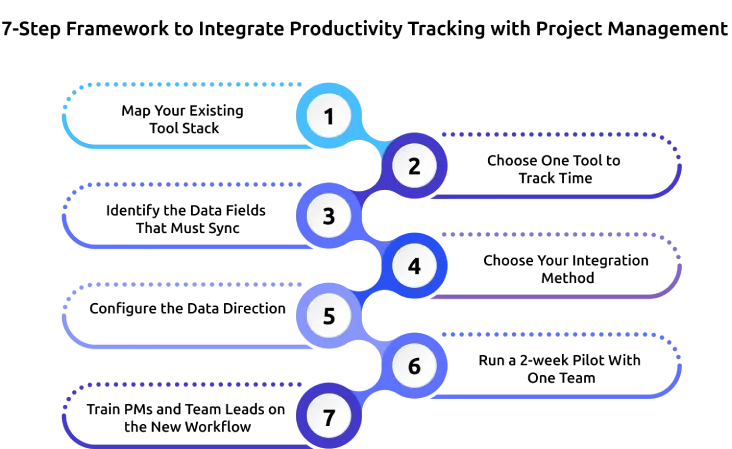
Step 1: Map Your Existing Tool Stack
Before you integrate anything, list every tool that captures time, activity, or task data. In most cases, you will find three or four overlapping tools, such as a timesheet app, a project management tool, a meeting tool that tracks duration, and a chat app where people share updates. Your goal is to simplify, not add more tools. If two tools collect the same data, choose one and remove the other.
Step 2: Choose One Tool to Track Time
Choose one tool as your single source of time tracking. Using multiple tools creates confusion and mismatched data. Pick either a productivity tracker for automatic and accurate tracking or your project management tool if your team already logs time there. Once you decide, use only that tool for tracking time. All other tools should read from it to keep your data consistent.
Step 3: Identify the Data Fields That Must Sync
Start by syncing five essential data fields between your systems.
- Project ID, which identifies each project
- Task ID, which identifies each task within a project
- Time logged, in hours and minutes
- User ID, which shows who logged the time
- Timestamp, which shows when the time was recorded
You can later add more fields like task status, productivity type, and budget usage. Begin with these core fields first, then expand once your integration runs smoothly.
Step 4: Choose Your Integration Method
You can choose from three main integration methods.
- Native Integration: Your productivity tool already connects with your project tool, such as Jira, Trello, Asana, or Monday. This is the easiest and most reliable option.
- API Integration: You build a custom connection using APIs and webhooks. Use this when you need custom data or use a niche tool.
- Manual Sync: You export data as CSV files and move them between tools weekly. This works temporarily, but you will outgrow it within 90 days.
Step 5: Configure the Data Direction
Decide how your data will flow. You can send time data from your productivity tracker to your project tool or allow it to sync in both ways. One-way sync is simpler and avoids errors, so it works for most teams. If you choose a two-way sync, define clear rules. Without rules, one update can overwrite another without warning.
Step 6: Run a 2-week Pilot with One Team
Run the integration with one team for two weeks before rolling it out across the organization. Choose a team, like engineering or client services, and use this period to test how well the integration works. Track how often the sync runs successfully, and check data accuracy by reviewing sample records, and note any issues or feedback. This helps you identify and fix problems early before expanding to a larger team.
Step 7: Train PMs and Team Leads on the New Workflow
Train your team on how to use the new setup. Run a short training session and share a simple workflow guide that explains what each role needs to do. This helps everyone follow the new process and prevents old habits from coming back.
Follow these steps carefully to build a smooth integration that gives you clear visibility, accurate data, and better control over your projects.
Need a productivity tracker that integrates with your PM tool?
Time Champ connects with Jira, Trello, Asana, ClickUp, and 80+ tools for seamless, real-time visibility.
The 5 Data Fields Every Integration Must Sync
If you configure these five fields correctly, your integration will work for 90% of use cases. Each field has a clear owner and purpose, and skipping it can lead to errors in your data and reports.
| Data Field | What It Is | Why It's Critical | Source System |
|---|---|---|---|
| Project ID | Unique identifier for each project | Connects time data to the right project | Project management tool |
| Task ID | Unique identifier for each task within a project | Allocates time to the right deliverable | Project management tool |
| Time logged | Hours and minutes spent on the task | The core productivity metric for billing and cost | Productivity tracker |
| User ID | Identifies which employee did the work | Enables individual reporting and capacity planning | Both systems must reconcile by email |
| Timestamp | When the time was recorded | Enables date-range views and prevents backdated entries | Productivity tracker |
Once the core five fields are stable, you can add three more for advanced reporting:
- Task status, which shows whether a task is active or completed
- Productivity classification, which shows if time is productive, unproductive, or neutral
- Budget consumed, which shows the total cost based on tracked time and hourly rate
For a deeper view of how to use this data once it is flowing, see our guide on how to analyze productivity data and build effective reports.
Three Integration Patterns: Which One Fits Your Team?
The right integration pattern depends on your team's tool stack, the complexity of your data needs, and how much developer time you have available. The table below compares the three patterns at a glance.
| Pattern | Best For | Setup Time | Maintenance | Reliability |
|---|---|---|---|---|
| Native integration | Teams using mainstream PM tools like Jira, Trello, Asana, Monday, and ClickUp | 30 minutes to 2 hours | Low, the vendor maintains the connector | High |
| API integration | Teams with custom or niche PM tools, or unique data needs | 1 to 4 weeks of dev work | Medium, your team owns it | Medium-High |
| Manual CSV sync | Teams piloting integration or without API access | 1 day to set up | High, someone runs the export weekly | Low, error-prone |
Native Integration (recommended)
Most productivity trackers already connect with popular project management tools. This is the easiest option to set up and most reliable as well. The tool handles updates automatically, and the integration usually works smoothly. If your project tool is supported, this is the best choice.
API Integration
If your tool is not supported or you need custom data syncing, you can build an API integration. This takes developer time, usually one to four weeks, and needs ongoing maintenance. You get full control over the data, but you are also responsible for fixing issues.
Manual CSV Sync
This is the basic fallback option. You export tracked hours, tasks, and user details from one tool and import them into the other every week. It works for a short time, but it is slow and prone to errors. Use this only as a temporary solution and plan to move to a better integration soon.
6 Common Integration Mistakes and How to Avoid Them
Most integration issues come from a few common mistakes. If you catch them early, they are easy to fix. If you catch them late, after weeks or months of incorrect data, fixing them becomes much harder and more time-consuming.
| Column 1 | Mistake | Why It Hurts | How to Avoid It |
|---|---|---|---|
| 1 | Two tools both treated as the source of time | Creates duplicate or conflicting hours, breaks reporting | Use a single tool to track time, and let other tools use this data |
| 2 | Project IDs and task IDs not standardized between systems | Data syncs to the wrong place; reports are unreliable | Make sure project and task IDs match in both tools during setup |
| 3 | No data direction policy; sync runs both ways without rules | Last-write-wins overwrites manager edits silently | Define how data should flow and avoid two-way sync without clear rules |
| 4 | Rolling out to the whole organization on day one | Hidden bugs cause large-scale data problems | Start with one team, fix issues, then roll out to others |
| 5 | Not reconciling user IDs between the two systems | Time logs orphaned to no user | Use a common identifier like email to match users correctly |
| 6 | Skipping the training step | PMs and team leads continue old workflows manually | Train your team and explain the new process clearly |
The first mistake on this list is using two tools to track time. This creates confusion and leads to incorrect data. It causes more integration problems than all the other mistakes. If you get only one thing right, make sure you use a single source for time tracking.
How Time Champ Connects Productivity Tracking and Project Management
Time Champ is an employee monitoring software with built-in workforce intelligence that includes both productivity tracking and project management in one platform.
All your data, like users, projects, and work hours, stays in one place, so everything stays accurate and easy to manage. If you already use tools like Jira, Trello, or Asana, Time Champ can still connect with them. It offers built-in integrations with 80+ tools. These integrations automatically sync key details like project, task, user, tracked hours, and timestamps.
You get a clear view of how work happens across tasks and projects. Along with task hours, you can see focus time, app usage, idle time, and productivity levels in one place. This helps you understand performance better and spot delays or inefficiencies quickly. With this visibility, you can plan workloads, improve team performance, and make decisions based on real data instead of guesswork.
Ready to integrate productivity tracking with your project management workflow?
Try Time Champ free for 7 days and get accurate productivity insights instantly.
Conclusion
When productivity tracking and project management work separately, you lack a complete view. Integration connects your team’s effort to the actual work, giving you a clear view of progress, workload, and performance. When you follow the right steps and avoid common mistakes, you can create a system that gives you accurate data and supports better decisions.

Guna Lakshmi

Table of Content
 How to Integrate Productivity Tracking with Project Management?
- Why Productivity and Project Management Integration Matters?
- The 7-Step Framework to Integrate Productivity Tracking with Project Management
- The 5 Data Fields Every Integration Must Sync
- Three Integration Patterns: Which One Fits Your Team?
- 6 Common Integration Mistakes and How to Avoid Them
- How Time Champ Connects Productivity Tracking and Project Management
- Conclusion

Related Blogs

Learn what a project management framework is, its components, importance, popular methodologies, benefits, and challenges for organizations.
Guna Lakshmi | Apr 08, 2026
Learn to create and leverage SMART goals effectively in project management for better planning, execution, and success. Get expert insights now!
Mounika Sai | Dec 06, 2023
Productivity Tracking Software helps remote teams stay on top, track progress, streamline workflows & boost efficiency effortlessly. Learn more!
Shabana Shaik | Mar 15, 2025
Implement a productivity tracking tool with clear steps, setup tips, and best practices to track employee productivity and improve team performance.
Thasleem Shaik | Apr 30, 2026
"Time Champ: The Ultimate Project Management Tool for Optimal Productivity. Discover the perfect blend of productivity and project management in one tool."
Mounika Sai | Aug 14, 2023
Discover how employee productivity tracking builds accountability, drives ownership, and turns daily activity into measurable team performance.
Guna Lakshmi | May 01, 2026


 4.7/5 avg.
Ready to Manage Your Workforce Smarter?
Join our family of 1500+ companies using smart insights to redefine workforces!

Free Trial
No Credit Card Required