How to Verify Contractor Work Hours Easily
Verify contractor work hours easily with accurate methods. Learn how to track, validate, and manage time accurately while reducing errors.

You're paying a contractor for 40 hours of work. But how do you actually know 40 hours of productive work happened? For the broader picture across this topic, our enterprise employee monitoring guide brings the moving parts together.
This is something many businesses don’t think about until they face some billing or invoice issues. Here, the main problem is the lack of a clear verification process. When there’s no structured system, small mistakes go unnoticed. Over time, those mistakes can lead to higher costs and confusion.
The good news? You don’t need to micromanage contractors. You just need a simple verification process.
In this guide, you’ll learn how to verify contractor work hours step by step, what to check before payment, and how to handle both remote and field work.
What Does It Mean to Verify Contractor Work Hours?
Verifying contractor work hours means confirming that the time a contractor submits is accurate, complete, and clearly linked to the work they actually performed. It goes beyond simply reviewing a timesheet. You’re checking whether the hours logged match actual progress, tasks completed, or proof like activity tracking, task updates, or location data.
For remote contractors, this could mean aligning hours with task updates or output, while for field contractors, it could involve validating time with GPS or jobsite records.
When you follow this approach, you get a clear picture of where time is actually spent. You can quickly spot gaps, avoid paying for unclear hours, and approve invoices with more confidence. It also helps you keep your records clean, so you don’t have to go back and fix issues later.

Did You Know?
Incorrect check-ins cost businesses up to $1,560 per employee each year.
Importance of Verifying Contractor Work Hours
If you approve contractor hours without checking them, you’re taking a risk on your budget, your projects, and your client’s trust. Even small mistakes can lead to higher costs and confusion later. When you verify hours regularly, you gain better visibility, reduce errors, and make approvals faster and more accurate.
Here’s why it really matters for your business:
Your Budget Stays Under Control
When you verify contractor hours, you clearly see where your money is going. Without verification, small errors like extra hours, duplicate entries, or unclear tasks can quietly increase your costs. Over time, these small gaps turn into serious budget overruns.
But when you review hours regularly, you can:
- Spot unusual time entries early
- Compare hours against actual work
- Adjust the scope before costs go out of control
This helps you stay proactive instead of reacting after the money is already spent.
Billing Disputes Become Easy to Handle
Disputes usually happen when there’s no clear record of work. If you don’t verify hours, you may end up relying on memory, messages, or assumptions, and that makes it hard to prove anything.
But when you have verified records:
- You can show exactly what work was done
- You have timestamps, task details, or proof
- You resolve issues quickly without long discussions
Instead of arguing, you simply refer to the data.
Your Project Planning Gets Better
Every verified hour gives you useful data. When you know how long tasks actually take, you can:
- Set realistic deadlines
- Allocate the right resources
- Estimate future projects more accurately
Without this data, you’re guessing, and guesses often lead to delays or missed expectations.
You Stay Legally and Financially Protected
Keeping accurate work records is helpful and also important for compliance. If questions come up later (from clients, audits, or internal reviews), you need clear proof of:
- Hours worked
- Work completed
- Payment justification
When your records are verified and organized, you reduce the risk of legal issues, payment disputes, or financial errors.
You Can Create Clear Accountability
When you have a verification process, contractors know what’s expected.
They understand that:
- Hours should match real work
- Entries need proper details
- Submissions will be reviewed
This creates clarity across the organization.
Still managing contractor hours manually?
Time Champ gives you a smarter way to verify work hours without chasing updates.
What are the Key Contractor Hours to Verify Before Approving Payment?
Before you approve any contractor invoice, it’s important to look beyond just the total hours. A clear review helps you understand whether the time reported actually matches the work done. When you check the right details, you can catch errors early, avoid overpayment, and make confident approval decisions without confusion.
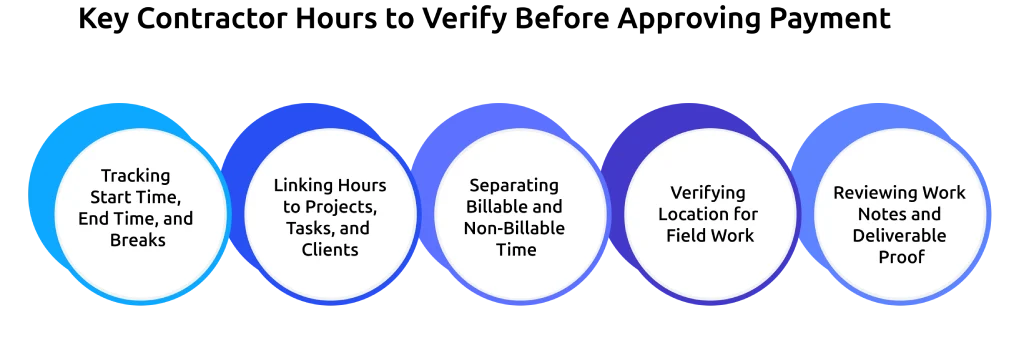
Tracking Start Time, End Time, and Breaks
Start by focusing on when the work started, when it ended, and how breaks were recorded, along with total hours. These details help you understand the actual flow of the workday. Check if the logged hours match the actual work done.
If entries show the same hours every day or don’t align with the employee workload, it may need a closer review. Clear time tracking helps you make sure the hours reported are accurate and genuinely reflect the work performed.
Linking Hours to Projects, Tasks, and Clients
Every hour should be linked to a specific task or project. Without this, it becomes difficult for you to verify the work. When time entries are tied to tasks, you can easily match hours with actual progress.
This also helps you quickly check whether the time spent is reasonable for the work completed. Clear task-level tracking reduces confusion and makes your approval process faster and more accurate.
Separating Billable and Non-Billable Time
Not all work should be billed, so you need to categorize time correctly.
Some activities, such as internal meetings, admin work, or preparation time, may not always be billable. If you don’t separate these clearly, it can lead to overbilling or client disputes. Clear categories help you approve only the right hours for payment.
Verifying Location for Field Work
Location verification is especially important for field roles like construction, maintenance, or service visits. You can use GPS tracking or geofencing to check whether the contractor was at the correct site during the reported hours. This helps you match the logged time with the actual work location and adds more accuracy to your verification process.
Reviewing Work Notes and Deliverable Proof
You should check simple notes or proof like files, updates, or photos to understand what work was completed. Even short descriptions can help you see what the contractor worked on during the logged hours.
When you review supporting proofs, it becomes easier for you to match the time spent with actual output. This helps you avoid unnecessary follow-ups and makes the approval process faster and smoother.
Still dealing with messy timesheets and delays?
See how Time Champ helps you bring structure to contractor hours and simplify approvals.
Step-by-Step Process to Verify Contractor Work Hours
Verifying contractor hours becomes much easier when you follow a clear process. Instead of checking things randomly, you can review hours in a structured way and catch issues before they turn into bigger problems.
Here’s how you can do it step by step:
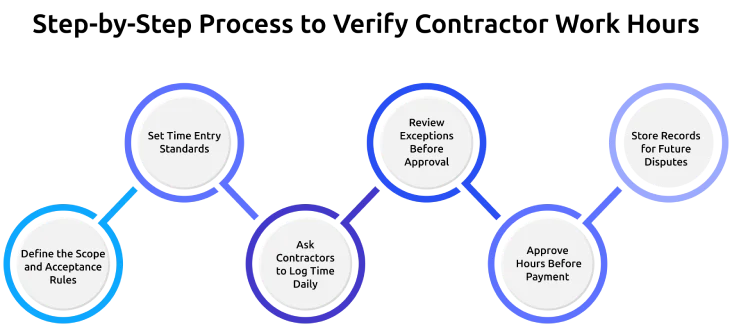
Define the Scope and Acceptance Rules
You should start by clearly defining what work is included and what counts as billable time. This includes tasks, expected hours, and any proof required for approval. When you set clear rules from the beginning, contractors understand what is expected, and you avoid confusion or disputes later.
This also gives you a clear reference point when reviewing and approving submitted hours.
Set Time Entry Standards
Decide how contractors log their time and what details each entry must include. This may include date, task, total hours, and short notes. When everyone follows the same format, it becomes much easier for you to review entries quickly and spot any missing or unclear information.
Consistent time entries help you compare work across different contractors without confusion.
Ask Contractors to Log Time Daily
Ask contractors to log their time daily instead of submitting it at the end of the week. Daily logging improves accuracy because the work is still fresh in their mind. It also helps you identify issues early, rather than reviewing a full week of unclear or incorrect entries.
This habit reduces errors and makes your verification process smoother.
Review Exceptions Before Approval
Instead of reviewing every entry in detail, you should focus on unusual or inconsistent records. This includes very high hours, missing details, or entries that don’t match the project progress. By reviewing only exceptions, you save time while still maintaining accuracy in your verification process.
This allows you to quickly catch problems without slowing down your workflow.
Approve Hours Before Payment
Always verify and approve contractor hours before making any payment. This step confirms that the submitted hours match the work done and follow the rules. Once approved, the payment process becomes smoother and more reliable.
It also reduces the chances of rework or corrections after payment is processed.
Store Records for Future Disputes
Keep all verified records in one place, including timesheets, notes, and proof of work. If any issues arise later, you can easily refer back to these records. This helps you resolve disputes quickly and keeps everything organized.
Having proper records also supports better decision-making and future planning.
How to Verify Field Contractor Hours with GPS and Geofencing?
When contractors work on-site, you should use GPS and geofencing to confirm where and when the work happened. This gives you better visibility and reduces reliance on manual entries. GPS tracking helps you match reported hours with actual location, while geofencing automatically records time when a contractor enters or leaves a job site.
You need to check if clock-in and clock-out times match location data and look for any gaps during work hours. Combining this with work notes or photos gives you a clearer view of the work done and makes verification more accurate.
Did You Know?
Manual reviews slowed payroll fixes, with top performers taking 2 to 4 days while others took 5 to 10 or more days.
How Can Time Champ Help Verify Contractor Work Hours?
Managing contractor hours manually quickly turns into confusion, missing entries, unclear tasks, and too much time spent checking everything. Time Champ helps you fix that by giving you clear, verifiable work-hour data in one place. Instead of chasing updates or guessing, you can confidently review and approve contractor hours with complete visibility.
Here are some key features that help you verify contractor work hours accurately and easily:
Automatic Time Tracking
Automatically records start times, end times, and break durations without manual input, maintaining accurate time logs. It tracks active work time in the background, detects idle periods, and separates them from productive hours. This helps you generate precise daily and weekly records, making it easier to review and approve contractor hours.
GPS and Geofencing
Captures real-time location data during work hours and enables location-based clock-in and clock-out. It allows you to set virtual boundaries around job sites and allows contractors to log time only within approved areas. Location history helps you verify field work and prevent location-related discrepancies.
Activity Tracking
Monitors app and website usage, along with keyboard and mouse activity during work sessions. It records active and idle time while providing detailed activity timelines for each contractor. This helps you connect logged hours with actual work performed, giving you clear context before approving entries.
Smart Alerts
Identifies unusual patterns such as extra hours, missing entries, or irregular activity automatically. It sends notifications for incomplete or delayed submissions and highlights inconsistencies that need attention. This allows you to focus only on critical issues and improve the accuracy of your verification process.
Clear Reports for Billing and Payroll
Generates structured reports based on time entries, projects, or contractors, making them ready for payroll and invoicing. It breaks down billable and non-billable hours and allows you to export data in formats like PDF, CSV, or Excel. This makes sure that approved hours are clearly documented and aligned with billing.
Want better visibility into how contractor time is actually spent?
Time Champ makes every hour easy to understand, review, and approve with confidence.
Conclusion
Verifying contractor work hours is simple. You need to make sure every approved hour has clear proof. When you check key details like time, tasks, billing type, location, and work proof, you remove confusion. A clear process helps you catch issues early, approve hours faster, and keep your records clean. With this, you can avoid overpaying, stay within budget, and handle disputes more easily. When you follow this approach consistently, verification becomes easier over time. Your team spends less time checking and more time focusing on actual work, while contractors clearly understand expectations and submit more accurate entries from the start.

Guna Lakshmi


Table of Content
-
 What Does It Mean to Verify Contractor Work Hours?
-
Importance of Verifying Contractor Work Hours
-
What are the Key Contractor Hours to Verify Before Approving Payment?
-
Step-by-Step Process to Verify Contractor Work Hours
-
How Can Time Champ Help Verify Contractor Work Hours?
-
Conclusion
Instant Signup
Thank you for your request!
We have received your signup request and our team will get back to you soon. In the meantime, you can book a demo to see Time Champ in action.
Book a DemoFree trial. No credit card required. Prefer a walkthrough? Book a demo.
Related Blogs

The contract labor act is a law that mainly aims at ensuring the employees under the job arrangements between a company and the workers supplied through the intermediate or contractor are justly treated.
Vijaya Lakshmi | April 27, 2024
Learn how time tracking works, its benefits, common challenges, and how to choose the right software to improve productivity.
Thasleem Shaik | November 8, 2024
Want to boost productivity? Uncover 20 time tracking best practices that can transform your workflow and help you achieve more with less effort.
Guna Lakshmi | July 1, 2025
Explore ethical employee monitoring techniques to track work transparently, protect privacy, and improve productivity while building trust across your team.
Anjali | Apr 27, 2026
Optimize your freelance workflow with the 10 best time-tracking tools! Boost productivity and manage projects seamlessly. Find the perfect solution for you.
Mounika Sai | January 9, 2024
Learn how to legally implement employee monitoring software. Covers legal requirements, policy steps, best practices, and what to tell your employees.
Thasleem Shaik | Apr 16, 2026


 4.7/5 avg.
Ready to Manage Your Workforce Smarter?
Join our family of 1500+ companies using smart insights to redefine workforces!

Free Trial
No Credit Card Required