8 Gantt Chart Alternatives for Project Management (2026)
Explore the best Gantt chart alternatives for project management. Compare tools, features, and benefits to find the best fit for your team’s workflow.

When projects run on tight timelines, it’s easy to lose sight of what’s really happening in your teams. Traditional Gantt charts show planned schedules but often do not reveal real progress, how teams share work, or where problems are developing. Gantt chart alternatives help teams see work clearly, stay aligned, and enable leaders to make smarter decisions by providing flexible and practical insights into how teams complete tasks. Anyone weighing this decision usually starts with our best project management software guide for the full landscape.
In this guide, you’ll explore 8 effective Gantt chart alternatives that help you manage projects efficiently, make informed decisions, and keep your teams focused and productive throughout every stage.
What Are 8 Gantt Chart Alternatives for Project Management?
Even with careful planning, teams often miss deadlines or fall behind the original plan. In fact, almost 70% of projects do not achieve their original goals or timelines, showing a clear gap between the planned schedules and how work actually happens. Traditional Gantt charts often fall behind shifting priorities, task dependencies, and actual team effort. This is why most teams turn to Gantt chart alternatives that offer a better view of workflow, performance, and results.
Below are 8 practical Gantt chart alternatives for project management, each suited to different project needs and working styles.
1. Kanban Boards
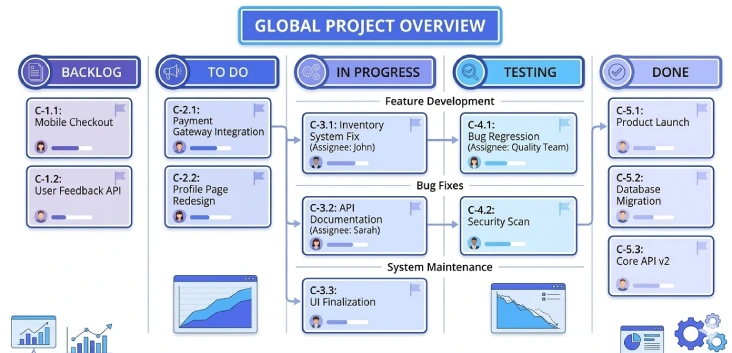
Kanban boards replace fixed schedules with a visual workflow. They display tasks as they pass through various phases, like planned, in progress, and completed. This method helps teams focus on flow, reduce work overload, and enhance the speed of project delivery. Kanban is effective when priorities shift frequently, and teams require flexibility instead of schedule bars.
Key Features
- Visual task flow across stages
- Easy prioritization of ongoing work
- Clear focus on work in progress
- Limits work overload and improves project delivery speed
- Flexible structure that adapts to changing priorities
Best For
Teams that follow agile or continuous workflows require flexibility instead of fixed project schedules.
2. Time Champ
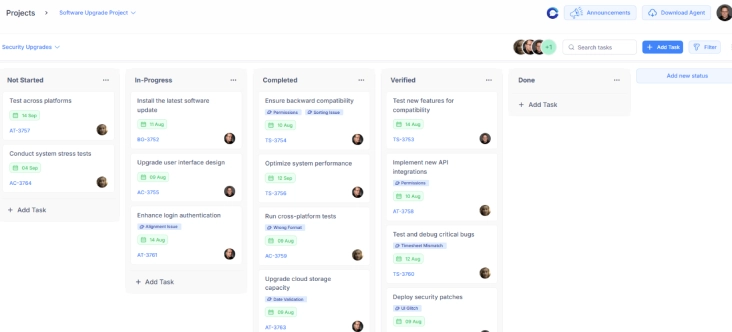
Time Champ is a workforce intelligence platform that provides a powerful project management module with flexible board types and customizations. It includes Kanban, Super Agile, and Template Workflow boards by default to organize tasks visually. It also allows you to create fully customized boards tailored to your specific processes and workflow needs. You can move tasks between statuses such as To Do, In Progress, and Completed, ensuring progress is clear at every stage.
Time Champ gives teams visibility into ongoing work, promotes collaboration, and helps leaders make data-driven decisions while keeping projects on schedule. Its boards combine real-time insights with easy-to-use task management so teams can work efficiently and adapt quickly to changing priorities.
Key Features
- Multiple board types, including Kanban, Super Agile, and Template Workflow
- Move tasks easily between statuses such as To Do, In Progress, and Completed
- Real-time visibility into task progress, team activity, and project performance
- Customisable workflows to match project needs and team processes
- Insights on team productivity, task completion trends, and workload distribution
- Supports collaboration with comments, notifications, and activity updates
- Provides analytics for informed decision-making and efficient resource planning
Best For
Teams and organizations that need flexible, visual, and insight-driven project management to stay aligned and deliver results efficiently.
3. Scrum Boards
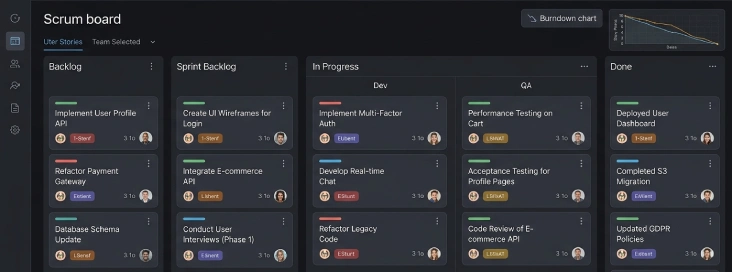
Scrum boards plan work in short time-bound sprints rather than in long timelines. Teams plan tasks for each sprint and focus on delivering small, meaningful outcomes. This approach promotes frequent review, faster feedback, and better collaboration. Scrum boards help teams adapt quickly when requirements change and keep everyone aligned on short-term goals.
Key Features
- Sprint-based task planning
- Clear short-term goals and deliverables
- Regular review and improvement cycles
- Strong focus on team collaboration
- Encourages faster feedback and adaptability
Best For
Agile teams work in iterations and require frequent feedback and adaptability.
4. PERT / CPM Network Diagrams
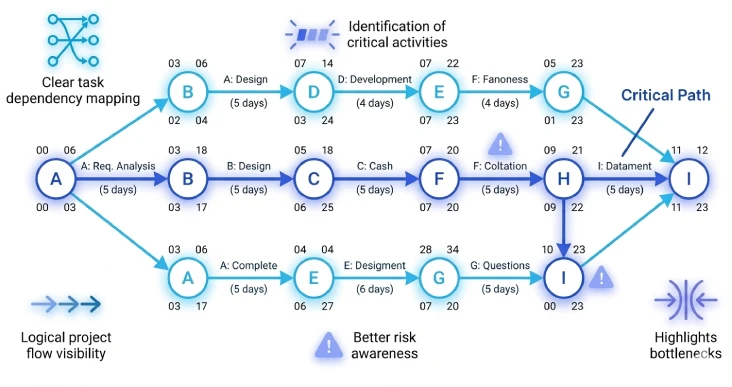
PERT and CPM charts show how tasks relate to each other instead of showing timelines. They map the dependencies between tasks and highlight the critical path that affects project completion. This method will assist you in knowing what activities are most important and where delays may affect the whole project. It is effective in complex projects that have numerous dependencies.
Key Features
- Clear task dependency mapping
- Identification of critical activities
- Logical project flow visibility
- Better risk awareness in planning
- Highlights project bottlenecks and task impact
Best For
Complex projects that depend heavily on task sequences and interdependencies.
5. Work Breakdown Structure (WBS)
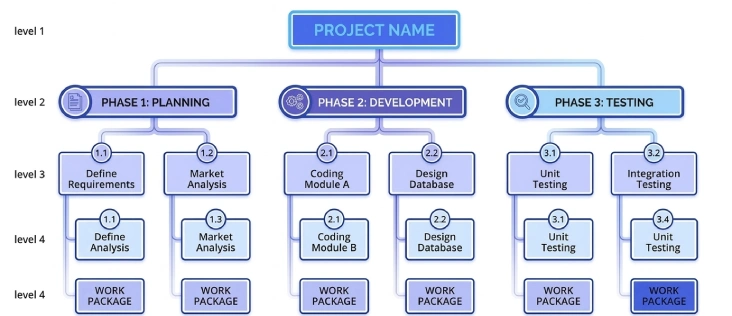
Work Breakdown Structure (WBS) divides a project into smaller and manageable sections. Instead of showing time-based schedules, it focuses on scope, deliverables, and responsibilities. This approach assists you in understanding what work the project includes and avoids scope gaps. WBS provides a solid basis for task planning, time estimation, and resource planning.
Key Features
- Clear breakdown of project scope
- Improved clarity on deliverables
- Better task ownership definition
- Strong base for project planning and time estimation
- Helps prevent scope gaps and misalignment
Best For
Projects that need clear scope definition and structured planning before execution.
Struggling to get real-time visibility on your projects?
Gain clear insights into your projects and boost team performance with Time Champ today!
6. Project Dashboards and Reports
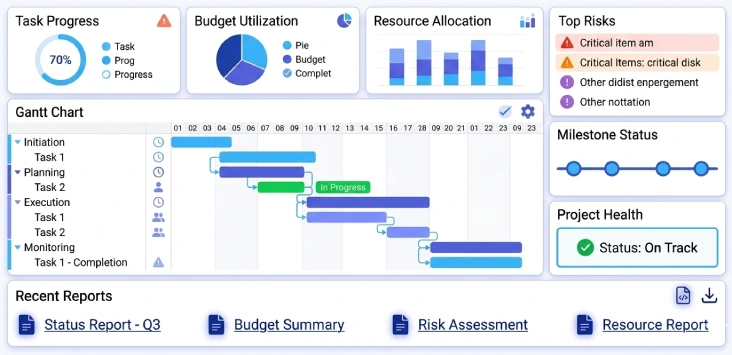
Project dashboards and reports present project health in terms of clear metrics and summaries. Dashboards focus on outcomes, progress, and performance rather than showing timelines, while reports summarize project data in detailed or visual formats, helping teams and leaders review performance, track progress, and make informed decisions.
This method helps decision-makers understand quickly what works, what requires attention, and where to take action. Dashboards and reports are effective when leaders need quick insights into various projects.
Key Features
- High-level project visibility
- Clear performance indicators
- Easy comparison across projects
- Decision-focused summaries
- Quick identification of issues and progress trends
Best For
Leaders and teams who need quick visibility into project status and outcomes across portfolios.
7. Mind Mapping
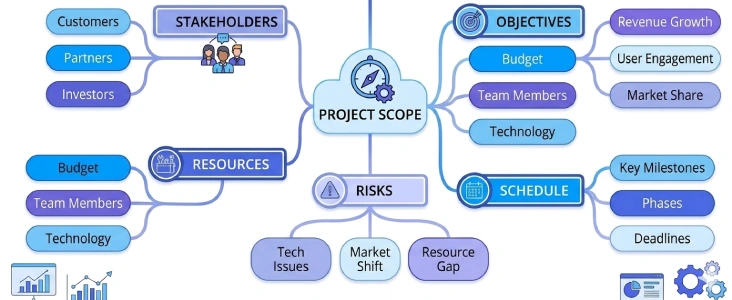
Mind mapping assists teams in planning and organizing ideas visually. Instead of static timelines, it shows how tasks, ideas, and goals connect and move work forward. This technique is effective during the early phases of the project when teams establish scope, structure, and direction. Mind maps also encourage creativity and simplify complex ideas.
Key Features
- Visual organization of ideas
- Clear connections between tasks
- Simple structure for early project planning
- Supports creative thinking
- Helps define project scope and structure before execution
Best For
Early-stage project planning and brainstorming where structure and clarity matter more than schedules.
8. Flowcharts
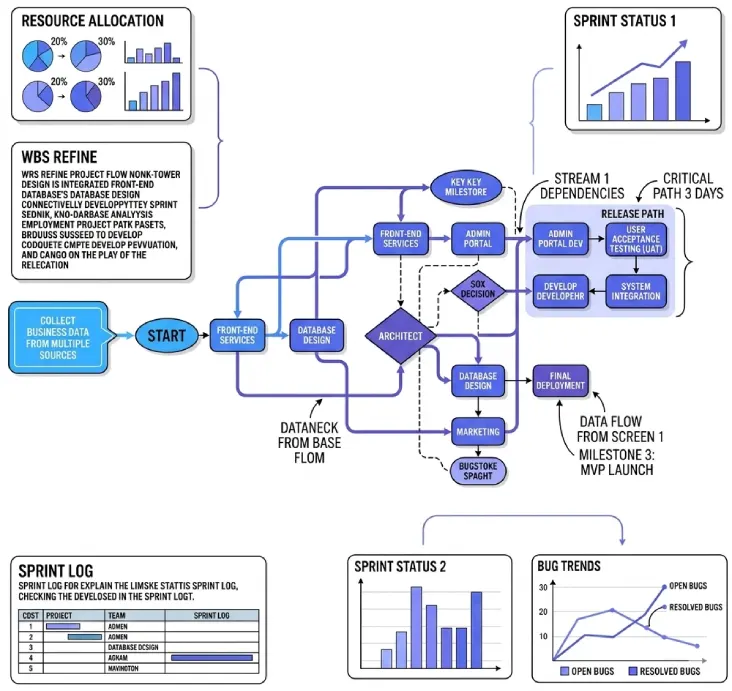
Flowcharts show how work moves step by step across people, teams, or departments. They focus on the process flow rather than time, helping teams visualize each step and understand the overall workflow. This method reduces confusion, clarifies responsibilities, and improves coordination during project implementation.
Key Features
- Step-by-step process clarity
- Clear responsibility mapping
- Improved coordination between teams
- Easy understanding of workflows
- Highlights handoffs and process inefficiencies
Best For
Process-driven projects that involve multiple teams or departments
Want to keep your projects on track without relying on outdated schedules?
Streamline workflows and make smarter decisions with Time Champ now!
Conclusion
Exploring these Gantt chart alternatives reveals multiple ways to manage tasks, monitor progress, and keep projects on track without depending only on traditional schedules. Whether you prefer visual boards, structured frameworks, or real-time insights, tools like Time Champ help you understand what is really happening, use resources wisely, and keep your team focused. Choosing the right approach will make your projects run smoothly, improve collaboration, and give you confidence that your work stays on track.

Table of Content
-
 What Are 8 Gantt Chart Alternatives for Project Management?
-
Conclusion
Related Blogs
Looking for Kickidler alternatives? Here are 10 tools that are worth trying out. Check out the best options for monitoring productivity and managing teams.
Shabana Shaik | July 30, 2025
Top DeskTime alternatives that help remote and hybrid teams to track time, improve productivity, support privacy, and create a healthier work culture.
Guna Lakshmi | August 01, 2025
Discover the top 10 Clockly alternatives that offer smarter workforce analytics, better time tracking, and improved productivity for field and remote teams.
Jahnavi Pulluri | July 31, 2025
Compare the top 10 alternatives to Asana that simplify task management, improve workflows, and help teams deliver projects faster with less effort.
Thasleem Shaik | August 01, 2025
Explore the top 10 monitask alternatives that simplify tracking, improve visibility, and match your team’s work style. Discover smarter choices today.
Thasleem Shaik | August 02, 2025
Find better Toggl Track alternatives and explore what unique features and valuable perks these powerful tools offer to improve your business workflow today.
Shabana Shaik | August 01, 2025


 4.7/5 avg.
Ready to Manage Your Workforce Smarter?
Join our family of 1500+ companies using smart insights to redefine workforces!

Free Trial
No Credit Card Required