Project Management Software: 14 Key Features You Need
Manage projects better with 14 key features of project management software, from task planning and tracking to collaboration, reporting, and productivity.
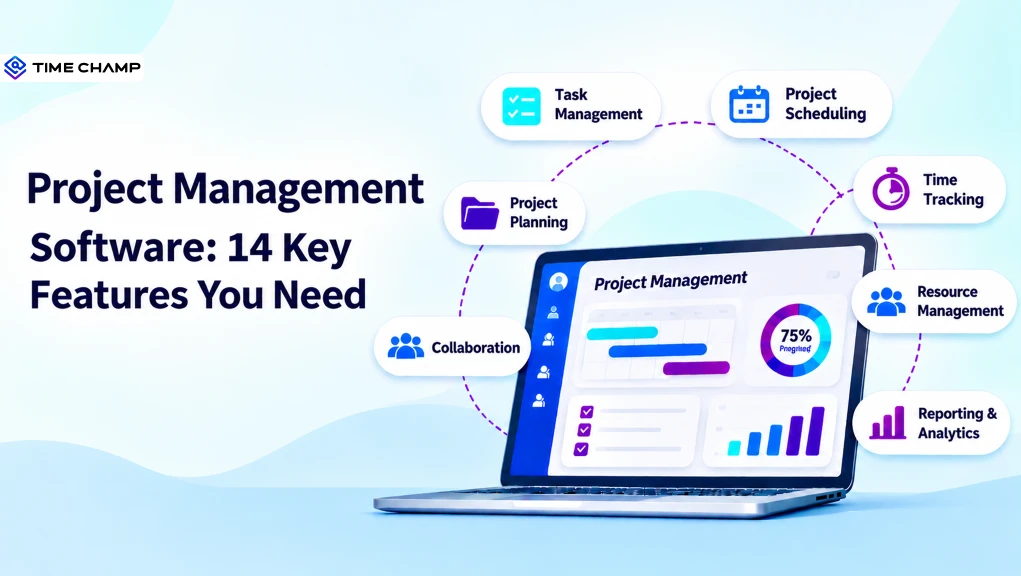
Keeping projects on track becomes harder when tasks, deadlines, updates, and team workloads are scattered across different tools. You may find yourself constantly following up, checking progress, and fixing gaps before they affect delivery. Having everything in one place can make project management much simpler.
Project management software brings essential project activities into one place, making it easier to plan work, assign tasks, track progress, and keep teams aligned. The right features can help you manage projects more clearly and with less manual effort.
Here you’ll understand the key features of project management software and how they support smoother project execution. You’ll also learn what to consider when choosing the right project management tool.
What Is Project Management Software?
Project management software is a digital solution that helps individuals and teams plan, organize, execute, and monitor projects. It brings tasks, timelines, resources, communication, and progress updates into one place, helping teams coordinate work, meet deadlines, track performance, and keep projects moving smoothly from planning to completion.
What are the 14 Key Features of Project Management Software?
The right project management software should help you organize work, keep teams aligned, track progress, and manage project resources from one place. Here are 14 key features to look for when choosing project management software.
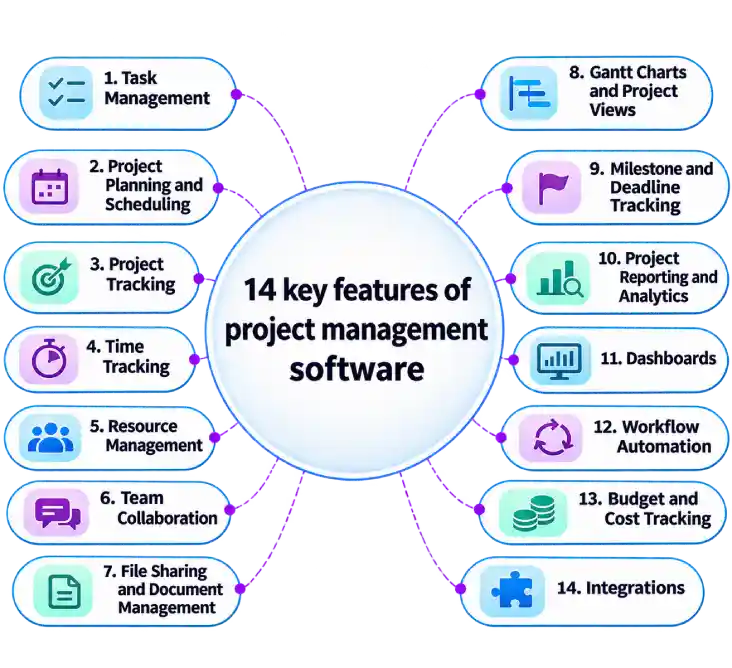
1. Task Management
Task management helps you create, assign, prioritize, and organize project tasks in one place. You can set task owners, due dates, priorities, and statuses to keep responsibilities clear. This makes it easier to see what needs attention and who owns each task. It also helps prevent important work from being missed.
2. Project Planning and Scheduling
Project planning and scheduling help you map out activities, timelines, dependencies, and expected deliverables. You can break larger projects into smaller tasks and set realistic deadlines for each stage. A clear schedule helps you understand what needs to happen and when. It also makes it easier to adjust plans when project requirements change.
3. Project Tracking
Project tracking gives you visibility into how work is progressing against planned timelines and goals. You can monitor task status, completed work, pending activities, and upcoming deadlines from one place. This makes delays and unfinished work easier to spot before they affect the project. Regular tracking also keeps everyone aligned with current priorities.

Did You Know?
Atlassian’s State of Teams research found that 56% of knowledge workers said teams plan and track work differently, making collaboration harder.
4. Time Tracking
Time tracking records how much time team members spend on projects and tasks. It helps you compare actual work hours with planned hours and identify where time goes. Accurate time records can also support client billing, payroll, timesheets, and project cost calculations. You can use these insights to plan future work more accurately.
5. Resource Management
Resource management helps you allocate people, time, budgets, and other resources according to project needs. It gives you a clearer view of team availability and workloads before assigning new work. This can help prevent overloading some team members while others have available capacity. Better resource allocation also supports smoother project delivery.
6. Team Collaboration
Team collaboration features give project members a shared space to communicate and coordinate their work. You can use comments, mentions, notifications, and shared updates to discuss tasks without relying on scattered conversations. Everyone can stay informed about changes, questions, and decisions related to the project. This keeps communication connected to the work itself.
7. File Sharing and Document Management
File sharing and document management keep project files, documents, and resources accessible to the right team members. You can attach files to tasks, organize important documents, and keep project information in one location. This reduces the need to search through different storage platforms for the latest files. Version control can also help your teams work with the correct documents.
8. Gantt Charts and Project Views
Gantt charts provide a visual view of project tasks, timelines, dependencies, and milestones. They help you understand how individual activities fit into the broader project schedule. Other views, such as Kanban boards and calendars, can present the same work in formats that suit different teams. Multiple project views make planning and monitoring easier.
9. Milestone and Deadline Tracking
Milestone and deadline tracking helps you monitor important stages and delivery dates throughout a project. Milestones mark significant achievements, while deadlines keep individual tasks and deliverables on schedule. You can receive reminders about upcoming dates and identify overdue work. This helps maintain momentum across longer projects.
10. Project Reporting and Analytics
Project reporting and analytics turn project information into reports that help you review progress and performance. Reports can cover areas such as task completion, time spent, project status, resource use, and deadlines. You can use these insights to identify delays, compare planned and actual progress, and review project outcomes. Regular reporting also supports better planning for future projects.
11. Dashboards
Dashboards provide a central view of important project information and current activities. They can display metrics such as project progress, pending tasks, deadlines, workload, and time spent. A well-organized dashboard helps you quickly check project status without reviewing every task individually. You can also use dashboards to keep priorities visible throughout the project.
12. Workflow Automation
Workflow automation handles repetitive project activities based on predefined rules or triggers. For example, a system can automatically update task statuses, send reminders, assign activities, or notify team members about changes. Automation reduces repetitive administrative work and keeps routine processes moving. It also helps you maintain consistent workflows across projects.
13. Budget and Cost Tracking
Budget and cost tracking helps you monitor project spending against the allocated budget. You can track expenses, labor costs, and other project-related costs to understand current spending. Comparing planned costs with actual expenses can highlight budget differences early. This gives you more time to review spending and adjust project plans when needed.
14. Integrations
Integrations connect project management software with other tools your team already uses. These may include communication platforms, calendars, accounting systems, customer relationship management tools, and payroll applications. Connecting these systems can reduce duplicate data entry and keep information flowing between workflows. It also creates a more connected workspace for managing projects.
Struggling to track project time, tasks, and workloads in separate tools?
Time Champ brings project tracking, time management, and productivity insights together in one place.
How Does Project Management Software Streamline Workflow Processes?
Managing projects becomes difficult when tasks, deadlines, and updates move across different people and stages. Small communication gaps can delay work and create confusion. Project management software brings these activities together, helping you organize tasks, track progress, and keep workflows moving smoothly.
Centralizing Project Information
Project management software keeps tasks, deadlines, files, updates, and project details in one shared workspace. You can access the information you need without searching through different tools or message threads. This gives everyone a common reference point throughout the project.
Improving Task Visibility
You can view assigned tasks, priorities, deadlines, and current statuses from one place. This makes it easier to identify pending work and understand who is responsible for each activity. Clear task visibility also helps teams focus on the right priorities.
Keeping Teams Aligned
Shared tasks, updates, comments, and notifications help everyone stay informed about project changes. Team members can follow discussions and updates related to their assigned work. This keeps communication connected to project activities and reduces confusion.
Tracking Progress in Real Time
Project managers can monitor completed, ongoing, and overdue tasks as work progresses. Dashboards, timelines, and project views provide a current picture of project status. This makes it easier to identify delays and address issues before they affect delivery.
Managing Workloads
Project management software helps you review team workloads, availability, and assigned work. You can identify uneven workloads and adjust task assignments based on available capacity. This helps teams manage their time and resources more effectively.
Automating Repetitive Processes
Automation can handle routine activities such as reminders, status updates, task assignments, and notifications. This reduces manual updates and saves time spent on repetitive administrative work. Automated workflows also help teams follow consistent processes across projects.
Did You Know?
PMI’s 2025 research found that 35% of executives cited a disconnect between planning and execution as the top barrier to organizational reinvention.
How to Choose the Right Project Management Tool
Choosing a project management tool can be difficult when every platform offers a different mix of features and pricing. Focus on what your team needs today and what the tool can support as your projects and workflows grow.
- Features and Functionality: Check whether the tool includes the features your projects require, such as task management, scheduling, tracking, reporting, and collaboration. Avoid paying for features your team will rarely use.
- Ease of Use: Choose a tool that your team can navigate without extensive training. A simple interface can make adoption easier and help everyone use the platform consistently.
- Scalability: Consider whether the tool can support more users, projects, and workflows as your business grows. A scalable platform saves you from switching systems when your requirements increase.
- Integrations: Check whether the tool connects with the applications your team already uses. Useful integrations can reduce duplicate work and keep information moving between systems.
- Reporting Capabilities: Look for reports that give you useful visibility into project progress, workload, time, costs, and performance. Customizable reports can also help different teams focus on the metrics relevant to them.
- Security: Review how the platform protects project data and controls access to sensitive information. Look for features such as user permissions, encryption, secure data storage, and access controls.
- Pricing: Compare pricing based on your team size, required features, and expected usage. Check for additional costs related to users, storage, integrations, or premium features.
- Support: Reliable support can help your team resolve technical issues and get more value from the platform. Check the available support channels, response times, documentation, and training resources.
- Customization: Choose a tool that lets you adapt workflows, dashboards, fields, notifications, and permissions to your processes. Customization helps the platform fit your team’s way of working.
How Time Champ Enhances Project Management and Productivity
Managing projects becomes harder when you lack visibility into where time goes, how workloads are distributed, and which tasks need attention. Time Champ is a smart employee monitoring software with project management features that help you organize projects, track work, manage resources, and improve team productivity from one place.
- Centralized Project Planning: Organizes projects, budgets, billing types, and team members in one place, helping you start and manage projects with greater clarity.
- Task Assignment and Ownership: Lets you assign tasks with priorities and timelines that help your team members understand their responsibilities and stay focused on deadlines.
- Resource Allocation and Capacity Planning: Shows team availability and workloads, helping you distribute tasks effectively and avoid uneven workloads.
- Built-In Project Time Tracking: Tracks time spent on projects and tasks, which helps you monitor effort, maintain accurate timesheets, and plan future work.
- Project Status Tracking: Shows task progress across different stages, helping you identify pending work, delays, and activities that need attention.
- Project Reports and Performance Insights: Provides project, time, resource, and productivity reports, helping you review performance and make timely project decisions.
Losing visibility into team effort, project progress, and workload balance?
Time Champ helps you track project time, manage tasks, monitor workloads, and improve productivity.
Conclusion
Choosing the right project management software can simplify planning, coordination, tracking, and reporting. The key features of project management software help your teams organize tasks, manage resources, monitor progress, and keep workflows on track. Evaluate each feature against your team’s needs to choose a tool that supports efficient project delivery and long-term growth.

Anjali

Table of Content
 What Is Project Management Software?
- What are the 14 Key Features of Project Management Software?
- How Does Project Management Software Streamline Workflow Processes?
- How to Choose the Right Project Management Tool
- How Time Champ Enhances Project Management and Productivity
- Conclusion
Related Blogs

Learn how to track time on multiple projects without losing billable hours or missing deadlines. Discover common challenges, workflows, and tool features.
Guna Lakshmi | May 21, 2026
Learn what workflow automation is, why it’s important, its types, examples, benefits, challenges, and how it differs from business process automation.
Anjali | Apr 08, 2026
Learn how to integrate productivity tracking with project management without broken workflows or manual exports. A practical step-by-step guide.
Guna Lakshmi | May 06, 2026
Track team productivity without watching people: 8 metrics with formulas, the three that fit your team, and how to spot when your numbers are being gamed.
Shabana Shaik | Aug 31, 2026
Discover the 10 best enterprise project management software for 2026. Compare features, pricing, pros and cons to scale the operations and align strategy.
Anjali | Apr 02, 2026
Find the 16 best project management software for 2026. Compare features, pricing, pros & cons to streamline workflows and drive smarter decisions.
Sai Keerthi Uppala | Apr 02, 2026


 4.7/5 avg.
Ready to Manage Your Workforce Smarter?
Join our family of 1500+ companies using smart insights to redefine workforces!

Free Trial
No Credit Card Required