DLP vs DRM: Key Differences and Which One You Need
Compare DLP vs DRM to understand their key differences, benefits, and use cases. Learn when to use each or both for stronger business data protection.
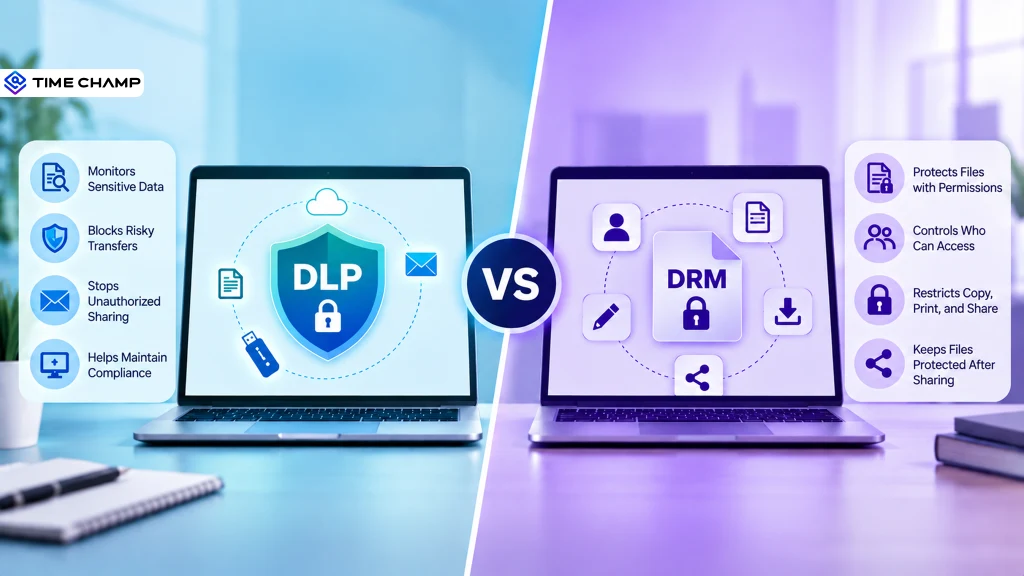
Protecting sensitive business data is challenging when files are constantly shared across devices, cloud platforms, and external users. If you’re unsure whether Data Loss Prevention or Digital Rights Management is the right solution, understanding the difference between them is the first step toward choosing the right protection strategy and building a stronger, more secure data environment.
Here, you’ll understand the comparison of DLP vs DRM, key features, and ideal use cases. You’ll also learn how they work together to provide comprehensive protection for sensitive business data.
What Is DLP (Data Loss Prevention)?
Data Loss Prevention (DLP) is a security solution that identifies, monitors, and safeguards sensitive data from unauthorized access, sharing, or exposure. It uses policies to detect confidential information and automatically blocks, alerts, or restricts risky actions across endpoints, networks, cloud applications, and email to reduce data loss and support compliance.
What Is DRM (Digital Rights Management)?
Digital rights management (DRM) is a security technology that controls how digital files are accessed, used, copied, printed, downloaded, or shared after distribution. Organizations use DRM to protect intellectual property, confidential documents, and other sensitive content by enforcing permissions that prevent unauthorized access and misuse throughout a file’s lifecycle.

Did You Know?
According to the Ponemon Cost of Insider Risks Report, organizations now face an average annual insider risk cost of $17.4 million, highlighting the growing need for layered security controls that combine technologies like DLP and DRM.
DLP vs DRM: Side-by-Side Comparison
Although Data Loss Prevention (DLP) and Digital Rights Management (DRM) both help you protect sensitive business information, they solve different security challenges. DLP focuses on preventing sensitive data from leaving your organization’s control, while DRM governs how authorized users can access and use files even after they have been shared. Many organizations deploy both solutions together to protect data throughout its lifecycle.
| Aspect | DLP (Data Loss Prevention) | DRM (Digital Rights Management) |
|---|---|---|
| Primary purpose | Prevents sensitive data from being leaked, copied, or shared without authorization. | Controls who can access and use digital files. |
| Main focus | Protects sensitive data by monitoring and controlling its movement. | Protects the file itself by enforcing usage rights. |
| How it works | Uses policies to inspect data and automatically block, alert, or allow activities based on risk. | Encrypts files and applies permissions such as view, edit, print, copy, or share. |
| Protection stage | Protects data while it is stored, in use, or in transit across endpoints, networks, email, and cloud services. | Continues protecting files even after they are shared outside the organization. |
| What it protects | Personal data, financial records, customer information, trade secrets, source code, and other sensitive business data. | Intellectual property, confidential documents, contracts, engineering files, and digital content. |
| Access control | Controls data transfers based on security policies rather than individual file permissions. | Provides detailed user-based permissions and file-level restrictions. |
| Common security actions | Blocks file uploads, USB transfers, email attachments, cloud uploads, printing, or copying when policies are violated. | Restricts printing, copying, screenshots, downloads, forwarding, and offline access. |
| Best use cases | Preventing insider threats, accidental data leaks, regulatory compliance, and monitoring data movement. | Secure document sharing, intellectual property protection, and external collaboration. |
| Compliance support | Supports compliance with regulations such as GDPR, HIPAA, PCI DSS, and other data protection standards through policy enforcement and monitoring. | Helps protect confidential documents but focuses primarily on usage control. |
| Deployment | Deployed across endpoints, networks, cloud applications, email systems, and storage platforms. | Usually applied to selected sensitive files and documents. |
| Key limitation | Protection generally ends once authorized data leaves environments where DLP policies are enforced. | Cannot prevent all methods of data exfiltration before a file is protected. |
| Ideal users | Organizations that need enterprise-wide visibility and control over sensitive data across multiple channels. | Organizations that frequently share confidential documents with employees, partners, or customers. |
Not sure whether your business needs DLP, DRM, or both?
Time Champ helps you prevent data leaks with built-in DLP features.
How Do DLP and DRM Work Together?
Using data lossprevention (DLP) or digital rights management (DRM) alone can leave security gaps. DLP is excellent at preventing sensitive data from leaving your organization, while DRM continues protecting files after they have been shared with authorized users. Together, they create a layered security approach that safeguards data throughout its entire lifecycle, from creation and storage to sharing and ongoing use.

1. DLP Identifies Sensitive Data, DRM Protects It
DLP continuously scans files, emails, cloud storage, and endpoints to detect sensitive information based on predefined policies. Once confidential data is identified, DRM applies file-level protection by encrypting the content and assigning access permissions. This ensures only authorized users can open and use the file.
2. DLP Prevents Unauthorized Sharing, DRM Controls Authorized Sharing
When an employee attempts to send confidential information through email, USB devices, or cloud applications, DLP can block or restrict the transfer if it violates security policies. If the file must be shared for legitimate business reasons, DRM ensures recipients can only perform approved actions, such as viewing the document without downloading, printing, or forwarding it.
3. DRM Extends Protection Beyond the Organization
DLP policies are most effective while data remains within monitored environments. Once sensitive files are legitimately shared outside your organization’s network, DRM keeps enforcing security policies. Even if a protected file is copied to another device or location, the assigned permissions remain with the document, allowing you to maintain control wherever the file travels.
4. They Reduce Both Accidental and Intentional Data Leaks
Many data breaches occur because employees accidentally send confidential files to the wrong recipient or intentionally misuse sensitive information. DLP minimizes these risks by detecting suspicious data movement before it happens, while DRM limits what authorized recipients can do with shared files afterward. Together, they provide stronger protection against insider threats and external data exposure.
5. Together They Strengthen Compliance and Data Governance
Many regulations require organizations to protect sensitive information throughout its lifecycle. DLP helps meet compliance by discovering, classifying, monitoring, and preventing unauthorized data transfers. DRM complements these efforts by enforcing continuous access controls and maintaining document protection even after files are distributed. This combination supports stronger governance, audit readiness, and regulatory compliance.
Did You Know?
According to the Data Breach Investigations Report by Verizon, credential abuse was involved in 22% of data breaches, while stolen credentials appeared in nearly one-third (30%) of initial access actions. This highlights why organizations need both DLP to prevent unauthorized data movement and DRM to control access to sensitive files after they’re shared.
How Time Champ Strengthens DLP and DRM Strategy
Protecting sensitive business data also requires continuous visibility into how employees interact with files, websites, USB devices, and cloud platforms. Without this, security teams can miss risky behavior that leads to data leaks. Time Champ is a smart employee monitoring software with built-in Data Loss Prevention (DLP) capabilities that gives you real-time visibility, policy-based controls, and actionable security insights. It helps strengthen DLP and DRM by detecting and preventing unauthorized data access and movement.
Here’s how Time Champ helps strengthen your data protection strategy:
- Monitors File Activity with Complete Visibility: Tracks file creation, modification, deletion, and access with detailed logs, making it easier to identify suspicious activity and investigate potential data leaks.
- Blocks Unauthorized USB Data Transfers: Monitors USB usage in real time and restricts unauthorized external devices to prevent confidential files from being copied or removed from company systems.
- Controls Risky Uploads and Downloads: Detects and blocks unauthorized uploads and downloads across approved and restricted domains, reducing the risk of accidental or intentional data exposure.
- Detects Suspicious User Behavior Instantly: Identifies unusual file activity, website access, USB usage, and other policy violations, then sends real-time alerts so security teams can respond before incidents escalate.
- Strengthens Access Control with Role-Based Permissions: Applies role-based permissions across users, teams, and departments to help ensure sensitive business data is accessed only by authorized personnel.
- Simplifies Compliance with Detailed Reports: Generates comprehensive audit-ready reports covering file activities, website violations, USB events, and data transfer records, helping organizations support compliance and security investigations.
Combining intelligent employee activity monitoring with built-in DLP capabilities, Time Champ adds an extra layer of visibility and control that complements both DLP and DRM solutions, helping you reduce insider risks and protect sensitive data more effectively.
Want better visibility into how your business data is used?
Time Champ helps you detect risks and prevent data leaks.
Conclusion
Choosing between DLP vs DRM depends on how you want to protect the organization’s sensitive information. DLP helps you prevent unauthorized data movement across endpoints, networks, email, and cloud environments, while DRM controls how authorized users access and use shared files. Together, they provide stronger protection throughout the entire data lifecycle. Assess your business needs, identify the biggest data security risks, and implement the right combination of solutions to safeguard confidential information, strengthen compliance, and reduce the risk of costly data breaches.

Anjali

Table of Content
 What Is DLP (Data Loss Prevention)?
- What Is DRM (Digital Rights Management)?
- DLP vs DRM: Side-by-Side Comparison
- How Do DLP and DRM Work Together?
- How Time Champ Strengthens DLP and DRM Strategy
- Conclusion
Instant Signup
Thank you for your request!
We have received your signup request and our team will get back to you soon. In the meantime, you can book a demo to see Time Champ in action.
Book a DemoFree trial. No credit card required. Prefer a walkthrough? Book a demo.
Related Blogs
Data loss prevention helps protect sensitive business data from leaks, theft, and misuse. See how DLP works, its benefits, challenges, and best practices.
Thasleem Shaik | Aug 21, 2026
Learn what endpoint data loss prevention is, how it works, its key features, and how to protect sensitive data from unauthorized access.
Guna Lakshmi | Aug 18, 2026
Data loss costs more than you think. Learn what causes it, how employee monitoring reduces data exfiltration risk, and how to protect your business.
Thasleem Shaik | Apr 17, 2026
Protect your sensitive data with Time Champ's Data Loss Protection. Detect, prevent, and respond to potential data leaks in real-time, keeping your business secure and compliant!
Shabana Shaik | Jan 23, 2025
Learn the difference between data leak prevention vs. data loss prevention and explore effective strategies to protect sensitive business information.
Sai Keerthi Uppala | Jan 22, 2025
Learn about the impact of data loss on business, including its consequences, real-world examples, and ways to reduce its impact.
Guna Lakshmi | Aug 14, 2026


 4.7/5 avg.
Ready to Manage Your Workforce Smarter?
Join our family of 1500+ companies using smart insights to redefine workforces!

Free Trial
No Credit Card Required