Data-Driven Management: The Smarter Way to Lead Teams
Use data-driven management to boost team performance. Discover 6 smarter decisions every manager can make with workforce data.
Making the right decisions for your team is not always easy. Sometimes, work slows down, deadlines slip, or employees start feeling overwhelmed, and it is hard to know why. That’s where data-driven management makes a real difference. When you can clearly see how work is happening across your team, you can spot problems early, balance workloads better, and support your employees at the right time.
In this guide, you’ll learn how data-driven management helps you lead your team more effectively, the key decisions it improves, and how to turn insights into real action.
What Is Data-Driven Management?
Data-driven management is the practice of using real workforce data, like employee activity, productivity, and work patterns, to make better and more accurate team decisions. Workforce analytics data reveals patterns like performance changes, workload imbalance, or early signs of burnout. Early identification of these patterns helps you respond faster, improve team efficiency, and make more accurate decisions.
It also gives you a clear view of how work is actually happening across your team, so you can move from reactive management to proactive decision-making. You can identify what is working well, what needs attention, and where support is required without relying on guesswork. Over time, this leads to better workload balance, more consistent performance, and stronger team outcomes.
Most modern tools collect this data automatically, so you don’t need manual timesheets or constant follow-ups. This makes it easy to get accurate insights without interrupting daily work. For a deeper look at the metrics that help to make these decisions, see our guide on workforce productivity analytics.
Want to see what’s really happening in your team?
Get clear workforce insights with Time Champ to make better decisions every day.
Difference Between Data-Driven Management and Micromanagement
You might think data-driven management and micromanagement are the same, but they are not. One helps you focus only where your attention is needed, while the other keeps you involved in everything, even when it is not required. Understanding this difference helps you manage better, build trust, and avoid unnecessary interference.
| Aspect | Data-Driven Management | Micromanagement |
|---|---|---|
| Approach | Uses real data like productivity, activity, and trends to guide decisions. Focuses on understanding how work is happening before taking action. | Relies on constant supervision and manual checking without clear evidence. Focuses more on control than understanding. |
| Focus | Pays attention only where needed, based on data signals such as performance drops or workload gaps. | Monitors almost everything, even when performance is stable. |
| Decision Making | Decisions are based on patterns, trends, and measurable insights over time. | Decisions are often based on assumptions, instincts, or immediate observations. |
| Manager Involvement | Steps in only when data shows a clear need, reducing unnecessary interruptions. | Gets involved in day-to-day tasks, even when it is not required. |
| Employee Experience | Builds trust, encourages ownership, and allows employees to work independently. | Creates pressure, reduces autonomy, and may lead to frustration or disengagement. |
| Productivity Impact | Helps improve efficiency by focusing on real problems and avoiding distractions. | Can reduce productivity due to frequent interruptions and a lack of trust. |
| Example | Reviews trends and checks in when performance drops over a few weeks, then provides support. | Frequently checks on employees regardless of performance, asking for updates even when work is on track. |
6 Key Decisions You Can Make Using Workforce Data
You make many team decisions every day, but it’s not always clear when to act or what to fix. With workforce data, you can quickly understand what’s happening and take the right action at the right time.
| Decision You Need to Make | What You Will Notice in the Data | What You Should Do Next |
|---|---|---|
| Redistribute workload | Some team members are consistently much more productive than others for a few weeks. | Move tasks from overloaded employees to those who have more capacity |
| Fix performance issues | An employee’s performance stays lower than the rest of the team for several weeks. | Talk with them using real data and set clear improvement goals |
| Decide when to hire | The team is working at high capacity, and overtime keeps increasing | Start a hiring discussion to reduce pressure on the team |
| Adjust shift schedules | You see late logins, frequent absences, or gaps in coverage | Change shift timings or coverage to fix the issue |
| Prevent burnout | Employees are working more hours, but productivity is going down | Check in early, reduce workload, or adjust deadlines |
| Improve tools or processes | Employees are not using tools properly or spending more time finding alternative ways to complete their work. | Find what is not working and improve the process or tool usage. |
How to Build a Data-Driven Management Culture in Your Team
Data-driven management only works when you apply data in everyday tasks. This means knowing what to track, when to review it, and how to use it to make decisions. The steps below will help you build a simple and effective way to manage your team using data.
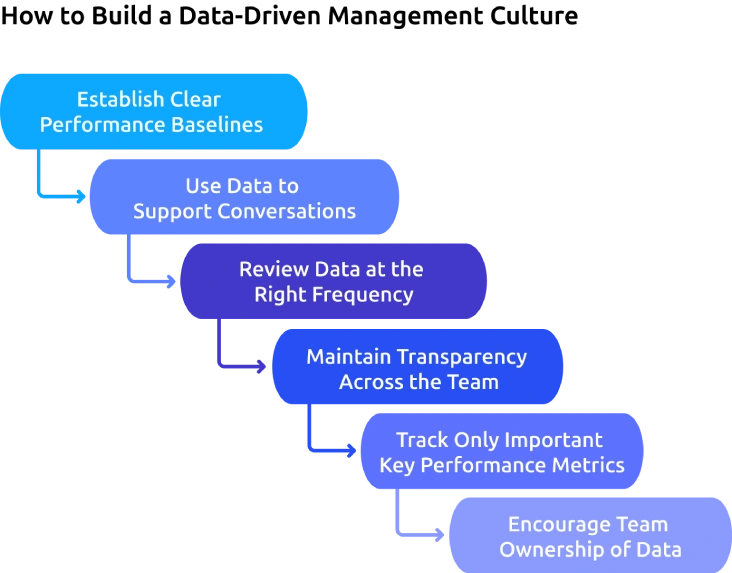
Establish Clear Performance Baselines
Before setting expectations, you need to understand what normal performance looks like for your team. Review existing data to identify:
- Average productivity levels
- Typical active time percentages
- Common attendance patterns
These baselines act as a reference point. They help you measure performance accurately and avoid setting unrealistic goals. Over time, this clarity helps you make better decisions, respond faster to issues, and guide your team with more accuracy.
Use Data to Support Conversations
The way data is used directly impacts how employees respond to it. If data is only used for evaluation or discipline, employees may become defensive or disengaged. On the other hand, when data is used to guide discussions and offer support, it builds trust and encourages improvement.
Use data to identify challenges early and to collaborate with employees on solutions. This approach ensures that data strengthens communication rather than creating pressure. For a clear picture of employee wellbeing signals, read our guide on employee burnout signs and prevention.
Review Data at the Right Frequency
Different types of data require different review intervals. Reviewing everything at the same frequency can either create unnecessary noise or delay important decisions.
- Daily: Monitor attendance and shift adherence to maintain operational consistency.
- Weekly: Review productivity trends to identify early performance changes.
- Monthly: Evaluate workload distribution, organizational health metrics, and attrition risks
Maintaining the right review cadence helps you respond at the right time without overreacting to short-term fluctuations.
Maintain Transparency Across the Team
Transparency plays a key role in building trust in a data-driven workplace. When employees clearly understand what is being tracked and why, they are more likely to see employee performance tracking data as a support system. When team members have access to their own performance data, they can reflect on their work and make improvements on their own.
Over time, this creates a culture where feedback feels fair, conversations are more open, and employees take greater ownership of their performance.
Track Only Important Key Performance Metrics
Trying to track everything can be overwhelming. Focus on a few important metrics that truly reflect your team’s performance. For most teams, this includes productivity, active time, attendance, and workload balance. Keeping things simple makes it easier to understand the data and take action quickly.
Encourage Team Ownership of Data
A data-driven culture works best when employees are involved along with managers. Encourage your team to review their own data, understand their performance, and make small improvements on their own. Team-level data access reduces the need for constant supervision and builds a strong sense of responsibility. When employees take ownership, improvement becomes a natural and continuous part of their work.
Want to build more transparency in your team?
Let your team access their data and improve operational efficiency with Time Champ.
How Does Time Champ Support Data-Driven Management?
To manage your team, you need clear visibility into how work is happening every day. That means having accurate, real-time insights you can easily understand and act on. Time Champ, an employee monitoring software, gives you clear, real-time insights into your team’s work so you can make better decisions every day. The platform automatically tracks activity data, productivity scores, attendance, and work trends from every session across remote, hybrid, and in-office teams. You get all this data without asking employees to fill out manual reports.
The productivity tracking classifies every application as productive, non-productive, or neutral by role for every team member in real time. Organizational-level dashboards show workload distribution and individual-to-team comparison at a glance. Workload management tools help you act on imbalance signals directly within the platform.
You also receive automatic alerts when productivity drops, attendance patterns change, or workload becomes too high. Automated alerts help you take action at the right time without constantly checking dashboards. With this setup, data highlights issues early, and you can focus on making the right decisions.
Ready to manage your team with real data instead of guesswork?
Track, analyze, and improve team performance using Time Champ.
Conclusion
Data-driven management is about making smarter decisions with the information you already have. In your team, you deal with the same challenges every day, such as balancing workloads, handling performance issues, and deciding when to hire. What really matters is how you respond to these situations.
When you rely on assumptions, you usually notice problems after they’ve already affected the team. When you use data the right way, you can spot changes early and step in before things get worse. This helps you make better decisions and creates more trust within your team.

Guna Lakshmi


Table of Content
-
 What Is Data-Driven Management?
-
Difference Between Data-Driven Management and Micromanagement
-
6 Key Decisions You Can Make Using Workforce Data
-
How to Build a Data-Driven Management Culture in Your Team
-
How Does Time Champ Support Data-Driven Management?
-
Conclusion
Instant Signup
Thank you for your request!
We have received your signup request and our team will get back to you soon. In the meantime, you can book a demo to see Time Champ in action.
Book a DemoFree trial. No credit card required. Prefer a walkthrough? Book a demo.
Related Blogs

Employee monitoring software can catch insider data breaches early, if you configure it right. See what it catches, what it misses, and how to roll it out.
Jahnavi Pulluri | Apr 16, 2026
Learn why filtering workforce data is essential, how to filter data for effective workforce intelligence step-by-step, and how it supports better outcomes.
Guna Lakshmi | Feb 18, 2026
A data breach takes place when any sensitive or confidential information is accessed by unauthorized people or organizations.
Vijaya Lakshmi | Apr 29, 2024
Learn the difference between data leak prevention vs. data loss prevention and explore effective strategies to protect sensitive business information.
Sai Keerthi Uppala | Jan 22, 2025
Understand how the Data Protection Acts in India affect how data is handled. Stay compliant to safeguard your digital assets from potential risks.
Hima Bindhu Nara | Feb 17, 2024
The right employee performance tracking software turns activity data into decisions. See what to look for, how to compare, and what works for your team.
Guna Lakshmi | Apr 18, 2026


 4.7/5 avg.
Ready to Manage Your Workforce Smarter?
Join our family of 1500+ companies using smart insights to redefine workforces!

Free Trial
No Credit Card Required