Time Champ > Blog > How to Filter Workforce Data to Create Effective Workforce Intelligence? > Content
How to Filter Workforce Data to Create Effective Workforce Intelligence?
Learn why filtering workforce data is essential, how to filter data for effective workforce intelligence step-by-step, and how it supports better outcomes.
Your organization generates a huge amount of workforce data daily, yet turning this data into clarity remains a challenge, right? Filtering workforce data helps cut through this complexity, turning scattered information into clear workforce intelligence that drives smarter decisions.
When workforce data is filtered properly, it reveals how work truly happens across your teams and roles. This clarity helps you identify productivity trends, understand employee workload, and detect potential issues early. With accurate data, you can move away from guesswork and make accurate decisions that lead to stronger workforce performance and better business outcomes.
Stop making decisions with scattered data.
Start building real workforce clarity with Time Champ today.
Why Filtering Workforce Data Is Essential?
Filtering workforce data is the key to eliminating distractions and highlighting what truly matters. It helps you in transforming raw data into useful insights by using workforce intelligence that leads to improved decisions.
- Improves Decision Accuracy
Unfiltered data often leads to incorrect conclusions. When data is filtered by role, time, or context, decisions become more accurate and actionable rather than based on averages or assumptions.
- Prevents Misleading Results from Poor Data Quality
Federal Committee on Statistical Methodology (FCSM) says that poor quality or unfiltered data gives inaccurate information and leads to poor decisions, especially when the data is obtained through two or more sources or the data is not checked on quality and is used without evaluating its quality.
- Improves Efficiency and Transparency in Analytics
Filtering and cleansing (also known as data cleansing) is used to eliminate false, irrelevant or duplicate records. It helps to minimize errors in insights and achieve consistency in data structures, which enhances the reliability of the workforce.
- Reveals Hidden Workforce Patterns
Important signals like early burnout, uneven distribution of work,
or decreased productivity are often hidden in raw data. Filtered data can reveal these patterns
before the patterns turn into major issues.
- Aligns Workforce Data with Business Goals
Not all workforce data supports every objective. Filtering ensures
that the data being analyzed directly connects to business goals like productivity, efficiency,
engagement, or cost optimization.
Hidden risks won’t wait.
Detect burnout and workload gaps early with Time Champ Workforce Intelligence.
How Can You Filter Workforce Data to Create Effective Workforce Intelligence?
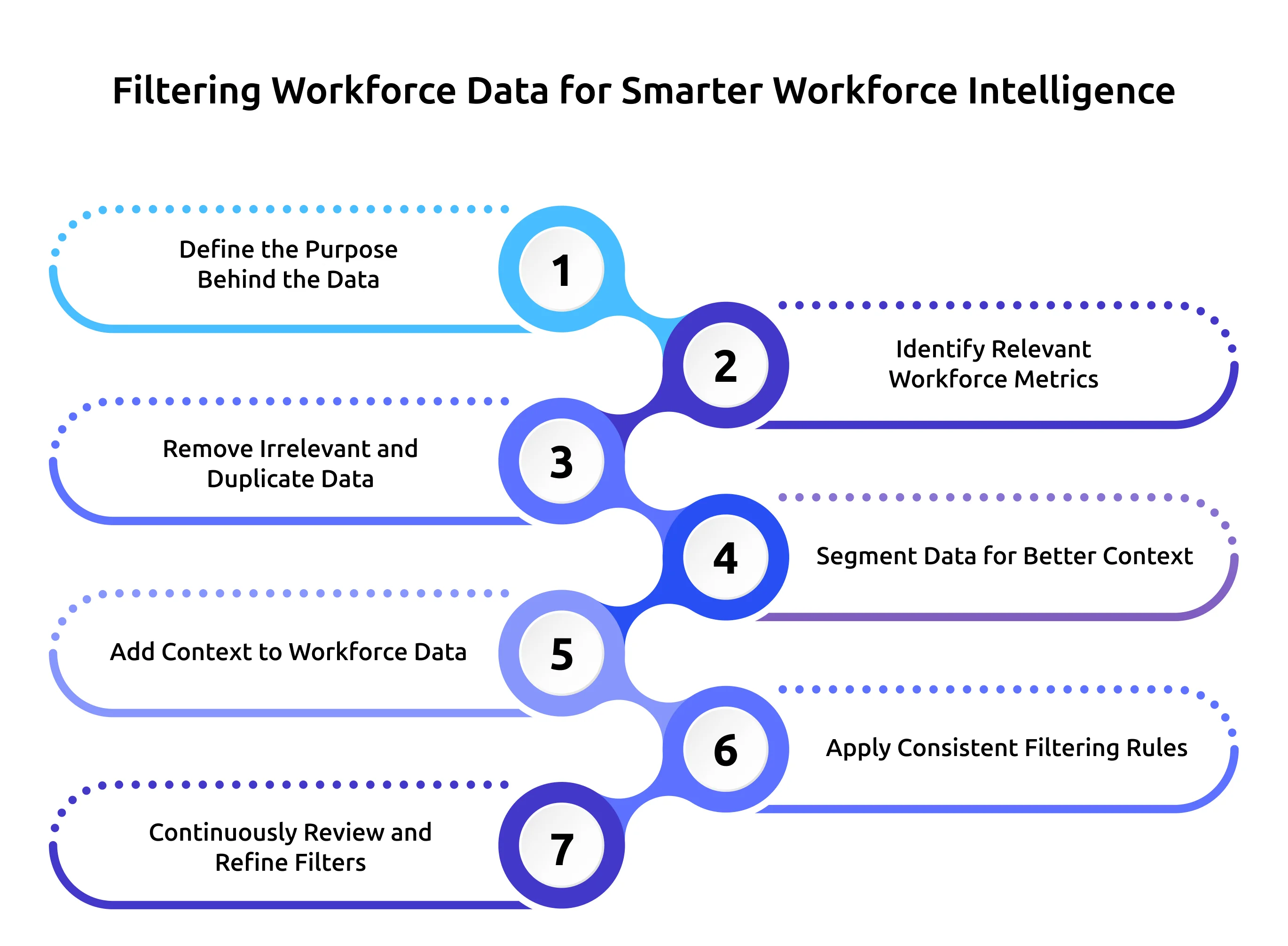
Filtering workforce data works best when it follows a structured, step-by-step approach. Each step adds clarity and improves the quality of insights used for workforce intelligence.
Step 1: Define the Purpose Behind the Data
Before filtering any data, be clear about ‘why’ you need it.Examples:
- Are workloads evenly distributed?
- Which teams show early signs of burnout?
- Where is productivity dropping and why?
A clear purpose will ensure that only the relevant workforce data is filtered and analyzed so that unnecessary information does not distract your decision-making.
Step 2: Identify Relevant Workforce Metrics
Not every workforce metric can lead to valuable insights. Select the data points that support your organization goal, such as:
- Working hours and attendance
- Productive vs idle time
- Task completion rates
- Team workload distribution
- Performance trends over time
This ensures that unnecessary data metrics do not impact workforce intelligence.
Step 3: Remove Irrelevant and Duplicate Data
Duplicate entries, outdated reports, and unused metrics dilute insights, clean your data by:
- Removing old or unused fields
- Eliminating repeated records
- Ignoring vanity metrics that don’t drive decisions
Removing irrelevant and duplicate data reduces confusion, enhances accuracy, and ensures the insights are generated based on only accurate information.
Step 4: Segment Data for Better Context
Segmenting workforce data is a core strategy for developing meaningful workforce intelligence. It brings clarity and fairness across the organization. Filter the data based on:
- Role or department
- Team or project
- Location or work model (remote, hybrid, on-site)
- Time periods (daily, weekly, monthly)
This helps you accurately compare performance and understand how work varies across teams and departments.
Step 5: Add Context to Workforce Data
Only numbers do not explain a reason why something happened. Adding context, such as project deadlines, workload spikes, or staffing changes, makes insights more meaningful.
Contextual filtering helps to avoid misinterpretation and allows you to make fair and informed choices.
Step 6: Apply Consistent Filtering Rules
Inconsistent filters lead to inconsistent insights. Create standard rules for:
- What data is included
- How often it’s updated
- How it’s reviewed and refined
Workforce intelligence results are more predictable in teams, with standardized filters.
Step 7: Continuously Review and Refine Filters
Regularly review filtered data to ensure it still aligns with business goals and workforce priorities. Continuous reviewing and refinement keep workforce intelligence accurate and actionable.
Filtering manually slows you down.
Automate workforce insights instantly with Time Champ.
How Filtered Workforce Data Supports Workforce Intelligence Outcomes?
Filtered workforce data is essential in transforming workforce intelligence into meaningful and quantifiable results. With clean, relevant and well-structured data, you can go beyond tracking to understanding. This visibility helps you to spot patterns, forecast risks and make informed decisions that drive actual workforce outcomes.
1. Enables Smarter Workforce Planning
Filtered data provides a clear picture of workforce capacity, workload distribution and future needs. This helps you plan better, hire resources more effectively, set clear timelines, and prevent errors that disrupt your operations.
2. Supports Early Detection of Burnout and Risks
Filtering workforce data and activity patterns helps to reveal early warning signs, such as overtime, focus drops, and imbalanced work distribution. This early visibility allows you to reduce the risks of burnout and attrition rate.
3. Improves Productivity and Performance Insights
Refining workforce data eliminates noise in the activities to reveal actual productivity trends. This helps you understand what drives high performance, identify inefficiencies early, and see how work truly flows across teams.
4. Accelerates Decision-Making with Clear Insights
When workforce data is clean and well-filtered, reports become easier for you to read and understand. With these clear insights, you can make accurate decisions, respond quickly to workforce challenges and adapt to changing business needs.
5. Strengthens Alignment between HR and Business Teams
When you and your team work with the same filtered data, discussions become clearer and more productive.This shared view helps HR and business leaders stay aligned on priorities, workforce needs, and actions, reducing confusion and improving collaboration.
6. Enables Fair and Informed Workforce Decisions
Filtered workforce data provides the right context for evaluating performance and workloads. This allows you to make balanced, well-informed decisions on performance reviews and workforce policies, which leads to greater transparency, consistency, and trust.
7. Enhances the Effectiveness of Workforce Intelligence Tools
Workforce intelligence tools deliver better results when you feed them clean, relevant data. Filtering removes noise and inconsistencies, allowing dashboards, analytics, and AI insights to focus on meaningful workforce patterns.
Conclusion
Workforce intelligence is ultimately effective when workforce data is filtered in the right way. Unfiltered data creates confusion, hides issues, and constrains the ability to make decisions. Filtering workforce data helps you to reduce this complexity, turning raw information into clear insights that explain how work actually happens across your organization.

Guna Lakshmi Ojili


Table of Content
-
 Why Filtering Workforce Data Is Essential?
-
How Can You Filter Workforce Data to Create Effective Workforce Intelligence?
-
How Filtered Workforce Data Supports Workforce Intelligence Outcomes?
-
Conclusion
Related Blogs

Learn what external workforce intelligence is, why it matters for enterprise strategy, real examples, how it shapes strategy & which teams benefit most.
Anjali | Feb 11, 2026
Discover how workforce intelligence improves workload distribution, balances team capacity, prevents burnout & how to manage it with data effectively.
Tarun Kumar Reddy | February 11, 2026
Learn why workforce intelligence matters for investment & strategy teams, what makes it a strategic asset, how teams use it & how it supports decisions.
Chethana | February 11, 2026
Learn workforce intelligence's role in employee experience & retention, how it redefines engagement, and key strategies to reduce turnover effectively.
Chethana | February 11, 2026
Explore how workforce intelligence supports healthcare organizations in workforce planning, burnout reduction, staffing, and informed HR decision-making.
Chethana | February 11, 2026
Discover why organizations use workforce intelligence, the shift to predictive intelligence, how it shapes future work, and key emerging trends.
Shabana Shaik | February 11, 2026


 4.7/5 avg.
Ready to Manage Your Workforce Smarter?
Join our family of 1500+ companies using smart insights to redefine workforces!

Free Trial
No Credit Card Required