The Complete Guide to Effective Timesheet Management
Explore timesheet management, its benefits, challenges, and best practices. Learn how the right system helps improve accuracy, planning, and productivity.

Time has a funny way of disappearing. A task that feels like it should take 30 minutes somehow turns into two hours, meetings run longer than expected, and by the end of the week, remembering where all those hours went feels almost impossible.
That's exactly why timesheets exist. But the real challenge isn't filling them out, it's managing them in a way that's simple, consistent, and useful.
So, what does effective timesheet management actually look like? Let's explore the practices that help teams track time with less effort and get more value from every timesheet.
What is Timesheet Management?
Timesheet management is the process of recording, reviewing, approving, and managing the time employees spend on tasks, projects, or client work. It covers everything from logging work hours to approving timesheets and using that data for payroll, client billing, project tracking, and workforce planning.
At its core, timesheet management answers three simple questions: Who worked? What did they work on? And how much time did it take? The challenge is making sure those answers are accurate without turning time tracking into a daily burden.
Benefits of Effective Timesheet Management
Effective timesheet management does more than help employees log their work hours.
Here are some of its biggest benefits:

1. Accurate Payroll
Timesheets ensure employees are paid for the hours they actually work, reducing payroll errors and saving time spent on manual corrections.
2. Better Client Billing
For businesses that bill by the hour, accurate timesheets capture every billable minute. This helps prevent lost revenue and builds trust through transparent invoicing.
3. Better Project Tracking
Comparing planned and actual work hours helps you find delays early, track project progress, and manage budgets more effectively.
4. Smarter Resource Planning
Timesheet data shows how work is distributed across the team, making it easier to balance workloads, avoid employee burnout, and plan future projects more effectively.
5. Higher Productivity
Tracking time helps teams understand how their workday is spent. It becomes easier to find repetitive tasks and focus on work that adds the most value.
6. Easier Compliance
Accurate timesheets create a reliable record of employee work hours, making it easier to comply with labor laws, overtime regulations, and audit requirements.
7. Better Business Decisions
Reliable time data gives you a clearer view of project costs, team performance, and resource usage, helping you make informed decisions rather than depending on assumptions.
Common Timesheet Management Challenges
Even the best timesheet system can fall short if people don't use it consistently. Here are some of the most common timesheet management challenges and how to solve them.
1. Inaccurate Time Entries
Many employees fill out their timesheets at the end of the day or even at the end of the week, depending on memory. This often leads to inaccurate time entries.
How to solve it: Encourage employees to log their time as they work or use automated time-tracking tools that record hours in real time.
2. Low Employee Adoption
If timesheets are complicated or take too long to complete, employees are less likely to submit them on time or fill them out accurately.
How to solve it: Keep the process simple. A timesheet should take only a minute or two to complete.
3. Employees Feel Like They're Being Monitored
Some employees see time tracking as a way to monitor their every move, which can reduce trust and participation.
How to solve it: Be open about why timesheets are used. Explain that the goal is better project planning, accurate payroll, and fair workloads, not employee surveillance.
4. Poor Integration with Other Tools
When timesheet software doesn't connect with payroll, project management, or accounting systems, teams end up entering the same data multiple times.
How to solve it: Choose a timesheet solution that integrates with the tools your business already uses to reduce manual work and improve accuracy.
5. No Real-Time Visibility
Waiting until the end of the week to review timesheets makes it harder to find delays, overtime, or workload issues before they become bigger problems.
How to solve it: Use a system that gives you real-time visibility into logged hours so you can make quick, informed decisions.
A better way to manage timesheets is just a click away
How to Implement Timesheet Software: Step by Step
Implementing timesheet software doesn't have to be complicated. The key is to keep the process simple, choose the right tools, and make it easy for your team to adopt. Follow these steps to set up a timesheet management process that works.
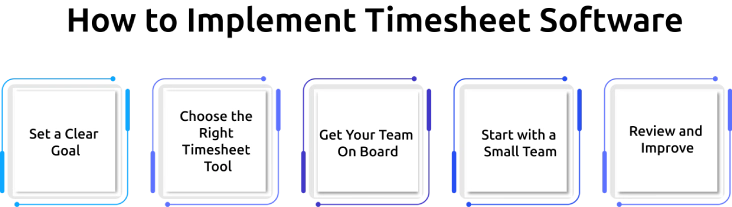
Step 1: Set a Clear Goal
Start by defining why you need a timesheet app. Are you trying to improve payroll accuracy, track billable hours, manage project costs, or monitor employee productivity? Having a clear goal will help you choose the right approach.
Step 2: Choose the Right Timesheet Tool
Look for a solution that fits your business needs. A good timesheet tool has to be easy to use, support automation, and integrate with your payroll, project management, or accounting software.
Step 3: Get Your Team on Board
Explain why you're introducing timesheet software and how it will benefit both employees and the business. Clear communication and simple training can help reduce resistance and encourage consistent use.
Step 4: Start with a Small Team
Instead of rolling it out across the entire company, test the process with one team or department first. This gives you time to identify any issues and make improvements before expanding it to everyone.
Step 5: Review and Improve
Once the system is in place, review how it's working. Check whether timesheets are being submitted on time, whether the data is accurate, and whether the process needs any adjustments. Small improvements over time can make the system much more effective.
Manual vs. Automated vs. Intelligent Timesheets: What's the Difference?
The biggest difference isn't how fast employees can fill out a timesheet, it's how much they have to remember in the first place. As businesses move from manual tracking to smarter solutions, the process becomes more accurate and much easier to manage.
| Type | How Time Is Tracked | Accuracy | Effort |
|---|---|---|---|
| Manual | Employees enter hours manually, often from memory. | Low | High |
| Automated | Time is logged using software with reminders and approval workflows. | Medium | Medium |
| Intelligent | Time is captured automatically from actual work activity, requiring only review and approval. | High | Low |
Most businesses start with manual timesheets and eventually move to automated tools. While automation reduces paperwork, employees still need to remember to start timers or enter their hours. That's where intelligent timesheets take a different approach.
How Time Champ Simplifies Timesheet Management
Managing timesheets shouldn't mean chasing employees for updates, fixing missing entries, or spending hours preparing payroll. Time Champ is a timesheet management software designed to simplify how businesses track, manage, and approve employee work hours.
Here's how Time Champ helps:
Automatically Generate Timesheets
Instead of asking employees to recreate their workday, Time Champ captures work activity and automatically builds timesheets. Employees simply review and submit them, saving time and improving accuracy.
Track Billable and Non-Billable Hours
Record time against projects, tasks, or clients and categorize it as billable or non-billable. This makes client billing more accurate and gives you better visibility into project costs.
Streamline Timesheet Approvals
Review, approve, or reject timesheets through a structured approval workflow. Every change and approval is recorded, making the process clear and easy to manage.
Export Data for Payroll and Billing
Export timesheets in formats such as Excel, CSV, or PDF, or sync them with your payroll system to reduce manual work and speed up payroll processing.
Generate Detailed Reports
Create reports based on employees, projects, tasks, or clients to understand time usage, project costs, and team performance. These insights support better resource planning and informed business decisions.
Manage timesheets with less effort
Track work automatically, approve timesheets faster, and keep payroll and projects running smoothly
Conclusion
Timesheet management doesn't have to be complicated. With the right process, you can easily track work hours, manage projects, and keep teams organized. A simple and effective timesheet system helps reduce errors, save time, and make better decisions. With the right system in place, managing timesheets becomes easier.

Jahnavi Pulluri

Table of Content
 What is Timesheet Management?
- Benefits of Effective Timesheet Management
- Common Timesheet Management Challenges
- How to Implement Timesheet Software: Step by Step
- Manual vs. Automated vs. Intelligent Timesheets: What's the Difference?
- How Time Champ Simplifies Timesheet Management
- Conclusion

Related Blogs

A timesheet is a digital record that contains information about the amount of time an employee spends on various tasks or projects during a specific period-
Jahnavi Pulluri | Sep 04, 2024
Always log accurate time with our easy and flexible timesheet templates. Download for free, customise to your needs, and use them according to your workflows.
Shabana Shaik | Mar 11, 2026
Discover how to use timesheet reports to track progress, manage time effectively, and ensure project success with better planning and efficiency.
Sai Keerthi Uppala | Sep 17, 2024
Laugh through the chaos of clock-ins and deadlines with these hilarious timesheet memes. Perfect for anyone who hates tracking and loves a good laugh.
Thasleem Shaik | June 30, 2025
Download free freelance timesheet templates to track billable hours, manage projects, improve productivity, and simplify time management for freelance work.
Anjali | May 29, 2026
Time tracking software vs manual timesheets: compare accuracy, cost, effort, and ROI to pick the right solution for improving your team's productivity.
Jahnavi Pulluri | May 15, 2026


 4.7/5 avg.
Ready to Manage Your Workforce Smarter?
Join our family of 1500+ companies using smart insights to redefine workforces!

Free Trial
No Credit Card Required