Time Tracking Discrepancies Template & How to Use It
Download our professional time tracking discrepancies template to identify, report, and resolve timesheet and attendance mismatches efficiently.

Payroll is due in an hour, and suddenly someone says their logged hours don't match what they worked. Now you are checking timesheets, fixing entries, and trying to avoid a bigger payroll issue at the last minute.
Issues with recorded work hours are common, but handling them without a clear process can quickly become messy. That is where a time tracking discrepancies template helps. It gives teams a simple way to report, review, and resolve timesheet issues without confusion.
What Is a Time Tracking Discrepancies Template?
A time tracking discrepancies template is a simple document used to record and fix problems with employee work hours. It helps teams track any mismatch between the hour's employees log and the hours actually worked.
Instead of handling every issue differently, the template gives you a clear process to review the problem, check the details, and document the final correction. Think of it as a record for resolving timesheet issues, not just tracking hours.
Why Use a Template Instead of Fixing Issues Manually?
Handling time tracking discrepancies without a clear process can quickly become messy. One week, you fix one issue through a quick message, while the next week, the same problem turns into a big conversation. Over time, this creates inconsistent records, payroll confusion, and avoidable disputes.
A time tracking discrepancies template gives your team a standard way to handle every issue. Instead of solving problems differently each time, you can document the discrepancy, review the details, record the correction, and keep everything organized in one place. This saves time, reduces mistakes, and creates a clear record if questions come up later.
Using a template also helps you find patterns. If the same type of discrepancy keeps happening, the issue may be with scheduling, attendance tracking, or the timekeeping system itself. Without proper documentation, these recurring problems are easy to miss.
There is also a compliance benefit. A documented process helps you keep better records, track corrections properly, and reduce the risk of payroll disputes in the future.
What Should a Time Tracking Discrepancies Template Include?
A good time tracking discrepancies template will be simple, clear, and easy to complete. The goal is not to create extra paperwork, it is to make sure every issue is handled the same way and properly documented.
Most templates include four main sections: the discrepancy record, investigation details, resolution, and prevention notes. Together, these sections help you track what happened, how it was reviewed, and what was done to fix it.
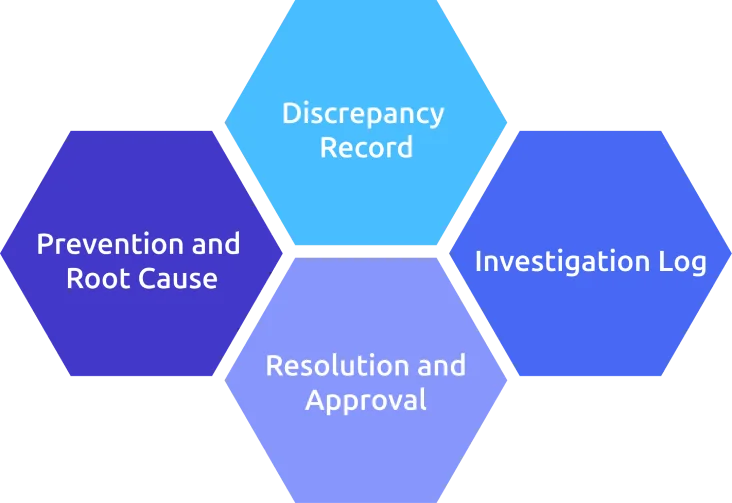
1. Discrepancy Record
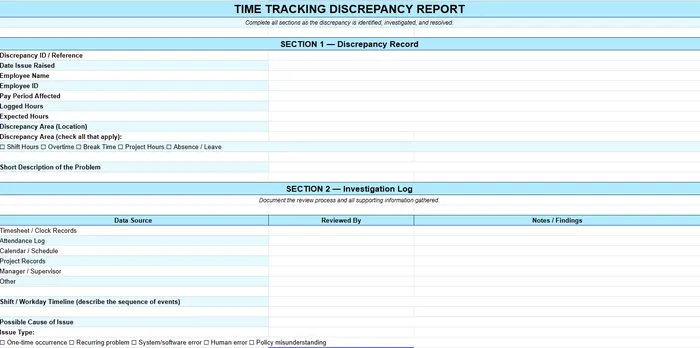
This section captures the basic details of the issue as soon as it is reported.
Include:
- Date the employee raised the issue
- Employee name and ID
- Pay period impacted
- Logged hours vs expected hours
- Where the issue appears (shift, project, overtime, break, etc.)
- Short description of the problem
2. Investigation Log
This section documents the review process and supporting information.
Include:
- Data sources checked (timesheets, attendance logs, calendars, project records, etc.)
- Notes from each source
- Timeline of the shift or workday
- Possible cause of the issue
- Whether it is a one-time issue or a recurring problem
3. Resolution and Approval
This section records the final correction and approval details.
Include:
- Corrected hours
- Changes made to the record
- Who approved the correction
- Whether payroll was notified
- Employee acknowledgement
- Additional notes if needed
4. Prevention and Root Cause
This section helps prevent the same issue from happening again.
Include:
- Root cause of the discrepancy
- Action taken to fix the issue
- Person responsible for the fix
- Follow-up or review date
Keeping all four sections in one document makes it easier to manage discrepancies, maintain records, and create a consistent process across your team.
To make this process easier to implement, you can use our ready-to-fill template that includes all the sections outlined above.
What Causes Time Tracking Discrepancies?
Most time tracking discrepancies happen because of a few common and repeatable mistakes, including:
- Missed Clock-Ins or Clock-Outs: Employees forget to start or end their shifts properly.
- Manual Entry Mistakes:Incorrect hours, duplicate entries, or typing errors during timesheet updates.
- Memory-Based Logging: Employees fill out timesheets later and forget the exact hours worked.
- System or Sync Issues: Delayed syncing, software bugs, or outdated spreadsheets can create mismatches.
- Overtime or Break Calculation Errors: Incorrect overtime tracking or missing break deductions can affect total hours.
- Unclear Time Tracking Policies: Employees may not fully understand rules for breaks, travel time, or overtime.
- Lack of Manager Review: Small mistakes go unnoticed until payroll processing begins.
- Remote Work Tracking Challenges: Distributed teams may face time zone issues or inconsistent tracking habits.
- Intentional Time Manipulation: In some cases, employees may intentionally alter time records or misuse the system.
Identifying the root cause is important because fixing the issue once is not enough, the goal is to stop the same discrepancy from happening again.
How Do You Stop the Same Discrepancy from Happening Again?
Fixing the hours is only part of the process. To prevent the same issue from repeating, you also need to identify what caused the discrepancy and improve the process behind it.
Here are some simple ways to reduce repeated time tracking issues:
- Enable clock-in and clock-out reminders to help employees avoid missed entries.
- Use a reliable time tracking system instead of outdated spreadsheets or manual methods.
- Simplify overtime and break policies to reduce confusion and calculation mistakes.
- Review timesheets regularly to identify small issues before payroll processing begins.
- Train employees on proper time tracking procedures and expectations.
- Automate repetitive tasks like approvals, syncing, and alerts to reduce manual errors.
- Track recurring discrepancy patterns to identify process or system issues.
- Schedule periodic audits to improve long-term accuracy and consistency.
The goal is not just to correct one mistake, it is to build a process that prevents the same issue from happening again.
How Time Champ Helps Reduce Time Tracking Discrepancies
Time Champ is an employee monitoring software with a built-in workforce intelligence layer that helps you simplify the entire process of identifying and resolving time tracking discrepancies. Instead of depending on manual entries or memory-based tracking, it automatically captures employee work hours and activity data in the background.
It has several key features that help businesses reduce time tracking discrepancies, improve payroll accuracy, and manage employee work hours more efficiently, including:
Automatic Time Tracking
It automatically records employee work hours, active time, idle time, and attendance data in real time. Instead of depending on manual entries or memory-based logging, the system tracks work activity in the background, helping you maintain more accurate records throughout the day. This reduces common issues like missed clock-ins, forgotten clock-outs, and incorrect hour entries that often lead to payroll discrepancies.
Easy Time Claim Management
Time Champ also makes it easier for employees to submit time claims when hours are missed, incorrectly logged, or require adjustments. You can review claims alongside supporting activity records, verify the issue quickly, and approve corrections with proper records. This creates a more transparent and organized process for handling time-related disputes and payroll adjustments.
Real-Time Activity Tracking and Audit Trails
Activity tracking provides detailed activity logs, application usage data, timelines, and work history to help you find discrepancies faster. Instead of manually collecting information from different sources, teams can access a clear audit trail in one place. These records help you maintain accountability, improve reporting accuracy, and support payroll reviews, compliance checks, and internal audits more effectively.
Accurate Timesheet Generation
Time Champ automatically generates detailed timesheets using tracked work activity and attendance data. Employees no longer need to manually enter their work hours at the end of the week, which helps reduce reporting mistakes and incomplete entries. You can review, approve, and export timesheets more efficiently while maintaining a clear record of employee work hours for payroll and compliance purposes.
Simplified Payroll Processing
With automated work-hour tracking and accurate timesheet generation, payroll processing becomes faster and more reliable. Time Champ helps reduce manual calculations, overtime errors, and attendance mismatches by providing verified work-hour data in one place. This minimizes payroll disputes, saves administrative time, and improves overall payroll accuracy across teams.
Upgrade your payroll and timesheet management with Time Champ!
Automate time tracking, simplify payroll, and reduce timesheet discrepancies effortlessly.
Conclusion
Time tracking discrepancies can quickly lead to payroll errors, confusion, and unnecessary data if they are not handled properly. Using a time tracking discrepancies template helps you create a consistent process for reporting, reviewing, and resolving issues efficiently. Combined with the right tools, you can reduce manual mistakes, improve payroll accuracy, and maintain better records across your team.

Jahnavi Pulluri

Table of Content
 What Is a Time Tracking Discrepancies Template?
- Why Use a Template Instead of Fixing Issues Manually?
- What Should a Time Tracking Discrepancies Template Include?
- What Causes Time Tracking Discrepancies?
- How Do You Stop the Same Discrepancy from Happening Again?
- How Time Champ Helps Reduce Time Tracking Discrepancies
- Conclusion

Related Blogs
Uncover the chaos of a day without time tracking. Explore how managers struggle with productivity, accountability, and team coordination in this insightful read.
Jahnavi Pulluri | Oct 25, 2024
Learn what a timesheet is, its uses, and how it improves work hour tracking, project management, and business efficiency.
Jahnavi Pulluri | Oct 26, 2024
A timesheet is a digital record that contains information about the amount of time an employee spends on various tasks or projects during a specific period-
Jahnavi Pulluri | Sep 04, 2024
Discover essential features of time tracking software and how Time Champ enhances project management, productivity, and accuracy.
Tarun Kumar Reddy | Aug 23, 2024
Create a clear time tracking policy to boost productivity and ensure accurate work-hour reporting. Download a free customizable template.
Thasleem Shaik | Oct 04, 2024
Discover effective ways to build employee trust in automatic time tracking software and create a transparent, productive, and positive work environment.
Thasleem Shaik | Mar 13, 2025


 4.7/5 avg.
Ready to Manage Your Workforce Smarter?
Join our family of 1500+ companies using smart insights to redefine workforces!

Free Trial
No Credit Card Required