Time Management Matrix: Prioritize Tasks Effectively
Stop wasting time on low-value tasks. Use the time management matrix to prioritize work, compare the Eisenhower and Covey time methods, and avoid mistakes.
Managing a busy schedule can make it difficult to decide which tasks need your attention first. As priorities keep changing, important work often gets delayed while less important tasks take up your time. The time management matrix helps you identify what deserves your attention first so that you can focus on the right tasks at the right time.
From understanding the four quadrants to comparing popular prioritization methods, every section is designed to help you make better decisions about your work. You'll also see how to use the matrix effectively for both individual and team productivity.
What Is the Time Management Matrix?
The time management matrix is a task prioritization framework that helps you organize work based on its urgency and importance. It divides tasks into four categories, making it easier to focus on high-impact activities, reduce distractions, and make better decisions about how you spend your time.
What Are the Four Quadrants of the Time Management Matrix?
The four quadrants of the time management matrix help you sort tasks based on their urgency and importance. Once each task is placed in the right quadrant, it becomes easier to decide what to do immediately, plan, delegate, and remove from your workload.
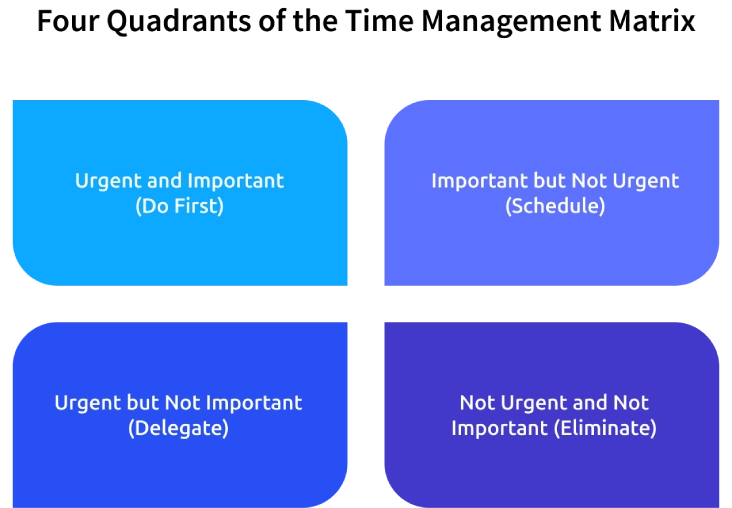
Quadrant 1: Urgent and Important (Do First)
What it is: This quadrant includes tasks that contribute to long-term success but do not require immediate action. Scheduling time for them helps prevent future crises and supports steady progress.
Examples:
- Completing a project due today.
- Fixing a major system outage.
- Responding to an urgent client issue.
Result: Handling these tasks first prevents missed deadlines, reduces risks, and keeps essential work on track.
Quadrant 2: Important but Not Urgent (Schedule)
What it is: This quadrant includes tasks that contribute to long-term success but do not require immediate action. Scheduling time for them helps prevent future crises and supports steady progress.
Examples:
- Strategic planning.
- Learning a new skill.
- Building client relationships.
- Exercising or personal development.
Result: Giving regular attention to these tasks improves productivity, supports growth, and reduces the number of urgent situations over time.
Quadrant 3: Urgent but Not Important (Delegate)
What it is: These tasks demand quick attention but do not require direct involvement. Whenever possible, these can be assigned to someone else.
Examples:
- Routine administrative work.
- Scheduling meetings.
- Answering non-critical emails.
- Collecting standard reports.
Result: Delegating these responsibilities frees up time for more valuable work and improves overall team efficiency.
Quadrant 4: Not Urgent and Not Important (Eliminate)
What it is: This quadrant contains activities that provide little or no value and often distract you from meaningful work. Reducing or eliminating them creates more time for important priorities.
Examples:
- Endless social media scrolling.
- Watching unnecessary videos during work hours.
- Repeatedly checking notifications without a reason.
Result: Removing these distractions improves focus, increases productivity, and allows more time for high-impact tasks.

Did You Know?
Gallup's 2026 report found that only 20% of employees were engaged at work in 2025. Highlighting that better task prioritization can improve engagement, productivity, and overall business performance.
Eisenhower Matrix vs Covey Time Management Matrix: Are they the same?
The Eisenhower Matrix and the Covey Time Management Matrix share the same task prioritization framework, but they emphasize different outcomes. One focuses on making better daily decisions, while the other encourages long-term effectiveness and personal growth.
| Aspect | Eisenhower Matrix | Covey Time Management Matrix |
|---|---|---|
| Origin | Introduced from the decision-making principle of former U.S. President Dwight D. Eisenhower. | Popularized by Stephen R. Covey in The 7 Habits of Highly Effective People. |
| Primary Focus | Helps make quick decisions by separating urgent tasks from important ones. | Encourages long-term effectiveness by spending more time on important but non-urgent activities. |
| Approach | Focuses on deciding whether to do, schedule, delegate, or eliminate a task. | Focuses on building habits, planning proactively, and achieving long-term goals. |
| Best Use Case | Managing daily workloads, deadlines, and urgent responsibilities. | Improving productivity, personal development, leadership, and strategic planning. |
| Time Perspective | Short-term task prioritization. | Long-term time and priority management. |
| Core Message | Handle urgent work efficiently while avoiding unnecessary tasks. | Invest more time in important work before it becomes urgent. |
How To Use the Time Management Matrix, Step by Step?
Knowing the four quadrants is only the first step, but the real value of the time management matrix comes from using it consistently to organize your workload and make better decisions. Follow these simple steps to build a matrix that helps you stay focused on the tasks that matter most.
Step 1: Brainstorm and List Your Tasks
Write down every task you need to complete, including work assignments, meetings, personal commitments, and recurring responsibilities. Don't prioritize them, just simply create a complete list so nothing important is overlooked.
Step 2: Set Up Your Four-Quadrant Matrix
Draw a simple grid with four sections based on:
- Urgent & Important
- Important but Not Urgent
- Urgent but Not Important
- Not Urgent and Not Important
This structure will help you sort tasks by priority.
Step 3: Assign Every Task to the Right Quadrant
Review each task carefully and place it in the quadrant where it belongs. Ask yourself whether the task is truly urgent, genuinely important, both, or neither. Be honest with your decisions, as placing tasks correctly is what makes the matrix effective.
Step 4: Take Action Based on Each Priority
Start working on the tasks in Quadrant 1 first. Schedule dedicated time for Quadrant 2 tasks, delegate Quadrant 3 tasks whenever possible, and remove or limit Quadrant 4 activities. Following these actions helps you stay focused on high-priority work and use your time more effectively.
Step 5: Review and Refine Your Matrix Regularly
Set aside time each week to review your matrix. Move tasks between quadrants as priorities change, add new responsibilities, and remove completed tasks. Keeping your matrix up to date ensures it reflects your current priorities and helps you stay organized.
How To Build a Time Management Matrix for a Whole Team?
Applying the time management matrix across a team creates better visibility into priorities, improves collaboration, and ensures everyone focuses on work that delivers the greatest value. Follow these steps to build a shared framework that keeps your team aligned and productive.

Step 1: Set Clear Priority Criteria
Define what “urgent” and “important” mean for your team before creating the matrix. Use factors such as deadlines, business impact, customer needs, and project goals to establish consistent standards. This ensures everyone prioritizes tasks using the same criteria.
Step 2: Track Team Activities for One Week
Ask every team member to record the tasks they complete over one week. Review the results to understand how time is spent, identify recurring work, and highlight activities that add little value. Use these insights to prioritize work more effectively.
Step 3: Organize Tasks into the Four Quadrants
Place every task, project, and recurring responsibility into the appropriate quadrant based on its urgency and importance. Discuss the classifications with your team to resolve differences and ensure everyone understands the priority of each task.
Step 4: Choose a Tool That Keeps Everyone Aligned
Select a task or project management tool that allows the team to assign work, track progress, and view priorities in one place. Keep the matrix accessible so everyone can follow the same priorities and respond quickly when plans change.
Step 5: Review and Update the Matrix Regularly
Review the matrix with your team at regular intervals. Move tasks between quadrants as priorities change, remove completed work, and add new responsibilities. Frequent updates keep the matrix relevant and ensure the team stays focused on the highest-priority work.
Struggling to keep your team's priorities on track?
Time Champ helps you track time, manage tasks, and improve team productivity with ease.
Common Mistakes When Implementing the Time Management Matrix
Using the time management matrix is simple, but small mistakes can reduce its effectiveness. Avoiding the following issues will help you prioritize tasks accurately, stay focused, and get better results from the framework.
Mistake-1: Treating Every Task as Urgent
When every task is marked as urgent, the matrix loses its purpose. This creates constant pressure, makes planning difficult, and leaves little time for meaningful work.
How to Fix It: Evaluate every task based on its actual deadline and business impact. Reserve the Urgent and Important quadrant only for work that truly requires immediate attention.
Mistake-2: Ignoring Important but Non-Urgent Work
Long-term goals, planning, training, and relationship building are often delayed because they don't demand immediate action. Over time, these neglected tasks become urgent problems.
How to Fix It: Block dedicated time for Important but Not Urgent tasks on your calendar. Review these commitments regularly to ensure steady progress.
Mistake-3: Keeping Too Many Tasks in One Quadrant
Adding too many tasks to a single quadrant makes prioritization difficult. It becomes harder to identify what should be completed first, reducing the matrix to another long task list.
How to Fix It: Rank tasks within each quadrant based on their impact and deadlines. Break large projects into smaller actions to make prioritization clearer.
Mistake-4: Failing to Delegate Suitable Tasks
Many people continue handling routine or administrative work even when someone else can complete it. This limits the time available for high-value responsibilities.
How to Fix It: Identify tasks that don't require your direct involvement and assign them to the right team members. Clear ownership improves efficiency and keeps priorities balanced.
Mistake-5: Creating the Matrix Once and Never Updating It
Work priorities change as deadlines shift, new tasks arrive, and business needs evolve. A static matrix quickly becomes outdated and no longer reflects current priorities.
How to Fix It: Review your matrix weekly or whenever priorities change. Move tasks between quadrants, remove completed work, and add new responsibilities to keep the matrix accurate and useful.
How Time Champ Supports Better Time Management
Managing priorities becomes difficult when there is limited visibility into how time is spent, which tasks receive the most attention, and where productivity is lost. Time Champ is a smart employee monitoring software with workforceintelligence features that help individuals and teams track work, identify priorities, eliminate time-wasting activities, and make better decisions for improved time management.
Key Time Champ features that support effective time management include:
- Automatic Time Tracking: Captures work hours automatically without manual time entries.
- Task and Project Time Tracking: Monitors the time spent on every task and project to improve workload visibility.
- Productivity Insights: Identifies productive, unproductive, and neutral work patterns to improve focus.
- Task Management: Organizes, assigns, and prioritizes tasks to keep work on track.
- Attendance and Work Hours Tracking: Records attendance and work hours to maintain consistency and accountability.
- Detailed Reports and Analytics: Provide actionable reports that help evaluate time usage and team performance.
- Idle Time Tracking: Detects inactive periods to reduce time loss and improve productivity.
- Productivity Timeline: Visualizes daily work activities to help identify focus patterns and optimize time management.
Ready to turn priorities into effective results?
Time Champ gives you the visibility and insights to manage time, tasks, and productivity more efficiently.
Conclusion
Effective time management starts with making the right decisions about how your time is spent. The time management matrix provides a practical framework for identifying priorities, reducing distractions, and focusing on work that creates the greatest impact. Whether you're managing personal tasks or leading a team, consistently reviewing priorities and acting on them improves productivity and reduces unnecessary pressure. Pairing this approach with the right tools and regular planning helps you stay organized, adapt to changing priorities, and achieve meaningful results without losing focus on what truly matters.

Anjali

Table of Content
 What Is the Time Management Matrix?
- What Are the Four Quadrants of the Time Management Matrix?
- Eisenhower Matrix vs Covey Time Management Matrix: Are they the same?
- How To Use the Time Management Matrix, Step by Step?
- How To Build a Time Management Matrix for a Whole Team?
- Common Mistakes When Implementing the Time Management Matrix
- How Time Champ Supports Better Time Management
- Conclusion

Related Blogs

Discover practical time management techniques to improve focus, prioritize tasks, reduce distractions, and manage your workday more effectively.
Thasleem Shaik | May 21, 2026
Track employee working hours accurately, improve productivity, reduce time waste, and gain better visibility into team performance with a work time tracker.
Anjali | Jun 08, 2026
Use our effective task management strategies to stay organized, reduce stress, and boost team’s productivity by prioritizing tasks and managing time effectively.
Guna Lakshmi | July 01, 2025
What is time blocking? Learn how to plan focus blocks, choose a method that fits your day, and audit whether your blocks actually held to get more done.
Shaik Shabana | Jun 08, 2026
Still believe multitasking saves time? Discover 10+ common time management myths that are holding you back and learn what actually works.
Guna Lakshmi | Jun 03, 2026
Top task management software tools that help organize work, streamline collaboration, improve productivity, enhance clarity, and simplify team workflows.
Thasleem Shaik | June 30, 2025


 4.7/5 avg.
Ready to Manage Your Workforce Smarter?
Join our family of 1500+ companies using smart insights to redefine workforces!

Free Trial
No Credit Card Required