8 Resource Allocation Strategies for Smarter Project Planning
Resource allocation strategies help you assign time, skills, and capacity where they matter most so you can plan projects clearly and avoid resource gaps.

Having more resources does not always solve a project planning problem. Resource allocation strategies help you make better use of the resources you already have by deciding which work should take priority, how much capacity each project needs, and where you need to make adjustments.
Think about a specialist assigned to four projects at the same time. Each project may have a valid claim on that specialist, but the combined workload can create delays across all four. A clear resource allocation strategy helps you spot these conflicts early and assign capacity based on what matters most.
This article covers eight practical strategies and shows when each one fits different project situations.
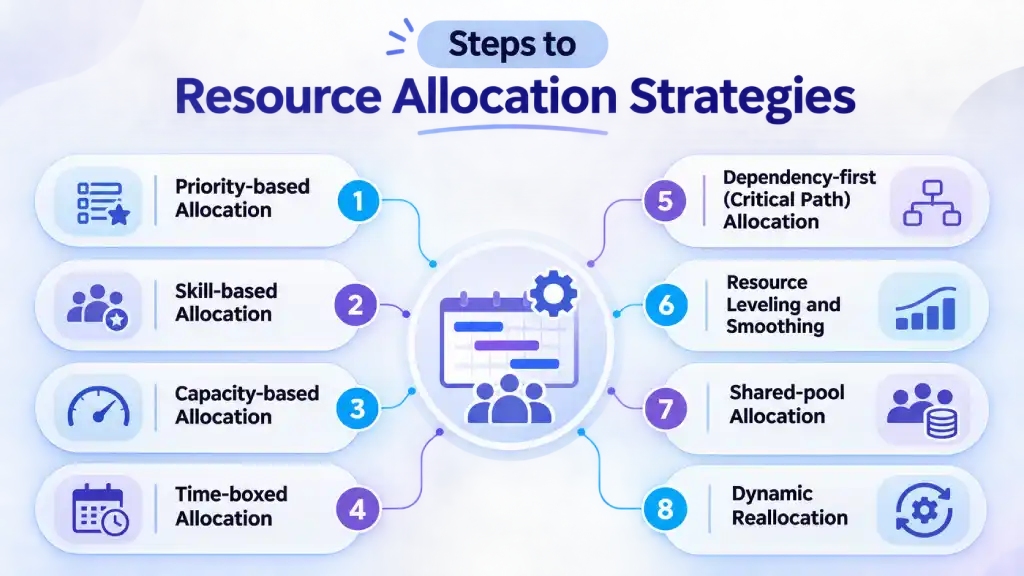
1. Priority-based Allocation
Priority-based allocation ranks your work by importance, then assigns resources to the highest-priority item first. You continue down the list until you reach your available capacity. It is a direct form of strategic resource allocation because it makes you decide what needs to wait instead of spreading your resources across everything.
Where it Fits: Use it when your workload exceeds your available capacity and you have clear business goals. It works well when you run a startup, manage competing client deadlines, or need to handle urgent work.
How To Do It:
- Choose three or four criteria, such as revenue impact, client commitment, delay risk, and strategic fit.
- Score each project against these criteria and rank the list.
- Assign resources to the highest-ranked project first, then move down the list.
Example: Suppose you lead a 10-person software team with a client migration due in six weeks, a feature release, and some internal tooling work. You rank the migration first and assign five engineers to it. The feature release gets three, while the remaining two handle tooling and maintenance. Your team can clearly see where its available hours go.
Watch Out For: Small but necessary tasks, such as maintenance and documentation, may not score high enough. Set aside a fixed share of your capacity for this work before ranking the rest.
2. Skill-based Allocation
Skill-based allocation matches each task with the teammate who has the right expertise instead of assigning it to whoever has an open slot. When the skills do not match the task, the work can take longer and may need rework. Allocating resources based on skills helps you maintain quality where expertise matters most.
Where it Fits: Use it for engineering, consulting, design, and other work where skills differ across your team. It works especially well for complex tasks that need specific expertise.
How To Do It:
- Create a simple skills inventory with names, skills, and proficiency levels.
- Break each task into the specific skills it requires.
- Match each task with the closest fit and update your inventory every quarter.
Example: Suppose you have a data migration and a UI refresh running at the same time. Assign the two engineers with previous migration experience to the first project. For the UI work, pair a junior developer with a senior developer so the junior can build skills while the work moves forward.
Watch Out For: Your most experienced specialists can become bottlenecks when you assign every difficult task to them. Set a stretch rule, such as giving a junior teammate one challenging task per cycle, with a senior teammate available for support.
3. Capacity-based Allocation
Capacity-based allocation starts with the hours each teammate can realistically give, then assigns work within that limit. The allocation of resources follows your team's actual bandwidth rather than the headcount on your org chart. This approach also works closely with capacity planning, which helps you understand how much work your team can realistically take on before you assign it.
Where it Fits: Use it when your team keeps missing deadlines even though your headcount looks sufficient. It also works well for long projects and creative work where constant overloading can affect quality.
How To Do It:
- Start with each teammate's actual weekly hours instead of assuming a flat 40. Account for leave, meetings, and support work.
- Plan around 70 to 80% of your available capacity instead of using 100%. This leaves room for unplanned work, absences, and changes in scope.
- Review the actual workload every week and adjust assignments before the gap becomes a problem.
Example: Suppose you have five developers with 200 hours available on paper each week. Instead of assigning all 200 hours to project work, you plan for around 140 to 160 hours. Meetings, leave, support work, and unexpected requests can then fit into the remaining capacity.
Watch Out For: This strategy depends on accurate data. If you estimate capacity from job titles or standard working hours, your numbers can quickly become unreliable. Use tracked time from the last quarter to replace assumptions with actual figures.
Are you planning work without knowing your team's real capacity?
Use Time Champ to track time and plan workloads around actual hours.
4. Time-boxed Allocation
Time-boxed allocation assigns your resources for a fixed period, such as a two-week sprint or a monthly cycle. Once the period ends, you review the work and decide where your capacity should go next. This prevents a project from holding your resources longer than it actually needs them.
The approach comes from agile delivery, where you fix the time and cost while allowing the scope to change within the set window. The Agile Business Consortium also describes timeboxing as a way to work within a defined time period.
Where it Fits: Use it for software, product, and content work that follows regular planning cycles. It can also help operations teams that want a consistent rhythm for reviewing and reassigning work.
How To Do It:
- Choose a time window that suits your work, such as one, two, or four weeks.
- Assign your available hours to the highest-priority work at the start of each cycle.
- Review the actual hours at the end and adjust assignments for the next cycle.
Example: Here is a quick resource allocation example. Suppose you run a four-person design team on two-week cycles. At the start of each cycle, you assign all four designers to the two highest-priority requests. Other requests wait for the next cycle. At the end, you review the actual hours and adjust the assignments if your priorities have changed.
Watch Out For: Long-running projects may need to be broken into smaller pieces that fit within each window. Make it clear that your team's time stays fixed during the cycle, while the scope can change based on the available capacity.
5. Dependency-first (Critical Path) Allocation
Dependency-first allocation starts with the tasks that control your project's finish date. You identify the critical path, then assign the required resources to those tasks before handling work with more flexibility. If a critical task falls behind, the delay can affect every task that follows it. It remains one of the most useful resource allocation techniques for work that follows a strict order.
Where it Fits: Use it for construction, engineering, software rollouts, and projects where tasks must follow a set order and the deadline cannot move. It also helps when several teams depend on each other's handoffs.
How To Do It:
- List your tasks, map their dependencies, and identify the longest chain from start to finish as your critical path.
- Assign your most suitable and available team members to critical path tasks first, then plan the remaining work around them.
- Protect their time from side requests and review the path regularly because it can change when tasks finish early or fall behind.
Example: If you are running a six-person team, rolling out software for a client. Your critical path runs through data migration, user testing, and go-live. Your most experienced migration engineer also has a request to build reports, but the reports have two weeks of flexibility. You assign her to the migration full-time and give the reporting work to a junior teammate. The go-live date stays on track, and the reports still have enough time for completion to be completed.
Watch Out For: Your critical path can change as the project moves forward. Review task progress and dependencies regularly instead of assuming the original path will remain critical.
6. Resource Leveling and Smoothing
Resource leveling and resource smoothing help you deal with uneven workloads, but they work differently. Resource leveling adjusts task timing when your available resources cannot handle all the planned work. Resource smoothing shifts work within the available scheduling flexibility while keeping the project end date fixed. Together, these approaches help you optimize resource allocation when workloads become uneven.
Where it Fits: Use leveling when your team's capacity is the main constraint, and you can allow the schedule to move. Use smoothing when the deadline cannot move, but some tasks have enough flexibility to shift.
How To Do It:
- Review your schedule and identify where workloads exceed available capacity.
- For leveling, move or split tasks until the workload fits the available resources.
- For smoothing, move flexible tasks within their available slack without changing the final deadline.
- Check the project schedule again after making the changes.
Example: A developer has three tasks scheduled for the same week, but two of them can move without affecting the project deadline. You can shift one task to the following week to reduce the workload. When the deadline must stay fixed, use the available slack to spread the work while keeping the final date unchanged.
Watch Out For: Leveling can push the project finish date when you have no spare capacity. Always check how schedule changes affect your deadline and critical path after leveling.
7. Shared-pool Allocation
Shared-pool allocation keeps scarce specialists such as designers, QA engineers, data analysts, or DevOps engineers in one central pool instead of assigning them permanently to one project. Projects request their time when they need specific skills. This lets you share specialists across several projects without giving each project a separate time allocation.
Where it Fits: Use it for IT services, agencies, and teams that support several projects with the same specialists. It works especially well for skills such as QA, DevOps, data analysis, design, and security.
How To Do It:
- Identify skills that several projects need but do not require full-time support.
- Keep those specialists in a shared pool with their available capacity visible.
- Create a clear process for requesting their time.
- Rank competing requests using your project priorities.
Example: Three client projects need QA support during the same month. Rather than assigning one QA specialist to each project, you keep two QA specialists in a shared pool. You assign their hours based on testing deadlines and project priorities, then move their capacity as each project reaches its next stage.
Watch Out For: A shared pool can create a queue when several projects request the same specialist at once. Set clear priorities and assign someone to coordinate requests so conflicts do not remain unresolved.
8. Dynamic Reallocation
Dynamic reallocation treats your resource plan as something you review and adjust rather than a fixed assignment that stays unchanged. You compare planned work with actual hours, progress, capacity, and changing priorities, then move resources when the data shows a clear need. It plays an important role in strategic resource allocation because project priorities can change faster than your original plan.
Where it Fits: Use it for agencies, product teams, support teams, and project portfolios where priorities change often. It works best when you already track actual hours.
How To Do It:
- Set a regular review cycle, such as weekly for active teams or monthly for a larger portfolio.
- Compare forecast hours with actual hours for each project.
- Check utilization, workload, project progress, and budget against the plan.
- Reassign capacity when the data shows that a project needs more support or another project has spare capacity.
Example: An eight-member support team reviews its workload every Monday. A product update increases ticket volume by 30%. Tracked hours show that two agents spent less than 10 hours last week on a reporting project while the support queue kept growing. You move both agents to the queue for two weeks, pause the reporting work, and review the workload again the following Monday.
Watch Out For: Without actual-hour data, dynamic reallocation can turn into random reshuffling. Use tracked time to support your resource allocation management and make decisions based on what is actually happening. Set clear rules early, such as who approves a move and which work it displaces. Avoid unnecessary mid-cycle changes because frequent shifts can disrupt your team's focus.
How Time Champ Helps You Manage Resource Allocation
When you plan project work, you need more than a list of assigned tasks. You need to know how much time each project actually takes, where your available hours go, and which workloads are starting to exceed capacity. Time Champ gives you this visibility through automatic time tracking across projects, tasks, and clients. You can compare planned hours with actual time, check workload and utilization, and use project reports to spot gaps before they affect your deadlines.
You can also use Time Champ to assign tasks with roles, priorities, and timelines, plan capacity, and adjust allocations as project needs change. Budget tracking and budget-versus-actual reports help you see when a project is using more resources than planned, while overutilization and overtime alerts can help you identify workload issues early. This gives you the information you need to make resource allocation management decisions based on actual work instead of assumptions.
Struggling to assign the right resources to the right projects?
Use Time Champ to track workloads, capacity, and project hours in one place.
Conclusion
Good resource allocation strategies help you put the right time, skills, and capacity behind the work that matters most. Start with clear priorities, plan around real capacity, and review your allocations as project needs change. If you want a clearer view of where your time goes, Time Champ can help you track project hours, workload, and capacity in one place.

Thasleem Shaik

Table of Content
 1. Priority-based Allocation
- 2. Skill-based Allocation
- 3. Capacity-based Allocation
- 4. Time-boxed Allocation
- 5. Dependency-first (Critical Path) Allocation
- 6. Resource Leveling and Smoothing
- 7. Shared-pool Allocation
- 8. Dynamic Reallocation
- How Time Champ Helps You Manage Resource Allocation
- Conclusion
Related Blogs

Learn how resource efficiency time tracking improves workload balance, productivity, resource utilization, and project outcomes without burnout for teams.
Anjali | May 21, 2026
Discover what resource planning is, its importance, examples, templates, strategies, pros & cons, and software to optimise project resources effectively.
Guna Lakshmi | Apr 02, 2026
Find the best project resource management software for 2026. Compare features, pricing, pros & cons to optimize resources and deliver projects on time.
Thasleem Shaik | Apr 02, 2026
Discover resource planning templates for HR, projects, teams, and IT. Free downloads in Excel, Word, and PDF for efficient planning & how to manage it.
Thasleem Shaik | Oct 30, 2025
Find the best HR software solutions for effective human resource management. Automate HR functions, hire employees and manage labor efficiently.
Hima Bindhu Nara | Jan 17, 2024
Learn what human resource management (HRM) means, its core functions, objectives, importance, skills, and career opportunities for HR professionals.
Guna Lakshmi | Sep 29, 2026


 4.7/5 avg.
Ready to Manage Your Workforce Smarter?
Join our family of 1500+ companies using smart insights to redefine workforces!

Free Trial
No Credit Card Required