Remote Work Compliance: A 2026 Guide + Checklist
Understand remote work compliance, including key laws, hiring requirements, employee rights, state regulations, and a practical compliance checklist.
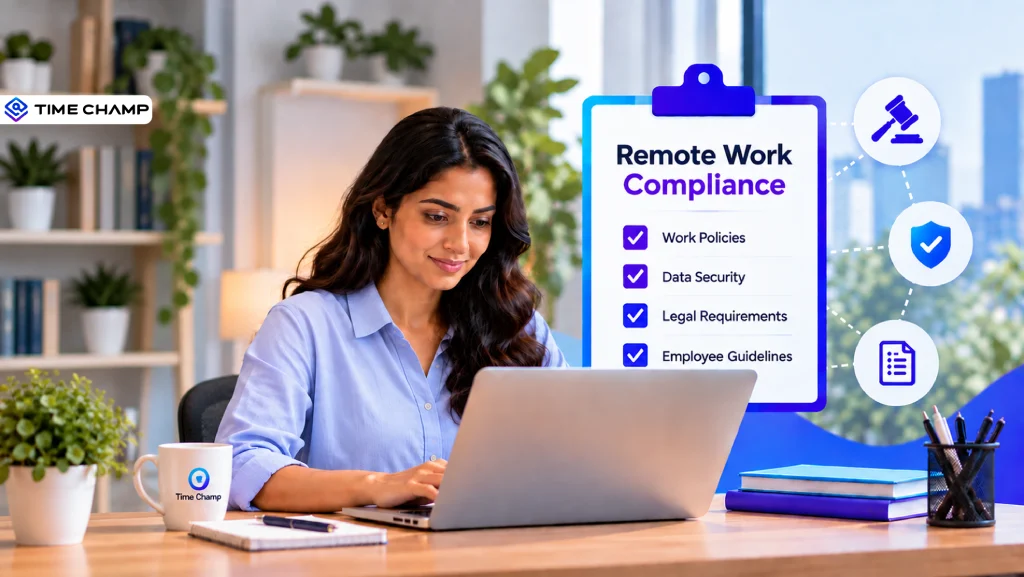
Remote work compliance becomes important when employees work from different locations. Companies need to consider areas such as hiring, pay, taxes, employee rights, data security, and workplace policies. Missing an important rule can create problems for a business.
This guide covers the main compliance areas, common risks, and a simple checklist to help companies follow the right rules when managing remote employees.
Note: This guide is general information, not legal advice. Employment and tax rules vary by location; check with qualified legal or HR counsel before acting on it.
What Is Remote Work Compliance?
Remote work compliance means following the laws, regulations, and company policies that apply when employees work outside a traditional office. It covers areas such as employment laws, wages, taxes, working hours, employee rights, data protection, workplace safety, and remote work policies.
The requirements can vary depending on where employees live and work. Companies need to make sure their remote work practices follow the rules that apply to each location.

Did You Know?
Remote work comes with more compliance challenges than you might expect. Deloitte’s Remote Work Survey found that 46% of organizations identify policy and regulation as their top challenge when enabling remote work.
Most Common Legal Issues in Remote Work
Remote work can create legal challenges when employees and employers are in different locations. The most common issues include:
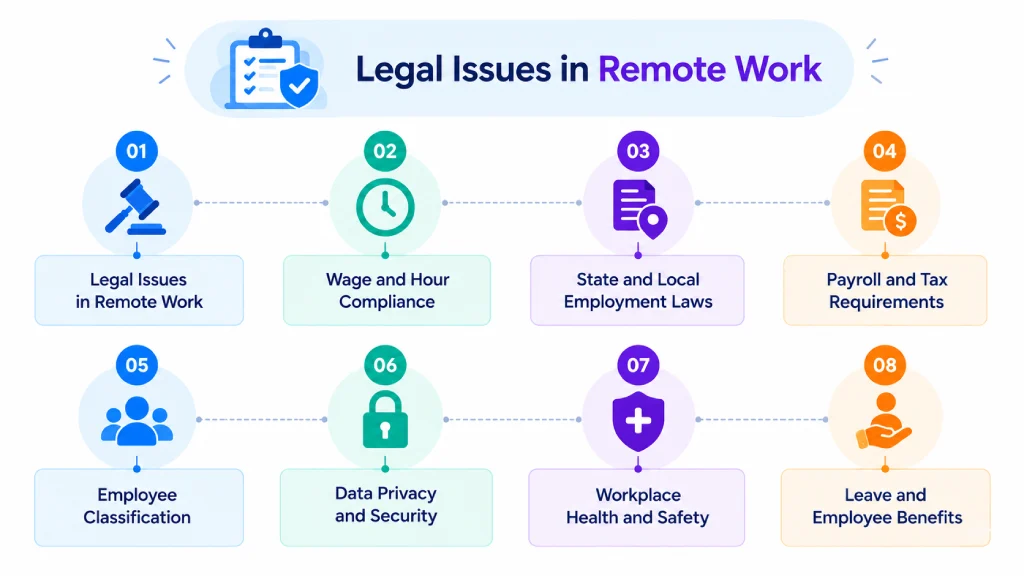
Wage and Hour Compliance
Remote employees must follow wage and hour laws. These rules cover minimum wage, overtime, working hours, breaks, and work time records. Companies with teams in different states need to follow the rules that apply to employees in each location.
State and Local Employment Laws
Each state and local area has its own employment rules. These rules cover minimum wage, paid leave, final pay, and employee rights. Companies with remote teams need to follow the requirements that apply in each location.
Payroll and Tax Requirements
Hiring remote employees in another state creates additional payroll and tax responsibilities. Employers need to handle the correct tax deductions, registrations, and payroll reports based on where employees work. Accurate payroll records help companies avoid compliance problems.
Employee Classification
Companies need to classify workers correctly as employees or independent contractors. Incorrect classification can cause problems with taxes, wages, benefits, and penalties. Companies should base the classification on the actual working relationship and applicable laws.
Data Privacy and Security
Remote employees often access company information outside the traditional workplace. Companies need to protect sensitive data across devices, applications, networks, and files. Strong security controls and clear data handling rules help companies reduce unauthorized access.
Workplace Health and Safety
Remote work does not remove workplace health and safety responsibilities. Companies need to provide a safe working environment and suitable equipment for employees. The specific requirements depend on the type of work and applicable laws.
Leave and Employee Benefits
Companies need to provide the leave and benefits required by applicable laws and company policies. These benefits can include sick leave, family leave, holidays, insurance, and other employee benefits. Companies should apply the correct requirements based on where employees work.
Remote Work Policies
A clear remote work policy sets expectations for employees working outside the office. Companies can include rules for working hours, attendance, expenses, equipment, data security, and communication. Clear policies help employees understand their responsibilities and help companies manage remote work consistently.
Want to manage remote work compliance without added complexity?
Time Champ helps you manage work hours, attendance, leave, timesheets, and employee activity in one place.
Remote Work Compliance Laws for Employees and Employers
Remote work laws create responsibilities for both employees and employers. The requirements depend on the employee’s location and the laws that apply to the workplace. Here’s the detailed explanation:
Remote Work Compliance Laws for Employees
| Law or Compliance Area | Employee Compliance |
|---|---|
| Fair Labor Standards Act (FLSA) | Employees covered by the FLSA receive minimum wage and overtime protections. Employees who qualify for overtime pay must record their working hours accurately when required. |
| Equal Employment Opportunity Laws | Employees have protection against workplace discrimination based on factors covered by federal law. These include race, color, religion, sex, national origin, age, disability, and other protected characteristics. |
| Americans with Disabilities Act (ADA) | Employees with qualifying disabilities can request reasonable workplace changes when the ADA applies. Remote work can serve as an accommodation when the job and situation allow it. |
| Family and Medical Leave Act (FMLA) | Eligible employees of covered employers can receive up to 12 weeks of unpaid, job-protected leave for qualifying family and medical reasons. The law also protects their health benefits during the leave. |
| Employee Classification | Employees receive legal protections that independent contractors do not. Worker status depends on the actual working relationship, not simply the job title or contract used. |
| State and Local Employment Laws | Employees must follow workplace requirements in their location while receiving the protections provided by the laws that apply to them. State laws can provide extra protections beyond federal laws. |
| Data Privacy and Security | Employees who work remotely use devices and remote access to connect to company systems and information. They need to follow security practices that protect those devices, remote connections, and company information. |
| Workplace Safety OSHA Home-Based Worksites Guidance | Employees should follow workplace safety rules and report work-related safety concerns according to company requirements. OSHA also provides guidance for home-based work situations. |
Remote Work Compliance Laws for Employers
| Law or Compliance Area | Employer Compliance |
|---|---|
| Fair Labor Standards Act (FLSA) | Employers must follow minimum wage and overtime rules and keep accurate records of employee wages and working hours. These records include hours worked, wages paid, overtime pay, and deductions. |
| Equal Employment Opportunity Laws | Employers must provide equal opportunities and avoid discrimination in hiring, pay, promotions, job assignments, termination, and other employment decisions. Federal laws cover areas such as race, color, religion, sex, national origin, age, and disability. |
| Americans with Disabilities Act (ADA) | Covered employers must provide reasonable workplace changes for qualified employees and applicants with disabilities unless doing so creates serious difficulty or expense. Employers must also consider changes that help employees perform their jobs. |
| Family and Medical Leave Act (FMLA) DOL FMLA Employer Notification Requirements | Covered employers must provide eligible employees with up to 12 weeks of job-protected leave for qualifying family and medical reasons. Employers must also continue group health benefits and follow the required notice and leave rules. |
| Employee Classification | Employers must correctly classify workers as employees or independent contractors. The classification depends on the actual working relationship rather than only the job title, contract, or payment method. |
| Workplace Safety OSHA | Employers must follow workplace safety requirements and provide workplaces free from recognized serious hazards. OSHA also provides guidance for home-based work and remote work arrangements. |
Remote Work Compliance Checklist
Use this checklist to review the key areas of remote work compliance and make sure the necessary requirements are in place.
| Checklist | Compliance Area | What to Check |
|---|---|---|
| ☐ | Employment Laws | Review the employment laws that apply in each location where remote employees work. |
| ☐ | Employee Classification | Classify each worker correctly as an employee or independent contractor. |
| ☐ | Wage and Hour Rules | Check minimum wage, overtime, working hours, breaks, and timekeeping requirements. |
| ☐ | Payroll and Taxes | Handle state and local tax registrations, deductions, and payroll reporting. |
| ☐ | Remote Work Policy | Document expectations for working hours, attendance, equipment, expenses, communication, and technology use. |
| ☐ | Data Protection | Set rules for accessing, storing, sharing, and transferring sensitive information. |
| ☐ | Remote Device Security | Use appropriate security controls for company laptops, mobile devices, applications, and networks. |
| ☐ | Leave Requirements | Check the leave and employee benefit rules that apply to each location. |
| ☐ | Workplace Safety | Provide appropriate guidance and equipment for a safe remote working environment. |
| ☐ | Employee Agreements | Keep employment contracts, remote work agreements, tax records, and other required documents up to date. |
| ☐ | Location Changes | Check compliance requirements whenever an employee moves to a new state or location. |
| ☐ | Regular Compliance Audits | Review policies, payroll, employee records, and security practices regularly to identify gaps. |
Best Practices to Stay Compliant
Keeping remote work compliant requires more than creating a policy and leaving it untouched. Companies need to review their practices regularly and keep up with changes in employment laws, tax rules, and data protection requirements.
Keep Remote Work Policies Updated
Review remote work policies regularly and update them when laws, business processes, or work arrangements change. Clear policies should cover working hours, attendance, expenses, equipment, data security, and communication.
Check Location-Specific Requirements
Employment and tax rules can differ between states and countries. Companies should check the requirements for each location where employees work and review them whenever an employee changes location.
Maintain Accurate Employee Records
Keep employment contracts, tax documents, time records, leave records, and remote work agreements organized and up to date. Accurate records make it easier to verify compliance and address issues when they arise.
Train Employees on Compliance Rules
Employees need to understand the rules that affect their remote work. Regular training can cover data security, acceptable technology use, working hours, company policies, and handling sensitive information.
Review Payroll and Tax Processes
Payroll teams should regularly check tax deductions, registrations, working hours, overtime, and other payroll requirements. Regular reviews help identify errors before they become larger compliance issues.
Protect Company and Employee Data
Companies should use appropriate security controls to protect sensitive information. Access controls, secure devices, strong passwords, and clear data handling policies can help reduce security and privacy risks.
Conduct Regular Compliance Audits
Regular audits help companies find gaps in policies, payroll, employee records, and security practices. Reviewing compliance on a set schedule also makes it easier to address changes before they create bigger problems.
Want to keep remote work policies and compliance reviews on track?
Use Time Champ to spot gaps faster, keep records accurate, and make compliance reviews easier.
How Time Champ Supports Remote Work Compliance
Managing remote employees across different locations requires accurate records, clear policies, and consistent processes. Time Champ brings several of these tasks into one platform.
Time Champ is an employee monitoring and remote team management software that helps companies maintain reliable work records and support their compliance processes.
- Automatic Time Tracking: Records work hours, clock-ins, clock-outs, breaks, and idle time to maintain accurate work-hour records.
- Attendance Management: Automatically captures attendance and gives managers a clear view of employee work schedules and attendance patterns.
- Automated Timesheets: Generates timesheets from recorded work activity to support payroll, billing, reviews, and recordkeeping.
- Productivity Analytics: Provides insights into active time, idle time, app usage, website usage, and work patterns across remote teams.
- Data Loss Prevention: Helps protect sensitive company information with controls for websites, USB devices, files, uploads, downloads, and suspicious activity.
- Role-Based Access Controls: Controls who can access workforce and security information based on their role and responsibilities.
Ready to manage your remote work compliance with confidence?
See how Time Champ helps you keep workforce records organized and start your free trial today.
Conclusion
Good remote work compliance helps companies protect their employees, reduce legal risks, and build a reliable remote work environment. Clear records, updated policies, regular reviews, and proper security practices help companies manage compliance requirements across different locations.
If you’re an employer looking to manage your remote team more effectively, Time Champ can be a great solution.

Guna Lakshmi

Table of Content
 What Is Remote Work Compliance?
- Most Common Legal Issues in Remote Work
- Remote Work Compliance Laws for Employees and Employers
- Remote Work Compliance Checklist
- Best Practices to Stay Compliant
- How Time Champ Supports Remote Work Compliance
- Conclusion

Related Blogs

Companies are watching remote workers more than ever. But is it ethical? We break down where monitoring is justified and where it crosses the line.
Guna Lakshmi | Apr 16, 2026
Struggling to keep your remote team connected? Explore 10 proven strategies to boost engagement, strengthen teamwork, and build a thriving remote culture!
Tarun Kumar Reddy | Mar 14, 2025
Download a free remote work agreement template in Word and PDF. Learn what to include, see a completed sample, and avoid common mistakes after signing.
Jahnavi Pulluri | Aug 19, 2026
Misread messages, missed updates, endless pings? Learn how to overcome communication challenges in remote work and keep your team connected.
Guna Lakshmi | Jul 20, 2026
Explore the essentials of remote work culture, including best practices, and strategies to enhance your productivity in a virtual environment!
Sai Keerthi Uppala | Oct 17, 2024
Create an effective and simple remote work policy with practical steps, proven best practices, helpful examples, and a free downloadable template.
Thasleem Shaik | Jul 27, 2026


 4.7/5 avg.
Ready to Manage Your Workforce Smarter?
Join our family of 1500+ companies using smart insights to redefine workforces!

Free Trial
No Credit Card Required