8 Best Communication Tools for Hybrid Teams in 2026
Find the best communication tools for hybrid teams in 2026. Learn how to build a communication stack, choose sync or async tools, and boost collaboration.
A quick decision is made in the office. A message gets shared in a hallway chat, but your remote teammates never hear it.
That’s the reality of hybrid work. Information gets lost, updates get missed, and teams slowly fall out of sync without even realizing it.
The right communication tools can fix that. In this blog, I’ll explore the best communication tools for hybrid teams in 2026 and how to choose the ones that actually keep everyone connected.
What is Hybrid Work Communication?
Hybrid work communication is the system of tools, channels, and practices used to help distributed teams communicate effectively when employees work both in-office and remotely. It includes a combination of real-time communication tools, such as video conferencing and chat apps, and asynchronous tools, such as shared documents, project management platforms, and recorded updates.
The goal of hybrid work communication is to ensure seamless information flow, improve team alignment, and reduce communication gaps arising from geographic differences.
Why Hybrid Teams Need a Structured Communication Stack
Hybrid teams don’t struggle because they lack tools, they struggle because those tools aren’t connected in a clear system. Let’s look at what happens when there’s no structured communication system in place.
- Important decisions get lost in informal conversations and are not properly documented.
- Remote employees often miss context shared in office discussions.
- Teams end up using too many disconnected tools, creating confusion and duplication.
- Lack of structure leads to delays in communication and slower decision-making.
- Information silos form between in-office and remote employees, reducing transparency.
- Inconsistent communication channels make it harder to track updates and accountability.
The 4 Key Layers of Hybrid Work Communication
A healthy hybrid communication stack is built on four key layers: real-time messaging, video meetings, asynchronous communication, and work visibility.
Most teams only use messaging and meetings, but overlook the rest. This imbalance is often where communication breakdowns begin.
| Layer | Purpose |
|---|---|
| Real-time messaging | Fast coordination, quick questions, team discussions |
| Video meetings | Live discussions, decisions, 1:1 conversations |
| Asynchronous updates | Documentation, recorded updates, cross-time-zone communication |
| Work visibility | Tracks alignment, workload, and communication gaps |
The first three layers are all about sharing information. The fourth layer makes sure that information is actually seen, understood, and followed through.
This is the most ignored part of a communication stack, but it’s also the one that makes the biggest difference between a system that just looks good and one that actually works.
Quick Comparison
| Tool | Best for | Mode | Layer |
|---|---|---|---|
| Slack | Channel-based team chat | Sync | Messaging |
| Microsoft Teams | Microsoft 365 collaboration | Sync | Messaging + video |
| Zoom | Video meetings & summaries | Sync | Meetings |
| Google Meet | Lightweight video calls | Sync | Meetings |
| Loom | Async video updates | Async | Async communication |
| Notion / Confluence | Documentation & knowledge | Async | Knowledge |
| Time Champ | Work visibility & productivity insights | Both | Work visibility |
Real-Time Messaging
1. Slack
Slack is a messaging platform where teams communicate through channels, direct messages, and integrations with other tools. It organizes conversations by topic so discussions stay structured instead of getting lost in long chat threads.
For hybrid teams, this helps keep remote and in-office employees on the same page. Important updates stay in dedicated channels, so no one depends on casual office conversations to stay informed.
2. Microsoft Teams
Microsoft Teams is a communication platform that combines chat, video meetings, and file sharing in one place. It is built around Microsoft 365, allowing teams to access documents and conversations within the same ecosystem.
For hybrid teams, this reduces the need to switch between multiple tools. Both remote and in-office employees can access the same chats, meetings, and files, which keeps work consistent and easy to follow.
Video Meetings
3. Zoom
Zoom is a video conferencing tool that lets teams run online meetings, share screens, and record sessions. It is built for clear and stable video communication, even in larger group calls.
For hybrid teams, Zoom helps keep discussions consistent across locations. Remote and in-office employees can join the same meeting, follow conversations in real time, and depend on recorded summaries to review decisions and action items later.
4. Google Meet
Google Meet is a video meeting tool that works directly in the browser and is part of Google Workspace. It allows teams to join meetings, share screens, and connect easily through Calendar links.
For hybrid teams, it makes meetings simpler and faster to access. Since it connects with Calendar and Docs, teams can move from meetings to notes and follow-ups without switching tools, keeping work connected and easy to track.
Asynchronous Videos and Updates
5. Loom
Loom is a tool that lets teams record short screen and voice videos to share updates without scheduling meetings. It allows people to explain work once and share it with others instantly.
For hybrid teams, it helps reduce unnecessary meetings and keeps communication flexible across time zones. Team members can watch updates whenever they are available, which saves time and avoids interruptions
Shared Knowledge
6. Notion
Notion is a workspace tool used to create documents, notes, wikis, and project pages in one place. It helps teams organize information in a flexible way that can be customized for different projects.
For hybrid teams, Notion keeps knowledge easy to access and updated in real time. It reduces confusion by making sure remote and in-office employees can find the same information without depending on chat messages.
7. Confluence
Confluence is a documentation tool used to create, store, and organize team knowledge and project documentation in a structured format. It is commonly used to maintain official records of work, decisions, and processes.
For hybrid teams, Confluence ensures important information is properly documented and easy to search. This helps teams stay aligned by keeping key updates and decisions in one reliable place instead of scattered conversations.
Work Visibility
8. Time Champ
Time Champ is an employee monitoring software with a workforce intelligence layer that shows how employees spend their work time across apps and tasks. It tracks activity like app and website usage, active vs idle time, and productivity patterns.
For hybrid teams, these features help you understand how work is actually happening across remote and in-office employees. It highlights time spent on meetings, tools being used most, and work patterns, making it easier to balance workloads and improve team focus and alignment.
Know what’s happening beyond the messages!
Track meeting load, tool usage, and work patterns to keep hybrid teams aligned.
How to Evaluate Your Communication Stack Performance
A communication stack is only useful if it actually improves how your team works. Here are some key points to check:
- Everyone receives updates at the same time, whether they are remote or in-office.
- Meetings are used only when needed, not for every small update.
- Teams are not depending on too many tools for the same work.
- Information flows clearly without confusion or repeated follow-ups.
- Work feels organized and easy to track across the team.
How to Roll Out a Communication Stack People Actually Use
Rolling out a communication stack is less about selecting tools and more about creating consistent communication habits. Most implementations fail not because the tools are ineffective, but because teams lack clear guidelines on when and how to use them.
Here are a few practices that improve adoption:
- Choose a Primary Tool for Each Layer: Use one primary tool for messaging, meetings, async updates, knowledge sharing, and work visibility. This helps avoid confusion and keeps communication organized.
- Define Communication Channels Clearly: Decide what should be shared in chat, meetings, documents, or project tools so everyone knows where to look for information.
- Document Important Decisions: If something is important, document it instead of only discussing it in meetings.
- Encourage Asynchronous Communication: Use tools like Loom for updates that do not require live discussion. This helps reduce meeting load and gives employees more flexibility.
- Review Adoption Regularly: After 30–60 days, check which tools your team is actively using and remove or replace anything that is not helping.
Common Hybrid Communication Mistakes to Avoid
Even with the right tools, communication can break down if teams do not follow clear practices.
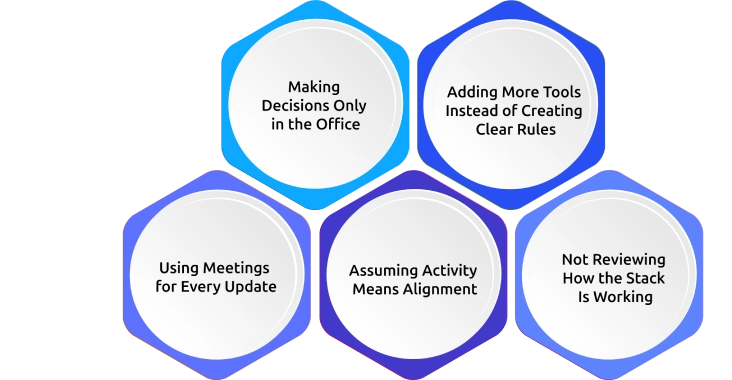
Here are some common mistakes that can create gaps between remote and in-office employees:
- Making Decisions Only in the Office: Important decisions should be shared and documented, so everyone has access to the same information.
- Adding More Tools Instead of Creating Clear Rules: Too many tools can create confusion. Clear guidelines often solve communication problems better than adding another app.
- Using Meetings for Every Update: Not every update needs a meeting. Routine information can often be shared through chat, email, or async video.
- Assuming Activity Means Alignment: A high number of messages does not always mean everyone understands or agrees on the next steps.
- Not Reviewing How the Stack Is Working: Without checking tool usage, meeting load, and communication patterns, it is difficult to know what needs improvement.
Conclusion
The best communication tools for hybrid teams are the ones that keep everyone informed, regardless of where they work. A strong communication stack combines messaging, meetings, async updates, shared knowledge, and work visibility to reduce gaps and improve collaboration. Start with the essentials, define clear communication guidelines, and regularly review what is working. With the right tools and habits in place, hybrid teams can stay connected, aligned, and productive.

Jahnavi Pulluri

Table of Content
 What is Hybrid Work Communication?
- Why Hybrid Teams Need a Structured Communication Stack
- The 4 Key Layers of Hybrid Work Communication
- 1. Slack
- 2. Microsoft Teams
- 3. Zoom
- 4. Google Meet
- 5. Loom
- 6. Notion
- 7. Confluence
- 8. Time Champ
- How to Evaluate Your Communication Stack Performance
- How to Roll Out a Communication Stack People Actually Use
- Common Hybrid Communication Mistakes to Avoid
- Conclusion

Related Blogs

Explore workplace communication, its types, styles, benefits, challenges, and practical tips to improve collaboration, performance, and employee success.
Anjali | Apr 08, 2026
Find the best team communication apps for 2026. Compare features, pricing, pros & cons to improve collaboration, productivity, and team alignment.
Guna Lakshmi | Apr 08, 2026
Discover the 10 best internal communication tools for 2026 with a comparison of features, pricing, pros, and cons to boost engagement and collaboration.
Anjali | Apr 08, 2026
Grapevine communication is informal workplace chatter. See its 4 types, real examples, plus the pros, cons, and proven tips to manage it. Read the guide.
Thasleem Shaik | Mar 22, 2024
Formal vs Informal Communication in the workforce. Understand definitions, key differences, similarities, examples, and when to use each style at work.
Tarun Kumar | Apr 02, 2026
Discover what leadership communication is, why it matters, key skills every leader need, real examples, and its impact on team performance.
Anjali | Apr 08, 2026


 4.7/5 avg.
Ready to Manage Your Workforce Smarter?
Join our family of 1500+ companies using smart insights to redefine workforces!

Free Trial
No Credit Card Required