How to Choose Resource Management Software: A Buyer’s Guide
Choosing resource management software? Compare must-have features, pricing, selection steps, and common mistakes to find the right fit for your teams.

Managing multiple projects can make it difficult to balance workloads, track availability, and assign the right people to the right tasks. Without clear resource visibility, you may face overworked teams, idle capacity, and missed deadlines. The right resource management software gives you a clearer view of capacity, workloads, schedules, and project needs. It also helps you plan resources more effectively and keep work aligned with available capacity.
In this guide, you’ll learn the nine must-have features to look for when comparing resource management tools. You’ll also understand seven selection steps, pricing factors, and common mistakes to avoid.
What Is Resource Management Software?
Resource management software is a digital solution that helps businesses plan and coordinate people, time, skills, budgets, and other resources across projects. It provides visibility into resource availability, workloads, assignments, and utilization, helping to allocate resources efficiently, balance capacity, prevent overloading, and keep projects aligned with business needs.
What to Look for in Resource Management Software: 9 Must-Have Features
A good resource management tool should help you see capacity, match people to work, track utilization, and adjust plans as priorities change. When comparing resource management software, focus on features that solve your actual planning challenges and support your team’s workflow. Here are 9 capabilities worth checking before deciding.
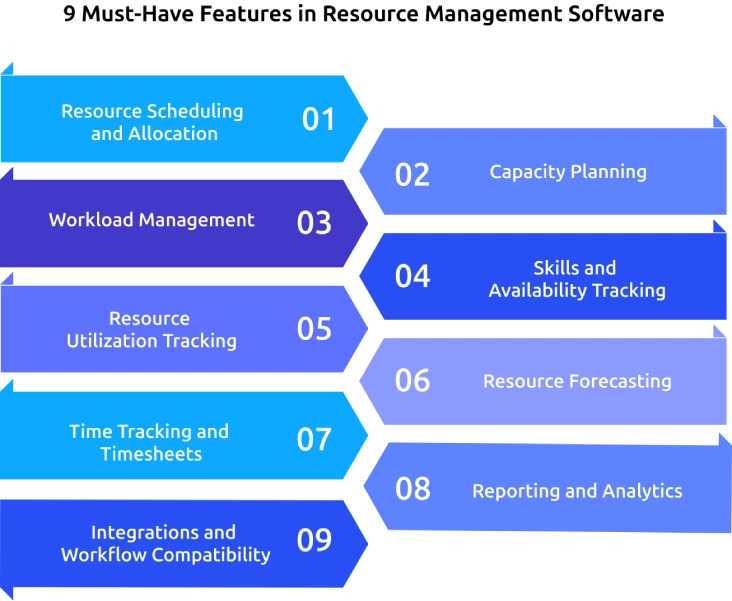
1. Resource Scheduling and Allocation
Look for flexible scheduling that lets you assign people based on their availability, skills, workload, and planned hours. Prioritize tools with visual calendars or timelines to spot scheduling conflicts and adjust assignments quickly.
2. Capacity Planning
Choose a tool that shows how much work your team can handle against its available capacity. It should highlight overloaded and underused resources early, helping you balance workloads before they affect project timelines.
3. Workload Management
Check for a clear workload view that compares assignments across team members and projects. Look for indicators of excessive workloads, unused capacity, and upcoming commitments so you can redistribute work when needed.
4. Skills and Availability Tracking
Prioritize software that tracks skills, roles, experience, working hours, certifications, and time off. This makes it easier to match the right people with tasks based on project requirements and current availability.

Did You Know?
SHRM’s Talent Trends report found that 80% of HR professionals have difficulty finding candidates with systems and resource management skills, including judgment, decision-making, complex problem-solving, and time management.
5. Resource Utilization Tracking
Look for utilization reports that show how effectively available resources are being used. Where relevant, check whether the software separates billable and non-billable, planned, and actual hours for a clearer view of resource usage.
6. Resource Forecasting
Choose software that helps you compare upcoming resource demand with available capacity. Forecasting should help you identify potential staffing gaps early and plan for changing project requirements.
7. Time Tracking and Timesheets
Check whether the software connects planned resource allocations with actual hours worked. This can help you identify planning gaps, measure project effort, support billing, and improve future resource estimates.
8. Reporting and Analytics
Prioritize tools with reports and dashboards that turn resource information into useful insights. Check for visibility into utilization, capacity, workloads, planned versus actual hours, project assignments, and resource trends.
9. Integrations and Workflow Compatibility
Make sure the software fits into your existing workflow. Check whether it integrates with your project management, time tracking, HR, payroll, calendar, and other business tools to keep resource information connected.
Finding it hard to spot overloaded or underused team members?
Time Champ gives you clear workload and time insights to balance capacity.
How to Choose Resource Management Software in 7 Steps
Choosing a platform based only on its feature list can leave you with a tool that looks impressive but does not fit your actual workflow. A better approach is to define your needs, test each option against real scenarios, and assess long-term fit before making a decision.
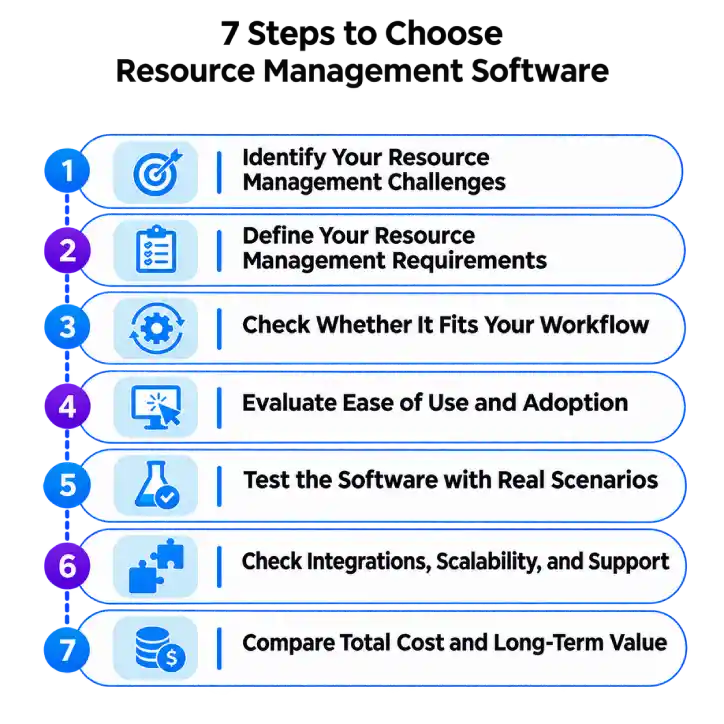
1. Identify Your Resource Management Challenges
Start by documenting the problems you need the software to solve. Look at issues such as overbooked employees, uneven workloads, scheduling conflicts, limited capacity visibility, or difficulty tracking utilization.
List your most frequent resource planning challenges and connect each one to a specific outcome you want the software to improve.
2. Define Your Resource Management Requirements
Turn those challenges into a clear list of requirements before comparing vendors. Separate essential capabilities from features that would be useful but are not critical to your workflow.
Create a must-have checklist covering scheduling, capacity planning, workload management, utilization tracking, reporting, integrations, and other requirements specific to your team.
3. Check Whether It Fits Your Workflow
A platform should support the way your teams actually plan and assign work. Consider your project structure, team sizes, working hours, approval processes, time-off rules, and how resources move between projects.
Map your current workflow against each tool and identify any steps that would require workarounds or manual updates.
4. Evaluate Ease of Use and Adoption
Even capable software can create problems if you and employees struggle to use it. A complicated interface can slow adoption and make everyday resource planning harder.
Test common tasks during a trial, such as assigning resources, changing schedules, checking workloads, and generating reports, to see how easily your team can complete them.
5. Test the Software with Real Scenarios
A product demo shows what a platform can do, but a real scenario shows how well it works for your business. Use actual or representative projects, team availability, workloads, and resource requirements during your evaluation.
Run the same scenarios across shortlisted tools and compare the results, effort required, and visibility each one provides.
6. Check Integrations, Scalability, and Support
Resource planning often depends on information from project management, time tracking, HR, payroll, calendars, and other systems. You also need to know whether the platform can support additional users, projects, and workflows as your business grows.
Verify integrations, data access, support options, user limits, and upgrade requirements before committing to a platform.
7. Compare Total Cost and Long-Term Value
Do not compare vendors only by their advertised starting price. Check the pricing tier that includes the features you actually need, along with user minimums, add-ons, implementation costs, and future upgrades.
Calculate the full cost of ownership and compare it with the time, planning effort, and resource visibility the software can provide over the long term.
Did You Know?
Gallup found that the average number of people reporting to U.S. managers increased from 10.9 in 2024 to 12.1 in 2025. This makes workload visibility and capacity planning important factors to consider when choosing resource management software.
Resource Management Software Pricing: Plans and How It Works
Resource management software pricing depends on the features, number of users, billing model, and level of support included in the plan. Some providers charge per user, while others offer tiered plans or custom pricing for larger organizations.
| Pricing Model | How It Works | Best Suited For |
|---|---|---|
| Per-user pricing | You pay a fixed amount for each user or employee added to the platform. | Teams that want costs to scale with their workforce |
| Tiered pricing | Plans offer different features and limits at different price points. | Businesses with varying resource management needs |
| Flat-rate pricing | You pay a fixed subscription fee regardless of the number of users within the plan limits. | Smaller teams with predictable usage |
| Custom pricing | The provider creates a quote based on users, features, integrations, and business requirements. | Large organizations with complex needs |
| Free or freemium plans | Basic features are available at no cost, with additional capabilities offered through paid plans. | Teams that want to test the software before upgrading |
Mistakes to Avoid When Choosing Resource Management Tools
Selecting a resource management tool involves more than comparing feature lists and subscription prices. Common buying mistakes include overlooking team adoption, ignoring workflow fit, and failing to check how the software will support future needs.
Choosing Based on Features Alone
A long feature list can look impressive, but it may include capabilities your team rarely needs. Buying more functionality can also make the software harder to navigate and adopt.
How to Avoid It: Start with your resource management challenges and define the decisions the software needs to support. Then compare each product against those specific requirements.
Overlooking User Adoption
A resource management system depends on accurate, regular updates from the people using it. If you and your employees find it difficult to use, availability, workload, and time information can quickly become outdated.
How to Avoid It: Test everyday tasks with actual users before purchasing. Check how easily they can update availability, assign work, record time, and review workloads.
Ignoring Integration Requirements
Resource information often sits across project management, time tracking, HR, payroll, and calendar systems. Poor integration can create duplicate data entry and leave teams working from different versions of the same information.
How to Avoid It: List the systems your team already uses and verify each required integration during the trial. Confirm what information syncs, how often it updates, and whether any manual steps remain.
Focusing Only on the Starting Price
The lowest advertised price may not reflect the cost of the plan your team actually needs. User limits, paid add-ons, implementation fees, and higher-tier features can change the total cost.
How to Avoid It: Request a complete quote based on your expected users and required features. Include implementation, add-ons, upgrades, and future expansion when comparing costs.
Forgetting Future Growth
A tool that works for your current team may become restrictive as you add employees, projects, locations, or more complex resource planning processes. Limited scalability can force another software change later.
How to Avoid It: Check user limits, project capacity, permissions, reporting, integrations, and upgrade options. Consider how your resource planning needs could change over the next few years.
Skipping a Real-World Trial
A polished demo does not always show how the software performs with your actual workflows. Some tools may look suitable until you try to manage real schedules, workloads, availability, and project assignments.
How to Avoid It: Use a free trial or structured evaluation with realistic scenarios. Test common tasks and record any friction points before making the final decision.
How Time Champ Fits as Resource Management Software
Managing resources becomes harder when you lack a clear view of how teams spend their time, where workloads are building up, and which projects need attention. Without accurate work and capacity information, it can be difficult to balance assignments and spot potential bottlenecks early. Time Champ is an employee monitoring software that adds workforce intelligence to everyday resource planning. Its project management, automatic time tracking, productivity tracking, and workload management features help you connect employee activity with project capacity and resource needs.
- Shows Employee Availability and Workload Capacity: Checks current workloads before assigning new tasks, helping you distribute work more effectively.
- Tracks Project and Task Time Automatically: Collects work hours against projects, tasks, and clients to give you a clearer picture of where resource time goes.
- Generates Automated Timesheets: Creates verified timesheets from tracked work hours, reducing manual entry and giving you reliable records for planning and reporting.
- Monitors Productivity and Work Patterns: Tracks productive hours, focus time, idle time, and app usage to help you identify workload patterns and areas that need attention.
- Identifies Potential Resource Bottlenecks: Forecasts resource needs and flags upcoming bottlenecks, helping you address capacity issues before they affect delivery.
- Balances Workloads across Teams: Identifies overloaded and underutilized team members and uses these insights to redistribute tasks more effectively.
Struggling to balance workloads and track where team time goes?
Time Champ tracks work patterns and workloads to help you plan resources better.
Conclusion
Choosing the right resource management software requires more than comparing features or prices. Focus on your team’s workload, capacity, scheduling needs, integrations, usability, and future growth before making a decision. A structured evaluation helps you avoid costly mismatches and select a tool that supports everyday planning. Review your current resource challenges, shortlist suitable options, and test them with real workflows. Then choose the solution that fits your team’s needs and start improving resource planning with confidence.

Anjali

Table of Content
 What Is Resource Management Software?
- What to Look for in Resource Management Software: 9 Must-Have Features
- How to Choose Resource Management Software in 7 Steps
- Resource Management Software Pricing: Plans and How It Works
- Mistakes to Avoid When Choosing Resource Management Tools
- How Time Champ Fits as Resource Management Software
- Conclusion
Related Blogs

Discover what resource planning is, its importance, examples, templates, strategies, pros & cons, and software to optimise project resources effectively.
Guna Lakshmi | Apr 02, 2026
Learn how resource allocation time tracking helps ops leaders balance workloads, improve utilization, reduce scheduling conflicts, and assign work confidently.
Anjali | May 22, 2026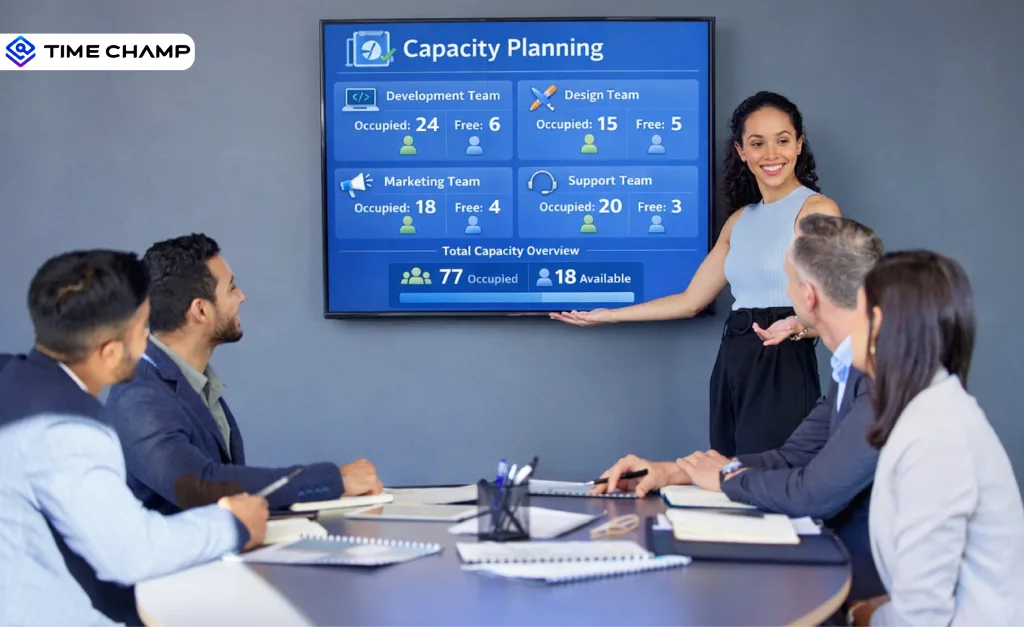
Capacity Planning: Explore what it is, types, strategies, real-world examples, benefits, challenges, and how to implement it effectively in projects
Tarun Kumar | Apr 02, 2026
Find the best project resource management software for 2026. Compare features, pricing, pros & cons to optimize resources and deliver projects on time.
Thasleem Shaik | Apr 02, 2026
Find the 10 best project portfolio management software for 2026. Compare the features, pricing, pros & cons to prioritize projects and control budgets.
Anjali | Apr 02, 2026
Discover strategic workforce planning: definition, process, tools, and templates. Align talent with business goals and prepare your workforce for the future.
Shabana Shaik | Sep 16, 2025


 4.7/5 avg.
Ready to Manage Your Workforce Smarter?
Join our family of 1500+ companies using smart insights to redefine workforces!

Free Trial
No Credit Card Required